
Get the best Sky Go VPN
Watch Sky Sports and Sky Cinema with VPN protection that enhances your streaming experience
- Choose from 5 UK server locations to work around connection errors
- Use ExpressVPN’s fast servers built for high-bandwidth streaming
- Access Sky Go on restricted networks with industry-leading encryption
30-DAY MONEY-BACK GUARANTEE FOR FIRST-TIME USERS

-

IPHONE/IPAD -

Android -

Windows -

Mac -

Linux -

Router -

Smart TV -

Game console
How to use ExpressVPN with Sky Go in 3 steps
Start streaming with a VPN in minutes
-
Step1

Subscribe and download ExpressVPN
Choose the ExpressVPN subscription that’s right for you.
-
Step 2

Connect to a secure server location in the UK
With multiple UK server locations, you have options close to your area.
-
Step 3

Launch the Sky Go app and start watching
Minimize Sky Go errors and other streaming issues with ExpressVPN.
24/7 customer support via live chat & email
Why you need a high-performance VPN for Sky Go
A VPN can help minimize common issues with streaming Sky Go

Avoid ISP throttling while you watch live football
Imagine watching a tight match that’s constantly interrupted by buffering. Content-based ISP throttling might be to blame.
VPN encryption can help curb this. Your ISP can't identify what you’re doing online, so it won't target streaming traffic for slowdowns.
Stream safely on public Wi-Fi and shared networks
Using public Wi-Fi lets you stream on the go, but cybercriminals on the same network might intercept your data.
A public Wi-Fi VPN sends your traffic through an encrypted tunnel, keeping your streaming activity and personal information secure from prying eyes.

Maintain access on restricted networks
Some networks, including school Wi-Fi and office networks, block Sky Go to manage bandwidth or maintain productivity.
A Sky Go VPN makes your traffic appear like regular HTTPS traffic. This helps you access Sky Go, even on restricted networks.
Does Sky Go work with a VPN? How to optimize your stream
Know how to get the most out of your VPN when streaming
-
Browser extensions vs. desktop apps for Sky Go
You can only stream Sky Go on your computer via the Sky Go Player app, as it doesn’t offer streaming on a browser.
This means that if you’re looking for a Sky Sports VPN, our desktop apps for Windows, MacOS, and Linux platforms are the way to go.
-
Consistent HD quality for box sets and movies

Streaming during peak hours often leads to the dreaded buffering wheel. So, choose a VPN service offering reliable support for HD streaming.
Our fast VPN servers are built to handle high-bandwidth traffic. ExpressVPN doesn't throttle your connection, helping you maintain reliable HD playback.
Why ExpressVPN is the best VPN for Sky Go
Here are four great reasons to choose ExpressVPN

Optimized servers across multiple UK locations
Sky Go can detect and may block VPN connections, triggering errors like "PFE 4002." That's where ExpressVPN's multiple UK server locations become essential.
We offer UK servers in London, East London, Docklands, Wembley, and the Midlands. If Sky Go blocks one location, simply switch to another UK server in the app and resume watching.
High-speed server infrastructure for 4K clarity
Improved security shouldn't mean settling for lower video quality. ExpressVPN's network is built to deliver both protection and performance. Our 10Gbps servers provide ample bandwidth for Sky Sports, with many locations upgraded to 40Gbps for even greater capacity.
We don’t impose bandwidth caps or limit your data usage, whether you're watching Sky Sports, Sky Cinema, or binge-watching box sets.

Connect 14 devices simultaneously with 1 subscription
With Sky Go available on everything from smart TVs to tablets, you need VPN coverage across all your devices, not just one at a time. One ExpressVPN subscription protects up to 14 devices simultaneously.
Stream Sky Sports on your TV, catch up on shows on your phone, and browse securely on your laptop—all at the same time. The whole household can enjoy protected Sky Go streaming without anyone having to disconnect.
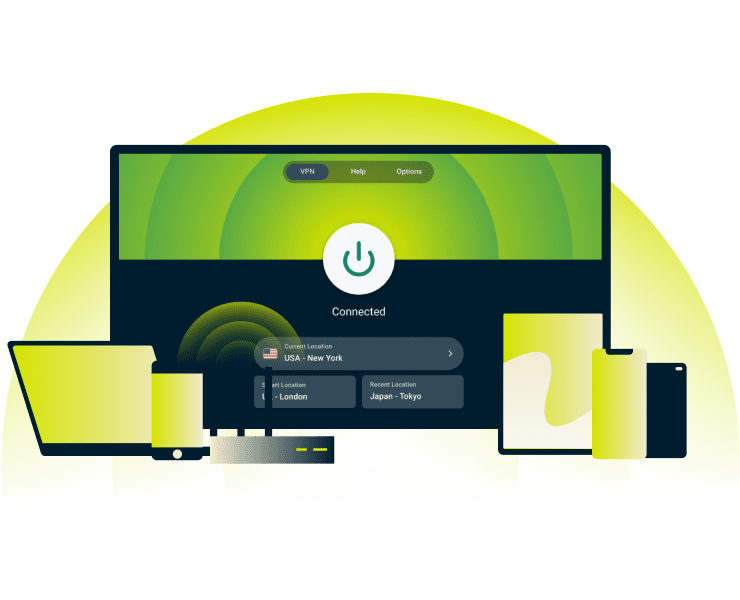
Native apps for iPad, Android tablets, and laptops
ExpressVPN works on all the devices you use to stream Sky Go: Windows, macOS, Linux, iOS, Android, Apple TV, and Android TV.
Our battery-efficient Lightway protocol doesn’t impact streaming time, so you can watch Sky Go as much as you want on phones and tablets. Subscribe, download the app, and start streaming with protection.
Troubleshooting Sky Go VPN errors
Encountering issues with your Sky Go VPN? Here’s how to fix them
-
How to resolve Sky Go error codes (e.g., PFE 4002)
Switching to a different VPN server location within the UK typically fixes Sky Go errors.
For persistent issues on your device, consider clearing your Sky Go app’s cache and reconnecting to the VPN or making sure both apps are up to date.
-
Prevent connection drops with the Internet Kill Switch
Intermittent connection drops could leave your data unprotected.
ExpressVPN’s Internet Kill Switch puts a lid on potential data leaks. It temporarily blocks your internet traffic until your VPN reconnects.
What people are saying about ExpressVPN
Find out why people love ExpressVPN
-
Absolutely fantastic. It was the perfect solution for connectivity issues in a game I've been playing recently.
J B


-
ExpressVPN is the perfect all around VPN service for your network security needs.
Dirt_Reynolds


-
ExpressVPN is the fastest VPN I've found. It shows you the fastest server you can connect to, and a list of alternate servers.
Christopher Gilmer
-
#1 Best VPN 2026 & Best Gaming VPN
ExpressVPN is the best Gaming VPN right now, thanks to its impressive speeds, excellent privacy protections and expansive global network of servers.

-
Editor’s Choice Award 2026
ExpressVPN’s expansive network and dedication to staying on the forefront of encryption tech earn it an award.

-
#1 Best VPN for the U.S. 2026
ExpressVPN is the best VPN for the U.S. right now. It has VPN servers in every American state, excellent security, and a simple user interface.

-
 Rated 4.4 out of 5
 -
 Rated 4.7 out of 5






Sky Go VPN: Frequently asked questions
We’ve got the answers to your most common Sky Go VPN questions
Why am I seeing an error code while using Sky Go?
That depends on the error code. The PFE 4002 error often means Sky Go has detected a VPN connection. Try switching to a different UK server location and attempt streaming again. If the issue persists, clearing your Sky Go app's cache may help resolve connection problems.
Is it legal to use a VPN for Sky Go?
It is legal to use a VPN for Sky Go. However, you may lose access to the service if you try accessing it outside of the UK, Channel Islands and, Isle of Man; or the Republic of Ireland, as it goes against Sky Go’s terms and conditions. Always comply with a service's terms.
Will a VPN slow down my live sports stream?
VPNs can add some overhead since your traffic is encrypted and routed through an additional server. However, ExpressVPN's 10Gbps servers (with many upgraded to 40Gbps) are built to minimize speed impact. Our network is designed to support high-bandwidth live streaming without significant slowdowns.
Where can I get the official ExpressVPN app for Sky Go?
You can download ExpressVPN from our website, or on your device’s official app store (Google Play Store or Apple App Store).
ExpressVPN has dedicated apps for various platforms, including Windows, macOS, Linux, iOS, and Android to ensure you’re covered wherever you stream Sky Go.
How does ExpressVPN protect my streaming data?
ExpressVPN encrypts your connection using 256-bit AES encryption, protecting your streaming data from interception on networks, including public Wi-Fi. Plus, our Internet Kill Switch feature blocks internet traffic if your connection drops unexpectedly, helping prevent your data from being exposed during reconnection.
Does Sky Go work with a VPN?
Yes, but a VPN that works with Sky Go requires should support fast speeds and have multiple UK servers you can switch between. ExpressVPN provides 5 UK locations with high-speed servers, letting you quickly switch between them if Sky Go detects your VPN connection and resume watching.
Start streaming Sky Go safely risk-free
Take advantage of our 30-day money-back guarantee* for all new customers
*Users who purchased their subscriptions through the Apple App Store (iTunes) or the Google Play Store do not have access to the ExpressVPN 30-day money-back guarantee. Instead, users can request refunds through the App Store or Play Store, at Apple’s or Google’s discretion.








