 Celebrate with up to 80% off
Session hijacking explained: The hidden threat behind stolen tokens


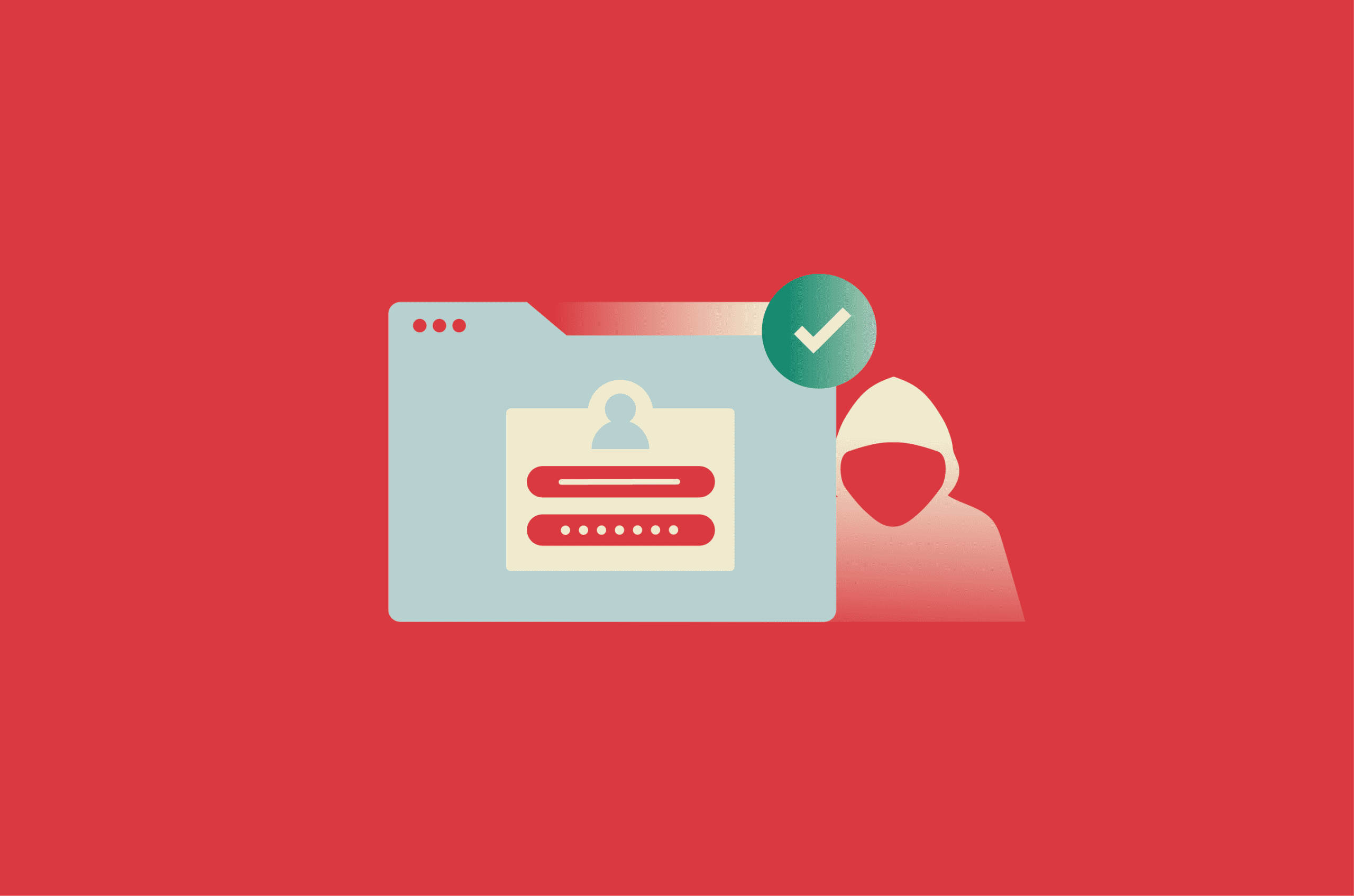
When someone signs into email, accesses online banking, or performs other tasks online and leaves the session active, that session could be misused by someone else without their knowledge. In some cases, this may expose sensitive information or enable unauthorized actions. These attacks can cause real harm.
What is session hijacking?
Session hijacking is when an attacker takes over a valid session between a user and a website or online service. This usually happens when the attacker steals, predicts, or otherwise obtains the session token issued to the user. Session hijacking is also sometimes called cookie hijacking when the session is tied to a browser cookie.
To fully understand why hijacking works, it’s important to know what sessions are.
What is a session?
A session is a period during which a user interacts with a website or online service across multiple requests. In authenticated sessions, the service issues a session secret or token to recognize the user from one request to the next.
For example, a session often begins when someone signs into a social media platform or online banking portal. As long as the session remains valid, the service can continue to recognize that user.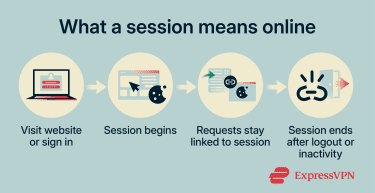
How web sessions work
Generally, web applications manage sessions through cookies. These cookies often store a session ID or another session token that the server uses to associate requests with an active session. In less secure or older designs, session IDs may also be passed in URLs instead of cookies.
These tokens usually take the form of a long, hard-to-guess string of characters. For example, a session ID might look like “a9f3c7e2b1d84f6a92c5e8f0b3d7a1c4.”
The server checks the session token with each request to determine which session it belongs to and what content or actions should be available. This helps the service maintain continuity across pages and requests.
Sessions usually end when a user logs out, when the server times out the session, or when the application invalidates it. Simply closing a browser tab doesn't necessarily end the server-side session. A new session ID is commonly issued after login or when a new session is created.
While cookies are the most common way to manage sessions in web browsers, other systems may take different approaches. For example, JavaScript Object Notation (JSON) Web Tokens (JWTs) are often used for authentication and session-related state APIs, as well as in mobile applications.
Why session IDs matter
Session IDs provide important practical benefits. They help websites maintain state across multiple requests, keep users signed in during an active session, preserve shopping carts, and deliver account-specific content.
In short, session IDs are crucial for maintaining state in stateless HTTP environments. Without them, many multi-step interactions across pages or actions wouldn't work smoothly.
At the same time, session IDs reduce the need to repeatedly provide passwords after login. Instead, the client presents the session token, and the server uses it to recognize the session and retrieve the appropriate state.
While that improves convenience, session IDs are not privacy tools. If exposed, they can allow an attacker to access the session until it expires or is revoked.
Also read: What is browser hijacking and how to stop it.
How session hijacking works
Session hijacking is typically a multi-phase process. Attackers can use various methods at different stages to obtain session tokens, retain access, and misuse an active session. As mentioned above, it can only happen after a legitimate session has been established and a valid session token is already in use.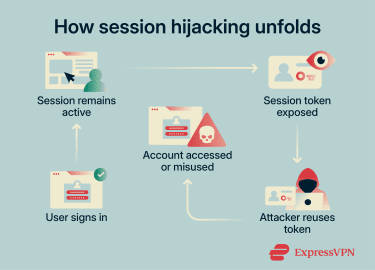
Session ID compromise and takeover
Once a valid session token is obtained and accepted, the attacker’s requests may be treated as though they came from the original user. In effect, the stolen token is being reused to impersonate the legitimate session.
This can reduce the effectiveness of login-time protections such as multi-factor authentication (MFA), though some services use reauthentication, step-up checks, or other session protections to limit that risk.
Impersonation and infiltration
Unless additional checks detect something unusual, the attacker may be able to navigate and interact with the system as though they were a legitimate user for as long as the session remains valid. This can lead to loss of privacy, impersonation, fraud, or theft.
Session termination
When the user logs out, when the session times out, or when the application invalidates the session, the server should terminate the session. If the stolen session token is properly invalidated on the server, it should no longer work for either the legitimate user or the attacker.
However, in systems that allow multiple active sessions or don’t fully revoke sessions on the server side, attackers may retain access even after the user logs out. In some cases, a hijacked session may also expose opportunities for other forms of account compromise, such as credential theft, though that is separate from the session hijack itself
Common types of session hijacking
Session hijacking can be described in different ways. One useful distinction is between attacks that disrupt the legitimate user’s session and those that aim to remain unnoticed. It can also be categorized by the specific method used to obtain or manipulate session IDs.
In more disruptive cases, the attacker’s takeover may interfere with the legitimate user’s session or trigger visible account changes that raise suspicion. Cybercriminals may then act quickly to achieve a concrete goal, such as accessing sensitive databases, stealing user information, changing passwords, or making unauthorized purchases.
In less visible cases, the attack may not interrupt the legitimate user’s session at all. The attacker’s aim is to avoid detection and preserve access for as long as possible, whether for surveillance, fraud, or a later opportunity to act.
Session fixation
Unlike a typical hijacking attack, session fixation involves getting the victims to use a session ID he attacker already knows. It succeeds when the application fails to issue a new session ID after login, allowing the attacker to reuse that same session after the victim authenticates.
Attackers may distribute malicious session IDs through phishing messages, links, or other delivery methods. When the victim follows the link, the vulnerable application may associate that ID with the user’s session.
This type of attack is effective because the attacker doesn’t have to actively monitor the target’s traffic and steal an existing session ID. Instead, the attacker can wait for the user to authenticate into a session that the attacker already knows.
Session sidejacking
Sidejacking attacks rely on tools such as packet sniffers to intercept unencrypted network traffic. Attackers inspect that traffic to locate session IDs or cookies, which they can then reuse to hijack the victim’s session.
Attackers often target public Wi-Fi networks because they aren’t always properly secured and may expose many potential targets at once. The risk is also higher if users visit sites that don’t consistently use HTTPS throughout the session.
Cross-site scripting (XSS)
This is when attackers exploit existing vulnerabilities to inject malicious scripts into legitimate web pages. Those scripts may be used to steal a visiting user’s session ID or perform actions in the context of the user’s session.
Because the injected script runs in the context of the legitimate site, the browser may treat it as trusted page code. In some cases, that can allow it to access session-related data or exfiltrate other sensitive information without obvious warning signs.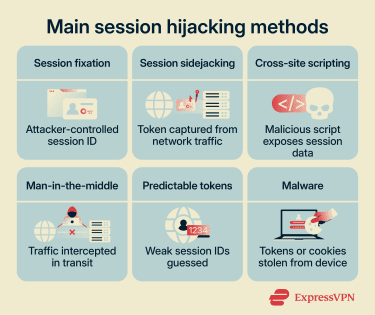
Man-in-the-middle (MITM) attacks
MITM describes attacks in which an attacker positions themselves between a client and the server to intercept, observe, and sometimes alter traffic in transit.
Adversary-in-the-middle (AITM) is one variant in which attackers use phishing proxies that mimic legitimate sites. They may then steal session tokens or credentials from users who think that they are dealing with the real service.
Man-in-the-browser (MITB) attacks pose a similar risk. These involve compromised browsers that can share session information or cookies with an attacker.
Predictable session token attacks
Cybercriminals often target websites with weak session management. If session IDs are not generated with enough randomness, attackers may be able to detect patterns and predict valid future IDs.
For example, weak generation schemes may rely on timestamps, predictable sequences, or other low-entropy values. Once threat actors can predict valid future session IDs, they may be able to hijack sessions without needing to steal an existing token.
Malware
Malware can steal session IDs, cookies, or tokens from a client device and send them to a remote attacker. Many information stealers are designed to stay undetected for as long as possible while exfiltrating valuable data from the infected device.
Why session hijacking is a serious threat
The danger of session hijacking is that it can provide unauthorized access from which attackers may carry out other harmful actions.
Many online systems authenticate users once and then rely heavily on the session token for continued access. Session hijacking may also be harder to detect than some credential-based account compromises, because reusing an already authenticated session may be less likely to trigger login alerts.
Session hijacking can have severe consequences for both individuals and organizations. Individuals may face unauthorized access to accounts, loss of privacy, impersonation, or financial harm. Organizations may suffer reputational, operational, or financial losses as a result.
Data breaches
Attackers may hijack sessions to collect sensitive information, like private messages, contact details, or files stored in online services. Healthcare or banking sites can be targeted, as can social media and cloud storage services. Cybercriminals may use this information for fraud, extortion, or further attacks.
Account takeovers
Attackers may be able to change account settings or reset login credentials, though some services require additional verification for sensitive actions.
Breached accounts may also lead to impersonation. Victims’ names may be used to engage in illicit activities or to target other users. For example, attackers may impersonate employees to access restricted systems or resources.
In organizational environments, long-term access via a hijacked session may sometimes serve as a starting point for lateral movement or privilege escalation.
Also read: What is credential dumping and how to stop it.
Financial loss and fraud
Users often save payment details to their online accounts for convenience. If someone accesses the account by hijacking the session, they may be able to see some or all of that information. Unless the service uses additional protections for sensitive actions, such as reauthentication or MFA, attackers may also be able to make unauthorized purchases or transfers.
Also read: Your complete guide to credit card authorization.
Reputational damage
If a session hijacking attack escalates far enough, it can become a public embarrassment for a company or an individual. Large-scale breaches that expose user information can lead to a loss of public confidence, regulatory scrutiny, fines, or lawsuits.
By impersonating organizations or account holders, threat actors can spread harmful content or use trusted access to target others. For example, they may send phishing emails to customers or abuse access to connected business systems.
At the same time, websites that are repeatedly exploited may suffer as well. If a site’s security practices are seen as insufficient, users may choose other services.
Legal and compliance issues
Session hijacking attacks often exploit weak or misconfigured session management. If a breach investigation finds that an organization failed to maintain reasonable security controls, it could face legal or regulatory consequences.
For example, organizations that process personal data in ways that fall under the General Data Protection Regulation (GDPR) may face significant obligations and penalties following a breach. In sensitive sectors such as U.S. healthcare, covered entities and business associates may also face obligations under the Health Insurance Portability and Accountability Act (HIPAA), including security and breach-notification requirements.
How to detect session hijacking
Session hijacking can be difficult to spot because it may not always trigger obvious warnings. That said, suspicious account activity can sometimes create telltale signs. If you notice any of the following, act quickly to secure your account and, where possible, sign out of active sessions.
- Notifications about unusual activity or an account being used in a new location or on a new device.
- Unexpected events, like suddenly being logged out of an account or being asked to reauthenticate without a clear reason.
- Unauthorized account actions, such as unrecognized messages, setting changes, or new purchases.
- Security notifications triggered by sensitive actions you didn’t initiate, such as credential changes, payment approvals, or subscription changes.
Preventing session hijacking
Website owners are primarily responsible for defending against session hijacking, but internet users can also reduce their exposure by adopting safer browsing and account security habits. Countermeasures include the following general security best practices and the use of specific technologies to combat hijacking tactics.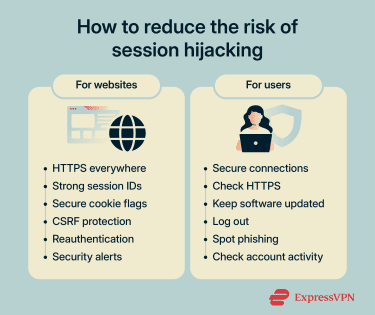
Use HTTPS everywhere
Websites that support HTTPS encrypt traffic between the user and the server. This helps protect data in transit, making it much harder for attackers to read if they intercept it.
HTTP Strict Transport Security (HSTS) is a policy a website can set to tell browsers to connect only over HTTPS in the future. This helps prevent users from falling back to unprotected HTTP connections and reduces the risk of downgrade attacks.
It’s also important for websites to consistently use HTTPS across all pages. Although less common today, sites that protect only login or signup pages can still expose users to unnecessary risk.
Strengthen session management
Websites should generate strong session IDs that are difficult to predict through brute-force or guessing attacks. In practice, that means making them long, random, and resistant to predictable patterns.
Other best practices include invalidating session IDs after logout, when their lifetimes expire, or across all active sessions as needed. Sites should also regenerate session IDs immediately after successful authentication.
Websites can also require reauthentication for protected actions, which can limit the damage from a stolen session. Additional signals, such as unusual IP changes or browser characteristics, may also help detect suspicious session reuse, though they are best treated as risk indicators rather than perfect identifiers.
Secure cookies and session tokens
When setting cookies, use security attributes such as HttpOnly, Secure, and SameSite. These flags help reduce certain risks: HttpOnly can help stop JavaScript from reading session cookies, Secure limits them to HTTPS connections, and SameSite can reduce some cross-site request risks.
Protect against cross-site request forgery (CSRF)
Like session hijacking, CSRF attacks can abuse an authenticated session, but they don't require the attacker to steal the session ID first. Instead, they trick the browser into sending unauthorized requests while the user is already signed in.
Website admins can reduce this risk by using CSRF protections, including framework-provided defenses or server-validated CSRF tokens on state-changing requests. These tokens add a unique, hard-to-guess value that the server can verify before accepting the action.
Also read: A complete guide to OpenID Connect (OIDC).
Enable multi-factor authentication
MFA enhances access controls by requiring an additional layer of authentication, which can make account compromise harder in many scenarios.
However, it's less effective once an attacker has already obtained a valid authenticated session token. During active sessions, MFA can still help when services require reauthentication or step-up verification for sensitive actions.
Educate users about safe browsing
Even with secure session management, risk remains if basic security habits are ignored. To stay safer, you should:
- Avoid accessing sensitive accounts over public Wi-Fi unless the connection is properly protected. A reputable virtual private network (VPN) can reduce the risk of interception, but it's not a complete defense against every session hijacking scenario.
- Check that a site uses HTTPS before entering sensitive information.
- Keep your browser, security tools, and operating system up to date.
- Log out of important accounts instead of relying on tab or browser closure alone.
- Learn to spot common signs of phishing or spoofed content, and scrutinize suspicious messages.
- Regularly review account activity, linked devices, and notification settings for signs of compromise.
Provide account alerts and activity monitoring
Websites should also give users tools to spot suspicious activity, such as security alerts and dashboards that show recent account or device activity. This helps users act quickly when something looks wrong and can provide a useful record during investigation and recovery.
Real-world examples of session hijacking
Session hijacking is not just a theoretical threat. Stolen or exposed session tokens have played a role in several high-profile security incidents.
Facebook “View As” vulnerability
In 2018, attackers exploited a vulnerability in Facebook’s “View As” feature, which lets users see their profile as if they were someone else. The attack relied on a chain of three separate bugs that allowed attackers to steal users’ access tokens.
Of the 50 million accounts Facebook initially believed were affected, the company later said about 30 million actually had their access tokens stolen. Attackers used the exploit to expand outward from accounts they already controlled to other users’ accounts. The vulnerability itself had been present since July 2017, before it was discovered and patched in September 2018.
Okta support system breach
In 2023, Okta disclosed a breach of its customer support system caused by unauthorized access to support case files linked to 134 customers. Some of those files were HAR files containing session tokens that could be used for session hijacking.
The incident drew attention because exposed session tokens can allow attackers to bypass normal login protections and access active accounts.
Okta responded by disabling the compromised service account, revoking exposed tokens, notifying customers, improving monitoring, and adding controls to reduce the risk of stolen admin session tokens being reused. Okta also later said its forensic investigation found no evidence of malicious activity beyond what it had already disclosed.
Also read: How to identify and mitigate attack vectors in cybersecurity.
FAQ
Can session hijacking happen on public Wi-Fi?
Is session hijacking the same as a man-in-the-middle (MITM) attack?
Can a VPN stop session hijacking?
How long can a stolen session stay active?
What should you do if your session is hijacked?