Credential dumping explained: How to detect and prevent it



When attackers break into an organization, they often aren’t after one machine or files on it. They’re after the credentials: the usernames, passwords, and authentication tokens that unlock everything else. Credential dumping is how they get them.
What is credential dumping?
Credential dumping is a technique used to extract authentication data from a system that’s already been compromised. That data can include:
- Plaintext usernames and passwords: Login details stored in readable form. This happens more often than it should, especially on older or misconfigured systems where the Windows Digest (WDigest) protocol is still enabled.
- Password hashes: One-way encrypted versions of passwords (such as New Technology LAN Manager (NTLM) hashes in Windows) used to verify identity without storing the actual password. Attackers don’t need to crack a hash to use it. Often, they can authenticate with the hash directly.
- Kerberos tickets: Session tokens that prove your identity across a Windows domain. Stolen tickets let attackers impersonate you without knowing your password.
- Security tokens: Temporary credentials that confirm an active, authenticated session. Stealing a token lets an attacker take over that session.
Operating systems store this data so users can move easily between applications and network resources without logging in repeatedly. Attackers take advantage of that design. They don’t guess passwords; they take the authentication material that’s already there.
Different types of credential attacks
Credential dumping is often confused with other credential-based attacks. The differences matter because each one calls for a different defense.
| Attack type | What it does | How attackers use it | Entry point required | Detection difficulty |
| Credential dumping | Extracts passwords, hashes, and tokens from a compromised system’s memory or credential stores | Pulls NTLM hashes, Kerberos tickets, or clear-text passwords directly from the machine to move across the network | Existing access to a compromised system, often with elevated privileges | Medium to high (especially when attackers use built-in Windows tools) |
| Credential stuffing | Uses stolen username/password pairs from previous breaches | Tries leaked credentials across many services, relying on password reuse | No system access required; relies on breached credential databases | Medium (abnormal login patterns can flag it) |
| Password cracking | Brute-forces a hash until the plaintext password is found | Cracks hashes obtained from a dump offline, away from detection tools | Needs the hash; no live system access required | Low to medium (rate limiting and monitoring can detect online attacks; offline cracking is invisible) |
| Credential harvesting | Tricks users into handing over credentials voluntarily | Phishing emails or fake login pages capture usernames and passwords | User interaction only; no system or hash access needed | Medium (depends on user awareness and email filtering) |
| Infostealers | Malware, for example, RedLine, that automatically collects credentials and sensitive data from infected devices and extracts them | Scrapes saved browser passwords, session cookies, and autofill data, often sending everything to attacker-controlled servers | Requires malware infection on the target’s machine, often via phishing or a malicious site | Low (runs quietly in the background, blending with normal web traffic) |
Where are credentials stored on systems?
Windows stores credentials in several locations to support authentication. Each location serves a different purpose and presents a different risk if compromised.
Local Security Authority Subsystem Service (LSASS) memory
LSASS is the Windows process that handles authentication and enforces security policies. When you log in, it stores your credentials in memory so the system can verify your access to files, applications, and network resources without asking you to constantly re-authenticate.
That’s what makes it the most targeted location in credential dumping. Depending on the system configuration, LSASS memory may contain NTLM hashes, Kerberos tickets, and active session tokens.
On systems where the WDigest is still enabled, LSASS also holds cleartext passwords. Disabling WDigest eliminates this exposure.
Attackers often target LSASS using tools such as Mimikatz or by dumping its memory to analyze offline.
Security Account Manager (SAM) database
The SAM database stores credentials for every local user account on a Windows machine. Windows doesn’t save passwords in plaintext. Instead, it stores hashed versions (such as NTLM hashes) and uses them to verify login attempts.
Attackers who extract these hashes can use them in pass-the-hash attacks, authenticating to other systems across the network without ever knowing the actual password. If a local administrator account uses the same password across multiple machines, which is common in organizations that haven’t deployed Local Administrator Password Solution (LAPS), a single hash lets an attacker authenticate to all those machines.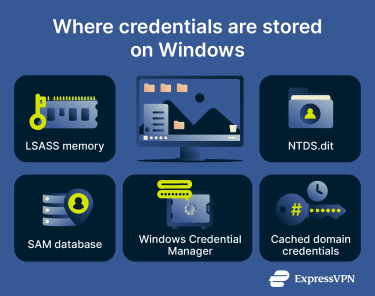
Active Directory database (NTDS.dit)
Active Directory (AD) is Microsoft’s centralized identity system for Windows domain environments. Every user account, service account, computer account, and their associated passwords and permissions live in a single database called NTDS.dit.
Because AD controls access across the network, a successful NTDS.dit dump is effectively a full domain compromise. Attackers can then create Golden Tickets, forged Kerberos Ticket Granting Tickets (KRBTGTs), that can grant unrestricted access to any system in the domain. However, AD accepts tickets signed with the current KRBTGT password or the immediately previous one, meaning this access is valid until the password is rotated twice.
One method worth knowing about is DCSync, an attack where Mimikatz impersonates a domain controller and uses Microsoft’s legitimate Directory Replication Service API to request password data. Because DCSync mimics normal domain controller replication traffic, an attacker doesn’t need to directly access NTDS.dit to pull credentials, and that makes it much harder to detect.
Cached credentials
Windows caches the last 10 domain logins on each machine by default, so users can log in when a domain controller isn’t available, for example, when working on a laptop offline. Windows stores those cached credentials as hashes, called Domain Cached Credentials v2 (DCC2) or MSCACHEv2, which are different from NTLM hashes. Because of how they’re generated, they can’t be used directly for authentication.
However, attackers with local admin access can extract these hashes and attempt to crack them offline. If successful, they recover the user’s plaintext password, which they can then use to move laterally across the network.
This is particularly important for laptops and remote workers. A stolen laptop that never reconnects to your network still holds 10 recent credential hashes. Reducing the CachedLogonsCount registry value (to 1 or 0 for high-security machines) limits this exposure.
Windows Credential Manager
Credential Manager stores the usernames and passwords that Windows saves for websites, shared drives, and applications. It’s organized into two categories:
- Web credentials (browser logins).
- Windows credentials (applications and network services).
Attackers can enumerate Credential Manager using cmdkey / list, a built-in Windows command that doesn’t need any special tools. They don’t need Mimikatz. This is a wider attack surface than many people realize.
How does credential dumping work?
A single credential dump can turn a limited foothold into full network control with access to high-value accounts. Here’s how that escalation generally unfolds:
- Initial access: Attackers gain an initial foothold, for example, through phishing, stolen credentials, or a vulnerable application.
- Privilege escalation: The attacker gains administrative or SYSTEM-level access to a machine.
- Credential extraction: They run a dumping tool to extract credentials from LSASS, the SAM database, or the registry.
- Credential reuse: They then use those credentials to move laterally, authenticating themselves to other machines in the network as a legitimate user (pass-the-hash or pass-the-ticket).
- Escalation: On each new machine, they repeat the process, escalating privileges, targeting admin accounts, then domain admin accounts. At the domain level, they have full control. They can read every mailbox, access every file share, deploy ransomware to every machine, and steal data for months.
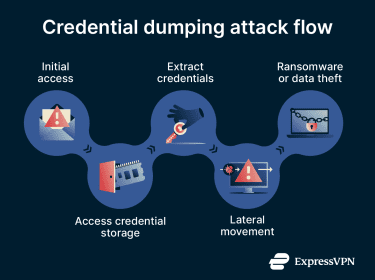
Credential dumping is almost never the final objective. It’s the mechanism that turns limited access into unrestricted access. For example, the SolarWinds attack, which affected thousands of organizations, including U.S. government agencies, used credential dumping as a key technique to move through targeted networks after the initial supply-chain compromise.
How to detect credential dumping
Most credential dumping tools were originally created for legitimate security testing or administration. Also, many credential dumping attacks fall under “Living off the Land” (LotL), where attackers use tools that are already installed on Windows (like ProcDump) instead of using purpose-built external tools like Mimikatz. This makes detection harder because the activity looks legitimate.
Still, there are various signs that indicate a possible credential dumping attack:
- LSASS handle events: Watch for processes opening handles to LSASS with memory-read access rights (Windows Event IDs 4656 and 4663). Legitimate software rarely needs to read LSASS.
- DCSync activity: Directory Replication Service requests originating from anything other than a domain controller are a strong indicator of a DCSync attack in progress.
- Lateral movement patterns: A workstation authenticating to many other workstations in rapid succession often follows a credential dump.
- Impossible logins: The same account authenticating from geographically distant locations or from two machines at the same time.
- After-hours admin access: Administrative accounts active outside normal business hours for accounts that don't usually work late.
Regular security audits and cyber threat hunting can help uncover these patterns.
How to prevent credential dumping
Preventing credential dumping works on three levels: making credentials harder to reach, reducing the value of credentials that are stolen, and limiting how far an attacker can go even after a successful dump.
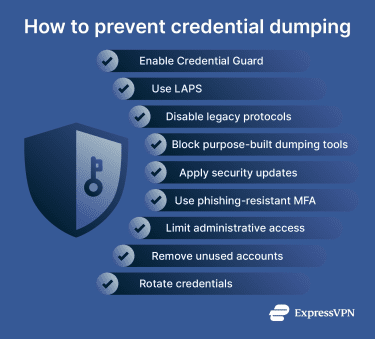
Common prevention strategies include:
- Enable Windows Credential Guard: Isolates credentials so that even an attacker with admin access can’t read its memory directly.
- Use "Protected Users" for privileged accounts: Windows doesn’t cache the NTLM hashes in LSASS for members of this group, removing a key target for credential dumping and blocking pass-the-hash attacks.
- Disable WDigest: Prevents LSASS from holding cleartext passwords. Disable WDigest by setting HKLMSYSTEMCurrentControlSetControlSecurityProvidersWDigestUseLogonCredential to 0.
- Use LAPS: Automatically randomizes the local admin password on every machine. It’s an effective defense against pass-the-hash lateral movement from the SAM database because each machine has a unique password rather than a shared one.
- Enforce least privilege: Only use domain admin accounts for domain administration. The fewer accounts with domain admin privileges, the smaller the blast radius of a credential dump.
- Audit DCSync permissions: DCSync requires “Replicating Directory Changes All” on the domain. Audit who holds this permission and remove it from any account that doesn't genuinely need it, which is almost everyone except domain controllers.
- Reduce cached logons count: For servers and high-security workstations, set this to 1 or 0 in the registry to limit cached credential exposure.
- Require phishing-resistant authentication on privileged accounts. Multi-factor authentication (MFA) won't stop a dump, but it limits how attackers can use stolen credentials. Hardware security keys are the strongest option; authenticator apps are better than SMS.
- Use application whitelisting: Tools such as AppLocker or Windows Defender Application Control can block purpose-built dumping tools. However, LotL techniques bypass this, making allowlisting one layer, not a complete solution.
- Patch promptly: Many credential dumping techniques rely on privilege escalation vulnerabilities to reach the access level needed for LSASS or SAM.
- Rotate credentials regularly: Especially on service accounts, which often have broad permissions and passwords that haven’t changed in years.
Layering these controls reduces the number of credentials attackers can access and limits how far they can move if they do get in.
FAQ
Can credential dumping happen without malware?
Can multi-factor authentication stop credential dumping?
What data can attackers steal with credential dumping?
Is credential dumping the same as password cracking?