FIFA World Cup 2026™ travel security and privacy guide


Traveling for the FIFA World Cup 2026™ means relying on your devices for almost everything. A phone becomes a ticket, map, wallet, and main way to stay in touch.
Along the way, travelers connect to unfamiliar networks, use new apps, and handle payments or bookings on the move. In busy environments like transit hubs, hotels, and stadiums, this can increase exposure to scams and other cyber risks.
Why the FIFA World Cup 2026™ can increase online risks
Major events like the FIFA World Cup 2026™ can create ideal conditions for scams. A recent report from U.K.-based financial services provider Santander showed an 82% increase in football-related scams between 2022 and 2024, with spikes around big-ticket events.
High demand for tickets and travel creates urgency, which can make it easier to pressure fans into acting quickly, especially with fake event ticket sales and last-minute offers.
Traveling abroad can also make it harder to spot when something isn’t right. Unfamiliar apps and international payment systems can feel different from what you’re used to, which can make it easier to miss warning signs.
In busy environments like transit hubs and stadiums, fans often connect to public Wi-Fi hotspots, which aren’t always secure. Large stations and transport centers can become especially crowded, making it easier for attackers to blend in and target connected devices.
At the same time, many fans share travel plans or match details online, which can give scammers useful information to target people with messages that seem more believable. Shoulder surfing can also expose sensitive information where someone may be looking over your shoulder to see what’s on your screen. Although less common, Bluetooth-based attacks can target nearby devices in crowded areas.
Common scams targeting fans
Common scams appear on platforms fans already use, such as social media and online marketplaces, which can make them harder to spot.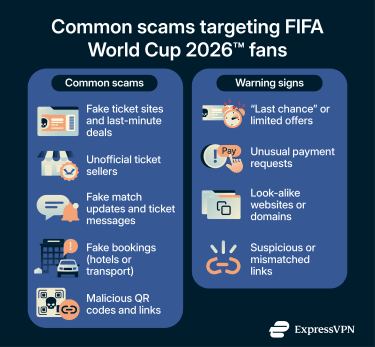
Some of the most common scams targeting FIFA World Cup 2026™ fans include:
- Selling fake tickets and “last-minute” deals: Scammers may create convincing shopping websites or social posts that pressure fans to act quickly. This urgency plays on the fear of missing out, which can lead to rushed decisions. Victims may lose money and receive nothing or end up with invalid tickets.
- Selling tickets outside the official FIFA World Cup 2026™ platform: Buying tickets outside the official ticketing platform can leave you with invalid or cancelled tickets that don’t work.
- Sending phishing messages that pose as match updates: Scammers may send phishing emails or texts about FIFA World Cup 2026™ schedule changes, ticket confirmations, or entry requirements. These messages can link to malicious websites that steal login or payment details.
- Creating fake accommodation or transport bookings: Scammers may set up fraudulent listings on sites such as Airbnb or cloned booking sites for the FIFA World Cup 2026™, knowing that fans are looking for places to stay.
- Using QR codes and links to redirect users to malicious sites: Scammers can place QR codes on posters, menus, or transport links. Scanning them can lead to malicious sites that collect personal data or encourage you to download unsafe files.
Learn more: Understand how to maximize your online safety while you travel.
Warning signs to look out for
Here are common red flags to watch for in scams targeting FIFA World Cup 2026™ fans:
- Pushing last chance ticket offers: Untrustworthy platforms may claim limited availability to rush you into paying, often without ticket protection.
- Asking for payment outside normal ticket or booking flows: Sellers may request bank transfers, cryptocurrency, or gift cards instead of secure checkout methods used by official ticket or travel platforms.
- Using look-alike FIFA World Cup 2026™ or ticketing websites: Fake sites may mimic official branding but use slightly altered domains or extra words that are easy to miss.
Why and how are organizations targeted during the FIFA World Cup 2026™
Companies that handle tickets, travel, payments, or customer support often see a surge in activity during the FIFA World Cup 2026™. With more people using their services at once, staff may be under pressure to respond quickly.
Attackers can take advantage of this by targeting support channels, impersonating customers, or exploiting small mistakes made during busy periods. Even routine requests, such as a customer asking to change a booking, can become an entry point if they’re handled without proper checks.
Phishing and data access attacks
Employees often receive more messages and urgent requests during major events. Attackers may send emails or texts that look like updates from colleagues or event organizers. These messages might encourage staff to click a link or share login details, which could give attackers a way into internal systems.
Once attackers gain access, they can attempt to reach systems that store booking details, payment information, or account records. This data can then be used to create fake reservations or carry out identity theft and fraud. This type of access can be more likely if staff use weak passwords or too many people share the same logins.
Attacks on ticketing, payment, or point-of-sale systems
Ticketing and payment platforms are especially busy during the FIFA World Cup 2026™, which can make them appealing targets. Attackers may try to overload these systems with traffic (known as distributed denial-of-service (DDoS)) or interfere with transactions so they stop working properly. Even a short disruption can cause long queues or prevent fans from accessing services.
Data breaches and sensitive data exposure
Attackers often exploit unpatched software or weak access controls to move deeper into a network. During busy periods, staff may miss these signs, which can give attackers more time to copy or leak sensitive information.
Once exposed, this data can spread beyond the original breach, for example, through resale on criminal marketplaces or sharing between attackers. It can then be reused in targeted scams or account takeover attempts, especially if the same details are used across multiple services. This can lead to ongoing fraud or locked accounts long after the FIFA World Cup 2026™ ends.
Ransomware and operational disruption
Some groups may launch ransomware during the busiest times or during high-demand periods. If systems are locked, staff may not be able to scan tickets or process payments. Attackers may demand payment or threaten to leak stolen data, knowing the pressure on the organization is already high.
FIFA World Cup 2026™ travel privacy tips for fans
As you move between different countries and services during the FIFA World Cup 2026™, you may interact with platforms that handle your data in unfamiliar ways. A few small adjustments can help limit how much of your personal data is exposed.
Be cautious on public Wi-Fi
Public Wi‑Fi can be poorly secured or shared with many users, meaning others on the same network could potentially intercept and view your activity. During the FIFA World Cup 2026™, attackers may set up fake hotspots with names like “Stadium Wi‑Fi” or “Fan Zone Free Wi‑Fi,” which can expose your browsing or login details if you connect to them.
If you need to connect to the internet, avoid logging into sensitive accounts on public Wi-Fi where possible, and switch off automatic Wi-Fi connections so your device doesn’t join networks without your knowledge.
Learn more: Check out our complete guide to FIFA World Cup 2026™ Wi-Fi safety.
Be mindful of what you access and share
Be mindful of what you access and share in crowded places, as others nearby may see your screen or overhear personal details. It’s easy to reveal more than intended when checking bookings or discussing travel plans in busy areas.
Try to keep conversations discreet by lowering your voice or stepping aside where possible, and avoid entering passwords or payment details in public. Lock your device when you’re not using it so your information isn’t exposed if you get distracted.
Be careful with links in messages and search results
Scammers often send messages that look like ticket confirmations or football schedule updates, so try to avoid opening any link you weren’t expecting. Some links use short URLs, which hide where they actually go.
Before clicking, check the full URL where possible by previewing the link or expanding it. If you’re unsure whether it’s a fake website, avoid using the link altogether and search for the official FIFA World Cup 2026™ site or ticket platform directly.
Use extra protection on shared connections
If you need to browse or check bookings on shared networks, using a virtual private network (VPN) can help keep your activity private. It encrypts your traffic, which makes it harder for anyone else on the same network to see what you’re doing. Services like ExpressVPN route your data through secure servers, adding an extra layer of protection when you’re using public or unfamiliar Wi-Fi.
This is especially important on shared connections because your data travels through the same access point as everyone else, so it can be easier for someone to monitor and see what you’re doing.
You can add another layer of protection by using antivirus software, which can detect and block malicious downloads or apps before they run on your device. Many devices also include built-in protections that warn you about unsafe websites, which can help stop you from opening harmful links on unfamiliar networks.
Quick digital safety checklist for FIFA World Cup 2026™ travel
Being at the FIFA World Cup 2026™ means being on the move, which can make your browsing activity more visible than it would be at home. Use the checklist below to help keep yourself safe online while you’re watching the tournament.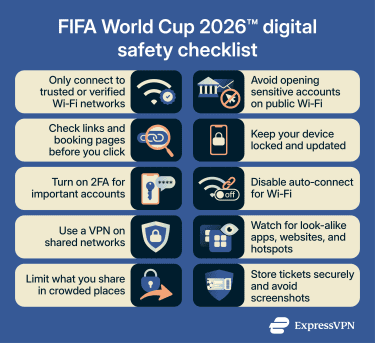
Cross-border travel security during the FIFA World Cup 2026™
Traveling between host countries like the United States, Canada, and Mexico means more checkpoints and situations where your device may leave your hands, so it’s important to secure it before you travel.
Lock down your device before you leave
Setting up strong protections before you travel lowers the risk of someone accessing your phone if it’s inspected or out of your hands.
Turn on a secure screen lock and use biometrics such as Face ID for convenience, along with a strong passcode for added protection. Check that you’ve enabled device encryption, since this keeps the information stored on your phone unreadable without the passcode.
It’s also worth reviewing lock screen notifications before unlocking your phone, especially when you’re standing in line outside a stadium or in a crowded pub, where others can easily see your screen.
Update your apps and operating system
Outdated software can contain security issues that attackers know how to target, so installing updates before you travel gives your device stronger protection.
Before you travel, update your operating system and any apps you plan to use. This includes those that store your match tickets, airline or train apps for boarding passes, and any booking apps for hotel reservations.
Doing this at home is usually faster and more reliable than when on airport or hotel Wi‑Fi, and it helps reduce the chances of someone exploiting a known vulnerability while you’re at the tournament.
Prevent device loss or theft while traveling
Travel days can be hectic, and it’s surprisingly easy to leave your phone behind at security or in a busy stadium.
Enable device tracking so you can see where your device is if it goes missing. It’s also worth setting up remote lock or wipe features, which let you secure or erase your data if you can’t get the phone back. That way, your personal information stays protected even if the device doesn’t.
Use strong passwords and a password manager
Using the same password across accounts can create bigger risks during a busy trip like the FIFA World Cup 2026™. If one account is exposed, others can be affected, especially those linked to booking confirmations or ticket accounts.
A password manager helps you create and store complex passwords without needing to remember them, so you’re not tempted to reuse simple ones. ExpressKeys can make this even easier by generating secure passwords for you and keeping everything in one protected place. It also has autofill, so it can fill in your details for you on websites and apps.
Enable two-factor authentication (2FA)
2FA adds another step to the login process, such as a one-time passcode or app authentication, which protects your accounts even if someone manages to get your password. This is especially useful for accounts you may need to access quickly during the FIFA World Cup 2026™, such as your ticket app at the stadium entrance or your email when confirming last-minute travel details.
App-based authentication is usually more secure than SMS, especially when traveling internationally where messages may be delayed or less reliable. If you can, turn on 2FA wherever it’s possible to keep your accounts secure. Some password managers, like ExpressKeys, can also store and generate these one-time codes for you, making it easier to log in securely while traveling.
Watch for unusual login activity
Unusual login alerts can be early signs that someone’s trying to access your accounts, so it’s worth checking them closely while you’re traveling. For example, if you’re traveling between host cities and receive a login alert from a different location, it might mean someone has accessed your account.
Be careful with login alerts that include links, as these can sometimes be phishing attempts. Instead of clicking through, open the app or website directly and check for any suspicious activity from there.
What to do if your phone or accounts are compromised during the FIFA World Cup 2026™
If your phone goes missing or you notice signs of unusual account activity during the tournament, it's important to act quickly to limit how much information is exposed. Here are some steps to take:
- Check nearby areas and speak to staff: If you’ve just lost your phone, retrace your steps. At stadiums or fan festivals, ask security or visit the lost and found, as items are often handed in during events.
- Lock or wipe your device remotely: If you can’t recover it, use your device’s remote tools to lock or erase your data so no one else can get into it.
- Secure your accounts: Change your passwords, sign out of active sessions, and remove any unfamiliar devices. Start with accounts you’re likely using during the tournament, such as your ticket app or payment methods.
- Watch for follow-up activity: Check for unusual logins or alerts in the hours and days after, as some suspicious activity may appear later.
Learn more: What to do if your phone is lost or stolen during the FIFA World Cup 2026™.
Should you use a VPN when traveling for the FIFA World Cup 2026™?
A VPN protects your data on public or shared Wi‑Fi by encrypting your internet traffic, which conceals your browsing, logins, and app activity as it travels between your device and the websites you use.
This encryption makes it harder for anyone on the same network to see what you’re doing, even if the Wi‑Fi is open or poorly secured. This is especially important when you’re checking sensitive details like tickets, payments, and travel updates.
A VPN also limits what networks and websites can collect about your connection, giving you more privacy. It helps hide your IP address from the websites and services you use, which can make it harder to link activity back to you.
However, a VPN doesn’t block everything. It won’t stop scams, fake ticket sites, or weak passwords, and it can’t fix issues caused by outdated apps or unsafe links. You’ll still need to stay alert to suspicious messages and secure your accounts with strong passwords and 2FA.
Learn more: Complete guide to using a VPN during the FIFA World Cup 2026™.
FAQ
How do I know if a FIFA World Cup 2026™ ticket website is legitimate?
How can I safely access my FIFA World Cup 2026™ tickets on my phone?
What should I do if I get a suspicious message about FIFA World Cup 2026™ matches or tickets?