When and why to use a VPN during the FIFA World Cup 2026™


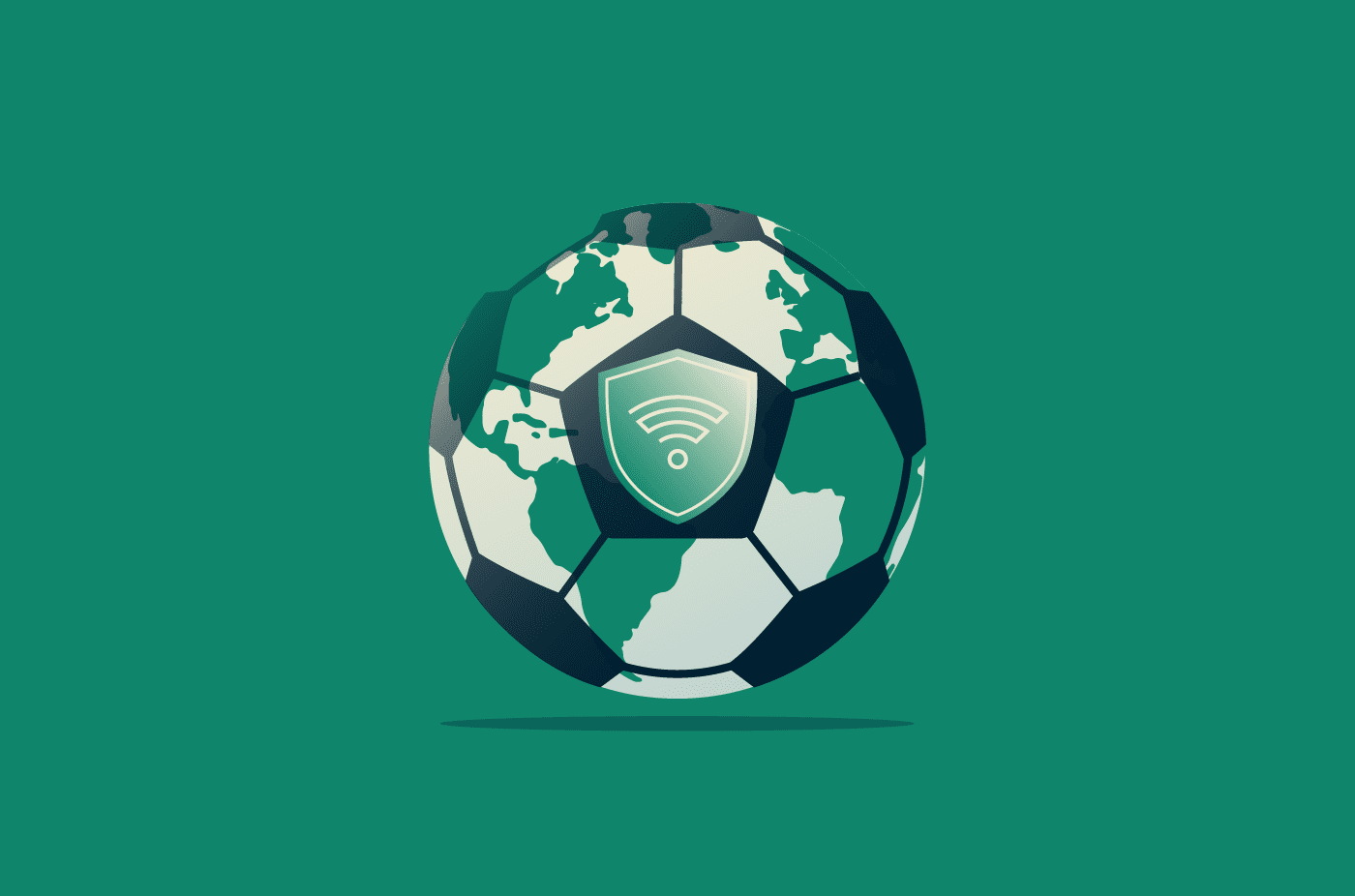
For many fans, the FIFA World Cup 2026™ means traveling between different venues and countries. Plans change quickly, and you’ll often be checking tickets, bookings, and updates while on the move. In those moments, especially when accessing important information, your security could be at risk.
A virtual private network (VPN) helps protect your data by securing your connection and adding privacy as you travel for the tournament.
Why using a VPN matters during the FIFA World Cup 2026™
Whether it’s opening tickets or checking bookings, a VPN can help keep your connection secure and help prevent others from seeing your sensitive data.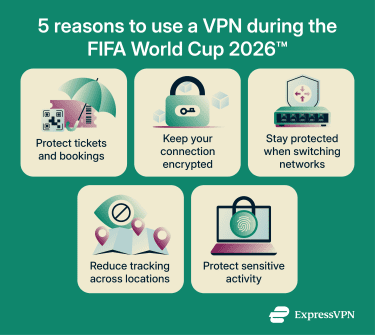
Access tickets, bookings, and travel apps securely
Thousands of fans use public Wi-Fi networks. On these networks, your data passes through a shared access point. If the connection isn’t properly secured, someone on the same network may be able to monitor or intercept that traffic.
This matters when you’re sharing sensitive data. Your match tickets, travel itinerary, and booking confirmations are likely to include personal details like your name, reservation numbers, or payment information. If that data is exposed, someone could use it to access your accounts or copy your booking details.
A VPN encrypts this information as it’s sent, so people on the same network are less likely to see or steal it. It also means your connection stays protected even on unsecured Wi-Fi, so you don’t have to rely solely on the network itself being safe.
Learn more: Need tips on how to stay safe on Wi-Fi during the FIFA World Cup 2026™? Understand how to protect your connection as you travel.
Protect payments and banking activity while traveling
Paying for transport, stadium concessions, or last-minute bookings often involves entering card details or logging into banking apps. Many stadiums use cashless systems, too, so you’ll likely pay for food, drinks, and other items with your card or phone.
These are high-value targets, especially on unfamiliar networks. If this information is exposed, it could be used for unauthorized payments or account access. A VPN helps protect your online accounts and transactions by encrypting your connection, so attackers are less likely to intercept your financial details while you’re making payments.
Stay protected while moving between locations
A typical match day might involve switching between mobile data, train Wi-Fi, and a stadium network within a few hours. Each time your device reconnects, it forms a new connection with different security conditions. Some may have encryption, but others may have no security at all.
That constant switching increases the chance of connecting to a poorly secured or even malicious network without realizing it. Your device may also send small amounts of data as it reconnects before you’ve had time to assess whether the network is safe.
You can set your VPN to stay active across all connections, so your traffic remains encrypted regardless of which network you’re using. This means you don’t have to check each connection manually or worry about others on the network seeing what you’re doing.
Add privacy when using unfamiliar networks
As you move between cities and venues, networks and websites can collect information about your connection, such as your IP address and approximate location. This can be used to track your activity across the web and build a picture of where and how you’re browsing.
During a global event like the FIFA World Cup 2026™, where you’re connecting from different places throughout the day, more services can collect this information. A VPN helps reduce this by masking your IP address. Sites only see the IP address of the VPN server you’re connected to, so it’s harder to link your activity across locations and networks.
Use your devices safely during matches and events
Fan zones and stadiums often rely on temporary or high-capacity networks to support large crowds, such as mobile hotspots. It’s not always clear which networks are official, and you might see multiple hotspots. Some of these may be fake hotspots set up by attackers in an attempt to steal your details.
If you connect to one of these networks, attackers may try to intercept or manipulate your traffic. While many apps and websites use encryption, some data or metadata could still be exposed, especially on unsecured connections. This can happen in seconds, especially if your device connects automatically.
At the same time, this is when you may be most likely to check scores or send messages without thinking about the connection you're using. With a VPN running, your connection stays protected even in these busy environments, where it’s harder to tell which networks are safe to trust.
When to use a VPN during the FIFA World Cup 2026™
It’s a good idea to keep your VPN running throughout the tournament, as it helps protect your data as you move between networks and access important information. However, it’s especially important to use it when:
- Connecting to public Wi-Fi: Such as in airports, hotels, or fan zones, where networks are shared and harder to verify.
- Opening tickets, bookings, or travel apps on the move: Especially in time-sensitive moments, like entering a stadium or catching transport.
- Logging into accounts or making payments: Where personal or financial details are being sent over the network.
- Switching between networks: Such as moving from mobile data to transport or venue Wi-Fi throughout the day.
- Browsing on unfamiliar or temporary networks: Where you’re not sure how the connection is set up or who controls it.
What a VPN doesn’t protect you from
A VPN helps secure your internet connection, but it doesn’t protect against every type of online risk. It’s still important to stay aware of how you interact with links and accounts during the FIFA World Cup 2026™.
For example, a VPN won’t stop phishing scams or fake links. If you click on a malicious link or enter your details into a fake website, a VPN can’t prevent you from sharing that information. This also applies to fake ticket offers or resale marketplaces, where scammers may try to trick you into paying for tickets that don’t exist or aren’t valid. However, some VPNs include additional tools to reduce exposure to these risks. For example, ExpressVPN’s Threat Manager helps block connections to known malicious and tracking domains at the device level, adding an extra layer of protection across apps, not just in your browser.
A VPN doesn’t protect against malware or unsafe downloads. Installing apps or files from untrusted sources can still put your device and data at risk, even if you’re using a VPN. A VPN won’t help you with physical risks, either, especially shoulder surfing in crowded places like stadiums where someone may be able to see what’s on your screen. It’s important to use proper device controls such as privacy screens to keep your information secure.
Finally, a VPN can’t fix weak passwords or poor account security. Make sure you use strong, unique passwords and enable features like two-factor authentication, especially when accessing accounts while traveling. That said, some VPNs, like ExpressVPN, include built-in password managers such as ExpressKeys, which can securely store passwords and generate one-time login codes.
How ExpressVPN helps protect you while traveling for the FIFA World Cup 2026™
ExpressVPN is designed to keep your connection secure without requiring constant setup, so you can focus on your plans rather than your connection. It encrypts your internet traffic, so when you open tickets, check bookings, or log into accounts, others on the same network are less likely to see that information.
Features like auto-connect turn the VPN on when you join new Wi-Fi networks so you don’t have to think about it. The kill switch also blocks your internet if the connection drops, helping prevent your data from being exposed.
ExpressVPN also includes built-in protections that can block known malicious sites, trackers, and ads.
How to set up ExpressVPN before you travel
Before you travel, take a few minutes to set up your VPN properly to make sure it’s ready to protect your connection when you’re at the FIFA World Cup 2026™.
To install and test ExpressVPN:
- Download and install the ExpressVPN app for your device. If you’re using iOS or Android, you can download the app from the App Store or Google Play Store.
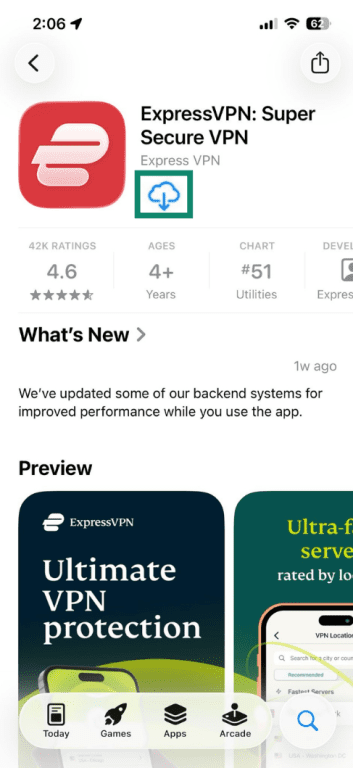
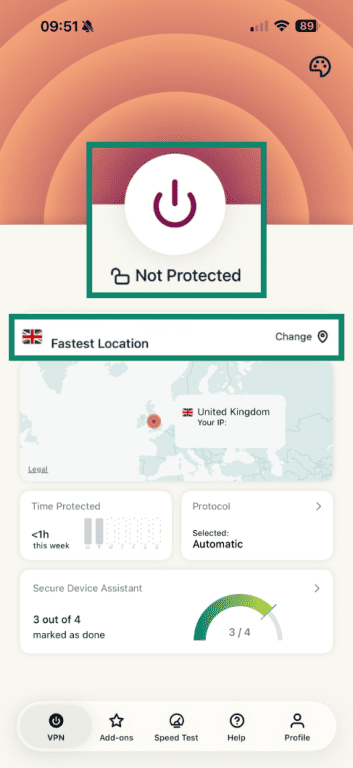
- Open the app and sign in. From here, tap the large Power button to connect to the closest server (Smart Location). You can also tap the Fastest Location button to browse through all locations.
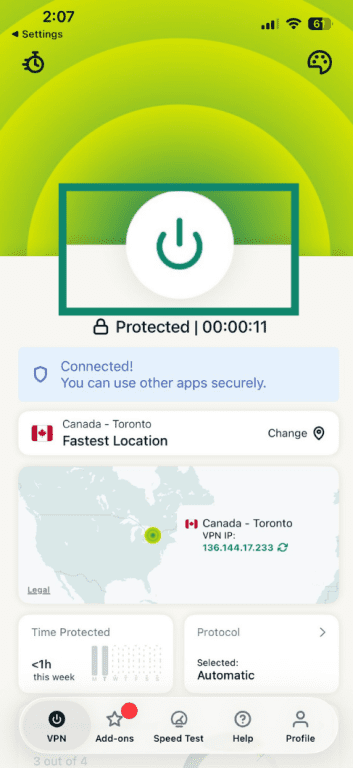
- Disconnect or switch servers. Press the Power button again to disconnect, or choose another location to switch servers.
Not sure which server to pick? Read our ultimate guide to picking a VPN server.
Enable key features for travel
Turn on auto-connect for Wi-Fi
Auto-connect lets ExpressVPN connect automatically when you join Wi-Fi networks. You can configure auto-connect settings to decide whether the VPN should turn on every time you connect to a secure or unsecured network.
Use the kill switch
ExpressVPN’s kill switch blocks internet traffic if your VPN disconnects unexpectedly. This helps prevent your data from being exposed, even for a few seconds.
ExpressVPN’s kill switch is built into its apps. On iOS, you can choose between Standard and Advanced options, while Android also supports stricter system-level blocking to stop all traffic if the VPN disconnects.
Enable Advanced Protection features
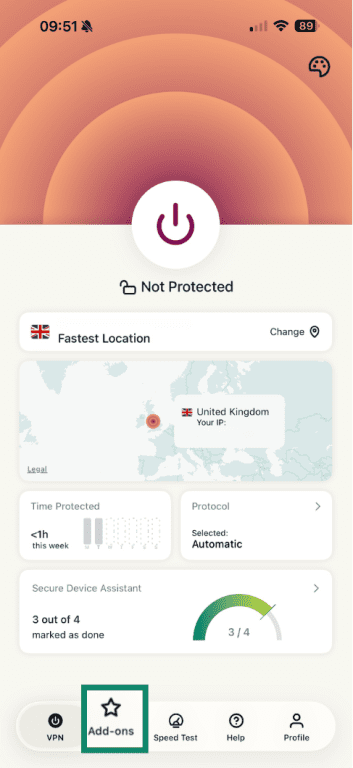
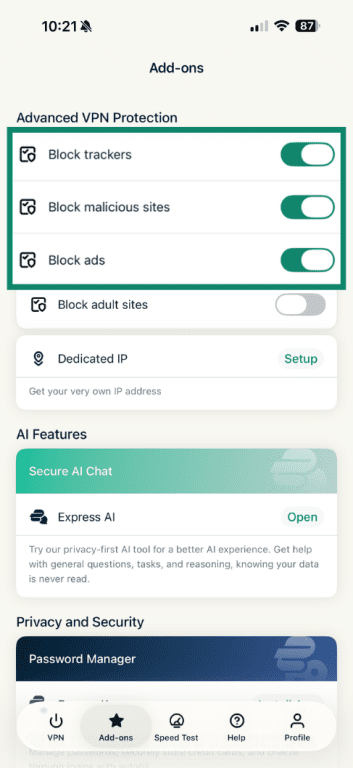
Advanced Protection can help block malicious sites, trackers, and ads while you browse, which can help you avoid fake websites and reduce the chance of clicking on unsafe links.
To turn on Advanced Protection:
- Open the ExpressVPN app and tap Add-ons.
- Turn on the toggles next to Block ads, Block malicious sites, and Block trackers.
Enable split tunneling
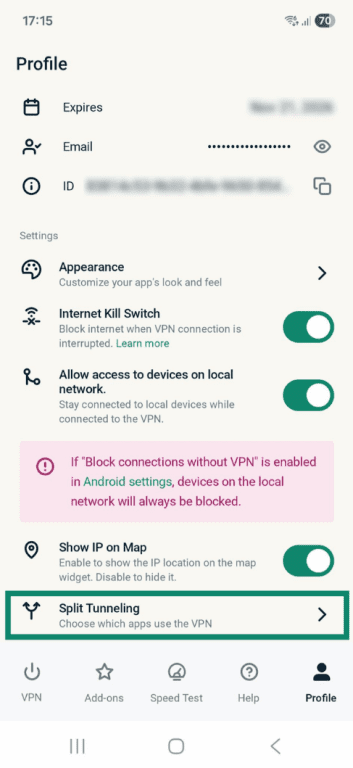
Split tunneling lets you choose which apps use the VPN and which connect directly to the internet. When using your phone in places like a hotel, you can protect sensitive activities with the VPN while accessing local services directly.
Here’s how to enable split tunneling on Android:
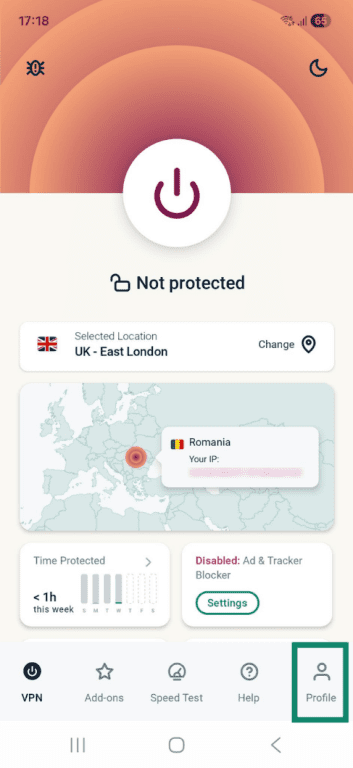
- Open the ExpressVPN app and tap Profile.
- Tap Split Tunneling.
- You'll see three options:
-
- All apps use the VPN.
- Do not allow selected apps to use the VPN.
- Only allow selected apps to use the VPN.
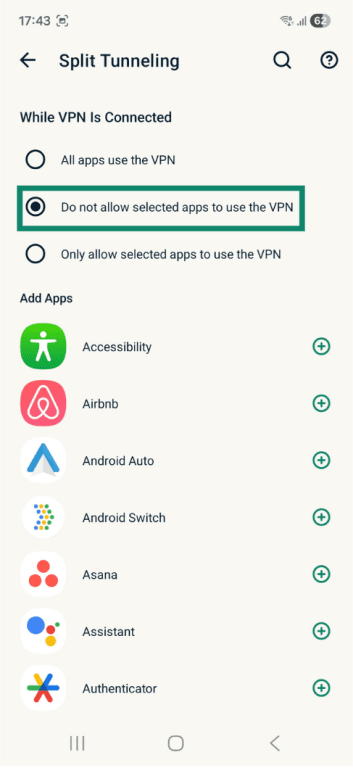
- Select the rule, then tap the plus (+) icon next to the app you want to add.
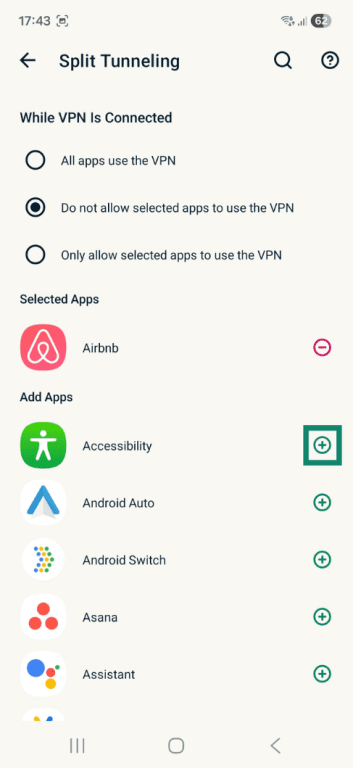
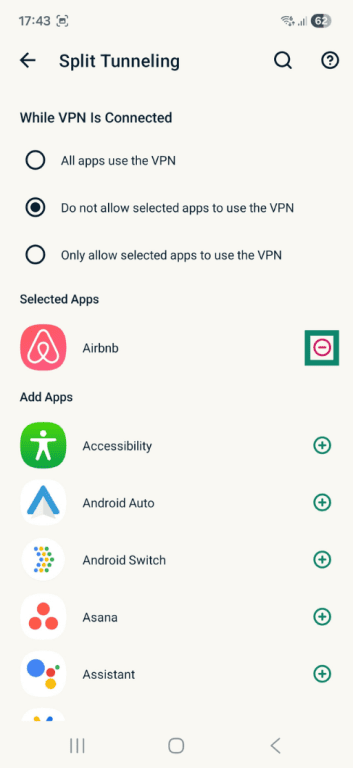
- To remove the rule, tap the minus (–) icon next to the app.
Install ExpressVPN on all your devices while traveling
If you’re taking multiple devices with you to the FIFA World Cup 2026™, it’s worth installing ExpressVPN on each one. You can use ExpressVPN on up to 14 devices at the same time. Install the app on your phone, laptop, and tablet, then sign in with the same account to stay protected wherever you go.
Use your VPN consistently while abroad
If you’ve set up your VPN, make sure you’re using it when it matters. Turn it on before connecting to public or unfamiliar Wi-Fi, especially if you haven’t enabled auto-connect. Keep it active when opening tickets, accessing booking confirmations, or logging into accounts, as these are when your data is most vulnerable.
Quick VPN checklist for FIFA World Cup 2026™ travelers
It only takes a few small habits to stay protected while you’re traveling. Here are some tips to help you make the most of your VPN and stay safe online while you’re at the FIFA World Cup 2026™:
- Install your VPN: Download and set up your VPN on your devices before you travel, so it’s ready to use when you arrive.
- Use it on public Wi-Fi: Turn on your VPN when connecting to shared networks in airports, hotels, stadiums, or fan zones. For added protection, enable features like auto-connect and the kill switch.
- Turn it on before accessing accounts: Activate your VPN before opening tickets or bookings or logging into apps that contain personal information.
- Keep it on while switching networks: Leave your VPN running as you move between mobile data, transport Wi-Fi, and venue networks.
- Use it on unfamiliar connections: Turn on your VPN when using networks you don’t recognize or can’t verify.
FAQ
Do I need a VPN during the FIFA World Cup 2026™?
Is public Wi-Fi safe to use during the FIFA World Cup 2026™?
When should I turn on my VPN while traveling?
Can a VPN protect me from scams during the FIFA World Cup 2026™?
Will a VPN affect streaming or browsing during the FIFA World Cup 2026™?