What is a secure web gateway (SWG)?


Work no longer happens within a single trusted network. Users access apps, files, and accounts from home networks, public Wi-Fi, and personal devices, making it harder to distinguish normal activity from phishing pages, malicious downloads, and unauthorized connections.
A secure web gateway (SWG) filters internet-bound web traffic and enforces access policies to reduce the risk of these threats. This guide explains how SWGs work, what they protect against, and where they fit in modern security environments.
What are secure web gateways?
SWGs are security solutions that sit between users and the internet, inspecting web requests and responses to control access, detect threats, and enforce organizational policies.
They primarily focus on HTTP and HTTPS traffic. When Secure Sockets Layer (SSL) / Transport Layer Security (TLS) inspection is enabled, it can inspect encrypted web traffic in greater depth. SWGs may also scan file uploads and downloads, apply URL filtering, detect malware, and control access to web-based or cloud applications.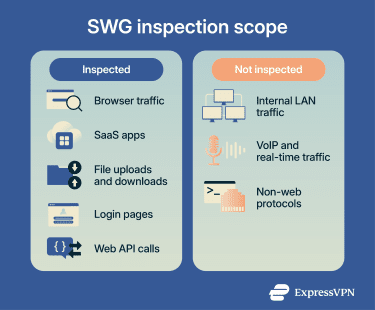
How secure web gateways work
A SWG controls web access by routing traffic through an inspection point where it's analyzed and evaluated against security policies.
The process typically follows these steps:
- Route traffic through the gateway: Web requests are routed via the SWG, such as through proxy settings, endpoint agents, or network forwarding rules.
- Evaluate the destination: URLs, domain reputation, categories, and access policies are checked to block known malicious or restricted sites.
- Inspect encrypted sessions: HTTPS traffic may be decrypted, analyzed, and re-encrypted when SSL/TLS inspection is enabled.
- Scan content for threats: Files, scripts, page elements, and downloads are analyzed for malware, exploits, phishing patterns, and suspicious redirects.
- Apply security policies: Rules for acceptable use, data transfers, and data loss prevention (DLP) are enforced across web activities.
- Enforce the decision: The SWG allows, blocks, restricts, or logs the session based on reputation, inspection results, user identity, policies, and, where available, device posture signals.
- Log activity: Traffic events and enforcement decisions are recorded for monitoring, reporting, and integration with security monitoring and analytics platforms.
Types of secure web gateways
SWGs can intercept and inspect web traffic in different ways depending on how user traffic is routed through the gateway.
- Forward proxy: Web requests are explicitly routed to the gateway, which retrieves content from the internet on the user’s behalf.
- Transparent proxy: Web traffic is automatically redirected to the gateway by network infrastructure, allowing inspection without requiring direct configuration on user devices.
- Cloud-based proxy: Traffic is routed to inspection nodes in the provider’s cloud network rather than passing through a company data center.
Deployment models
Organizations deploy SWGs across different infrastructure models, which determines where inspection occurs.
- On-premises: Runs on hardware or virtual appliances within the organization’s network.
- Cloud: Operates as a hosted service managed by the security provider.
- Hybrid: Combines local gateways with cloud inspection nodes to cover both internal networks and remote users.
Key features of secure web gateways
Modern SWGs combine several security functions into a unified control layer for web traffic. The main features include:
URL filtering and categorization
SWGs classify websites into predefined categories, such as social media, file-sharing, finance, and newly registered domains. Administrators can apply category-based policies that allow, block, or restrict access without evaluating destinations individually.
Many gateways also support custom categories, domain risk scoring, and workflows for reviewing and reclassifying websites.
Threat detection and prevention
SWGs analyze downloaded files, scripts, and page content for indicators of malicious activity.
Detection methods may include signature-based malware scanning, file reputation checks, exploit detection, and sandbox analysis. These controls help detect malicious content before it reaches user devices.
Policy enforcement and access controls
Administrators can enforce granular browsing policies based on contextual signals such as user identity, group membership, device posture, and location. This allows organizations to apply different restrictions for employees, contractors, or unmanaged devices while maintaining consistent protection across environments.
SSL/TLS inspection
Many SWGs support SSL/TLS inspection, allowing encrypted sessions to be analyzed for threats and policy violations.
When enabled, the gateway decrypts the traffic, applies security inspection and policy checks, and then re-encrypts the connection before forwarding it.
Application-level controls
Some SWGs can identify specific web applications rather than only entire domains. This allows administrators to apply more granular controls, such as restricting file uploads, downloads, or external sharing.
Threat intelligence integration
SWGs frequently integrate with threat intelligence feeds that provide information about newly discovered malicious domains, phishing campaigns, and command-and-control (C2) infrastructure. This intelligence enables the gateway to block emerging threats more quickly.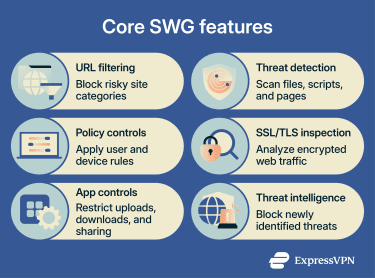
What threats do secure web gateways protect against?
Many modern threats hide within normal-looking web traffic, making detection difficult without deeper inspection. SWGs focus on identifying these attack patterns at the point where users interact with external sites. Common web-based threats SWGs help protect against include:
- Phishing and malicious websites: Fraudulent login pages and brand-impersonation domains are used in phishing campaigns. SWGs can block known or suspected phishing sites, reducing the risk of credential theft.
- Malware and drive-by downloads: Compromised websites can distribute malware through exploit kits or deceptive downloads. SWGs analyze files, scripts, and web content before they reach the device.
- C2 communications: Malware may communicate with attacker-controlled infrastructure to receive instructions or exfiltrate data. SWGs detect and block known or suspicious outbound web connections.
- Malvertising and harmful scripts: Advertising networks and embedded scripts can redirect users to malicious destinations. SWGs can block risky pages, redirects, downloads, or scripts depending on their inspection capabilities.
- Risky or unauthorized file downloads: Files from untrusted sources or restricted file types can pose security risks. SWGs can restrict, scan, or block these downloads.
Secure web gateways vs. other security technologies
Organizations often deploy SWGs alongside other security technologies, each addressing different risks and traffic types. The sections below explain how they differ.
SWG vs. firewall
Traditional firewalls focus mainly on network- and transport-layer filtering, including Layers 3 and 4 of the Open Systems Interconnection (OSI) model. They control inbound and outbound network traffic.
SWGs specialize in web traffic inspection and policy enforcement, focusing on outbound user-initiated web traffic.
That said, some next-generation firewalls (NGFWs) can include Layer 7 inspection, application awareness, intrusion prevention, and threat intelligence, so they may overlap with some SWG capabilities. SWGs typically provide more specialized control over web browsing, web applications, and user web activity.
SWGs can also apply user- and identity-based policies, while traditional firewalls are typically more network-, port-, protocol-, and IP-based.
SWG vs. proxy
Basic web proxies route traffic from clients to servers. SWGs use proxy architecture but add security inspection, threat detection, URL filtering, and centralized access controls.
SWG vs. CASB
A cloud access security broker (CASB) focuses on visibility, security, and policy enforcement for cloud applications and services, especially Software-as-a-Service (SaaS) platforms.
SWGs provide broader web protection and focus primarily on internet-bound web traffic, web access policies, and web-based threats.
SWG vs. SASE
Secure Access Service Edge (SASE) is an architectural model that combines cloud-delivered security with network connectivity functions. SWG functionality is often included in SASE platforms.
For example, SASE platforms may include:
- SWG for web traffic inspection.
- Software-defined wide area network (SD-WAN).
- Firewall-as-a-Service (FWaaS).
- Cloud access security broker (CASB).
- Zero-trust network access (ZTNA).
Common use cases for secure web gateways
Organizations deploy SWGs to address practical web access challenges in distributed environments. Common use cases include:
- Securing employee internet access: Reduces exposure to unsafe sites, phishing pages, malware, and risky downloads.
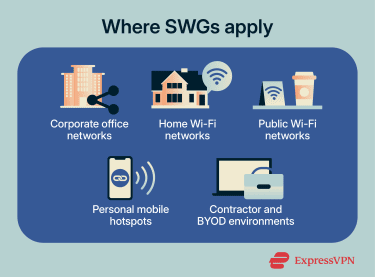
- Protecting remote, hybrid, and bring your own device (BYOD) users: Extends consistent web controls to users connecting from home networks, public Wi-Fi, and branch offices.
- Enforcing acceptable use policies: Restricts access to certain site categories while maintaining visibility into web usage.
- Reducing data loss: Helps detect or block the sharing of sensitive data via web uploads, forms, or cloud apps.
- Improving shadow IT visibility: Identifies web-based services employees adopt without formal approval.
Challenges and limitations of secure web gateways
While SWGs strengthen web control, they introduce operational considerations that organizations must manage. These include:
- Encrypted traffic limitations: TLS inspection can break applications that rely on certificate pinning or strict validation rules, requiring exclusions that reduce visibility.
- Certificate management: TLS inspection depends on trusted root certificates and secure handling of certificate keys. Misconfiguration can weaken trust protections or disrupt access.
- Performance overhead: Decrypting, inspecting, and re-encrypting web sessions consumes processing resources and can add latency, especially in high-traffic environments.
- Policy complexity: Rule ordering, exclusions, and evolving encryption requirements need ongoing tuning to keep enforcement predictable.
Best practices for deploying secure web gateways
Effective SWG deployment requires more than enabling traffic inspection. Policies, visibility, and user behavior must be aligned to ensure controls are practical in real-world use.
- Assess employee web usage: Identify the websites, applications, and traffic patterns employees rely on, as well as the threats most relevant to your environment.
- Roll out controls gradually: Monitor traffic and establish baseline behavior before enforcing blocking rules to reduce disruption.
- Keep detection engines and threat intelligence up to date: Ensure signatures, models, and threat feeds are current (often automated), and validate that updates are applied correctly.
- Train employees on safe web behavior: Define acceptable use and common risks to reduce unsafe browsing.
- Review and adjust policies regularly: Use gateway data to refine rules, reduce false positives, and adapt to changing usage patterns.
FAQ: Common questions about secure web gateways
How does a secure web gateway work in simple terms?
Is a secure web gateway the same as a proxy?
What’s the difference between a firewall and a secure web gateway?
Are secure web gateways part of SASE?
Do secure web gateways inspect HTTPS traffic?