Firefox VPN extension: Secure, fast, and private browsing
Your browsing reveals a lot about you, and ExpressVPN's Firefox extension helps keep it out of the wrong hands
- Encrypt your browser traffic with a no-logs VPN service
- Choose from VPN servers across 105 countries
- Use it as a browser-only proxy or a controller for the full VPN app
Start Your Risk-Free TrialDownload Add-On
Got ExpressVPN? Download the Firefox extension now








How to use a VPN on Firefox
Get VPN protection directly on your browser in three steps
-
Step1

Install a Firefox VPN extension
Subscribe to ExpressVPN risk-free* and install the Firefox VPN extension.
-
Step 2

Turn on and connect to a server
Choose from one of our VPN servers in 105 countries worldwide.
-
Step 3

Check if your VPN is working
Visit our IP address checker to confirm if your virtual location has changed.
What is a Firefox VPN extension?
It adds encryption and IP masking directly to your Firefox browser traffic

What does a Firefox VPN extension do?
It encrypts your Firefox browser’s traffic to protect your privacy and lets you change your virtual location to browse from a server location of your choice.
Beyond encryption, some Firefox VPN extensions come with extra features that add more layers of privacy and security to your browsing.

VPN apps vs extensions: Key differences
A Firefox VPN extension typically covers only your browser’s traffic, while a VPN app encrypts traffic across your entire device.
ExpressVPN's Firefox extension can do both: use it as a standalone browser proxy, or pair it with the app for full-device encryption.
Do you need a VPN app for full protection?
Not necessarily. If privacy while browsing is your main concern, the extension alone is enough.
If you want your entire device's traffic encrypted, including other apps and browsers, you'll want the full VPN app, with or without the extension.
Does Firefox have a built-in VPN?
Firefox launched a built-in privacy feature that masks your IP address, but it's not a VPN
-

Firefox built-in VPN vs browser extensions
Firefox's built-in feature is a proxy service, not a full VPN. It masks your IP address but relies on existing HTTPS encryption rather than adding a dedicated encryption layer.
A VPN browser extension, by contrast, adds a much stronger encryption layer on top and often comes with important protections, such as DNS leak prevention, built in.
-

Limitations of built-in options
Firefox's built-in option comes with notable restrictions: a 50GB monthly data cap, no server location choice, browser-only traffic coverage, and availability currently limited to the US, UK, Germany, and France.
A dedicated VPN extension typically has none of these constraints.
Why you need a VPN for Firefox
A Firefox VPN boosts your security and helps avoid content-based ISP throttling

Protect your data on public Wi-Fi
On public Wi-Fi, Firefox’s privacy features can't keep hackers on the same network from monitoring your online activity and intercepting unencrypted traffic.
ExpressVPN encrytps your browser traffic before it leaves your device, making it significantly harder for hackers to capture your data. This minimizes your risk when booking flights, sending emails to colleagues, or accessing your bank account on unsecured networks.

Hide your IP address and browsing activity
Without a VPN, websites you visit will see your real IP address, while your ISP or local network can see which sites you're visiting and when. They can use the information to profile you, track you, or determine your approximate location.
With ExpressVPN’s encryption, you can limit how much websites, your ISP, and local networks can see of your online activity. Together with Firefox’s ad tracker blocking and Private Browsing mode, you can go online with enhanced privacy.

Avoid content-based ISP throttling
You’re getting ready for movie night when your stream suddenly won’t stop buffering. There may be several reasons for this, one of which could be your ISP throttling your streaming traffic.
To get around this, connect to an ExpressVPN server before opening your favorite streaming app. This can help stop your ISP from detecting and slowing down specific traffic, like streaming (known as content-based throttling).
Free vs paid Firefox VPNs
Paid Firefox VPNs offer more ways to maintain your security and privacy
-

Free Firefox VPNs
Some free Firefox VPNs collect your activity and connection logs, and sell them to third parties. Others only offer a proxy service with no dedicated encryption layer like 256-bit AES, which can make your data significantly easier to intercept.
Even worse, some free VPNs use a peer-to-peer network model to save money. This routes your traffic through another VPN user’s device and vice versa, putting your privacy and security at risk.
-
Paid Firefox VPNs
Paid VPNs understand the value of trust. ExpressVPN, for example, keeps no connection or activity logs, and protects your traffic with industry-leading encryption.
One subscription also covers up to 14 devices at once, and our apps come with features like our Internet Kill Switch, which keeps your data safe if your connection drops and goes online again before the VPN reconnects.
Why choose ExpressVPN for Firefox
Access more servers, get proven security, and more with our Firefox VPN

Fast servers in 105 countries
You open your go-to streaming platform on Firefox while on vacation, ready to watch the finale of the show you’ve been following for months. It’s nowhere to be found.
Want to skip the frustration? Open ExpressVPN and connect to a fast VPN server in your home country first. Our servers in 170+ locations across 105 countries has you covered, so you aren’t left hanging when you’re on the road.

Trusted no-logs policy and audits
VPNs can know a lot about you, since you route all your traffic through their servers. Because of this, it's critical that you choose one you can trust to not collect your sensitive data.
ExpressVPN follows a strict no-logs policy and uses RAM-only servers, both independently audited by KPMG and PwC. This means no activity or connection data is ever stored on our servers.

Advanced security features
ExpressVPN’s Advanced and Pro plans include additional security features beyond standard VPN protection. These features are conveniently built into our app, and cover all device traffic, not just your Firefox browsing.
Threat Manager blocks malicious websites and apps, while Ad blocker removes unwanted ads, and parental controls restrict access to explicit content. Set them up once and they run in the background.
Easy-to-use Firefox extension
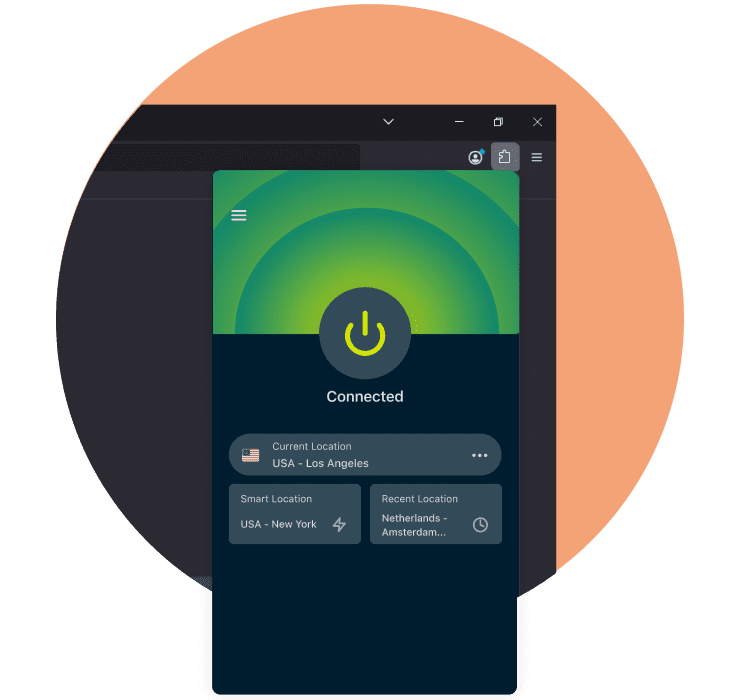
Sometimes, you simply want to use a VPN for Firefox without opening a separate app. ExpressVPN's Firefox extension lets you connect in one click, directly from your browser toolbar.
Use it as a standalone browser proxy, or pair it with the ExpressVPN app to encrypt all traffic on your device and take advantage of advanced features, without ever leaving Firefox.

24/7 customer support
Need help setting up our VPN with Firefox?
Contact our 24/7 customer support team via live chat and they'll walk you through the steps of getting ExpressVPN up and running on your Firefox browser or on your device.
What People Are Saying About ExpressVPN
Check out why Firefox users and other customers love ExpressVPN
-
Absolutely fantastic. It was the perfect solution for connectivity issues in a game I've been playing recently.
J B


-
ExpressVPN is the perfect all around VPN service for your network security needs.
Dirt_Reynolds


-
ExpressVPN is the fastest VPN I've found. It shows you the fastest server you can connect to, and a list of alternate servers.
Christopher Gilmer
-
#1 Best VPN 2026 & Best Gaming VPN
ExpressVPN is the best Gaming VPN right now, thanks to its impressive speeds, excellent privacy protections and expansive global network of servers.

-
Editor’s Choice Award 2026
ExpressVPN’s expansive network and dedication to staying on the forefront of encryption tech earn it an award.

-
#1 Best VPN for the U.S. 2026
ExpressVPN is the best VPN for the U.S. right now. It has VPN servers in every American state, excellent security, and a simple user interface.

-
 Rated 4.4 out of 5
 -
 Rated 4.7 out of 5






Frequently Asked Questions
Your common questions about Firefox VPNs, answered
Does Firefox have a built-in VPN?
Yes, Firefox launched its built-in VPN in March 2026. Initially, available to users in the US, the UK, Germany, and France, it masks your IP address, though server location is assigned automatically with no option to choose your own.
How do I turn on VPN on Mozilla Firefox?
To use a VPN on Mozilla Firefox, install the ExpressVPN extension from the Firefox Add-ons store. Once installed, click the ExpressVPN icon in your toolbar, sign in, and connect to a server of your choice.
What is the best VPN for Firefox?
ExpressVPN is the best Firefox VPN. Our browser extension can work as a standalone browser proxy with no app required, or as a remote control for the ExpressVPN desktop app, giving you full device protection without leaving Firefox.
Is there a free VPN for Firefox?
Yes, but free Firefox VPNs typically come with significant limitations: fewer server locations, data caps, and weaker security standards. ExpressVPN offers servers across 105 countries, no data caps, and 256-bit AES encryption as a more complete alternative.
Do I need a VPN app with a browser extension?
Having a VPN extension for Firefox installed along with an app isn't necessary but can be a convenient option. ExpressVPN, for example, lets you control the desktop app using the Firefox extension so you don't need to leave the browser window to manage your VPN settings.
Is a Firefox VPN extension safe?
Yes, but it depends entirely on the provider. ExpressVPN proves its safety and security standards with regular independent audits through companies like KPMG and PwC. These auditors verify our systems work as promised, in line with our strong no-logs policy.
Try the VPN trusted by Firefox users risk-free
Take advantage of our 30-day VPN trial* for all new customers
*Contact support to request a refund within 30 days. Purchases through the App Store are handled by Apple, and refunds are at their discretion.