
What can you do with a VPN? 16 practical uses you should know


Most people know that they can use a virtual private network (VPN) to mask their IP address. However, not everyone knows that a VPN can be incredibly useful for remote workers, travelers, sports enthusiasts, media content consumers, and everyday internet users.
What is a VPN, and why do people use it?
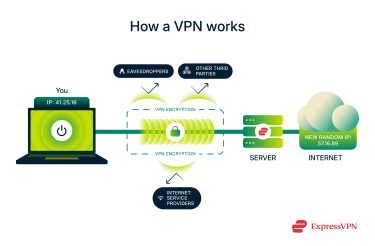
A VPN is an internet security and privacy tool that's designed to encrypt your internet traffic and change your IP address. This basic functionality opens up a lot of other use cases that make VPNs worthwhile for any internet user.
What's more, some VPN providers, ExpressVPN included, go beyond the basics and pack their products with extra features, from parental controls to reliable password managers and future-proof protections.
16 things you can do with a VPN
Here are the top things you can use a VPN for. To truly benefit from them, choose a VPN that's both trustworthy and performs reliably.
1. Protect your online privacy
A VPN helps you secure your data online from trackers, snoops, your internet service provider (ISP), the government, cybercriminals, and anyone who may be following your web traffic. It ensures online privacy protection in the following ways:
- Encrypting your internet traffic so it's unreadable to anyone on the outside.
- Changing your IP address to throw trackers off your scent.
- Some VPNs, like ExpressVPN, can block ads and trackers that follow you from site to site.
So, you get back some control of your data and can browse the internet with greater anonymity from anywhere.
2. Stay secure on public Wi-Fi
Public Wi-Fi networks are often unsecured, making them an easy target for cybercriminals. Fortunately, most websites today use HTTPS encryption, keeping every piece of information you share on those sites secure to a large extent.
But what happens when a cybercriminal intercepts your messages and internet requests before they get to the website? This is called a man-in-the-middle (MITM) attack, and unsecured public Wi-Fi networks make it easier for cybercriminals to intercept information such as your credit card data, personal details, and login info you share online.
But that changes once you connect to a high-quality VPN before using public Wi-Fi. The VPN encrypts your connection for a secure browsing experience. Even if the cybercriminal intercepts your internet traffic, it'll be unreadable to them.
3. Avoid price discrimination when shopping
Imagine someone stepping out of a store with a nice jacket, which they bought for $50. That same instant, you walk into the store, and the store owner wants to sell it to you for $75.
Why? Just because you look like you can afford it at that price. That's price discrimination.
Many e-commerce and online retailers do it today. Their algorithms can single you out for more expensive prices based on a mix of factors, including where you're browsing from. In other words, your IP address.
By connecting to VPN servers in different regions, you can shop around to try and get the best deals.
4. Stream your favorite shows while traveling
Streaming platforms are often under licensing agreements that limit where they can show certain movies, shows, or other content. So when you travel, you might suddenly lose access to your favorites. A VPN lets you connect to a server in your home country, so you can keep watching no matter where you are.
5. Access live sports and region-locked content
Live sports channels and content providers often have regional licenses that restrict where they can broadcast. That's why people traveling or working abroad might lose access to their favorite games and live events.
You can try to restore your access to live games and sports content like you were back home by connecting to a server in your home country.
6. Unblock social media and messaging apps
When you travel or use certain networks, like at work or school, you might not be able to use social media or messaging apps to talk to friends.
Connecting to a VPN server in your home country, where these apps work, should let you use them again.
7. Bypass censorship
Some internet providers and network admins may restrict your internet access. This may be less than ideal for journalists, students, employees, and other general internet users.
In this case, you'll need a VPN that can bypass censorship, and not all VPNs are designed for such intensive tasks. Fortunately, ExpressVPN is.
Once you're connected, your internet traffic goes through the VPN's servers instead of your ISP's, letting you access restricted content, depending on the location.
8. Minimize tracking from advertisers and websites
Some VPNs can help you avoid website and advertiser tracking in two ways:
- Masking your IP address: A VPN assigns you another IP address whenever you connect to its servers, so websites and advertisers won't be able to use it to link your internet activity to you.
- Ad and tracker blockers: Some VPNs, like ExpressVPN, also offer tracker and ad blocking. This goes beyond simply changing your IP address: the VPN actively blocks tracking and ad cookies, which may stay on your browser and follow you around.
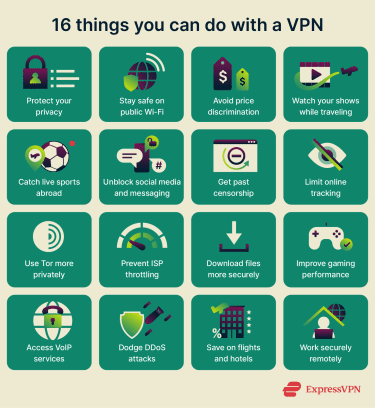
9. Use Tor network securely with a VPN
secures your IP address from everyone else you communicate with. However, your ISP can still see that you're connecting to Tor. A VPN can help hide Tor usage from your ISP as well as bypass Tor-blocking networks.
10. Protect against ISP throttling
In countries without net neutrality, ISPs may throttle your internet connection based on your activity during peak usage hours. This is why your heavy downloads, gaming, and content streaming may sometimes feel slower than usual.
Now, a VPN won't give you faster speeds than what your ISP promises. However, it'll encrypt your internet activities, keeping your ISP from seeing what you're doing online and potentially reducing speed throttling based on usage.
11. Download large files securely
You should know these two things about P2P downloads:
- Some ISPs don't like torrenting, so they might slow down your internet connection a lot when you try to download files.
- When you're downloading through P2P, everyone in the pool can see your IP address.
A VPN solves both problems; it encrypts your internet traffic, hiding it from your ISP, and replaces your real IP address with that of the VPN server, so other peers in the swarm won't see it.
For more details, read our detailed guide to why you should hide your IP address.
12. Improve your online gaming experience
Connecting to a VPN can help improve your online gaming experience in different ways, including:
- Helping you maintain access to games available in your home country when traveling abroad.
- Hiding your IP address to reduce the risk of distributed denial-of-service (DDoS) attacks or swatting.
- Bypassing throttling attempts when streaming games or playing online for hours.
Some popular games also have servers in different hubs, allowing players to connect to their closest option. If you're far away from even the closest server, you can connect to a VPN server in that region to reduce ping.
13. Use VoIP services without restrictions
Are you having issues using Voice-over-Internet Protocol (VoIP) services from anywhere or on a certain network?
In some cases, connecting to a VPN server in your region or your home country can help restore access to certain VoIP services. That way, you stay connected to your friends, family, and coworkers from anywhere.
14. Avoid DDoS attacks while gaming or streaming
DDoS attackers swarm your IP address with more requests than it can handle, leading to service disruptions. Here's our detailed guide to the mechanics of a denial-of-service (DoS) and distributed denial-of-service (DDoS) attack.
Most people don't need to worry about being directly targeted by DDoS attacks, but gamers and streamers often do.
Luckily, a VPN can help protect you in some cases. When you connect to a VPN, your real IP address is hidden and replaced with a VPN-assigned one. This means some types of attacks may target the VPN's infrastructure instead of your device, but effectiveness can vary depending on the VPN provider and the nature of the DDoS attack.
It's best to choose a VPN with a kill switch. That gives you extra security against IP and Domain Name System (DNS) leaks if you ever temporarily lose connection to the VPN server.
15. Save money on flights and hotels
Airlines and hotel booking platforms may adjust prices based on your location.
Your IP address plays a key role in determining what you see. It reveals your approximate location, which platforms often use to display prices in your local currency or apply regional pricing strategies. In some cases, users in higher-income regions may be shown higher prices than users elsewhere.
That's why you can try shopping around for flight and hotel deals from different IP addresses before settling on a booking. However, note that this strategy doesn't guarantee success: price changes are more commonly driven by availability, fare class limits, and time before departure than by targeting individual profiles.
16. Work securely from remote locations
Working outside your company's office network introduces new security risks: home and public Wi-Fi networks are often much less secure than corporate infrastructure.
That's where a VPN helps. Even if you're not on a company network, it encrypts your internet connection on any Wi-Fi, keeping your data safe from snoops, hackers, and other threats while you work remotely.
VPN benefits with ExpressVPN
ExpressVPN gives you all the major benefits we've talked about, plus a few extras you won't usually find with other VPNs.
Total device protection at home and on the go
ExpressVPN offers easy-to-use and intuitive apps for your smartphones and desktop computers, including:
- Android
- iOS (iPhone and iPad)
- Mac
- Windows
- Linux
You can also configure ExpressVPN on a router or set up its MediaStreamer feature to extend access to other devices:
- Gaming consoles, such as Xbox and PlayStation
- Streaming devices, such as Roku
- Smart home units, such as Amazon Echo and Google Nest Hub
Block phishing and harmful sites
ExpressVPN comes with Threat Manager that blocks malicious websites. It works by intercepting DNS requests and checking them against an extensive, regularly updated blocklist of domains known for malware, phishing, trackers, spyware, or adware. This filtering happens locally on your device (not in the cloud) and only when you're connected to ExpressVPN using its private, encrypted DNS servers. The best part is that you don't have to pay extra to use this tool: it's included in ExpressVPN Advanced or Express Pro subscriptions.
Store and autofill passwords securely
A VPN can't fix weak passwords, and that's why ExpressVPN created ExpressKeys, a secure password manager included with the Advanced and Express Pro plans.
Why do you need ExpressKeys, though?
- It generates secure passwords for your online accounts: This reduces the chances of threat actors breaching your passwords with brute force and other common password-hacking attempts.
- It securely stores your passwords: You no longer have to worry about remembering complex passwords or losing that notebook where you wrote them all down.
- It supports passkeys: For compatible accounts, ExpressKeys can store and manage passkeys, giving you a secure sign-in option that doesn’t rely on traditional passwords.
- It discourages password reuse: Since you can now securely generate and store unique passwords, you don't need to reuse passwords across multiple online accounts anymore. That helps protect you from credential stuffing attacks.
- It autofills your saved passwords: ExpressKeys makes online account access extra seamless by automatically filling your login details on saved websites.
Protect yourself against identity theft
U.S. Advanced and Express Pro subscribers also get access to the ExpressVPN Identity Defender app on Android and iOS, a privacy and security suite that helps protect against identity theft. Available features vary by plan but include:
- Data Removal: Removes your data from data brokers and people-search sites.
- ID Alerts: Monitors the dark web, public records, and financial data for signs of identity misuse and alerts you to suspicious activity.
- ID Theft Insurance*: Offers coverage for eligible losses if your identity is used by a fraudster.
- Credit Scanner: Monitors your credit activity and includes monthly credit reports, helping you to spot potential issues early.
FAQ
What is a VPN used for?
A VPN encrypts your internet connection and masks your IP address, helping protect your privacy and security online. It can also enhance the safety of your online activities, safeguard sensitive data on shared networks, and provide a more secure connection when streaming, gaming, or browsing the web.
When should I use a VPN?
Ideally, whenever you're connected to the internet. If you don't want to have it turned on all the time, you can limit your use to whenever you're on public Wi-Fi networks, shopping for items online, booking flights and vacations, playing a game, or downloading large files.
Can I use a VPN on my phone?
You can use a VPN on your phone. Reputable VPN providers like ExpressVPN provide easy-to-use VPN apps for Android and iOS smartphones.
Does a VPN hide my location?
A VPN changes your IP address, which most websites and online services use to identify your location. However, a VPN alone can't modify your GPS settings, which other apps (such as Maps) use to approximate your location.
Is using a VPN legal?
Using a VPN is legal in most countries. Just one caveat: using a VPN doesn't make illegal activities legal. If it's against the law without a VPN, it's still illegal with one.
How do I know if my VPN is working properly?
The easiest way to know if your VPN is working is to check your IP address. After connecting, go to ExpressVPN's IP checker. If it shows the VPN server's location instead of your real one, you're all set. You can also try using a website or service that's only available in the country your VPN server is located in. If it loads, your VPN is working, too.
*The insurance is underwritten and administered by American Bankers Insurance Company of Florida, an Assurant company, under group or blanket policies issued to Array US Inc, or its respective affiliates, for the benefit of its Members. Please refer to the actual policies for terms, conditions, and exclusions of coverage. Coverage may not be available in all jurisdictions. Review the Advanced Tier Summary of Benefits and the Express Pro Tier Summary of Benefits.

















Comments
Great article! Small tip though : Isn't this underlying sentence a case of double denial? 🤣 so nothing from your browsing history to your download choices can’t be connected back to you.
Show more Show lessRight you are, Ronald! Thanks for flagging. It's been fixed.
Show more Show less