
What is a residential VPN? Your guide to secure browsing


A residential virtual private network (VPN) routes your internet traffic through IP addresses assigned by internet service providers (ISPs) to home connections, rather than through servers hosted in data centers. The IP address that websites see belongs to a real household, so it's generally less likely to be automatically flagged than data center IPs, although advanced detection systems consider additional signals beyond IP type.
The methods residential VPN providers use to source IPs vary, and not all of them are equally transparent. Depending on the model, there may be significant trade-offs around cost, performance, and control over how your connection is used compared to a mainstream VPN.
How residential VPN providers source IP addresses
Providers differ in how they obtain residential IP addresses.
A common model is a peer-to-peer (P2P) network. Users who join agree to share their home IP address and some of their bandwidth with others on the network. When users connect, their traffic exits through another participant's home connection. In return, their own connection may serve as an exit point for other users' traffic.
In legitimate P2P models, users clearly agree to share their connection. However, the wider residential IP ecosystem has also included cases where users were enrolled through unclear terms, software development kits (SDKs), malware, or compromised devices.
Other providers assign residential IPs without requiring users to share their own connection. With these services, a user's traffic doesn't exit through another user's device, but the IP address websites see still belongs to a residential ISP range.
How these providers build their IP pools isn't always clear; some say they partner directly with ISPs, while others appear to source IPs through third-party suppliers or through SDKs, which are tools that app developers can embed in their apps. In that model, app users opt in to share their connection in exchange for ad-free access or similar benefits.
Regardless of the sourcing method, residential VPN providers don't always disclose how they acquire IPs, how they handle abuse reports, or how they reassign addresses. That can make it difficult to know what's happening with your connection beyond your own device.
Related: What are different types of IP addresses?
Key features of a residential VPN
Residential VPNs use the same core technology as standard VPN services. Where they differ is in how they source and manage exit node IPs. Common features include:
- Residential IP access: The ability to connect using IP addresses associated with household internet connections rather than data center infrastructure.
- IP rotation controls: Some services allow residential IP addresses to change automatically between sessions or at defined intervals.
- Static residential IP: Some providers offer a residential IP that doesn't change between sessions.
- Location-level selection: Like standard VPNs, residential VPNs may support choosing traffic exit locations at a country or city level, based on where residential IPs are available.
- Dedicated residential IP options: Some providers offer residential IP addresses that are assigned to a single user rather than shared. These are typically sold as a paid add-on and reduce the risk of reputation issues caused by other users' activity on the same IP.
- Encryption and protocol support: Most residential VPNs use standard VPN protocols such as OpenVPN or WireGuard to encrypt traffic between your device and the VPN server.
How does a residential VPN work?
When you connect to a residential VPN, the app on your device establishes an encrypted connection with the VPN server you selected. From that point on, your internet traffic is sent through the VPN instead of going directly to the websites you visit.
The VPN server then forwards that traffic to its destination and passes responses back through the same encrypted connection.
Residential exit nodes
An exit node is the point in the VPN's network where your traffic leaves the VPN and enters the public internet. The IP address attached to that exit node is the address that websites see. In a residential VPN, that IP address belongs to a residential internet connection.
In P2P residential VPNs, the exit node is another user's device. With non-P2P services, traffic exits through provider-managed systems that use ISP-assigned residential IP ranges rather than standard data center infrastructure. These IPs may be obtained through partnerships with ISPs, leased residential IP blocks, or distributed exit nodes connected to residential networks.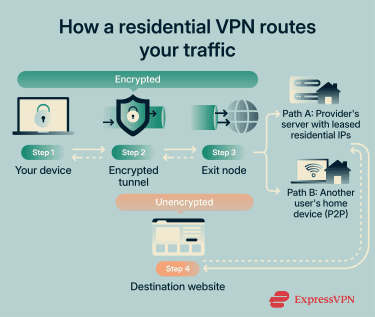
Encryption and tunneling
A residential VPN protects your traffic the same way any other VPN does. It creates an encrypted tunnel between your device and the VPN server, which prevents local networks, ISPs, or other intermediaries from reading your data while it's in transit.
Once traffic exits the VPN and reaches its destination, the VPN's encryption no longer applies. If the site uses HTTPS, the connection between your browser and the site remains encrypted. If it doesn't, the data travels unencrypted after it leaves the VPN. This behavior is the same for all VPNs, whether mainstream or residential.
Protocols used in residential VPNs
Residential VPNs typically use the same protocols as standard VPN services. The protocol doesn't change based on whether the IP address is residential or from a data center.
Residential VPNs that operate like standard VPNs may support familiar VPN protocols such as OpenVPN, WireGuard, or Internet Key Exchange version 2 / Internet Protocol Security (IKEv2/IPsec). However, protocol support varies by provider, especially for services that rely on P2P or proxy-like infrastructure (see below).
OpenVPN is open source and has been widely used for over two decades, while WireGuard is a newer protocol designed for speed with a smaller codebase. IKEv2/IPsec is common on mobile devices because it handles network changes reliably.
Residential VPN vs. residential proxy
A residential proxy routes traffic from a specific app, browser, or script through a residential IP address. Unlike a VPN, it doesn't create a device-wide connection; only the traffic you explicitly configure is affected. Apart from traffic scope, the differences between the two include:
- Session handling: Residential proxies offer per-request control over IP assignment. You can rotate IPs automatically, set rotation intervals, or hold a specific IP for a task using sticky sessions. Residential VPNs assign one connection at a time, and changing the IP means switching servers.
- Setup complexity: Residential proxies require application-level configuration. Residential VPNs are typically easier to use once connected.
- Typical use: Residential proxies are commonly used for repeated or automated requests that need tight control over how traffic is sent. Residential VPNs are more common for general browsing and privacy.
However, the distinction is not always clean in practice. Residential VPNs and residential proxies can rely on the same broader residential IP ecosystem, including overlapping providers, resellers, SDK-based sourcing, or shared IP pools. Because of this, users should look beyond the label and check how the service sources residential IPs, whether device owners have clearly consented, and how the provider handles abuse.
What is a residential VPN used for?
There are several common use cases for residential VPNs, including the ones below.
Web testing and ad verification
Businesses that run online advertising need to verify that their ads are displaying correctly across different regions. Similarly, development and QA teams may need to check for region-specific differences like localized content, cookie banners, or layout variations. A residential IP can make these requests appear to come from a regular user in the target area, which helps avoid the bot-detection filters that sometimes block data center traffic.
Market research and SEO monitoring
Search engines and e-commerce platforms often adjust results based on a user's location and connection type. Residential IPs can help produce data that more closely reflects what users in a specific location see, rather than results filtered or adjusted for data center traffic.
At scale, this type of research is more commonly done with residential proxies, which allow per-request IP rotation across multiple locations. Residential VPNs can serve a similar purpose for smaller-scale manual checks, like comparing search results or verifying pricing from a handful of locations.
However, residential IPs may be slower for large-scale data collection due to P2P routing or less optimized infrastructure, which can affect the speed of research workflows. It's also worth noting that using residential IPs for automated scraping or SEO data collection may violate some websites' terms of service.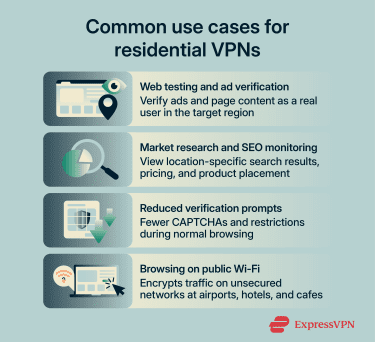
Reduced verification prompts
Many websites use IP reputation as one of several signals when deciding how to handle incoming traffic. Data center IP addresses are commonly associated with automated tools, bots, and VPN services, so some sites respond to them with additional verification steps like CAPTCHAs, temporary access restrictions, or limited functionality.
Residential IPs are less likely to trigger these responses during normal browsing. The difference isn't guaranteed on every site, however, since platforms use a range of detection methods beyond IP type alone.
What's more, standard VPN providers also offer features that can reduce verification prompts without the trade-offs of residential IP sourcing. For example, ExpressVPN's dedicated IP add-on assigns a fixed IP to a single user. Because it isn't shared with other VPN users, it can reduce the "bad neighbor" effect that often triggers CAPTCHAs and access restrictions.
It runs on ExpressVPN's managed infrastructure with a zero-knowledge allocation system, which means even ExpressVPN can't link the dedicated IP back to your account.
Browsing on public Wi-Fi
Public Wi-Fi networks at airports, hotels, and cafes may be open, shared, or otherwise less trustworthy than a private home network. Similar to a standard VPN for Wi-Fi, a residential VPN encrypts that connection, which keeps your browsing activity private from others on the same network.
Residential VPNs vs. standard VPNs
The main differences between residential and standard VPNs relate to cost, performance, and how much control the provider has over the connection.
| Standard VPN | Residential VPN | |
| IP type | Data center IP | Household IP from consumer ISP |
| Speed | Consistent; managed servers | Variable; depends on exit node |
| Infrastructure | Provider-managed server infrastructure | P2P: user devices; Non-P2P: not always clear |
| Detection risk | Higher; easier to flag as VPN | Lower; resembles home traffic |
Cost
Residential VPN pricing varies by provider and plan type. Some charge a flat monthly fee similar to standard VPNs, while others use pay-as-you-go models based on data consumption. Standard VPNs generally charge a flat rate with unlimited data, which makes costs more predictable.
Performance consistency
Mainstream VPNs like ExpressVPN route traffic through managed data center infrastructure with high-bandwidth connections, so speeds tend to be consistent. Residential VPN performance depends on the connection at the exit point.
In P2P models, that's another user's home internet, which may have limited upload bandwidth or varying speeds. Non-P2P residential services can be more stable but still rely on consumer-grade ISP connections rather than purpose-built server networks.
Infrastructure and control
Standard VPN providers typically operate or rent dedicated server infrastructure. This means they can manage software updates, respond to outages, and control how traffic is routed.
With residential VPN exit points, that level of control isn't available. In P2P models, the exit device is someone's home computer or phone, and the provider can't maintain or monitor it. With non-P2P services, the provider may handle the routing, but the exit IP still sits on a consumer ISP connection that the provider doesn't own.
Are residential VPNs legal and safe?
The legality of residential VPNs depends on where you are, while safety depends on the provider and how the service is built.
Legality by region and terms of service
In many countries, including the U.S., the U.K., Canada, and most of the EU, using a VPN is legal. Residential VPNs are generally legal too, but they can raise additional questions around consent, IP sourcing, and misuse.
Some countries restrict or prohibit VPN use more broadly. These restrictions apply regardless of whether a VPN uses residential or data center IP addresses.
Actions that are illegal without a VPN remain illegal when one is used. Using a VPN doesn't grant immunity from local laws, nor does it change the legal status of the activity being carried out.
Residential VPN providers also set their own terms of service. In P2P residential VPNs, users typically agree to allow their internet connection or IP address to be used as part of the network.
This can carry risk because traffic routed through your connection may appear to websites, services, or investigators as if it came from your IP address, even if you weren't personally responsible for it.
Safety considerations
Residential VPNs introduce important safety considerations that don't exist with standard VPN services, especially when P2P models are involved. These include:
- Shared IP use: In P2P residential VPNs, other users' traffic may exit through your IP address. Activity associated with that IP can therefore be attributed to your connection by external services.
- Limited control over exit points: Standard VPN providers typically operate and manage their own servers. In P2P residential VPNs, exit points may be user devices that aren't under the provider's direct control.
- Provider transparency: Residential VPN services vary in how clearly they explain IP sourcing, traffic handling, and data practices. Quality mainstream VPN providers like ExpressVPN publish independently audited no-logs policies and maintain mature compliance frameworks; many residential VPN providers don't offer the same level of public accountability.
- ISP agreements: Consumer internet service agreements may restrict routing third-party traffic through a home connection. Whether and how this restriction is enforced depends on the ISP.
Free residential VPN services
Free residential VPN services often rely on P2P networks and may provide minimal detail about how bandwidth and IP addresses are used. The business model might involve significant data privacy trade-offs that aren't immediately obvious.
Paid residential VPN services aren't risk-free, but they typically have a clearer revenue model than the free alternatives.
Do you need a residential VPN?
For most people, the answer is no. A quality mainstream VPN like ExpressVPN can cover everyday privacy and security needs with more predictable performance and clearer accountability from the provider.
Residential VPNs serve a narrower purpose. They're most useful when your work requires seeing how websites, ads, or search results appear to regular users in specific locations, where data center IPs may get filtered out or served different content.
If your main concern is reducing CAPTCHAs or getting a consistent IP, using a dedicated IP from a standard VPN provider that offers this feature is a simpler option with fewer trade-offs.
FAQ
What is the difference between a residential VPN and a normal VPN?
Are residential VPNs safe?
What are the use cases for residential VPNs?
What is meant by a dedicated residential IP address?