
What is unauthorized access? Risks, causes, and how to prevent it



Unauthorized access can be as simple as someone using stolen login details to open an account that isn’t theirs, or as complex as an attacker moving through business systems after gaining a foothold. In either case, the impact can include exposed data, service disruptions, and account takeovers.
What is unauthorized access?
Unauthorized access happens when a user, process, or device interacts with systems, data, or resources without valid authorization or beyond assigned permissions. It can occur through bypassed identity checks, exploited system weaknesses, misconfigured access rules, or overly broad permissions.
Modern systems rely on access control mechanisms to define what actions are allowed. These decisions are usually based on identity validation, assigned roles, and session context (e.g., login location, device posture, or time of access), which together determine whether a request is approved or denied.
A key distinction exists between authentication and authorization. A system may correctly verify identity but still grant access to resources or actions outside its defined permissions.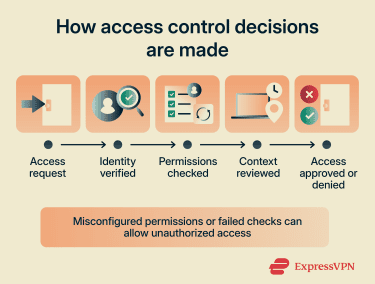
Types of unauthorized access
Unauthorized access can take several forms, including the following:
- External unauthorized access: An outside party gains entry to a system or data without an approved account, for example, by exploiting a vulnerability or bypassing access controls.
- Insider unauthorized access: A legitimate user misuses assigned permissions, such as viewing or copying data outside their role.
- Compromised-account access: An attacker uses valid credentials for an account that doesn’t belong to them, making their activity appear legitimate.
- Privilege misuse or escalation: A legitimate user abuses permissions they already have, or a user or attacker gains higher-level permissions than intended.
- Physical access: An attacker uses an unlocked, shared, lost, or improperly secured device to access systems or data.
- Non-human or service-based access: An application, script, API key, token, or service account retains access it no longer needs, uses overly broad permissions, or continues working after access should've been revoked.
Common causes and attack vectors
Attackers exploit weaknesses in controls, credentials, or software to gain entry or move further within a system. The sections below cover the most common causes.
Weak passwords and credential reuse
Passwords are a common entry point for systems, making them a primary target. Most attacks focus on obtaining, guessing, or reusing credentials rather than directly breaking into systems.
Risk increases when passwords are weak or if the same password is used across multiple services, as credentials exposed in one breach can be tried against other accounts.
Attackers use several techniques to exploit this:
- Brute-force attacks: Trying large numbers of password combinations until one works.
- Credential stuffing: Using leaked username and password pairs from previous breaches.
- Password spraying: Testing a small set of common passwords across many accounts to avoid account lockouts.
Attackers may also obtain credentials through malware such as keyloggers or infostealers. These tools can capture keystrokes, extract stored passwords, or steal session tokens. Stolen session tokens may allow attackers to access an already authenticated session and, in some cases, bypass protections such as two-factor authentication (2FA).
Read more: Password attacks: Common types and how to prevent them.
Software vulnerabilities
Weaknesses in code or system design can enable unauthorized access, unauthorized actions, data exposure, privilege escalation, or, in some cases, arbitrary code execution. These vulnerabilities can affect operating systems, web apps, backend services, and third-party components.
Attackers target known, unpatched flaws, which can be used to bypass security controls, manipulate system behavior, or access data beyond intended permissions. Common examples include:
- Memory corruption: A program incorrectly handles memory (e.g., reading or writing beyond its intended bounds), which can enable arbitrary code execution or other unauthorized actions.
- Injection flaws: An app treats untrusted input as commands rather than data, which can allow query manipulation, unintended execution, or data extraction.
- Cross-site scripting (XSS): Malicious scripts are injected into a trusted website or web app and executed in a user’s browser, enabling session theft, input capture, or actions performed as that user.
- Cross-site request forgery (CSRF): An authenticated user’s browser is tricked into sending unintended requests, potentially triggering account or settings changes.
- Server-side request forgery (SSRF): A server is tricked into making unintended requests, potentially reaching internal services, cloud metadata endpoints, or resources not meant to be exposed.
- Authentication or authorization flaws: Flaws in login flows, session handling, or role checks can enable account takeover, persistent access, or unauthorized actions.
- Race conditions: Concurrent operations are processed incorrectly, creating timing gaps that can allow checks to be bypassed or cause errors.
- Directory traversal: File paths are manipulated to access files or directories outside the intended location, potentially exposing sensitive data.
Misconfigurations
Misconfigurations can expose systems or data through weaknesses in access controls, services, or resource settings, including:
- Excessive permissions that grant broader access than required.
- Unnecessary or exposed ports and services that accept external connections.
- Storage or databases that are publicly exposed.
- Default settings, unused features, or disabled security controls that leave systems insufficiently hardened.
Phishing and social engineering
Social engineering targets people rather than software. Attackers use urgency, trust, or authority to trick users into giving up credentials, approving access, or taking actions that hand over a legitimate account. Common techniques include:
- Phishing: Deceptive messages or websites that mimic trusted services to capture user credentials, deliver malware, or prompt unsafe actions.
- Impersonation: Posing as a trusted person or organization, such as a coworker, manager, vendor, or support team, to prompt information sharing or action without verification.
- Pretexting: Using a fabricated scenario (e.g., an urgent security issue) to pressure users into sharing information or taking action.
- Baiting: Offering enticing content (e.g., files, rewards, or access offers) to trick users into exposing credentials or triggering malicious actions.
- Multi-factor authentication (MFA) fatigue: Sending repeated push approval requests to a user’s device until one is accepted, often due to frustration or confusion.
- Real-time phishing: Capturing or relaying credentials and MFA responses during a live login attempt, sometimes through an adversary-in-the-middle phishing page.
Insider error
Unauthorized access doesn’t always start with an attacker. Exposure can result from routine actions, such as sharing the wrong file, approving unintended requests, emailing sensitive data to the wrong recipient, or forwarding information without verifying access.
These issues may go unnoticed until access is reviewed, reported, or misused. In complex environments, even small oversights can expose sensitive systems or data.
Risks associated with unauthorized access
Unauthorized access can extend beyond the initially affected system, especially in connected environments. Once a system is compromised, it may lead to data theft, operational disruption, or movement across systems. The impact depends on the scope of the compromise.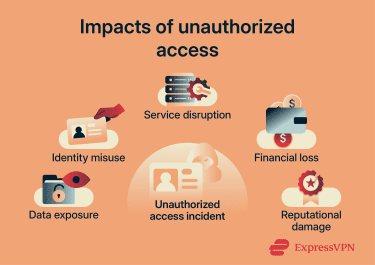
Data breaches and financial loss
Data breaches or data exposure incidents may compromise sensitive information, including internal records, contracts, intellectual property, operational data, or communications.
The impact of this can include:
- Direct loss: Fraudulent transactions, theft of funds, or abuse of financial systems.
- Incident response costs: Containment, investigation, and system restoration.
- Regulatory penalties: Fines or enforcement action if regulated data wasn't adequately protected or required response steps weren't followed.
- Legal exposure: Lawsuits, settlements, or compensation claims from affected users or partners.
- Ongoing costs: Monitoring, auditing, legal follow-up, security upgrades, and additional controls.
Some incidents also involve extortion. Attackers may steal sensitive data and threaten to publish it unless a payment is made, creating financial pressure and increasing the risk of reputational harm.
Identity theft and privacy exposure
When personal data is exposed, it can be combined with other information to facilitate identity theft, impersonation, or unauthorized access to accounts. This may include names, addresses, account details, or authentication data.
This data may be misused for fraudulent account openings, unauthorized transactions, or abuse of account recovery processes.
In some cases, personal data may appear in breach collections or criminal marketplaces, where it can be reused in scams, impersonation attempts, or targeted fraud.
Business disruption and reputational damage
Disruption to systems and services can affect normal operations and result from both the incident itself and response actions, including:
- System downtime: Taking systems offline to contain the incident.
- Access restrictions: Limiting access during investigations.
- Ransomware impact: Encrypting systems, blocking access to critical data, or forcing shutdowns during response.
Reputational effects may persist after system restoration, affecting business relationships and revenue. This may result from loss of customer trust, negative media coverage, or concerns from partners or regulators.
How to prevent unauthorized access
Preventing unauthorized access involves applying controls that verify identity, limit permissions, and reduce exposure across systems. Key practices include: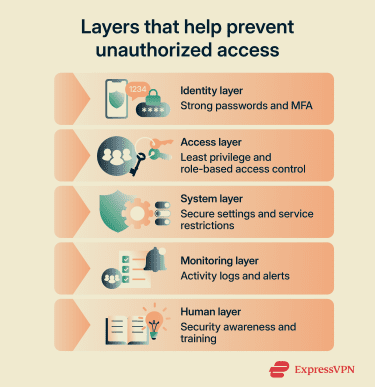
Strong password policies
A strong password policy reduces the risk of unauthorized access. Effective policies focus on length, uniqueness, and resistance to automated attacks, while avoiding rules that make passwords predictable. Key elements include:
- Password length: Require long passwords or passphrases. For single-factor passwords, use at least 15 characters where possible, and allow longer passwords.
- Uniqueness: Require unique passwords for each account and, where technically possible, prevent reuse.
- Common password blocking: Reject known weak passwords (e.g., “123456” or “password”).
- Pattern avoidance: Avoid reliance on predictable complexity rules, such as adding “!” at the end.
- Compromised password checks: Block passwords found in breach data or in known weak password lists, and reset exposed credentials when detected.
Tips for implementing password managers
Password managers generate, store, and autofill credentials, helping reduce password reuse and manual errors. When used effectively, they rely on a few key practices:
- Password generation: Generate strong, random passwords for each account to reduce reuse and predictability.
- Master password strength: Choose a long, unique password to protect access to stored credentials.
- Account protection: Enable MFA for the password manager account where available.
- Vault protection: Protect devices with a PIN, password, or biometric unlock to reduce the risk of local unauthorized access.
- Credential storage: Keep passwords in the manager rather than storing them in notes, documents, or other unprotected locations.
Tools such as ExpressKeys can support these practices by generating strong passwords, storing credentials in an encrypted vault, autofilling logins, checking password health, and providing built-in 2FA code generation.
Using multi-factor authentication
Passwords alone may not fully protect access. MFA adds additional verification steps, so access requires more than just a password. Common MFA methods include:
| Method | How it works | Security level |
| Passkeys | Use cryptographic keys unlocked by device authentication | Very strong and phishing-resistant |
| Security keys | Use cryptographic authentication tied to the legitimate site | Very strong and phishing-resistant |
| Authenticator apps | Generate time-based codes on a device | Strong, but not phishing-resistant |
| Hardware code tokens | Generate one-time codes on a physical device | Strong |
| Push notifications | Send login approval requests to a device | Moderate; stronger with number matching |
| SMS codes | Send one-time codes via text | Lower; SIM-swap and interception risks |
| Biometrics | Unlock a device, passkey, or authenticator using fingerprint or face | Strong when paired with secure hardware |
Multi-factor authentication best practices
Poorly configured MFA can introduce weaknesses. The following practices help reduce these risks:
- Phishing-resistant methods: Use security keys or passkeys where possible, and use app-based codes instead of SMS when phishing-resistant options aren't available.
- Fallback options: Limit weaker backup methods that can be used to bypass MFA, such as email-based account recovery.
- Push approval controls: Require number matching or additional confirmation to reduce accidental approvals.
- Recovery paths: Secure backup codes and recovery methods to prevent account access through recovery flows.
- High-risk accounts: Require MFA for administrative roles, sensitive systems, and remote access points.
Access control and least privilege
Access control determines who can do what inside a system. Poorly managed access controls can result in excessive permissions, increasing the risk of account misuse.
The principle of least privilege limits each user or system to only the access required for their role. This is supported by practices such as:
- Role-based access: Assign permissions by job role to ensure users only have the access required for their responsibilities.
- Just-in-time access: Grant elevated permissions only when needed and remove them after use to limit exposure.
- System segmentation: Separate sensitive systems so that access in one area doesn’t allow movement to others.
- Access reviews: Regularly review who has access and remove permissions that are no longer needed.
- Separation of duties: Split critical actions across multiple users so no single user can complete them alone.
User training and awareness
Users interact with systems daily, making them a key part of access security. Training helps reduce the risk of unintended actions that could expose systems or data. This includes:
- Recognizing suspicious requests: Identifying unexpected login prompts, messages, or file requests that may indicate phishing or social engineering.
- Handling sensitive data: Storing, sharing, and transmitting information using secure systems and approved methods.
- Reporting procedures: Promptly report unusual activity through established security or IT channels.
- Ongoing training: Reinforcing security practices through regular, updated training sessions.
- Simulated exercises: Testing awareness through phishing simulations or other controlled scenarios.
Audit logging and access records
Audit logs record account activity, system events, and access patterns, helping teams understand which accounts accessed a system, what actions occurred, and when. This helps teams detect unusual behavior, investigate incidents, and confirm whether access followed expected patterns.
Organizations often use centralized monitoring and security information and event management (SIEM) systems to collect and analyze these logs for faster detection and response. Common logging practices include:
- Authentication events: Recording logins, failed attempts, and MFA activity.
- Sensitive data access: Monitoring access to and modification of critical files or systems.
- Permission changes: Recording role changes, privilege assignments, group membership updates, and account creation or deletion.
- Log integrity: Preventing logs from being altered or deleted so recorded activity remains reliable.
- Centralized logging: Collecting logs in one system to simplify monitoring and speed up incident investigation.
- Log review: Reviewing logs regularly to identify unusual access patterns, failed logins, or unexpected changes.
Read more: A comprehensive guide to cyber threat monitoring.
What to do if unauthorized access occurs
An effective response focuses on limiting impact, understanding what was affected, and recovering safely while preserving visibility into the incident.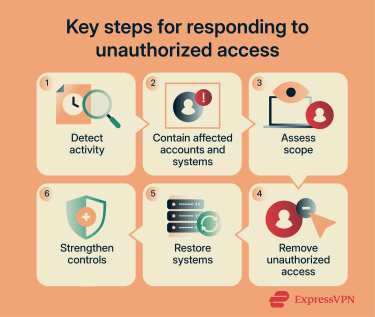
Contain the incident and secure affected accounts
- Restrict affected accounts: Block sign-in for accounts showing signs of compromise until they’re verified as secure.
- Reset credentials and recovery methods: Force password changes for affected accounts, review MFA settings and recovery options, and check for related or similarly exposed accounts.
- Revoke active sessions: Invalidate sessions, refresh tokens, API tokens, and Open Authorization (OAuth) grants to prevent continued access after credential changes.
- Isolate affected devices: Remove compromised endpoints or servers from the network to stop further activity.
- Preserve evidence: Retain relevant logs, alerts, and system snapshots before making destructive changes where possible.
Investigate the scope
During and after containment, determine what was accessed or changed. This helps define the extent of the incident and what needs to be recovered. This may include:
- Authentication activity: Unusual login locations, times, or devices.
- Account changes: New inbox rules, forwarding settings, authentication methods, app permissions, or role changes.
- Sensitive data access: Access to critical files, systems, or databases.
- System or network changes: Resource modifications, policy updates, or unfamiliar network connections.
- Persistence mechanisms: Residual access paths such as unauthorized tokens, OAuth grants, service accounts, trusted devices, or scheduled tasks.
Restore systems and strengthen security
Once the scope is understood, recovery focuses on returning systems to a trusted state. This typically involves:
- Removal of unauthorized access: Removing unauthorized rules, permissions, or access paths identified during the investigation.
- System restoration: Recovering systems and data from backups or rebuilding systems where restoration is insufficient.
- Recovery validation: Confirming normal activity has resumed, access is authorized, and no signs of continued compromise remain.
- Root cause remediation: Addressing the issue that enabled the incident, such as misconfigurations, unpatched systems, or weak identity controls.
Review and improve incident response plans
After recovery, the incident is examined in detail to understand what happened and improve how similar events are handled. This review is typically structured into:
- Timeline reconstruction: Mapping how access occurred, how it progressed, and when it was detected.
- Incident analysis: Identifying control failures, the attack path, and contributing factors.
- Response evaluation: Assessing delays, gaps, or unclear responsibilities during the response.
- Improvement actions: Updating procedures, controls, and response steps based on the findings.
FAQ
What are the warning signs of unauthorized access?
Can unauthorized access happen without a stolen password?
How often should access permissions be reviewed?
What is the difference between unauthorized access and a data breach?
Who is most vulnerable to unauthorized access?