 Celebrate with up to 80% off
Is Cash App safe? What you need to know before using it


Cash App is one of the most widely used peer-to-peer (P2P) payment apps, making it easy to send, receive, and manage money from your phone. Its speed and simplicity are part of its appeal, but they also raise a common question: how safe is it?
Cash App includes built-in security features, but it's important to understand how the service works, what security features it includes, and how certain types of misuse or fraud can occur across P2P payment apps.
What is Cash App?
Cash App is a mobile payment service that allows users to send, receive, and manage money directly from their devices. It isn't a bank, which means it doesn't offer the full range of services associated with traditional banking. Instead, the platform focuses on convenience, so users can make payments, request money, or manage balances quickly without needing cash or bank transfers.
The app is developed by Block, Inc. and is commonly used for personal payments, some small business transactions, and basic financial services. Instead of relying on account numbers, users typically connect through a unique username called a $Cashtag.
How Cash App works
Cash App links a user's account to a funding source, like a credit or debit card. Once connected, money can be moved between users almost instantly. At a basic level, the process looks like this:
- A sender selects a contact, phone number, or $Cashtag.
- An amount is entered and confirmed.
- The funds are transferred digitally within the app.
The recipient can then keep the money in their Cash App balance or move it to a linked bank account.
Key features of Cash App
Cash App combines several financial tools into one platform. These are some of its primary features:
Sending and receiving money
Sending and receiving money is the core function of Cash App. To send money, a user simply enters an amount and selects a recipient. To receive money, the app provides a personal identifier.
Cash Card and banking tools
The Cash Card is a debit card linked directly to a user's Cash App balance, allowing funds in the app to be used for everyday purchases both online and in physical stores. Alongside the card, Cash App offers several basic banking-style tools to help users manage their money. These include direct deposit for receiving paychecks, balance tracking within the app, and access to a transaction history.
Bitcoin and investing features
Cash App also includes options for users interested in investing. These features are built into the same app, making it possible to manage payments and investments in one place without switching between platforms. Users can buy and sell bitcoin, invest in stocks with small amounts of money, and track their portfolio directly within the app. Availability of these features may vary by region.
Is Cash App safe to use?
Cash App can be used safely for everyday transactions when it's used as intended. It includes built-in protections and follows standard financial security practices designed to help limit unauthorized access and support secure account activity.
Cash App is most commonly used for straightforward transactions between people who know and trust each other. In these situations, transactions typically proceed as expected: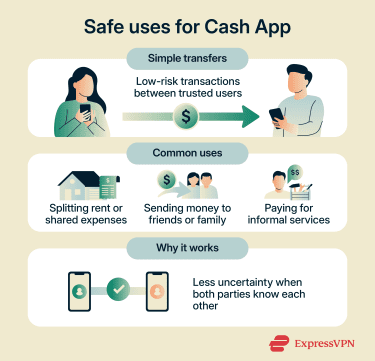
- Splitting shared expenses like rent or meals.
- Sending money to friends or family.
- Paying for informal services between trusted parties.
In these cases, the app functions as a digital alternative to cash, where both parties are aware of the transaction and its purpose.
Cash App safety features
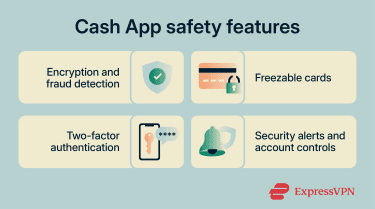
Encryption and fraud detection
Cash App uses encryption to protect sensitive information during transfers. Encryption converts data into a coded format to help protect it while it's being transmitted.
In addition to encryption, the platform uses an automated system to monitor account activity 24/7. This system looks for patterns that may indicate fraud, including unusual transaction sizes or unexpected behavior. If activity is flagged, the system may temporarily block a transaction, request additional verification, or mark it for further review.
Freezable cards
Cash App allows users to temporarily lock their Cash Card directly through the app, which adds an extra layer of control if the card is misplaced or suspected to be compromised. Freezing the card will block new purchases until it's unfrozen again. Note, however, that locking the card won't stop pending charges from completing.
Two-factor authentication
Two-factor authentication (2FA) adds an extra layer of security to an account by requiring a second verification step. This second layer often involves a one-time code sent to a trusted device, authentication app, or phone number, which can make unauthorized access more difficult.
When enabled, each time a user logs into their Cash App account, they receive a one-time use login code that serves as an additional factor to use along with their account PIN. Cash App also recommends that users enable 2FA on the email account associated with their Cash App account, since that inbox may be used for login verification, account recovery, or security alerts.
Security alerts and account controls
Cash App provides alerts and account control features that help users stay in control of their account activity. These include notifications for completed transactions and a Security Lock setting to protect payments. Together, these features make it easier to spot unusual behavior and monitor activity.
How Cash App protects your data
Cash App collects and processes user data, including payment details and account information, to operate its services. In the U.S., privacy protections vary according to state law. For example, the California Consumer Privacy Act (CCPA) applies specifically in California; some other states have similar laws, but some don't.
Cash App's privacy notice indicates that users' rights and disclosures can vary depending on their location, but it also outlines a general approach across its services, explaining what data is collected, how it's used, who it might be shared with, and what controls users have over their information.
Limitations and risks of using Cash App
Despite the security features Cash App provides, users may still encounter many of the same scams that target Venmo, Zelle, and other P2P payment services. The sections below outline how payments are handled, where protections may be limited, and how common scams can occur with P2P payment apps.
Limited protection for purchases and transfers
Cash App payments are often processed as direct P2P transfers, not traditional credit card purchases. This distinction matters because it can affect how disputes, chargebacks, and refunds are handled.
In many cases, payments sent to another person are difficult to reverse once completed, especially if the transfer was authorized by the account holder. For example, sending money to the wrong person or falling for a scam may not be treated the same way as an unauthorized transaction.
Protections may be available in certain fraud or error situations, but they're generally more limited than those associated with traditional credit cards or bank payment systems.
Banking coverage limits
Cash App offers some financial protection through partnerships with regulated banks, but that coverage is limited and doesn't apply to every type of account activity.
For example, Cash App Balances and Savings Balances may be eligible for Federal Deposit Insurance Corporation (FDIC) pass-through insurance if certain conditions are met. Eligible funds are insured through Cash App's program banks: Wells Fargo Bank, N.A. and Sutton Bank (both members of the FDIC). Eligibility depends on how the account is structured and held at partner banks.
Data and privacy considerations
Like any financial service, Cash App processes large quantities of personal and financial data. This includes details such as account information, transaction history, and device data.
As with traditional banks and payment providers, this data may be used to operate the service, detect fraud, comply with legal requirements, and provide customer support. Additionally, Cash App's privacy policy states that it may use your data for advertising and marketing.
Phishing, social engineering, and payment scams
One of the most common risks associated with Cash App involves scams that rely on social engineering, such as phishing.
In one scenario, the victim receives a message that appears to come from a trusted source, such as Cash App customer support. The message may ask for login details, verification codes, or prompt the user to click a malicious link.
A related tactic is known as angler phishing, where attackers impersonate legitimate customer support accounts on social media to target users who are seeking help. These fake support responses can look convincing and may direct users to share sensitive information or move conversations to less secure channels.
Payment scams can involve overpayment or payment reversal tactics, where a user is asked to forward money based on a payment that appears to have been sent but hasn't actually been completed or verified. In a social engineering scam, victims may be pressured to send money using a P2P payment app, which may be more difficult to reverse once completed.
Is it safe to link your bank account to Cash App?
Linking a bank account to Cash App is a standard part of how the service functions and can be done securely when account protections are in place. The connection allows money to move in and out of the app more easily, which is essential for using most of its features.
However, as with other financial services, linking accounts can increase the potential impact of unauthorized access.
Also read: How to secure your bank account from hackers
How to use Cash App safely
Using Cash App safely comes down to a mix of awareness and good habits. The platform itself provides tools, but day-to-day behavior also plays a major role in reducing risk. Below are a few simple Cash App strategies you can employ to protect your information.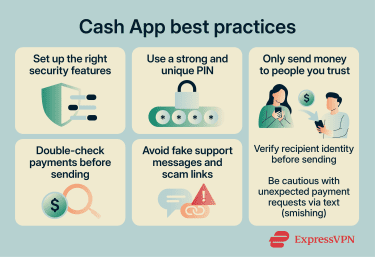
Set up the right security features
Cash App includes several built-in security settings that can be configured to add additional protection and help make unauthorized access more difficult.
Use a strong PIN and 2FA
Cash App relies on a PIN to authorize payments and access the app. A weak or commonly used PIN may make unauthorized access easier if your device is lost or compromised.
To strengthen your security:
- Choose a strong, unique PIN: Avoid obvious combinations like "1234," "0000," or repeated numbers. Pick something harder to guess but still memorable.
- Enable device-level security: Use your phone or tablet's app lock, fingerprint, or facial recognition features to add an extra layer of protection beyond the Cash App PIN.
- Keep your PIN private: Never share it, and be cautious of phishing attempts asking for it.
Only use trusted and updated devices
You should only access Cash App on devices you trust and avoid public or shared devices. Also, remember to keep both the app and your device up to date to benefit from the latest security fixes.
Only send money to people you trust
Cash App is designed for direct peer‑to‑peer transfers, which are generally treated as final once sent. This means there's often no easy way to reverse a mistaken or fraudulent payment. Scammers try to exploit this by posing as customers, trusted contacts, or service providers to trick users into authorizing transfers.
Be especially cautious with unexpected payment requests received via text messages. This tactic, known as smishing (SMS-based phishing), can involve messages that appear to come from someone you know or from a legitimate service, but are actually from criminals intending to pressure victims into acting quickly before thinking it through.
Double-check payments before sending
Mistakes can happen quickly when sending digital payments. A small error, like choosing the wrong contact or entering the wrong amount, can result in unintended or irreversible transfers. Before confirming a payment, review key details, including:
- Recipient name or $Cashtag: Verify that the person or business receiving the funds is correct.
- Amount being sent: Confirm the exact dollar value to avoid overpayment or underpayment.
- Purpose of the transaction: Make sure the payment is intended and clearly understood by both parties.
Avoid fake support messages and scam links
Scammers often impersonate customer support or trusted services to trick users into sharing sensitive information. These messages can appear via email, text messages, or social media and are often designed to look legitimate at first glance. Watch for warning signs:
- Urgent requests for immediate action: Scammers may pose as buyers, sellers, or support agents and pressure you to act quickly, for example, to send money to "reverse" a transaction or secure a deal.
- Requests for login details or one-time codes: Criminals may impersonate Cash App support and ask for your PIN, sign-in code, or verification code to "confirm your account" or "fix an issue." Legitimate support will not ask for these details, and sharing them can lead to account takeover.
- Links to fake app downloads: Scammers might ask you to download an app for remote access or to complete a test transaction.
Use security tools
While these tools can reduce exposure to known scams, they don't prevent all types of fraud, particularly those that rely on social engineering.
However, you can consider using browser tools with phishing detection to add an extra layer of protection. Many modern tools, including ExpressVPN's Threat Manager, can block known suspicious links or scam websites.
What to do if you get scammed on Cash App
Experiencing a scam on Cash App can be stressful, but prompt action can help minimize damage. Even though some payments sent to scammers can't be reversed, taking the right steps quickly can help limit further unauthorized activity if your account has been compromised.
Steps to take immediately
- Review recent transactions and account activity: Identify any payments you didn't authorize or don't recognize. If money was sent as part of a scam, recovery options may be limited, but reporting the transaction is still important.
- Contact Cash App support: Use the official app to report the issue and follow the instructions provided.
- Secure your account: Change your PIN, update linked email and phone number credentials, and monitor for further activity.
- Contact your bank or card issuer: If a linked bank account or card was used, notify the institution immediately to prevent additional transfers.
How to report fraud
If you encounter fraud while using Cash App, consider reporting it to government authorities to support broader scam investigations.
- Federal Trade Commission (FTC): File a complaint in the U.S. at reportfraud.ftc.gov with details of the incident.
- Internet Crime Complaint Center (IC3): Submit information at ic3.gov to alert U.S. law enforcement to online scams.
- Action Fraud: Report the fraud or scam to U.K. law enforcement at reportfraud.police.uk/.
When reporting, include as much information as possible, such as the transaction date and amount, the $Cashtag or contact information involved, and a brief description of what happened.
Follow-up steps
Once the immediate situation is under control, focus on securing the account to prevent repeat incidents. Key steps include:
- Change your account PINs and passwords: If you haven't already, create a new PIN for your Cash App account and change the password for the email account linked to it.
- Review and update security settings: For example, you can require a PIN or Touch ID to make payments.
- Remove unknown devices or linked accounts: Deauthorize any devices you don't recognize and disconnect unfamiliar bank accounts or cards.
- Monitor account activity closely: Check transactions and alerts regularly to ensure no further suspicious activity occurs.
FAQ
Can Cash App reverse a payment sent by mistake?
Is Cash App safe for buying from strangers?
Can someone access your bank account through Cash App?
Does Cash App protect your money like a traditional bank?
What warning signs should you look for before sending money?
How do you recover a hacked Cash App account?