 Celebrate with up to 80% off
Can VPNs be hacked? The real risks and how to stay safe


It's possible for a virtual private network (VPN) to be hacked, but not in the way many people imagine. VPNs are designed to secure connections and protect data in transit, but they can still be affected by vulnerabilities, misconfigurations, or compromised systems.
Can VPNs really be hacked?
Yes, but it's uncommon when a VPN is properly configured and kept up to date. Reputable VPNs use strong encryption, such as 256-bit Advanced Encryption Standard (AES), which is considered highly resistant to brute-force attacks.
As a result, VPN-related attacks usually target weaknesses around the encrypted tunnel, such as outdated apps, poorly configured servers, weak protocols, exposed credentials, unsafe settings, or compromised devices.
How VPN security can fail
A VPN's security depends on its encryption, protocol, app, infrastructure, and how well each part is configured, updated, and maintained. If one part is weak, it can reduce the protection the VPN is meant to provide.
Outdated protocols, weak encryption, and improper implementation
VPNs rely on protocols, which are the rules that control how data is encrypted and transmitted. Certain older protocols, such as the Point-to-Point Tunneling Protocol (PPTP), are known to have weaker encryption that can be broken more easily with modern computing methods.
A well-known example is PPTP's use of MS-CHAPv2 authentication. Security researchers have shown that this system can be cracked with specialized tools, allowing attackers to recover login credentials in certain scenarios. Because of this, PPTP has been widely deprecated.
In 2019, security agencies warned that attackers were exploiting unpatched or poorly secured VPN products. The issue was not that VPN encryption itself had been broken, but that exposed VPN gateways can become entry points into corporate networks when they aren't patched, properly configured, protected with two-factor authentication (2FA), and monitored for suspicious access.
In other words, the risks associated with VPNs being hacked most commonly come down to implementation.
VPN leaks (DNS, IP, WebRTC)
A VPN is supposed to hide identifying information, but leaks can expose it without the user realizing it.
- Domain Name System (DNS) leaks: DNS requests bypass the VPN tunnel, potentially revealing which websites are being visited.
- IP leaks: The real IP address is exposed instead of the VPN assigned one, making it possible to identify the device's location.
- Web Real-Time Communication (WebRTC) leaks: Browser-based WebRTC features can reveal IP addresses even when a VPN is active.
Tip: A quick VPN leak test can help confirm whether the VPN is working as expected.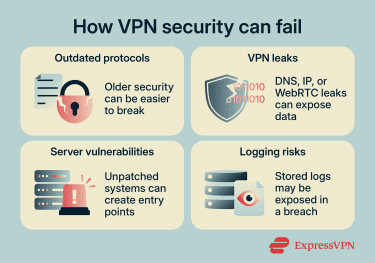
Vulnerabilities in VPN servers and infrastructure
VPN services rely on servers and supporting systems to operate. Like any internet-connected infrastructure, these systems can contain bugs or unpatched flaws.
A real-world example is the Common Vulnerabilities and Exposures (CVE)-2019-11510 vulnerability, which was actively exploited in 2019. Attackers were able to access sensitive files from vulnerable VPN servers, including user credentials and session data, without needing to break the encryption. The vulnerability was patched, but any system left unpatched would remain at risk.
If attackers find and exploit weaknesses like this, they may gain unauthorized access to vulnerable VPN servers, exposed files, or related account data.
Logging practices and data exposure risks
Some VPN providers keep logs, which are records related to user activity and service usage. These can include connection metadata such as timestamps and IP addresses but may also extend to bandwidth usage, device information, or, in some cases, browsing activity.
If a provider experiences a breach and is storing logs, that data could be accessed without permission and potentially reveal information about user activity. Even when logging is limited, poor handling or storage practices can increase the risk of exposure.
VPN app vulnerabilities
VPN apps are software, so they can contain bugs like any other app installed on a device. A flaw in the VPN app may affect how traffic is routed, how settings are applied, or how the app behaves under certain conditions.
In some cases, this could cause the VPN to fail silently, expose limited data, or leave users relying on protections that are not working as expected. This is why it's important to keep the VPN app updated and avoid using old or unsupported versions.
Account takeovers
Not every VPN-related security issue involves the VPN technology itself. Sometimes, the weak point is the user account.
If someone gains access to a VPN account through a reused, weak, or stolen password, they may be able to view or change account details, subscription information, or settings. This does not mean the VPN tunnel has been broken, but it can still create privacy and security risks for the account holder.
Using a unique password and enabling 2FA, where available, can reduce this risk.
Device compromise
A VPN protects traffic after it leaves the device, but it cannot secure a device that has already been compromised. If malware is installed on a phone, laptop, or computer, it may be able to capture information before it enters the VPN tunnel.
Keeping the operating system and apps updated, using security software where appropriate, and avoiding suspicious downloads all matter alongside VPN protection.
What happens if a VPN is compromised
If a VPN is compromised, the exposed data will depend on which systems were affected, how the incident happened, and whether attackers gained access to traffic, account systems, or supporting infrastructure.
What data could be exposed?
Depending on the provider and the nature of the incident, exposed data may include:
- Connection metadata: Timestamps, session duration, or server locations can show when and how the service was used.
- IP address records: Stored IP data may connect a user's real IP address to VPN sessions or account activity.
- Browsing-related data: DNS requests, traffic patterns, or browsing logs may show which sites or services were accessed, depending on what the provider records.
- Account information: Usernames, email addresses, or account settings could be exposed if account systems are compromised.
- Payment records: Billing details or transaction records may be exposed depending on how payments are processed and stored.
- Device information: Device type, operating system, or app version may be linked to account activity.
This is why no-logs policies matter most when they are clear, specific, and independently verified.
What to do if you suspect a VPN issue
If a VPN starts behaving unexpectedly, it's important to act quickly. Warning signs can include frequent disconnects, unusual login alerts, or settings changing without explanation.
Immediate steps to secure your connection
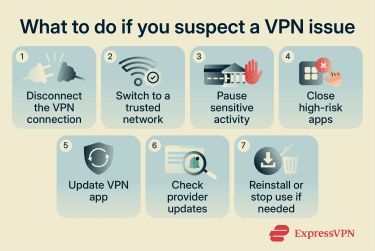
If a VPN issue is suspected, taking quick action can help limit potential exposure:
- Disconnect from the VPN: Stop data from passing through a potentially unstable or compromised tunnel.
- Switch to a trusted network: Use a secure home connection or mobile data to rule out local network issues.
- Pause sensitive activity: Avoid logins, payments, or data sharing while the issue is being checked.
- Close high-risk apps: Shut down browsers or apps that handle sensitive data.
- Update the VPN app: Install the latest version to apply recent security fixes.
- Check official updates: Review provider notices or status pages for known issues.
- Reinstall or pause use: If problems continue, reinstall the app or temporarily stop using the service.
How to choose a secure VPN
A secure VPN should protect data without collecting more information than necessary. The safest options usually combine modern protocols, strong encryption, clear privacy policies, leak protection, and regular independent audits.
A trustworthy VPN should also explain how it handles user data, how it secures its infrastructure, and what protections are built into the app if the connection drops or a leak occurs.
Modern protocols and strong encryption
Look for a VPN that uses modern protocols. Options like WireGuard or Lightway improve performance while addressing known security weaknesses.
It's also important to check the encryption standard. A reliable VPN should use AES-256 or another modern encryption standard to keep data unreadable without the correct key.
No-logs policies and transparency
Check whether the provider clearly states a no-logs policy, meaning it doesn't store records of user activity. This should be backed by clear privacy documentation and, ideally, independent audits.
It's also worth reviewing the provider's terms of service and privacy policy before committing. These documents should explain what data is collected, how it's used, and whether the provider's no-logs claims are supported in practice.
Built-in protections (kill switch, leak protection)
Look for built-in features that help prevent accidental exposure. A kill switch, for example, cuts the internet connection if the VPN drops, which helps keep data inside the secure tunnel.
Leak protection is another useful feature. It helps prevent issues like DNS or IP leaks that could reveal identifying information.
Independent audits and reputation
Check whether the VPN has undergone independent audits. These are external reviews that verify security and privacy claims, especially when the results are publicly available and easy to verify.
A trustworthy VPN provider should make audit information easy to find. For example, ExpressVPN's Trust Center brings together details on independent audits, security practices, and privacy commitments, including audits of its no-logs policy, privacy policy claims, apps, browser extensions, router software, VPN protocol, and server technology.
It also helps to consider the provider's reputation. Services with a consistent track record and user trust are generally a safer choice than unknown or unproven options.
Why a VPN isn't enough on its own
Relying on a VPN alone can create a false sense of security, especially when other common risks are left unaddressed.
Start with the risk you're trying to reduce
The right security setup depends on the type of risk involved. A VPN can help protect data on untrusted networks, reduce exposure to internet service providers (ISPs), and make basic IP-based tracking harder. But it won't solve every privacy or security problem.
For example, someone worried about public Wi-Fi has different needs from someone worried about phishing, malware, or account takeovers. In the first case, a VPN can play a major role by encrypting traffic in transit. In the others, a VPN, especially one with extra security features, can still help, but stronger protection comes from additional security practices, such as using reputable antivirus software.
Thinking about the specific risk makes it easier to understand where a VPN helps and where extra protections are needed.
Additional security practices you need
To stay secure, a VPN should be combined with other basic measures. The habits below work alongside a VPN to reduce overall risk and create a more complete approach to online security:
- Use strong, unique passwords: Each account should have its own password to reduce the risk of multiple accounts being affected by a single breach. A password manager like ExpressKeys can help generate and store strong passwords, making it easier to manage across many accounts.
- Keep devices and software updated: Regular updates fix known security issues and reduce the chance of exploitation. Users can check for updates in their device's system settings, browser settings, and app store, as well as within any security or VPN apps they use.
- Install software from trusted sources: Software downloaded from official websites or recognized app stores is less likely to contain hidden threats or malicious code. Avoid unofficial download sites, cracked software, or links from unexpected messages, as these may bundle malware or altered versions of legitimate apps.
- Be cautious with links and downloads: Suspicious messages or unexpected files can still introduce risks, even with a VPN active. A VPN protects data in transit, but it can't stop a user from entering details on a phishing page or opening a malicious file.
- Use reputable antivirus software: Antivirus software can help detect and block malware, suspicious downloads, and other threats that a VPN doesn't address. It adds another layer of protection by scanning files, monitoring for suspicious behavior, and warning users about potentially harmful software.
- Review account and privacy settings: Many services offer controls for login alerts, connected devices, app permissions, and data sharing. Reviewing these settings can help reduce unnecessary exposure and make suspicious activity easier to spot.
FAQ
Are free VPNs more likely to have security issues?
The bigger risk is with free VPNs that lack transparency, have unclear ownership, use weak security practices, or rely on collecting user data to make money. Because VPNs handle sensitive traffic, it's important to check how a provider funds the service, what data it collects, whether it has a clear no-logs policy, and whether its apps and infrastructure are regularly maintained. Paid VPNs are not automatically safer, but well-maintained paid services often have more resources for security, audits, support, and infrastructure.
Can a VPN expose my passwords?
Why is updating a VPN app important?
How do I check if my VPN is leaking data?
Does switching servers improve security?
What features matter most in a secure VPN?