Cyber hygiene best practices: A practical guide to staying secure online


Small security gaps can build up over time, whether they involve an overdue update, a reused password, or an account with unnecessary access. Cyber hygiene reduces this exposure through routine practices that help protect devices, accounts, data, and networks.
What is cyber hygiene?
Cyber hygiene is the set of practices individuals and businesses follow to maintain the security and integrity of their devices, systems, data, and networks. The term draws a deliberate parallel to personal hygiene: just as consistent daily habits reduce the risk of illness, consistent digital behaviors reduce the likelihood of security incidents.
Together, these measures help minimize the common vulnerabilities that contribute to many cybersecurity incidents.
Why does cyber hygiene matter?
Many successful cyberattacks exploit weaknesses that stem from what could reasonably be described as poor hygiene. Common examples include unpatched vulnerabilities, misconfigured systems, and poorly managed administrative privileges.
Benefits of cyber hygiene
The goal of cyber hygiene is to keep sensitive data secure and strengthen the organization's ability to recover if an attack is successful.
Key benefits of cyber hygiene include:
- Reducing the likelihood of common security incidents.
- Protecting sensitive data and accounts.
- Improving resilience and recovery.
- Supporting compliance and trust.
Cyber hygiene for individuals
Maintaining good cyber hygiene at an individual level involves following simple but consistent security practices that reduce everyday risks. Here’s how to do that: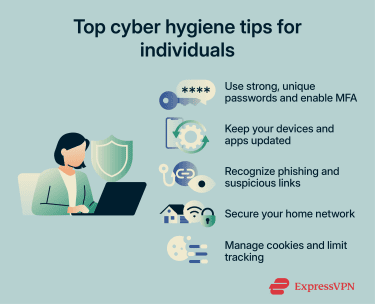
Use strong, unique passwords and enable multi-factor authentication (MFA)
A foundational step for cyber hygiene is using strong, unique passwords for all your accounts. Passwords should ideally be longer than 15 characters, but note that length matters more than complexity: a long passphrase is harder to crack than a short string of characters with symbols substituted in.
More importantly, passwords should never be reused across accounts because a credential exposed in one breach can be used to access others through credential stuffing attacks. For convenience and security, it’s best to use a password manager like ExpressKeys, which generates and stores unique passwords for every account, removing the need to remember them.
Two-factor (2FA) or multi-factor authentication (MFA) adds an extra layer of security to your accounts, as it requires users to verify their identity using more than one method before gaining access. Even if a password is stolen, MFA prevents an attacker from using it alone.
Keep your devices and apps updated
Every piece of software, including operating systems, browsers, applications, and firmware, contains code, and code contains bugs or flaws.
When a security bug is discovered, it is assigned a Common Vulnerabilities and Exposures (CVE) identifier and given a severity score. Software vendors release patches to fix these vulnerabilities, but there is always a window between a vulnerability becoming known and a patch being applied.
Once a patch is publicly released, the vulnerability details are often public too, meaning attackers can target users who haven’t updated yet. Enabling automatic updates reduces this window as quickly as possible.
Router firmware is frequently overlooked. Unlike phones and laptops, most routers don’t prompt users when updates are available, so checking for firmware updates periodically is a good idea.
Recognize phishing and suspicious links
Phishing is a form of social engineering that uses deceptive messages to trick recipients into revealing sensitive information, installing malware, or taking other harmful actions. According to the 2025 Verizon Data Breach Investigations Report, phishing ranked as the third most common initial access vector behind credential abuse and vulnerability exploitation.
Technically, phishing works by exploiting trust signals. Attackers use email spoofing to make messages appear to come from legitimate senders, register lookalike domains through typosquatting, and copy the visual design of legitimate emails.
More advanced attacks may use adversary-in-the-middle (AiTM) proxies: the victim is directed to a site that relays the legitimate login page in real time, captures the entered credentials and MFA token, and uses them immediately to authenticate to the real service, which can bypass some forms of MFA in the process.
With the rise of AI and ready-made phishing kits, creating realistic messages has become more accessible.
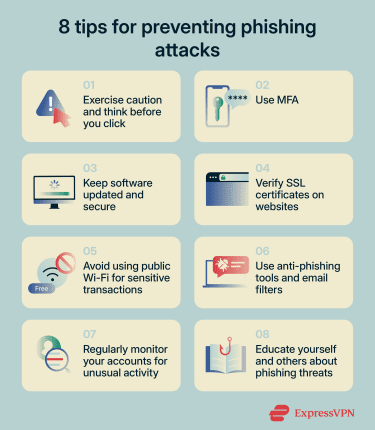
Here are some tips to prevent phishing attacks:
- Treat any unexpected urgency as a red flag.
- Hover over links to see the actual destination URL.
- Verify that the sender's email domain matches the organization it claims to be from (not just the display name).
- Go directly to a website by typing the address rather than following a link in a message.
- When in genuine doubt, contact the sender through a known, separate channel to verify the message.
Secure your home network
The home router is the gateway between every device on the local network and the internet. A poorly managed network can allow attackers to exploit weak entry points, such as weak passwords, outdated firmware, or weak Wi-Fi security, and potentially compromise all connected devices.
To secure your home network:
- Change router credentials: Most home routers ship with default admin credentials that are publicly documented in manufacturer manuals and widely indexed online, making them an easy target for automated scanning. You should also occasionally review connected devices and remove unknown devices from your Wi-Fi network.
- Use Wi-Fi Protected Access 3 (WPA3) whenever possible: WPA3 is the latest Wi-Fi encryption standard that improves on its predecessor, WPA2, by closing a known WPA2 weakness that could allow attackers to capture a network handshake and crack the password offline.
- Disable Wi-Fi Protected Setup (WPS): WPS lets devices connect without entering a password, but it’s a convenience feature that introduces a brute-force vulnerability. Disabling it removes an unnecessary attack surface.
- Segment the network: Smart and Internet of Things (IoT) devices typically have weaker security than laptops and phones, which makes them easier targets. A guest or dedicated IoT network isolates them so that if an attacker compromises one, they can’t move laterally to more sensitive devices on the same network.
Manage cookies and limit tracking
Cookies are small files that websites store on a device to maintain functionality, like keeping users logged in, remembering preferences, and saving shopping cart contents. These are generally necessary for website functionality. The more relevant concern is third-party tracking cookies, which are placed by advertisers and data brokers. These follow users across unrelated sites, building behavioral profiles that may be shared or sold.
From a security perspective, a more direct risk is session cookies being stolen. If an attacker obtains an active session cookie through a phishing attack or a malicious script, they may be able to impersonate the user without needing a password or MFA code. This technique is known as session hijacking.
A few practical steps help manage exposure without disrupting normal browsing:
- Block third-party cookies in browser privacy settings, or use a browser that does so by default. This limits cross-site tracking without affecting the functionality of sites being visited.
- Be selective with cookie consent banners. Accepting all cookies on every site increases the data available to third parties unnecessarily.
- Log out of sensitive accounts, such as banking, email, and work tools when finished, rather than leaving sessions open indefinitely.
Common mistakes to avoid
Even with the right tools and practices in place, a few habitual oversights consistently undermine personal security, including:
- Using public Wi-Fi for sensitive tasks: Public Wi-Fi networks offer no guarantee of security. Attackers can set up networks that mimic legitimate ones to intercept connections. For anyone regularly using public Wi-Fi for sensitive tasks, using a virtual private network (VPN) like ExpressVPN is worth considering. It encrypts traffic between the device and the internet, making interception significantly harder.
- Keeping unused browser extensions installed: Browser extensions have access to browsing activity and, in some cases, can read page content, form inputs, and session data. They may change behavior after installation, especially after updates, meaning previously safe extensions may introduce new risks. Remove anything that is no longer actively used, and treat unexpected permission requests after an update as a warning sign.
- Oversharing on social media: Birthdays, pet names, hometowns, and mothers' maiden names are common inputs for security questions and password guessing. Publicly visible personal details lower the effort required to compromise an account or craft a convincing phishing message. Review privacy settings and limit what is publicly visible.
- Storing passwords in the browser: Most browsers offer to save credentials, but browser-stored credentials may be accessible to anyone with access to an unlocked device or browser profile. A dedicated password manager is generally a safer option: it requires a master password to access the vault and works across devices and browsers without relying on a single browser's security model.
- Ignoring account activity alerts: Most services like email providers, banks, and social platforms offer login notifications and suspicious activity alerts. Paying attention to these alerts and acting on anything unfamiliar is a simple way to catch unauthorized access early.
Cyber hygiene for businesses
Building strong cyber hygiene at an organizational level requires structured visibility and control over systems and processes.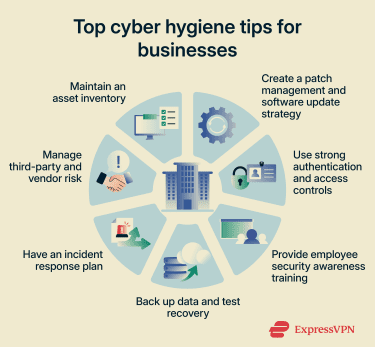
Maintain an asset inventory
A foundational step of good cyber hygiene for businesses is keeping an inventory of assets across the environment, including devices, software, and equipment. The principle is straightforward: you can’t secure what you do not know exists.
In practice, asset inventories cover four categories, each with its own visibility challenge:
- New devices can join the network without being formally recorded.
- Employees sometimes install applications without IT approval, a practice known as shadow IT. Cloud platforms can be provisioned outside central oversight, making them invisible to traditional inventory processes.
- Accounts accumulate over time and are not always deactivated when an employee leaves or changes roles.
Businesses often use a combination of these tools to identify and track assets:
- Network mapping tools: Scan for unrecognized devices on the network and flag anything not present in the inventory.
- Software discovery tools: Inventory what is installed across devices and surface anything unapproved or unrecorded.
- Cloud access security brokers (CASBs): Provide visibility into sanctioned and unsanctioned cloud service usage.
- Identity and access management (IAM) platforms: Track active accounts and flag orphaned or excessive access.
Create a patch management and software update strategy
Patch management is an important step in strengthening cybersecurity in organizations. For businesses, the challenge is not just applying updates but managing them at scale across many systems, versions, and environments simultaneously.
Effective patch management prioritizes based on severity, typically by using the CVSS score, and exploitability. A critical, remotely exploitable vulnerability in an internet-facing system should be prioritized for rapid patching; a low-severity internal vulnerability can follow a slower cycle. Automated patch management tools can deploy updates across fleets of machines, track compliance, and generate reports for audit purposes.
To reduce the risk of patches introducing new problems, organizations can:
- Test before deploying: Apply patches in a controlled environment first to identify compatibility issues or performance problems before rolling out to production systems.
- Stage the rollout: Deploy to a subset of systems first to catch any anomalies before wider deployment.
Use strong authentication and access controls
Access control for organizations operates at two levels: authenticating who is allowed in and limiting what they can access once inside.
Wherever possible, businesses should enforce MFA across all accounts, whether via one-time passwords (OTPs), smart cards, and certificates.
Many organizations also use risk-based authentication, where the system assesses factors such as the location of login requests, the time of day, and the frequency of such requests. If anything seems unusual, the system can flag these attempts as suspicious. For instance, login attempts outside business hours or from unfamiliar locations may indicate a malicious attempt.
Once inside, access should follow the principle of least privilege: every employee, application, and system gets access only to what it needs to do its job. Administrative accounts, which can modify systems, manage other users, or access sensitive data, should be used only when necessary and subject to just-in-time (JIT) access where possible.
Back up data and test recovery
Data backups are important for businesses from both a security and a regulatory perspective. Backed-up data should be encrypted at rest and in transit, with access restricted to authorized personnel.
When designing a backup strategy, ransomware is a primary security threat to account for. Many ransomware attacks target backup systems before activating to eliminate the victim's ability to recover without paying. That’s why businesses should ensure at least one copy is isolated from the main environment:
- Air-gapped backups: Media physically disconnected from the network.
- Immutable cloud backups: Storage configured so data cannot be modified or deleted for a defined retention period.
Two parameters should guide how often backups run and what architecture is needed: the recovery time objective (RTO) or how long the business can tolerate being down, and the recovery point objective (RPO) or how much data loss is acceptable.
Backups should also be tested through regular restore exercises. A backup that has never been restored is an assumption, not a guarantee.
Have an incident response plan
An incident response plan is a structured and documented action plan for businesses to respond to security incidents. It outlines the steps an organization and its employees must take when faced with a security incident, along with clearly defined roles and responsibilities.
A well-designed and implemented incident response plan helps businesses minimize downtime and identify the root cause of an attack. It also helps contain damage and limit further data loss.
An incident response plan can be divided into six steps:
- Preparation: Designing the response plan, documenting it, establishing a communication plan for quick response, and forming a cybersecurity incident response team (CSIRT).
- Identification: Establishing how to detect and confirm whether an incident has occurred, using tools such as intrusion detection systems and firewalls.
- Containment: Limiting the impact of the incident and isolating affected systems as quickly as possible.
- Eradication: Removing malicious components and fixing the cybersecurity vulnerabilities that led to the incident.
- Recovery: Restoring systems and returning them to the production environment after testing, monitoring, and validation.
- Reporting: CSIRT teams document the incident, identify root causes, and record the lessons learned.
Provide employee security awareness training
Employees are often one of the weakest links in an organization's cybersecurity environment. According to the 2026 Verizon Data Breach Investigations Report, the human element was a component of 62% of breaches.
Effective training programs include:
- Simulated phishing campaigns: Controlled tests that send employees realistic phishing emails and measure how many click, how many report, and how quickly. Awareness training can reduce phishing risks over time.
- Multi-channel simulations: Phishing via email is one of the most common attack vectors, but simulations should also cover smishing (SMS), vishing (phone calls), and pretexting scenarios to reflect real-world attack variety.
- Incident reporting training: Employees should know what to do when they suspect an attack, including who to contact, how to report it, and why speed matters. Early reporting can limit the damage of a successful attack.
- Increasing sophistication over time: Simulations that never change lose their effectiveness. Tests should grow more targeted and realistic as staff become more aware.
Manage third-party and vendor risk
Businesses rarely operate in isolation. Software vendors, managed service providers, payroll companies, and logistics partners often have access to internal systems or data. An attacker who can't breach an organization directly may find it easier to compromise a supplier that already has access in what’s called a supply chain attack.
This is why it is important to determine the impact of each vendor on your operations and conduct thorough due diligence before onboarding. Here are some best practices for determining vendor risk:
- Evaluate the vendor's compliance history, security commitments, and overall capabilities.
- Examine a vendor's IT security posture by reviewing their policies and ensuring they align with industry standards, including verifying recognized certifications.
- Conduct cybersecurity audits to assess the vendor’s ability to handle threats such as phishing or data breaches.
- Classify vendors based on the type and volume of internal data they can access and your organization's degree of reliance on them.
- Track vendor key performance indicators (KPIs) such as incident response time, vulnerability scan results, penetration testing, and past compliance lapses.
Common cyber hygiene mistakes for businesses
Even well-secured organizations can develop gaps over time, especially when routine processes like updates and monitoring are delayed or overlooked.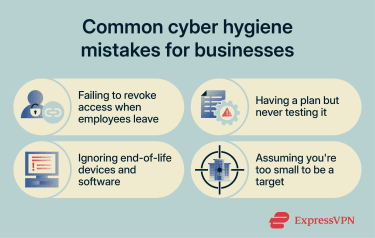
Failing to revoke access when employees leave
Former employees continuing to have unauthorized system access creates an insider risk. Even if their intent is not malicious, these inactive accounts can become entry points for cyber attackers. Additionally, unrevoked access may violate privacy regulations, leading to penalties or reputational damage.
To mitigate this, businesses should implement a clear offboarding process that disables accounts and revokes access immediately, ideally automated through integration between HR and identity management platforms.
Having a plan but never testing it
Even a carefully drafted incident response plan can be ineffective if it hasn’t been regularly tested. Enterprise environments are continuously evolving, with new cloud systems, infrastructure changes, and workforce turnover, and so outdated plans may fail to deliver the desired results during an incident.
Always test plans through tabletop exercises, periodic simulations, and full-scale drills, ensuring they can be executed effectively during real incidents. Businesses should also ensure that top management participates in these exercises, given their significant influence during such events.
Ignoring end-of-life (EOL) devices and software
EOL devices and software stop receiving security updates from their manufacturers. Any vulnerability discovered after that point may stay permanently unpatched, giving attackers a potential entry point into the environment.
Businesses should maintain a clear picture of which systems are approaching end-of-life and prioritize replacing them. Where immediate replacement is not feasible, compensating controls such as network isolation and enhanced monitoring may help reduce risk in the interim.
Assuming you're too small to be a target
This is a common misconception. Many attacks are opportunistic and do not distinguish between organizations by size, and smaller businesses may have fewer resources dedicated to security. Every business, regardless of size, should follow strong cyber hygiene.
Read more: Cybersecurity tips for small businesses
Cyber hygiene challenges
Maintaining cyber hygiene is not without challenges, requiring continuous adaptation to changing threats.
Keeping up with evolving threats
The threat landscape changes continuously. New vulnerabilities emerge, and attack techniques evolve over time, including in response to defensive measures.
For individuals, staying current means staying broadly aware of current threats and not relying on outdated advice. For businesses, the challenge is more structured. Frameworks such as the National Institute of Standards and Technology (NIST) Cybersecurity Framework and the Center for Internet Security (CIS) Critical Security Controls provide regularly updated guidance that helps prioritize where to focus security efforts as the threat landscape shifts.
Balancing security with usability
Security controls can feel burdensome. Additional steps at login, restrictions on system access, and requirements around passwords all add friction to everyday workflows. When that friction becomes too much, users may look for workarounds, creating vulnerabilities that technical controls may not be able to compensate for.
One approach is to choose controls that address the most significant risks while remaining practical enough to be consistently followed. A risk-based approach helps here: prioritizing what matters most and selecting implementations that minimize disruption.
Businesses can also give users some flexibility within defined boundaries. For example, letting employees choose their preferred MFA method and configure their own security alert preferences also helps increase adoption.
Alert fatigue
Security tools generate a high volume of alerts, covering everything from suspicious logins and unusual network traffic to potential malware and policy violations. In a typical business environment, this can amount to hundreds of alerts a day, many of which turn out to be false positives. When security teams spend most of their time investigating alerts that lead nowhere, genuine threats can get lost in the process.
Addressing this starts with configuring tools correctly, especially for smaller businesses that don’t have entire security teams. Out-of-the-box alert thresholds are often too broad, flagging activity that is normal for a specific environment. Tuning these settings, suppressing known false positives, and routing alerts by severity helps ensure that the issues requiring immediate attention are visible.
FAQ
Which cyber hygiene habits make the biggest difference?
How can small businesses improve cyber hygiene on a budget?
What are the first signs of poor cyber hygiene?
How do remote teams maintain good cyber hygiene?