 Celebrate with up to 80% off
What is spam? Types, signs, and how to reduce it


Spam is a routine part of modern online communication. Some spam is harmless, while other forms may involve deception, scams, or phishing attempts. The most dangerous type of spam can lead to data loss, device or account takeover, or even financial losses, depending on the situation. Fortunately, there are red flags to watch out for, and preventative measures you can take to identify it.
What is spam?
“Spam” refers to unsolicited digital communication, typically distributed in bulk to large numbers of people. It can take many forms and is commonly associated with bulk advertising, unwanted promotions, mass messaging, and deceptive or misleading content.
Why am I receiving spam?
Spam often increases after contact details are exposed, shared, or collected. This can happen in several ways: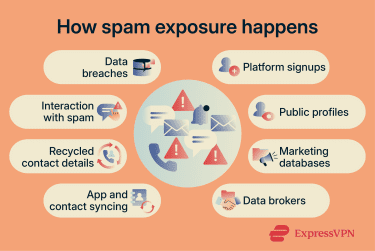
- Data breaches: When a company experiences a data breach, exposed contact details can spread between spam and marketing databases after the original breach.
- Public exposure: Contact details posted on websites, forums, resumes, or social profiles can be collected automatically and added to spam lists.
- Marketing lists: Email addresses and phone numbers used for newsletters, downloads, or free trials may later appear in advertising or lead-generation databases.
- Data brokers and data sharing: Some companies collect, sell, or share personal data, which can cause contact details to appear on additional marketing or spam lists.
- App and contact syncing: Apps that access contacts, phone numbers, or email accounts may contribute to spam exposure if that data is shared, leaked, or misused.
- Recycled phone numbers or accounts: Spam linked to a previous user’s activity may continue after a phone number or account is reassigned.
- Interaction signals: Replying to suspicious emails, texts, or calls can indicate that an account or number is active, which may lead to more spam.
Spam vs. phishing vs. scams
While spam, phishing, and scams are closely related, they do not mean the same thing. The table below highlights the main differences:
| Term | What it describes |
| Spam | Unwanted communication, often distributed in bulk. |
| Phishing | A scam technique that uses misleading messages, websites, or impersonation to steal information or gain access. |
| Scam | A broader deceptive scheme designed to obtain money, information, or access. |
These categories often overlap in practice. For example, a spam email may contain phishing links as part of a broader scam attempt.
Common spam channels
Spam can blend into many different types of online communication. Below are some of the most common channels used.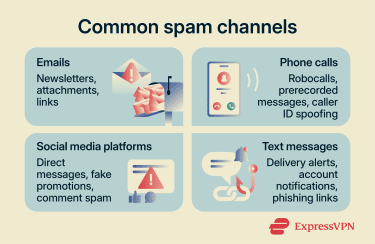
Email spam
Email supports detailed formatting, branding, images, links, and attachments, making it a common channel for promotions, newsletters, and other unsolicited messages.
Some spam emails may also involve phishing attempts using tactics such as fake account alerts, malicious attachments, or misleading links.
Because email is widely used for shopping, work, banking, and account notifications, spam messages can sometimes resemble ordinary communication and be harder to recognize.
Read more: How to stop spam emails
Spam calls
Spam calls can include telemarketing calls, robocalls, surveys, promotional offers, or prerecorded messages.
Because phone calls involve live interaction, they can sometimes encourage quick responses before there’s time to fully verify who’s calling.
While many spam calls are promotional, others may involve scams, fake services, or attempts to collect personal information. In some cases, caller ID spoofing is used to display familiar-looking phone numbers or business names, making calls appear local or recognizable.
Read more: What is spam risk, and how can you stop these calls?
Spam texts
Spam texts can appear through SMS, Rich Communication Services (RCS), and other messaging services. They may include promotions, delivery updates, account alerts, surveys, or other unsolicited messages.
Because text messages are often viewed on smaller screens, sender details and link destinations can be harder to inspect, making unusual details easier to miss.
Some scam-related spam texts may include phishing links or misleading requests and may imitate routine messages, such as delivery notifications or account alerts, to encourage quick interaction.
Social media spam
Social media spam can appear through repetitive comments, direct messages, promotional posts, mass tagging, or excessive self-promotion.
Unlike other channels, social media spam blends into ordinary platform activity, often appearing in comments, replies, hashtags, and shared posts.
Some social media spam may also involve copied accounts, misleading links, or fake promotions intended to attract clicks, followers, or engagement.
Read more: TikTok scams, Instagram scams
Common spam-related scams
While some spam is only unwanted advertising, other spam messages may be misleading, deceptive, or harmful. These often share warning signs such as urgency, vague details, unfamiliar senders, suspicious links, or requests for sensitive information.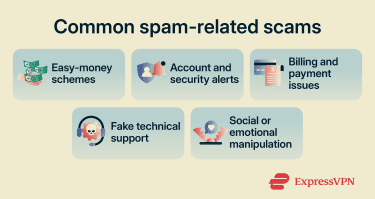
Common examples of scams distributed through spam messages include:
- Giveaways and easy-money schemes: Unexpected prize claims, guaranteed earnings, fake job offers, or requests for upfront fees.
- Account and security alerts: Fake password resets, delivery problems, account warnings, or verification requests.
- Billing and payment issues: Unfamiliar invoices, refund claims, subscription renewals, or payment requests.
- Fake technical support: Virus warnings, requests to call support numbers, or claims that a device or account has been hacked.
- Social or emotional manipulation: Messages that use familiarity, emotional pressure, or urgent personal situations to request payment or encourage interaction.
Many legitimate companies also send account alerts, invoices, promotions, and support notifications, so context matters. Unexpected messages, unusual requests, or communication that cannot be verified through official channels should be treated with additional caution.
Potential risks of spam
While some spam is considered low-risk, deceptive spam messages may involve privacy, security, or financial risks.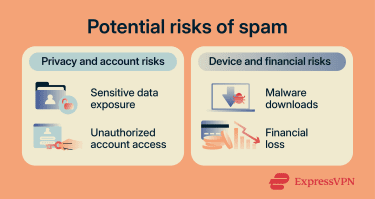
- Sensitive data exposure: Requests for passwords, payment details, addresses, or other personal information may later be used for fraud or impersonation.
- Unauthorized access: Messages that request login credentials or verification codes may be used to access accounts or change security settings.
- Malware: Links, attachments, or software downloads may expose devices to programs that affect security, privacy, or performance.
- Financial loss: Fake invoices, payment requests, subscriptions, or refund scams may result in unauthorized charges.
How to manage spam
While spam cannot always be completely avoided, a few practical steps can help reduce and manage exposure. This includes:
- Limiting public sharing: Be cautious about where email addresses, phone numbers, or usernames are shared publicly.
- Using email aliases or masked addresses: Separate email addresses, aliases, or masked email services can help reduce spam when signing up for websites, newsletters, or free trials. Services such as ExpressMailGuard can generate masked email addresses for online signups.
- Using spam controls: Spam filters, blocking tools, and reporting systems can help reduce repeat messages across communication channels.
- Verifying unexpected requests: Messages involving payments, account activity, downloads, or personal information are safer to confirm through an official website or app.
- Protecting accounts and devices: Strong passwords, two-factor authentication (2FA), and regular updates can help improve account and device security.
FAQ
Is spam illegal?
Can spam contain malware?
What should I do if I clicked a spam link?
How do spammers get my contact information?
Should I reply to spam messages?