
How to delete your Plenty of Fish account


Closing your Plenty of Fish (POF) account can feel like a big step, whether you’ve met someone, decided to take a break from dating apps, or simply want to move on. Whatever your reason, understanding how the process works helps ensure your account is fully closed without issues.
Deleting your account is relatively straightforward across iOS, Android, and the web. This guide walks you through each step, outlines what happens to your data after deletion, and answers common questions along the way.
By following these instructions, you can confidently close your POF account and move on knowing exactly what to expect.
What to know before you delete your Plenty of Fish account
Before deleting your POF account, it’s worth checking a few basics. Doing this can help you avoid account access issues or billing confusion later.
Make sure you can access your account
Before starting the deletion process, make sure you can still sign into your account. It’s a good idea to confirm that:
- Your email address is active.
- You know your password.
- You can receive any verification or password reset emails if needed.
If you can’t access your account or no longer receive password reset emails, try POF’s account recovery options first. If that doesn’t work, you may need to contact POF support to request help with account access or deletion.
What happens to your profile, messages, and matches
When you delete your POF account, your dating profile and account activity are generally removed from the platform. This usually includes your:
- Profile details.
- Photos.
- Conversations.
- Matches, likes, or connections.
Once an account is deleted, it can’t be restored. If someone decides to return later, they’ll need to create a brand-new account. Any paid upgrades linked to the deleted account also won’t carry over to a new one.
Cancel your subscription before deleting
Deleting your POF profile doesn’t always cancel an active subscription. Depending on how you signed up, billing may be handled through Apple, Google, or directly through the POF website, which means it can continue separately from your account.
To avoid any unexpected charges, it’s a good idea to cancel your subscription first, then proceed with deleting your account. This helps ensure everything is fully closed, regardless of how your subscription is managed.
Keep in mind that subscription fees are typically non-refundable, so canceling before your next billing date can help avoid additional charges.
How to cancel your Plenty of Fish subscription
If you’re paying for a POF subscription, canceling it is a separate step from deleting your account. How you cancel depends on where you originally signed up.
Canceling on iPhone
If you subscribed through Apple, the payment is handled through your Apple account, not directly through POF. To cancel on iPhone:
- Open the Settings app.
- Tap your Apple ID at the top.
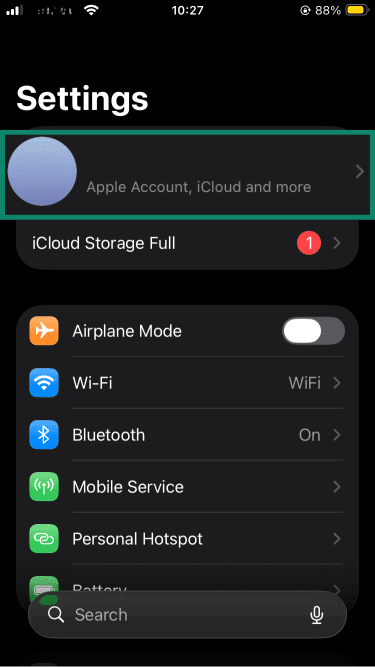
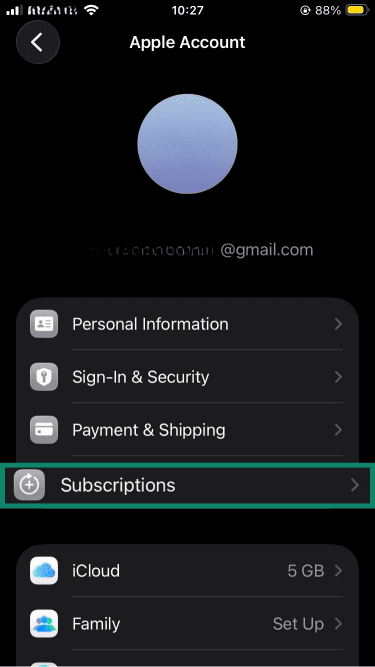
- Tap Subscriptions.
- Find your Plenty of Fish subscription.
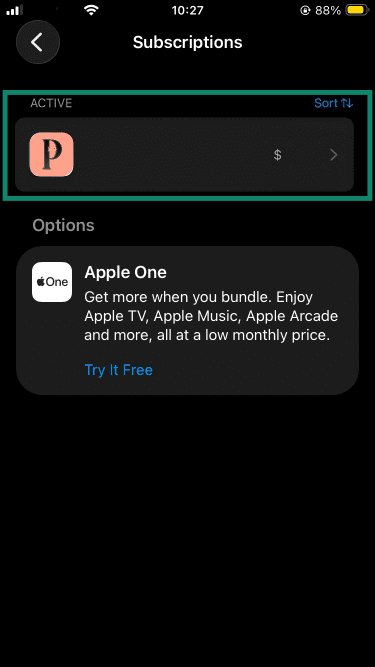
- Tap it and choose Cancel Subscription. Confirm your selection if asked.
Canceling on Android
If you subscribed through Google Play, you’ll need to cancel it there. To cancel on Android:
- Open the Google Play Store.
- Tap your profile icon.
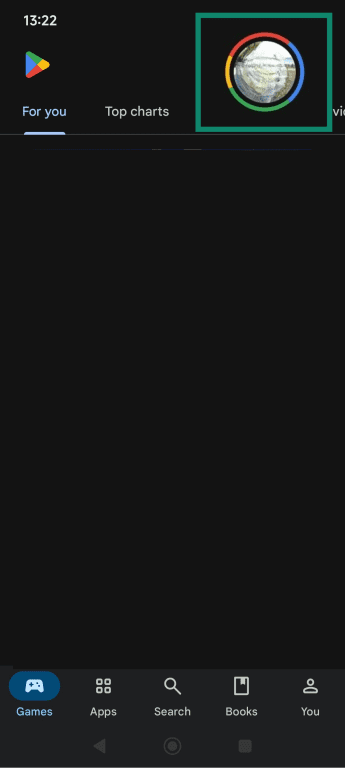
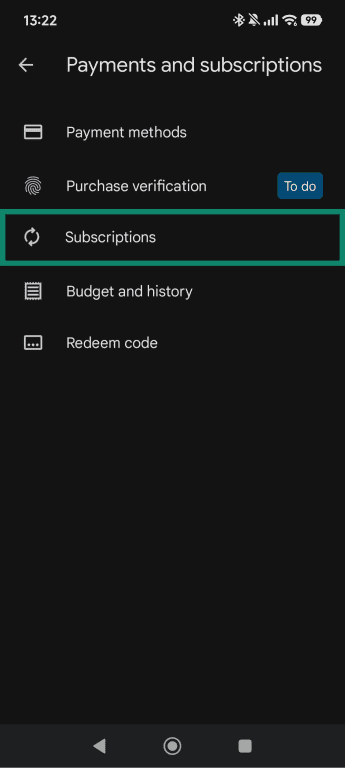
- Go to Payments & subscriptions.
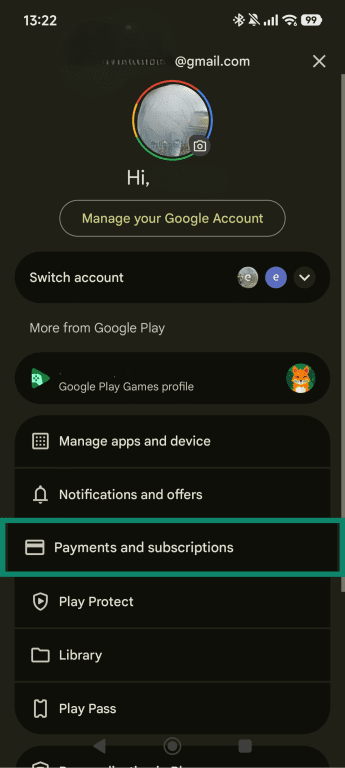
- Tap Subscriptions.
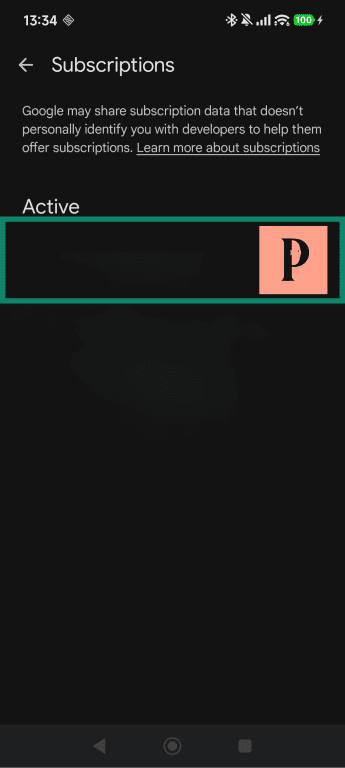
- Select Plenty of Fish.
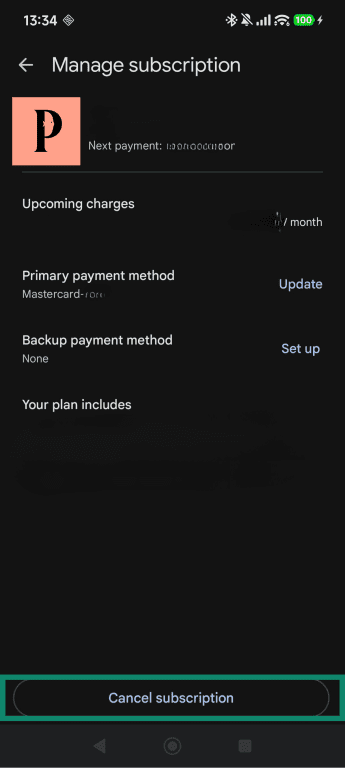
- Tap Cancel subscription and follow the prompts to finalize cancellation.
Canceling through the website
If you signed up directly through the POF website, you need to cancel through your account settings there. To do that:
- Sign into POF in a web browser.
- Open the Manage account settings.
- In the Membership field, select Account type.
- Select the Cancel membership option.
- Confirm the cancellation.
Step-by-step guide to deleting your Plenty of Fish account
Once you’ve canceled your POF subscription, deleting your account only takes a few minutes, but the steps can vary depending on the device you use. Below, you’ll find the easiest way to remove your account on desktop, iPhone, and Android.
How to delete your account via web browser
Deleting your POF account through a browser is usually the most direct option.
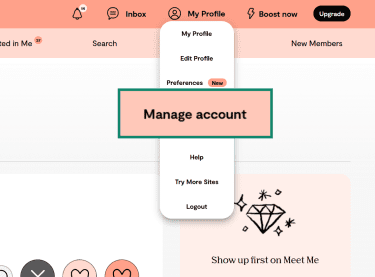
- Open My Profile and select Manage account.
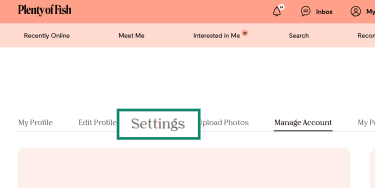
- Click on the Settings tab.
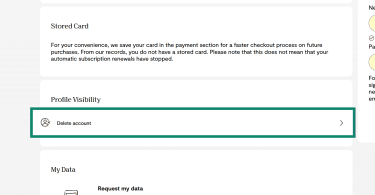
- Find the Profile Visibility field and select the Delete account option.
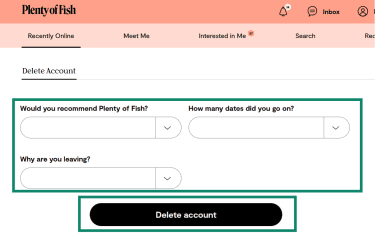
- Choose a reason for deletion and click Delete account (you can leave the recommendation and number of date options blank).
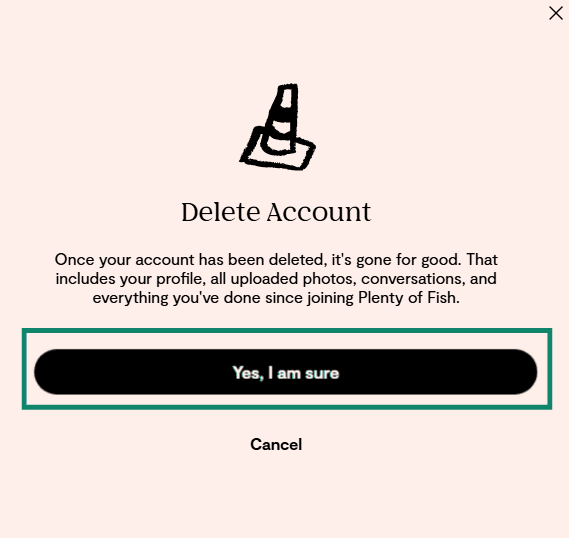
- Confirm your selection by clicking Yes, I am sure.
How to delete your account on iPhone
To delete POF on an iPhone, follow these steps:
- Open the Plenty of Fish app.
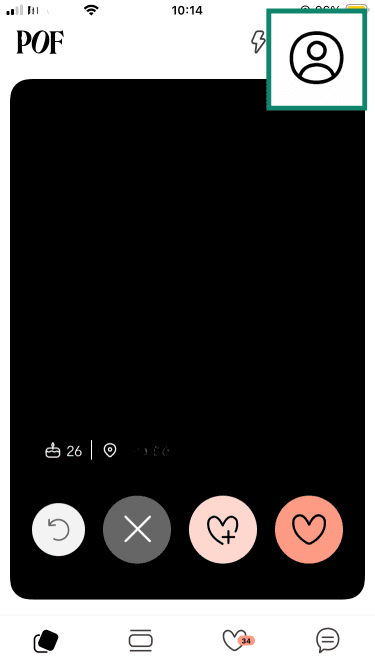
- Tap on My Profile.
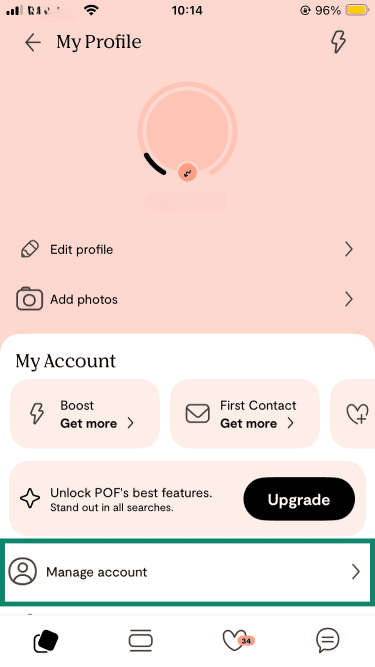
- Select the Manage account menu.
- Choose Delete my Account.
Note: Some users may not see the delete option. If the option isn’t visible, try accessing your POF account through a web browser instead.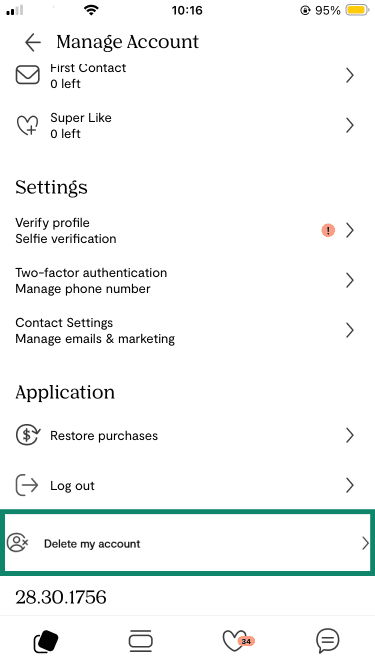
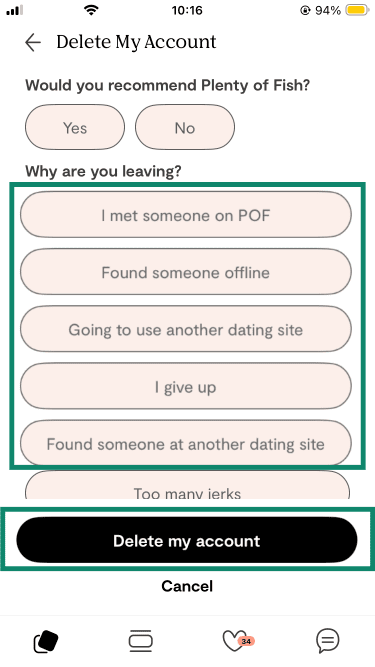
- Select a reason for deletion and confirm (the "Would you recommend Plenty of Fish?" prompt is optional).
How to delete your account on Android
If you’re using the Android version, account deletion isn’t available within the app itself. As such, head to POF.com on your mobile browser, and follow the instructions below:
- Open the Plenty of Fish website on your Android device.
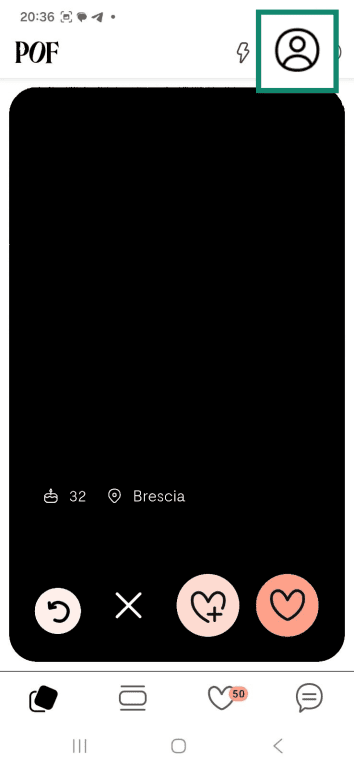
- Tap on the profile icon.
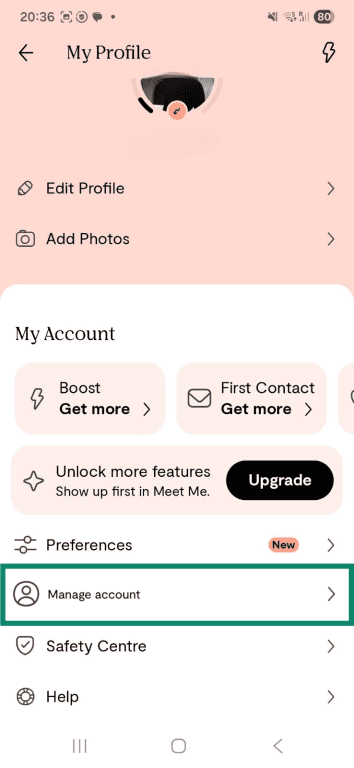
- Select Manage account.
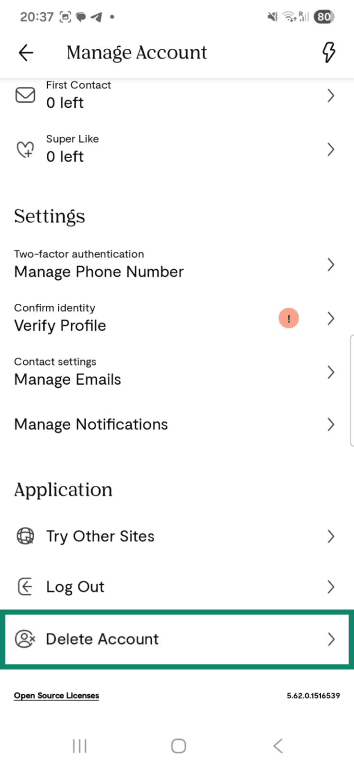
- Tap Delete Account.
- Choose a reason and select Delete my account (the "Would you recommend Plenty of Fish?" prompt is optional).
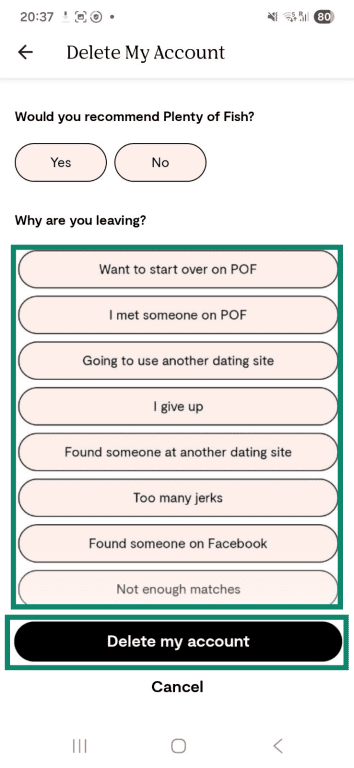
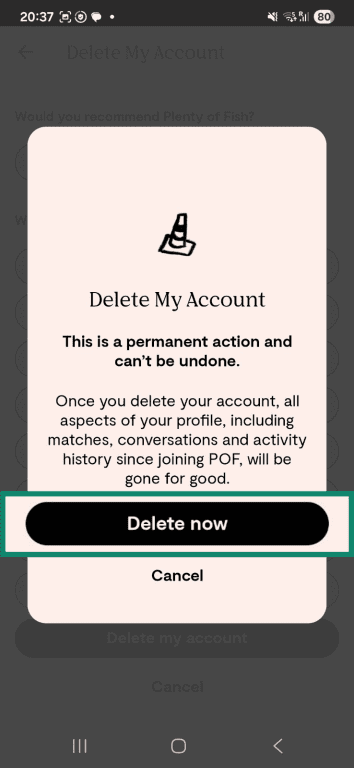
- Confirm deletion by pressing Delete now.
Tip: If privacy is one of the main reasons for leaving, it’s also worth learning how to stay safe on dating apps and how to spot online dating scams before joining another platform.
What happens after you delete your POF account
Deleting your POF account removes your profile and access to the platform, but that doesn’t always mean everything disappears instantly. Some changes happen right away, while others may take a little more time behind the scenes.
Immediate effects of account deletion
Once a POF account is deleted, your profile is removed from the platform and can no longer be accessed. In most cases, this means:
- The profile is no longer visible.
- Account access is removed.
- Active use of the account comes to an end.
What data may still be retained
Even after an account is deleted, some information may still be kept for a period of time. This is common across many online platforms.
POF states that it may retain certain types of data for defined periods, including:
- Transaction data and the approximate location of purchase for up to 10 years.
- Records of user consent for up to 5 years.
- Customer support communications and related records for up to 5 years.
- User-generated content associated with banned accounts for up to 2 years.
This helps with charge disputes, abuse investigations, or compliance with privacy laws such as the General Data Protection Regulation (GDPR). That said, retained data isn’t the same as a visible, usable dating profile.
For anyone trying to take privacy a step further, it may also help to understand the laws that remove your information from the internet and what it really takes to delete yourself from the internet more broadly.
Alternative: How to hide your Plenty of Fish profile
If deleting a POF account feels too permanent, using “Take a break” can be a useful middle ground. This feature lets someone step away from the platform without fully deleting their account.
However, it’s only temporarily available in certain regions, so not everyone will see it. It can also only be activated through the POF app or mobile web, not on desktop. If “Take a break” isn’t available, deleting the account may be your only option.
When hiding your profile makes more sense than deleting
Hiding a POF profile can make more sense than deleting it when someone wants flexibility rather than a full reset. This option may be a better fit if:
- A break from dating apps is needed.
- There’s uncertainty about leaving the platform permanently.
- There’s no desire to rebuild the profile from scratch in the future.
Tip: If the account is being kept active, it’s a good idea to review general privacy risks from everyday apps and brush up on how to stay safe on dating apps moving forward.
How to hide your profile on iPhone and Android
The steps for hiding a POF profile can be found in the options to delete your account, and are generally the same on both iPhone and Android. Here’s how to do it:
- Tap on My Profile icon.
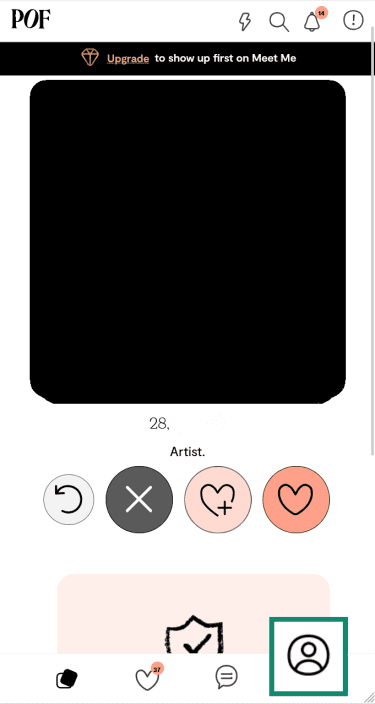
- Select the Manage account option.
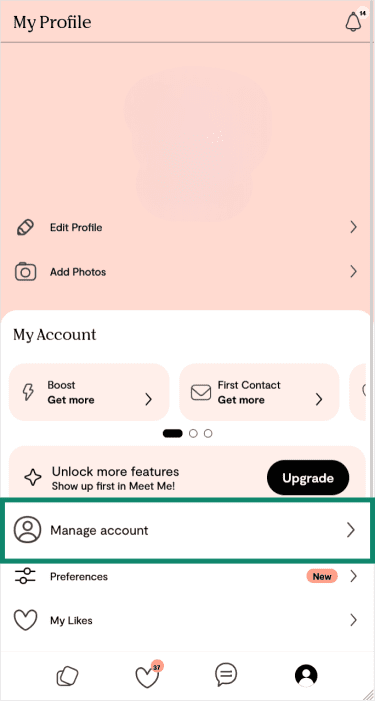
- Tap on Delete my account.
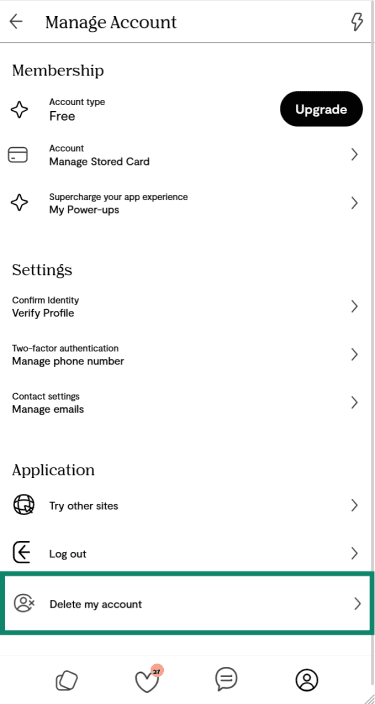
- Press the Take a break option.
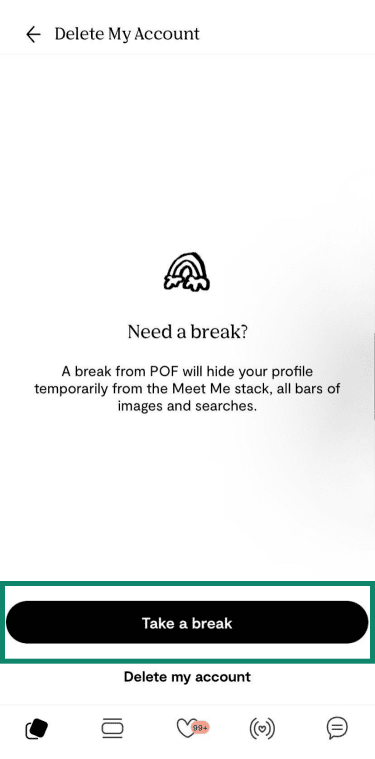
- Select how long you'd like to take a break for. The app will present a few preset duration options to choose from, so pick whichever one you’d like.
FAQ: Common questions about deleting a Plenty of Fish account
Do I need to cancel my subscription before deleting my account?
Will deleting my account remove my messages and matches?
Can Plenty of Fish keep any of my personal data after deletion?
How long does it take for my account to disappear?
What should I do if I can’t delete my account?
Is hiding my profile better than deleting my account?