What is Yoti age verification, and how safe is it?


Age checks are becoming more common when accessing certain online services and content. One provider you may encounter is Yoti, the company behind some “prove you’re over 18” checks. Yoti’s age-assurance tools are used or offered for contexts such as PlayStation and retail age checks, social platforms, dating, gambling, and financial services.
Note: This article is for informational purposes only and is not legal or privacy advice.
What is Yoti age verification?
Yoti is a U.K. digital identity company, founded in 2014 by Robin Tombs, Noel Hayden, and Duncan Francis. It provides age-assurance and digital identity tools for businesses and users in multiple countries, though availability, accepted documents, and legal requirements vary by market.
Its age-check tools help websites, apps, and retailers confirm whether a user is over a required age, such as 13, 16, or 18, without necessarily sharing their full identity. The amount of data involved depends on the method used.
The company offers a few ways to do that:
- Facial age estimation: A selfie is analyzed by an AI model to estimate your apparent age.
- Document-based verification: A photo of your passport, driving license, or national ID.
- Reusable Digital ID: A phone app you set up once and then use to prove your age across multiple sites and services.
Some checks may also include liveness detection, which is designed to confirm that there’s a real person in front of the camera rather than a printed photo, a video on another screen, a deepfake, or a 3D mask.
According to Yoti, its MyFace liveness system has passed iBeta Level 1 and Level 2 testing under International Organization for Standardization (ISO) / International Electrotechnical Commission (IEC) 30107-3. Yoti also states that in January 2026, MyFace became the first passive, single-selfie liveness technology to meet iBeta Level 3.
Also read: What is identity verification? A comprehensive overview.
Why do platforms use age checks?
Platforms use age checks for several reasons, including legal compliance, child safety, fraud prevention, and access control for age-restricted products or services. The rules vary by country and industry, but regulators in several markets are pushing platforms to prove that children are not accessing restricted or harmful content.
In the U.K., the Online Safety Act made age checks a legal requirement for certain in-scope services that provide age-restricted content or content that may be harmful to children. From 25 July 2025, those services had to use what the Office of Communications (Ofcom) calls “highly effective age assurance” to help prevent children from accessing restricted material, and the penalties are significant: fines of up to £18 million or 10% of qualifying worldwide revenue, whichever is higher.
With enforcement now underway, regulatory pressure is one reason many platforms have rolled out stricter age checks over the past year.
Three terms worth knowing. They are sometimes used interchangeably, but they don’t mean exactly the same thing:
- Age assurance: The umbrella term for methods that give a service confidence about a user’s age, including whether they are above or below a required age.
- Age verification: A check that uses evidence, such as an identity document or another trusted source, to confirm a user’s age or whether they meet an age threshold.
- Age estimation: A method that estimates a user’s likely age or age range, for example from a selfie, without necessarily identifying who they are.
This article uses “age verification” loosely throughout, but the distinction matters because the methods involve different levels of privacy, certainty, and data collection.
Also read: Are age verification laws in the U.S. a threat to digital freedom?
How does Yoti age verification work?
What you’ll experience during a Yoti age check depends on which method the requesting website, app, or service has chosen. In its Age Verification Privacy notice, Yoti states that, depending on the client’s setup, the service may receive either the user’s age in years or an over/under result showing whether they meet the required age threshold.
Facial age estimation
You take a selfie, an AI model estimates whether you’re above a required age threshold, and the result goes back to the website. That’s the process in a sentence.
Here’s what’s happening underneath:
- Yoti processes the check: The check runs through Yoti’s system rather than the platform estimating your age.
- You take a selfie: The image needs to be clear, well-lit, and show only your face.
- Liveness detection may run: If the platform enables it, it checks whether the image is of a real person and not a 2D image, a mask, or a bot.
- The model estimates your age: Yoti states in its facial age estimation white paper that its facial age estimation model is trained on millions of images from sources including Yoti app onboarding, consented data collection exercises, and vetted third-party suppliers
- A result is returned: The platform receives a simple pass or fail result based on the required age threshold. In its Age Verification documentation, Yoti says that it deletes the selfie image as soon as the age estimate is given and doesn't share facial images with the client or any third party.
For many platforms, this is meant to feel faster and less intrusive than uploading a passport or driver's license.
Also read: Is Face ID safe? A deep dive into biometric safety.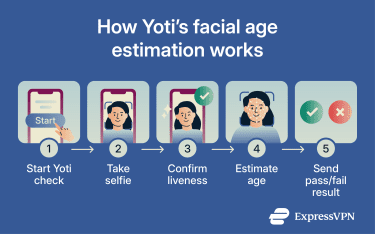
How accurate is Yoti's age estimation?
Accuracy depends heavily on the age group. According to Yoti’s July 2025 facial age estimation research:
- Ages 6–12: Mean absolute error (MAE) of around 1.3 years.
- Ages 13–17: MAE of around 1.1 years.
- Ages 18–24: MAE of around 2.1 years.
- Ages 6–70 overall: MAE of around 2.4 years.
In simple terms, the estimate is usually fairly close but not exact. Yoti’s reported MAE is lowest among teenagers in this dataset, while accuracy generally declines with older age groups because visible age cues change less predictably.
To reduce the risk of underage access, many services may set the pass threshold above the legal minimum. This is similar in principle to the “Challenge 25” rule in U.K. retail, where customers who appear to be under 25 may be asked to show ID for age-restricted purchases
Several other factors also influence accuracy:
- Lighting and angle.
- Whether your face is fully visible (glasses, hats, or hands in shot).
- Age group.
- Camera quality.
- Skin tone and gender.
Facial age estimation is not facial recognition
This is one of the biggest misconceptions about Yoti, so it’s worth being clear: Yoti's facial age estimation doesn't identify you. It looks at your face as a pattern of numbers and estimates your age, unlike facial recognition, which compares your image against stored images or templates to confirm who you are.
Platforms may use age assurance to:
- Cut down on fake accounts.
- Help keep users in age-appropriate spaces.
- Reduce the risk of adults posing as underage users.
- Limit access to harmful or age-inappropriate content.
The U.K. Information Commissioner’s Office (ICO) distinguishes biometric recognition from some biometric classification uses, such as age estimation, but notes that age assurance methods may still involve biometric data depending on how the technology is deployed.
However, the legal treatment of biometric data remains contested. In 2026, the Spanish Data Protection Agency (AEPD) fined Yoti for violations of the General Data Protection Regulation (GDPR) related to the Yoti Digital ID app, reportedly including biometric processing, consent, and data retention. Yoti rejects the decision and says it has begun an appeal to the Spanish High Court.
Document-based age verification
If a platform requires higher-assurance evidence of age, you may be asked to verify with an ID document instead. Here’s the flow:
- You upload your ID: A photo of a passport, driver’s license, or national ID card.
- The system checks the document: Yoti states that it uses both automated and manual processes to verify the security features of ID documents and assess their authenticity.
- Your date of birth is extracted: The system uses the date-of-birth field to confirm whether you meet the age requirement.
- You may need to take a selfie: When the platform wants higher confidence, the system also compares the selfie to the photo on the ID.
- Liveness checks may run: If requested, the system checks that there’s a real person in front of the camera, not someone trying to bypass the process with fake imagery.
This approach is generally considered more accurate than facial age estimation. However, document checks involve more sensitive information and usually take longer.
Facial age estimations vs. document-based age verification
| Feature | Facial age estimation | Document-based age verification |
| Purpose | Estimates whether you’re above a threshold | Confirms age from an official document |
| How it works | Selfie and AI estimate | ID document and a selfie (if required) |
| Data used | Facial image | ID details and facial image |
| Confidencelevel | Lower, because it’s an estimate | Higher, because it uses an official record |
| Typical use cases | Quick age-threshold checks | Higher-assurance verification |
Reusable digital ID and age tokens
Yoti also offers reusable options that can reduce the need to repeat the full process on every site that supports them.
Age tokens and Yoti Keys
Age tokens are reusable proofs that show an age check has already been completed. They can be stored locally as browser cookies or saved to a device as a Yoti Key.
With a browser-based age token, another supported site can accept the token if it meets the site’s age requirement without rerunning the full check. Users can remove browser-based tokens by clearing their browser data.
Yoti Keys are device-based passkeys. After an initial age check, a user can save an anonymous age token as a Yoti Key and reuse it across supported websites, including in private or incognito browsing.
Yoti Digital ID app
The Digital ID is a more involved, reusable option. You set it up once by downloading the app and following the instructions, which may include adding an ID document, taking a selfie, or using a facial age estimate where supported. After that, you can use the app to confirm your age across supported services, including participating cinemas and retail settings.
The idea is that you share only the minimum information necessary. For example, proving that you’re over 18 doesn’t mean handing over personally identifiable information (PII), such as your name or date of birth.
The trade-off is that reusable systems create a persistent digital ID that must be stored and managed securely, using Yoti’s app and infrastructure. Some people value that convenience, while others may prefer to verify each site separately.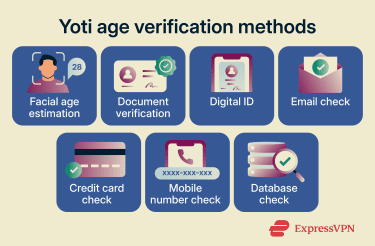
Other ways Yoti can check your age
Selfies and ID documents get most of the attention, but Yoti also supports checks that use other signals. These methods can reduce friction, but each has limits and may only work in certain countries or use cases.
- Email age check: Estimates whether an email address is likely to belong to someone over 18 based on signals such as its history and associated accounts. It avoids biometrics and documents, but access to an email address doesn't always prove the user’s age.
- Credit card check: Uses the fact that credit cards are usually issued only to people old enough to enter a credit agreement. It can be useful in supported countries, but the inference depends on local credit-card rules.
- Mobile number check: Checks a mobile number against carrier-held account information where supported. It can work well for accounts already linked to a phone number, but the contract holder may not be the person using the device.
- Database check: Checks details such as name, date of birth, and address against third-party records. It can provide stronger background evidence, but may exclude people with limited credit or public-record history.
Where Yoti age verification is used
Yoti doesn’t publish a full client list, but public examples show its technology being used across social platforms, gaming, retail, e-commerce, and other age-restricted services.
Social media
TikTok offers Yoti facial age estimation as one option for users in Europe who need to confirm their age during an appeal process. Meta says users may verify their age on Facebook with Yoti by taking a video selfie or uploading an ID, and it has also used Yoti in the age-verification flows for Instagram and Facebook Dating.
Other social platforms may use different providers or run their own age-assurance systems.
Gaming
In gaming, Yoti has been used in age-verification flows for major platforms. Sony has introduced Yoti-supported age verification for PlayStation users in the UK and Ireland, with mandatory checks beginning in June 2026 for adult accounts seeking access to communication and certain social features. Verification options include a mobile number, a facial scan, or a government-issued ID.
Epic Games’ Kids Web Services (KWS), through SuperAwesome, has integrated Yoti’s facial age estimation as one option for verifying that a parent or guardian is an adult during parental-consent flows in certain countries.
Also read: Internet safety for kids: 10 rules every parent must know.
Retail and e-commerce
In U.K. supermarket trials, Yoti’s facial age estimation and Digital ID tools were tested at self-checkouts for age-restricted purchases, including in participating Asda, Morrisons, and Co-op stores. These trials were designed to reduce friction for age checks, although some age-restricted purchases may still require staff oversight depending on local rules and store policy.
Online, the Yoti Shopify integration lets merchants add age checks for restricted products such as vapes, alcohol, and knives.
Yoti privacy and data handling
How much data Yoti handles depends largely on the type of check, the client’s setup, and whether manual review or a reusable option is used. According to Yoti's Privacy notice, its systems are designed to minimize the data shared with the requesting platform.
For facial age estimation, the system works from a selfie without needing details like your name or address. During document checks, the system processes more sensitive information, including government-issued IDs and, in some cases, a selfie for face matching.
Yoti may also process technical information needed to run and secure age checks, such as device, browser, IP address, session, timestamp, and security-log data.
What happens to your data?
According to its Privacy notice, data is deleted as soon as the check is complete for most age-checking methods. If a client configures manual review for an ID document check, Yoti keeps the data for 28 days. Yoti also stores age-check results on behalf of the client for six months unless deleted sooner, and clients may store those results for longer
For access or deletion requests, the right contact depends on the setup. For most age verification methods, the platform requesting the check is the controller, so you’d contact them. If you use the Digital ID app or Yoti Keys, Yoti may act as the controller for more of the data. Yoti says Digital ID information is kept until the account is deleted, while Yoti Keys can be deleted from the user’s device.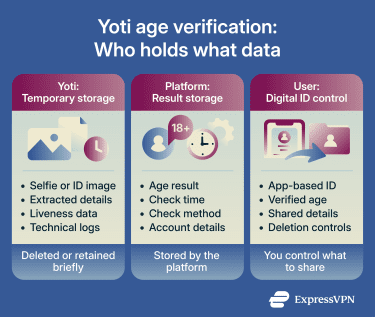
Yoti security and compliance
According to Yoti's published security documentation, it uses several safeguards during verification:
- Encryption: Data is encrypted in transit and at rest.
- Limited access: Access to production systems is restricted to authorized staff and protected with access controls.
- External certifications: Its ID Verification Services are certified to ISO/IEC 27001:2022, and its privacy information management system is certified against ISO 27701.
Yoti limitations to keep in mind
No age check system is perfect, and Yoti’s methods have practical limits:
- Accuracy varies by age group: Yoti’s reported accuracy is strongest for teenagers and less precise across older age groups, so false rejections can still happen, especially when fallback options are limited.
- False approvals are possible: No estimation system is perfect, so some underage users may be incorrectly estimated as meeting a threshold. This is one reason some platforms use higher challenge thresholds.
- Demographic performance can vary: Yoti reports small or minimal differences by gender and skin tone in its facial age estimation white paper, but independent evaluations and broader age-assurance trials show that demographic performance differences remain an important industry-wide consideration.
- Practical issues can block checks: Poor lighting, face coverings, glare, damaged IDs, or low camera quality can all derail a check.
- The platform matters too: Even when Yoti deletes data on its end, the website requesting the check may store the result alongside account, device, IP, or transaction data.
- The experience can vary: Different platforms configure Yoti differently. Some offer several methods, while others provide fewer fallback options.
Should you use Yoti age verification?
It depends on the check offered and what data you’re comfortable sharing. A selfie-based age estimate usually involves less identity data than an ID document check, while a reusable Digital ID or age token can reduce repeated checks but creates a persistent verification method.
The requesting platform matters too. Depending on the setup, the platform may receive an over/under result or your age in years and may store that result alongside account, device, IP, or transaction data.
In practice, the trade-off is between convenience, privacy, and the alternatives the platform offers.
FAQ
Can Yoti see my passport or driver’s license?
Does Yoti store my face scan?
Can parents manage Yoti for teens?
What should I do if Yoti’s age estimate is wrong?
Can I use Yoti without downloading the app?
Can I delete my Yoti account?