Docker vs. VMs explained: Which is better for modern application deployment?



Virtualization and containerization are essential components of modern application deployment. They allow teams to create consistent environments for developing, testing, and deploying applications across local and cloud infrastructure.
Containers and virtual machines (VMs) are two major approaches to isolating and deploying application workloads. Containers isolate processes at the OS level, while VMs virtualize hardware and run complete guest OSs. Although they work differently, they can be used separately or together throughout the software development lifecycle (SDLC).
This article explains how each technology works and how containers and VMs fit into modern workflows.
What is the difference between Docker and virtual machines?
Docker containers and VMs may serve similar purposes, but they operate at different levels of the computing stack. The best way to understand these differences is to examine each technology individually.
What is Docker and how does it work?
Docker Engine is an open-source containerization technology for creating and running containers. The broader Docker ecosystem includes tools and services for building, sharing, running, and managing containerized applications.
Docker uses containerization to package applications with supporting libraries, runtimes, binaries, and other user-space components. This allows developers to deploy applications across compatible systems without having to install most bundled dependencies separately. Runtime settings, secrets, storage, networking, and platform compatibility may still need to be managed.
Containers typically share the host OS kernel while maintaining isolated processes, file systems, and dependencies. Because they don't include a complete guest OS, they generally require fewer resources than VMs.
Docker is one of the most widely used container ecosystems. Other container tools include Podman, while runtimes such as containerd and CRI-O provide lower-level container execution capabilities.
Docker primarily uses Linux container technologies. Linux containers require a compatible Linux kernel and cannot run directly on Windows or macOS kernels. Docker Desktop uses a lightweight Linux VM to run them on these systems. Windows can also run Windows containers using compatible Windows kernel functionality.
What is a virtual machine (VM), and how does it work?
A VM is a virtualized computing environment that runs a complete guest OS. Each VM has its own kernel, system services, applications, virtual devices, and associated drivers, libraries, and binaries.
VMs can replicate complete computer or server environments on physical hardware. Configuring a VM involves allocating resources, such as CPU capacity, memory, storage, and network interfaces. From the guest OS’s perspective, these virtual resources behave much like physical hardware.
For example, a Linux guest OS can run in a VM on a Windows or macOS computer. A hypervisor creates and manages VMs by providing virtualized hardware. Some hypervisors run on top of a host OS, while others run directly on physical hardware. A single hypervisor can support multiple VMs, including VMs running different guest OSs.
Modern cloud infrastructure relies heavily on VM technology to allocate and provision computing resources. Infrastructure-as-a-Service (IaaS) providers use VMs to offer virtual servers and support isolated workloads on shared physical infrastructure.
Containers (Docker) vs. VM architecture explained
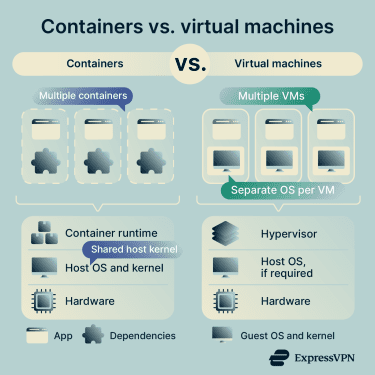 Both containers and VMs commonly use images to create consistent environments. An image is a reusable template rather than necessarily a snapshot or backup of a running system.
A VM image typically contains a guest OS and may include installed software, configurations, and one or more virtual disks. Its exact contents vary by platform and image type. A VM snapshot, by contrast, captures a disk or VM state at a particular point in time.
A container image is a read-only, layered package containing the files, binaries, libraries, and configuration needed to run an application. It may include a language runtime, but it doesn't include the host kernel or container runtime. Persistent data is generally stored separately in volumes rather than in the image.
The main architectural difference is the level at which isolation occurs. Containers isolate applications and processes while typically sharing the host OS kernel. They package user-space dependencies to help applications run consistently across compatible environments.
VMs virtualize hardware, allowing each VM to run a complete guest OS with its own kernel. The hypervisor allocates physical resources, such as processing power, memory, storage, and networking, among the VMs. A host OS may also be present, depending on the type of hypervisor.
Neither a container image nor a VM image should automatically be considered a backup. Container images are primarily application deployment artifacts, while VM images are reusable templates for creating VMs. Snapshots and dedicated backup systems serve different recovery purposes.
Docker containers vs. virtual machines: Key differences
There are many functional, non-functional, and architectural differences that separate these two approaches to virtualization:
| Docker container | Virtual machines | |
| Primary applications | Microservices, cloud-native applications, multi-cloud workloads, and containerized monoliths. | Legacy applications, multi-tenant environments, and workloads requiring guest OS or kernel-level control. |
| Architecture | Packages application code, dependencies, binaries, libraries, and other user-space components. | Runs a complete guest OS, including its own kernel, services, applications, and virtual devices. |
| Virtualization | Isolates processes through the host OS while typically sharing its kernel. | Virtualizes hardware to support an independent guest OS and kernel. |
| Isolation | Provides process-level isolation, with security depending on the runtime configuration and the host kernel's security. | Generally provides stronger isolation, although hypervisor vulnerabilities and shared resources can create risks. |
| Management | Uses a container engine and runtime to create and manage images, containers, networks, and storage. | Uses a hypervisor to create VMs and allocate virtualized hardware resources. |
| Portability | Uses standardized image formats but requires a compatible kernel, CPU architecture, and runtime environment. | Depends on the hypervisor, image format, CPU architecture, virtual hardware, and platform compatibility. |
| Resource sharing | Uses shared host resources, with optional limits and reservations for individual containers. | Uses assigned virtual resources, which may be fixed, dynamically adjusted, shared, or overcommitted. |
Docker vs. VM: Comparison across categories
Containers and VMs both support reusable images, version management, and efficient application deployment. However, their different architectures affect performance, scalability, portability, and security.
Security and isolation
Containers isolate applications and processes, but they typically share the host OS kernel. This creates risks in both directions: malware, compromised accounts, unsafe configurations, and host-level vulnerabilities may affect containers, while a kernel-level exploit launched from a container could allow an attacker to escape its isolation and compromise the host or other containers. Proper access controls, secure configuration, image scanning, and timely kernel updates help reduce these risks.
VMs generally provide stronger isolation because each runs its own guest OS and kernel, reducing the likelihood that a compromised VM will affect the host or other VMs. However, isolation is not absolute: hypervisor vulnerabilities and shared resources, such as folders or devices, can weaken this boundary.
A compromised host may give an attacker several ways to access or manipulate its VMs, including their virtual disks, memory, and configurations. VMs can also be compromised through malware, exposed network services, weak credentials, or guest OS vulnerabilities. Hypervisor vulnerabilities may provide another path between a VM and its host or neighboring VMs.
Docker and some other container platforms do offer advanced security controls to manage threats and provide better isolation from the host system. However, it requires specialized knowledge to configure and adds to the container's complexity.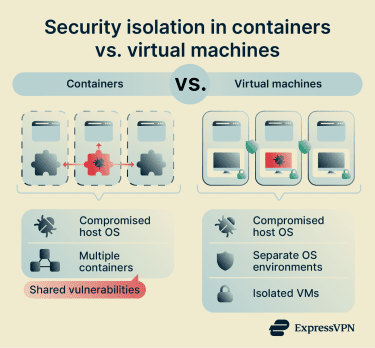
Performance and stability
Because they effectively run a complete guest OS, VMs are typically more resource-intensive than containers. Each guest OS requires processing power, memory, storage, and background services in addition to the resources used by its applications.
VMs also introduce some virtualization overhead, although modern hypervisors can provide near-native performance. Actual performance depends on the hypervisor, hardware, workload, configuration, and level of resource contention. Type-1 hypervisors run directly on physical hardware, so a separate conventional host OS is not always required.
When multiple workloads compete for resources, both the host and its VMs may experience reduced performance. VMs are assigned virtual CPU, memory, storage, and networking resources, but these resources are not necessarily reserved or continuously occupied. Modern virtualization platforms can dynamically adjust, share, or overcommit some resources.
In contrast, containers typically have less overhead because they share the host kernel and do not run a complete guest OS. By default, containers use available host resources as needed, although administrators can apply limits and reservations. Large or resource-intensive containerized workloads may still require performance tuning and careful resource management.
Because container images use reusable layers and build caching, continuous integration/continuous delivery/deployment (CI/CD) pipelines can rebuild and transfer only changed layers rather than an entire image. This can accelerate subsequent builds and deployments, even when the complete container image is large.
VMs can be updated in place, but image-based deployment models may instead require teams to build and distribute a new VM image and replace or restart the affected instances. Containers often enable faster application-level replacement because the underlying host or VM doesn't need to be rebuilt.
Scalability and replicability
Containers are generally highly scalable and easy to replicate. Developers can rapidly create, replace, or remove container instances based on application demand. Containerized workloads also integrate well with orchestration platforms like Kubernetes, which can automate deployment, load balancing, failure recovery, and scaling across server clusters.
This allows teams to manage many container instances dynamically with relatively little manual intervention, making containers ideally suited for fast-paced and agile workloads.
Container images are often smaller than VM images because they don't include a complete guest OS and kernel. Containers also share the host kernel, which can allow more container instances than VMs to run on the same hardware. However, image sizes and achievable density vary considerably depending on the workload, dependencies, resource limits, and isolation requirements.
VMs are generally slower and more resource-intensive to replicate because each runs a complete guest OS and requires allocated virtual hardware. However, VM templates and prebuilt images avoid the need to install and configure the OS from scratch each time.
Dedicated virtualization platforms or cloud services can automate VM provisioning, autoscaling, recovery, and load balancing. Containers often provide advantages in startup speed, workload density, and resource overhead, but the extent of these benefits depends on the application and infrastructure.
Portability and compatibility
Both VMs and containers help address the challenges of maintaining consistent application configurations across different underlying infrastructures. However, they take different approaches to portability.
Although containers are generally easier to distribute, compatibility depends on the application, container runtime, host kernel, and CPU architecture. Container images can use standardized formats, such as those defined by the Open Container Initiative (OCI), and are widely supported in cloud environments.
Developers can use registries such as Docker Hub to store, organize, and share container images across teams. Image tags and reusable layers help teams track releases and deploy consistent application versions across compatible environments. However, tags can be changed or reused; image digests or immutable tags provide stronger assurance that the exact same image is deployed.
Containers require a compatible kernel and CPU architecture. A Linux container cannot run directly on a Windows or macOS kernel. Docker Desktop provides the required Linux environment through virtualization, using Windows Subsystem for Linux (WSL) 2 on supported Windows systems or a Linux VM on macOS. Compatibility issues may also arise from differences in architecture, required kernel features, runtime configuration, networking, storage, or external services.
Containers are therefore most portable across development, testing, staging, and production environments that provide compatible container runtimes and underlying platforms.
VMs include a complete guest OS and kernel, allowing an OS different from the host’s to run on virtualized hardware. VM image compatibility still depends on factors such as the hypervisor, image format, hardware architecture, and available virtual devices, although some platforms support importing or converting common VM formats.
Container vs. VM: Pros and cons
Containers and VMs involve different tradeoffs that influence how teams use them throughout the SDLC:
Advantages and disadvantages of Docker
| Advantages | Disadvantages |
| ✅ Fast to provision, start, and stop | ❌ Requires expertise with containerization tools and workflows |
| ✅ Relatively simple to scale dynamically. | ❌ Can become complex to manage across large-scale deployments |
| ✅ Generally more resource-efficient than VMs | ❌ Shares the host kernel, requiring careful security configuration |
| ✅ Keeps application environments consistent across compatible systems | ❌ Requires compatible OS kernels, CPU architectures, and runtime environments |
| ✅ Supports modular development and CI/CD workflows | ❌ Requires careful image, dependency, and pipeline management |
Advantages and disadvantages of virtual machines
| Advantages | Disadvantages |
| ✅ Generally provides stronger workload isolation than containers | ❌ Generally more resource- and storage-intensive than containers |
| ✅ Supports multiple guest OSs on the same hardware | ❌ Requires separate guest OS management and maintenance |
| ✅ Well-suited to legacy software and dedicated OS environments | ❌ Typically slower to provision, start, and scale than containers |
| ✅ Offers a mature ecosystem for enterprise infrastructure and virtualization | ❌ VM images are generally larger and may be less portable than container images |
Containers vs. VMs: Use cases and real-world examples
Because they often serve as complementary layers within the same development pipelines, there is considerable overlap between the real-world applications of containers and VMs. However, each has distinct strengths, limitations, and use cases throughout the SDLC.
Real-world uses for containers and Docker
Containers are ideally suited to fast-changing workloads, such as:
- Microservices for large-scale web apps: For platforms like streaming or ride-sharing services, for example, orchestration and portability are often important. Containers allow individual application components to be deployed, replaced, and scaled across compatible server clusters and cloud environments. Orchestration platforms can automate much of this process.
- Maintaining consistency across SDLC stages: Development, testing, staging, and production may use separate environments with different configurations, versions, or dependencies. Containers package applications with their dependencies, helping reduce compatibility problems as software moves through the SDLC. However, external services, secrets, networking, and platform configuration still require separate management.
- Automated software releases: Automation benefits from predictable and repeatable application environments. Containers allow developers to package updates into new images and deploy them without manually reinstalling application dependencies. Immutable images can also support versioned releases and rollbacks.
- Multi-cloud Software-as-a-Service (SaaS) deployments: Deploying web apps or backend services across cloud providers may require teams to adapt the underlying environment and platform configuration. Standardized container image and runtime formats can improve portability across compatible cloud platforms.
Real-world uses for virtual machines
Typical real-world VM use cases include:
- Multiple OSs on the same hardware: Teams can create multiple VMs on one physical system to test applications across different OSs, versions, and configurations. VMs are particularly useful when workloads require a complete guest OS, a specific kernel version, or kernel-level control.
- Legacy enterprise software: Organizations may use VMs to run legacy software that requires an older OS or virtual hardware configuration. VMs can also help test new software on older OS versions, especially when it requires administrative or kernel-level privileges. However, unsupported guest OSs may introduce security and compatibility risks.
- Long-term virtual servers: Cloud providers use VMs to deliver virtual servers on shared or dedicated physical infrastructure. VMs underpin many IaaS offerings and may also support Platform-as-a-Service (PaaS), SaaS, and container services behind the scenes, although their underlying architectures vary.
- Sensitive or isolated workloads: Organizations may use VMs to isolate workloads such as financial systems, healthcare databases, internal applications, or malware-analysis sandboxes. Separate guest OSs provide stronger workload isolation than standard containers, helping limit accidental exposure and lateral movement. However, host compromise, hypervisor vulnerabilities, and shared resources can weaken this boundary.
Can containers and VMs work together?
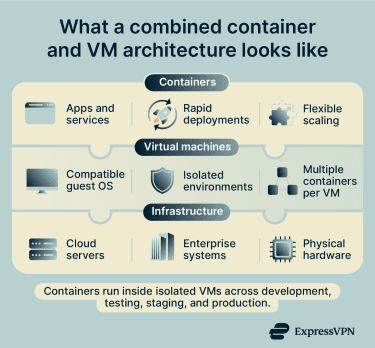 Containers and VMs provide abstraction at different levels of the computing stack, so they are often used together. VMs virtualize hardware and run complete guest OSs, while containers package and isolate applications within a compatible OS environment.
During development and testing, teams may use VMs to run different OSs or create isolated environments. Multiple containers can then run inside each VM, helping manage dependencies and maintain consistency across development, testing, staging, and production.
This combination is also common in production. VMs can provide the underlying infrastructure and stronger workload isolation, while containers support application deployment, scaling, updates, and rollbacks. Cloud container platforms frequently follow this model.
Docker Desktop on Windows provides a familiar example. Linux containers cannot run directly on the Windows kernel, so Docker can use the Linux kernel supplied through WSL 2. WSL 2 runs this kernel inside a lightweight, managed VM, while Docker manages the Linux containers running in that environment.
Application updates can generally be deployed by rebuilding and replacing the relevant containers without rebuilding the underlying VM. However, the VM and its OS still require separate maintenance, security updates, and configuration management.
Docker vs. VM: Which one should you choose?
Containers are commonly used when applications require reproducible environments, rapid deployment, and flexible scaling. VMs are commonly used when workloads require a complete guest OS, stronger isolation, support for different OSs, or greater system-level control.
The lightweight and modular nature of containers allows application components to be deployed independently. This supports granular scaling and makes containers common in microservice architectures, CI/CD pipelines, and cloud-native platforms. Containers can also package and deploy monolithic applications.
Orchestration platforms can dynamically manage and scale large numbers of container instances with relatively little manual intervention. Component-based architectures allow individual services to be updated or scaled separately, whereas monolithic applications are generally deployed and scaled as a single unit.
VMs are widely used when teams need to run multiple environments or different guest OSs on the same hardware. Provisioning a VM is generally faster and less costly than provisioning new physical hardware. Although VMs typically take longer to start than containers, cloud platforms can automatically provision and scale VM instances according to demand.
VM instances may persist for extended periods or be stopped and restarted repeatedly. In autoscaling and immutable infrastructure models, they may instead be dynamically created, replaced, and terminated.
Containers and VMs are used across industries and throughout the SDLC. Containers commonly support rapid application deployment and scaling, while VMs provide complete guest OS environments with greater system-level control.
FAQ: Common questions about Docker vs. VM
Is Docker replacing virtual machines?
Is Docker faster than a virtual machine?
Can Docker run without a virtual machine?
Are containers more secure than VMs?
Containers typically share the host kernel, creating a larger shared attack surface. A host compromise may affect its containers, while a kernel or runtime vulnerability may allow an attacker to escape a container. Docker provides controls such as seccomp profiles, user namespaces, reduced capabilities, and rootless operation to strengthen isolation.
What are the limitations of Docker?
Do companies still use virtual machines in 2026?
How do Docker containers handle scaling compared to VMs?
What is the easiest way to get started with Docker or VMs?