
How to keep your online accounts safe during the FIFA World Cup 2026™


The FIFA World Cup 2026™ will span multiple host cities and draw massive global crowds. Roughly 6.5 million fans are expected to pass through stadium gates, with many more booking travel, chasing resale tickets, and refreshing the FIFA World Cup 2026™ app from hotel Wi-Fi.
If you’re booking flights, buying tickets, or logging into accounts on the go, you’re likely more exposed to scams than usual. You may be using unfamiliar networks, making quick decisions, or dealing with time pressure, all of which can make it easier to overlook warning signs.
Cyber threats to watch out for
Major events like the FIFA World Cup 2026™ make scams more likely, thanks to high demand, urgency, and crowds of people unfamiliar with their surroundings. Here are the scams you’re most likely to run into during the FIFA World Cup 2026™.
Fake ticket sites and speculative listings
Resale platforms often list FIFA World Cup 2026™ seats for thousands of dollars, sometimes before official tickets even exist. Some are speculative listings (the seller is gambling they’ll find a ticket later). Others are simply fraud.
A few rules to keep in mind:
- The only authorized sources are the official ticketing platforms.
- The only sanctioned secondary markets are the official resale and exchange marketplaces.
- There are no PDF tickets in 2026. All tickets are digital and delivered through the official FIFA World Cup 2026™ app. If anyone offers a PDF or a printout, it’s a fake.
- Tickets bought outside authorized channels may be canceled at any time without notice. So even a “real” ticket bought off Facebook Marketplace can be voided before reaching the turnstile.
Learn more: How to avoid ticket scams when buying FIFA World Cup 2026™ tickets
Copycat sites for hotels, flights, and visas
While ticket scams often make the headlines, accommodation fraud is a problem as well. Fraudsters may clone travel bookings, set up accommodation scams in cities where supply is tight, or run paid ads that appear in search results alongside legitimate sites.
The patterns to watch for:
- Prices noticeably below market. “Below” being the keyword, not “cheap.”
- Hosts pushing for payment outside the platform: “WhatsApp me directly for a 20% discount.”
- Brand new listings with thin reviews, or stock photos that can be found with a reverse image search.
- Slightly misspelled domain names or small variations from the real ones.
Some sites may go further and act as fake login pages, prompting users to enter their email and password. These can then be used for identity theft or financial fraud.
International fans flying into the U.S. should also know about Electronic System for Travel Authorization (ESTA) scams. Third-party sites that offer to process your ESTA for a fee are not official government services. You should apply directly at esta.cbp.dhs.gov/.
Phishing messages
Once you’ve booked travel or bought tickets, you may become a more attractive target for phishing attempts. Phishing messages can pretend to be from the FIFA World Cup 2026™ organizers, airlines, hotels, banks, or delivery services and try to get you to click a link without thinking.
Common scripts include:
- "Your ticket is at risk. Confirm your account within 24 hours."
- "Itinerary change: Review your booking here."
- "You've won a competition draw for a ticket to the final."
- "Your delivery is held up at customs; pay $4.99 to release it."
If a message creates urgency and contains a link, treat it as a warning sign. Clicking the link can take you to a fake site or install malware.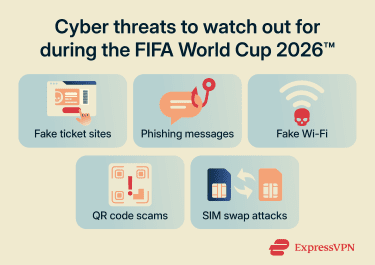
Public Wi-Fi and fake hotspots
Public Wi-Fi at airports, hotels, and stadiums is convenient and often safe for basic browsing. In many cases, the real risk isn’t the official network; it’s the fake one with a similar name.
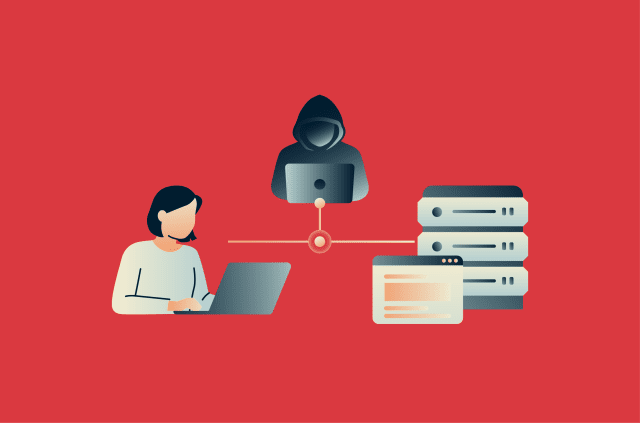
For example, you might see two networks at the airport: Airport_Free and Airport_Free_WiFi. One is real; the other is controlled by an attacker. It’s called an evil twin attack. If the user connects to the fake network, the attacker may be able to monitor unencrypted traffic or redirect the user to fake websites.
Even when networks are legitimate, they’re shared with many users. On poorly secured networks, this can increase the risk of interception or snooping.
Learn more: The complete guide to Wi-Fi safety at the FIFA World Cup 2026™
Risky QR codes
QR codes are everywhere, which can make them easy to abuse. Called QR phishing (or quishing), attackers place stickers over real QR codes on restaurant menus, parking meters, or EV chargers. Visitors scan them expecting a payment site. Instead, they get a fake login page or a malicious download.
SIM swap scams
A SIM swap scam is when someone convinces a mobile provider to transfer your number to a SIM or eSIM they control. Once they have the number, they may be able to receive SMS one-time passwords (OTPs) or account recovery codes.
Before you travel to the FIFA World Cup 2026™
Much of the work happens here. A little preparation can make a big difference.
Use strong, unique passwords
If you reuse passwords across sites, one leaked password could grant access to all those accounts. Use strong, unique passwords for each of your online accounts. Aim for at least 12 characters, with a mix of letters, numbers, and symbols, or use a passphrase: a memorable string of unrelated words like purple-piano-radish-cliff.
A password manager like ExpressKeys can generate and store these for every account and autofill them so you don’t have to type anything. Spend some time adding your email, banking, FIFA World Cup 2026™ app, airlines, and hotel logins, and let it generate new passwords for those you’ve reused.
Turn on two-factor authentication
Enable two-factor authentication (2FA) on important accounts such as banking, email, and social media. This adds a second verification step, making it harder for attackers to access accounts even if they have the password.
SMS-based 2FA is better than nothing, but authenticator apps or hardware keys are generally more secure and don’t need a cellular connection to receive a code. If you only do this for one account, do it to protect your email. Email is the master key: anyone with access to it can hit “forgot password” on every other service you use.
Tip: ExpressKeys can generate 2FA codes, so you can keep your passwords and authentication codes in one place.
Update your phone, browser, and apps
Before you leave, install pending updates. Updates fix known security vulnerabilities that attackers exploit to gain access to your device. Once you’re abroad on hotel Wi-Fi, you don’t really want to be downloading a 2GB iOS update over a connection you don’t trust.
Where possible, turn on automatic updates so security patches install as soon as they’re released.
Install security tools
Set up security tools such as an antivirus and a virtual private network (VPN) on your device. An antivirus scans your device, including downloads, to detect malicious files and apps.
A trusted VPN like ExpressVPN is useful because it encrypts your internet traffic, which helps protect it from interception on untrusted networks. It also masks your IP address, reducing the risk of tracking and some location-based scams. However, it does not prevent phishing or fake websites, although some VPNs offer extra protection against malicious sites. For example, ExpressVPN’s Threat Manager helps block apps and websites from connecting to known malicious domains, reducing your exposure to scams and trackers.
Review apps and permissions
Before you travel, remove apps you no longer use. This reduces the amount of data stored on your device and limits unnecessary access.
For the remaining apps, review permissions in your device settings. Some access is required for functionality, such as camera access for scanning tickets. Others, like contacts or location, may not be needed.
When downloading the apps you need for the FIFA World Cup 2026™, use official app stores or websites, not links in an email. After installing, review and limit permissions to what’s necessary.
Back up your data
Before you leave, back up important files such as your contacts, travel documents, ID, reservation confirmations, and emails. If your phone gets lost or stolen, this could be the difference between a bad afternoon and a ruined trip.
On that note, also enable tracking or find device features:
- iPhone: Settings > [your name] > Find My > turn on Find My iPhone > activate Find My network and Send Last Location.
- Android: Settings > Security & Privacy > Find My Device > enable.
Enable transaction limits and alerts
Set daily and per-transaction limits on your cards. This helps keep track of spending and may help limit financial damage if a card is lost or stolen.
Also, enable transaction alerts on your banking apps. This can help identify unauthorized activity if an account is compromised during a FIFA World Cup 2026™ trip.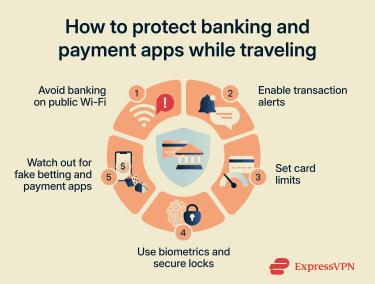
On the ground at the FIFA World Cup 2026™
Now you’ve done the prep, here are some daily habits to keep your account safe.
Stick to official apps and websites
Reselling, exchanging, or transferring a ticket to a friend who’s flying out? All of it goes through the official app. If anyone offers to “instant transfer” you a ticket through screenshots, WhatsApp, or anything else outside the official ticketing app, walk away.
Bookmark all the official sites for your tickets, travel bookings, and payments so you don’t need to rely on search results, where fake sites may appear.
Check the full URL before you type in a password. Look out for extra letters or unusual domains (the bit at the end). The padlock icon in the browser bar means the connection is encrypted. It doesn’t mean the site is real.
You should also be careful with links and QR codes. If you get an "urgent" message from your airline, hotel, or bank, check in the app or open the website in a browser. If a public QR code looks scratched, layered, or stuck over the top, check the URL preview before tapping.
Lock your messaging apps
Set a PIN, password, or biometric lock on all your social media and email apps. Then check what your lock screen shows when a notification arrives. Many phones default to showing message content. In a busy stadium, train, or fan zone, that may open you up to shoulder surfing, where someone can read sensitive information like a passcode or PIN when it flashes on your locked screen. Switch to “show notifications without preview.”
Check active sessions and linked devices
Applications like Telegram, WhatsApp, and LinkedIn let users stay logged in on multiple devices at once. While convenient, it means that if a device is stolen, an attacker might be able to exploit these active sessions to access accounts.
Open each app, find the linked devices list, and remove anything you don’t recognize. If you borrow a device, log out of all applications before handing it back.
Scams during high-profile events like the FIFA World Cup 2026™ often target fans. For example, an attacker may send a link to a discussion group. The page asks the user to scan a QR code to join the group, but the code really logs the attacker into the account on a different device.
Turn off automatic downloads
Disable automatic downloads in messaging apps. This prevents files from being saved to your device without your review.
Attackers may distribute unwanted or potentially malicious files disguised as ticket offers, promotions, or giveaways. Reviewing files before opening them can reduce this risk.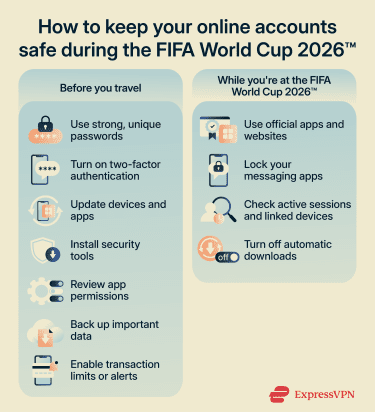
If something goes wrong
You now know how to secure your messaging, email, banking, and payment apps when at the FIFA World Cup 2026™. However, nothing is foolproof. So if something does go wrong, here are some tips on what to do next.
If your phone is lost or stolen
From another device, sign into Google’s Find My Device or Apple's Find My to locate (if online) it or see its last known location. Then enable Mark as Lost (Android) or Lost Mode (iOS) to lock your device, display a return contact message, and disable Apple Pay and Google Pay.
As a last resort, you can remotely wipe your device. However, you won’t be able to track the device afterward.
File a police report locally. Your travel insurance (and most credit card purchase protection) will need a report number.
If you think an account is compromised
If you suspect that your account has been compromised:
- From a different device, change the password.
- Sign out of all active sessions.
- Enable 2FA on affected accounts. If it was enabled, check that it still is and that the recovery phone number and email haven’t been changed.
- Run a security scan on your device if you clicked a suspicious link or downloaded a file.
- Check recent activity for any unauthorized actions.
- Notify your contacts if messages or links were sent from your account without your knowledge.
If money is at risk
If you get a transaction alert for something you don’t recognize, report it immediately.
- Call your bank to freeze your card.
- Dispute the charge formally. Try to call the same day to limit losses.
- Document everything: screenshots, transaction IDs, and dates and times.
- File a fraud report with the right agency:
- United States: https://reportfraud.ftc.gov/, plus https://www.ic3.gov/ for cyber-specific fraud.
- Canada: Canadian Anti-Fraud Centre (https://antifraudcentre.ca/) and the Competition Bureau.
- Mexico: Procuraduría Federal del Consumidor (PROFECO).
- If your identity was likely exposed (passport, license, or full Social Security number), you may be able to request a credit freeze to stop new accounts from being opened in your name.
FAQ
Is it safe to use my banking app during the FIFA World Cup 2026™ abroad?
Are ticket messages on WhatsApp safe?
Is hotel Wi-Fi safe for messaging apps and email?
Do criminals target tourists during the FIFA World Cup 2026™?
No approach is foolproof, but the basics are simple: stick to official channels, treat urgent messages as suspicious, and pay with a credit card.