What is a content delivery network? How CDNs work, their benefits, and the risks to know


A website hosted on a single server in New York loads quickly for someone in Boston. For someone in Los Angeles, that same page could take noticeably longer because the data has farther to travel and may pass through more network paths. Content delivery networks (CDNs) help reduce this delay.
This guide explains what a CDN is, how it works, and why websites use one. It also covers the main benefits and risks, how a CDN compares to web hosting, and what to look for when choosing a provider.
What is a content delivery network?
A CDN is a geographically distributed network of servers that helps deliver internet content faster and more reliably.
Rather than serving all website visitors from a single server in one location, a CDN can cache copies of content (images, videos, scripts, stylesheets, and sometimes webpages) across servers placed strategically around the globe. When a user requests a page, the CDN routes the request through its network instead of sending every request directly to the origin server.
Why content delivery networks matter
CDNs are a big part of what makes the modern internet feel fast.
When people talk about “site speed,” they often focus on bandwidth, such as how many megabits per second (Mbps) someone gets on Wi-Fi. Bandwidth matters, but latency also affects how fast a website feels. Latency is the delay between requesting data and receiving it, and distance is one factor that affects round-trip time. A server in New York and a user in Seattle will usually have more round-trip delay than a server in Seattle and a user in Seattle.
That delay can add up. A single page load can trigger dozens of separate requests for images, scripts, fonts, and other sources, each adding its own round-trip delay. CDNs help by serving cacheable content from edge servers closer to users, reducing the distance some requests must travel, easing demand on the origin server, and helping pages load more efficiently.
How does a CDN work?
A CDN relies on a few core components working in sync. Understanding what each one does makes the delivery process much easier to follow.
What are the main components of a CDN?
A CDN includes edge servers, caching layers, Domain Name System (DNS) routing, and origin infrastructure.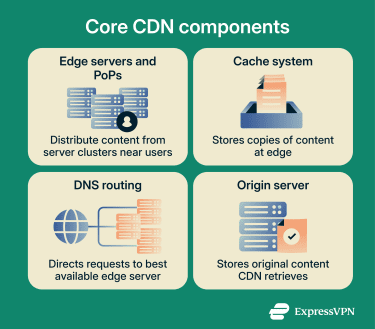
Edge servers and Points of Presence
An edge server is a server that sits at the edge of the network, as close to the end user as possible. In a CDN, they’re distributed across a CDN provider's network.
Edge servers are usually deployed in clusters, and each cluster at a given location is called a point of presence (PoP). A PoP is typically placed strategically for connectivity and performance, often in regions with high user density or where multiple network paths intersect.
CDN providers usually operate PoPs across dozens or hundreds of cities worldwide. More PoPs don’t always guarantee better performance, but they can indicate broader geographic reach.
Caching systems
Caching is the practice of storing copies of content so it can be retrieved faster later. In a CDN, caching usually happens on edge servers, allowing the network to serve content to nearby users without fetching it from the origin server each time.
Cache behavior is controlled through rules and HTTP headers. Content owners can specify how long certain files should be cached (the time to live, or TTL), when caches should be invalidated, and what should or shouldn't be cached at all. Getting this right is an important part of CDN configuration.
In practice, directives like Cache-Control tell caches whether they’re allowed to store something and for how long.
DNS and request routing
The DNS lets internet users use domain names, like example.com, instead of IP addresses. In CDN setups, providers often use DNS for request routing (called DNS-based routing) to direct users to an appropriate edge server rather than the hosting server directly.
What server the lookup resolves to usually depends on where the user is located. That said, many providers also factor in network conditions, congestion, server health, and capacity so users aren’t sent to an overloaded edge location.
More sophisticated CDNs use Anycast routing, where the same IP address is advertised from multiple locations simultaneously. Traffic is routed to a suitable nearby location, and if one location becomes unavailable, traffic can be routed to another available location.
Origin servers
The origin server is where the original website content lives. It’s the “source of truth” for what the CDN caches and serves. When a CDN edge server receives a request for content that isn't cached, it fetches the content from the origin and caches it for future requests.
A helpful way to think about it is this: the origin server is where content is created and updated, while the CDN distributes it to users.
The CDN delivery process
The delivery process starts the moment a user requests a resource, say, an image on a webpage. Here's what happens:
- The user's browser makes a DNS request to resolve the website address.
- The CDN's routing system returns the IP address of an appropriate edge server.
- The browser sends the content request to that edge server.
- If the content is cached (a "cache hit"), the edge server returns it.
- If the content is not cached (a "cache miss"), the edge server requests it from the origin, stores a copy, and then returns it to the user.
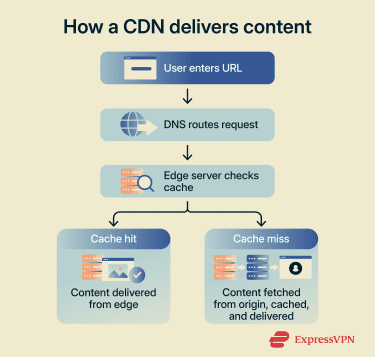
After that first cache miss, other users requesting the same content from the same region may receive the cached copy directly, without another trip to the origin. How long the copy stays valid depends on the caching rules set by the website owner.
Static and dynamic content delivery
CDNs handle two types of content differently. Static content, including images, CSS, JavaScript files, fonts, and videos, usually doesn't change between users and can often be cached for as long as the caching rules allow. This is where CDNs deliver the most obvious value: the same file is requested thousands of times, and the edge server handles each request without involving the origin.
Dynamic content is trickier. A logged-in user's dashboard, shopping cart, or personalized product recommendation may change depending on who is asking, when they ask, and which session data applies. That means there may not be a single version that can safely be cached and served to everyone.
Modern CDNs address this in three ways:
- Partial caching: Splits a page into cacheable and non-cacheable fragments. A product page, for example, might cache the layout, images, and description at the edge while fetching the price, stock level, or personalized recommendations from the origin.
- Optimized routing: Sends dynamic requests that can't be cached over efficient network paths between the edge and the origin. Even when the edge can’t serve the content itself, it can help reduce the time needed to fetch it.
- Edge computing: Runs lightweight application logic closer to the user. For example, the CDN may verify user authentication, personalize a response, or decide which page version to show in an A/B test at the nearest PoP.
Who uses CDNs?
Any website or platform that serves users across different locations, handles high traffic, or delivers large files has a reason to use a CDN. In practice, that covers most of the modern web, in particular:
- E-commerce websites: Product pages are image-heavy, and checkout flows are sensitive to delay. CDNs cache and deliver static assets close to shoppers and help absorb traffic spikes during sales events or product launches.
- Streaming and media platforms: Video and audio files are large, and users notice buffering immediately. CDNs distribute media efficiently at scale, including live streams where delivery needs to be fast and consistent.
- Gaming and interactive experiences: Patches, installers, and game assets are large static files that are well-suited to CDN caching. For players spread across regions, CDNs can also help deliver downloads and updates from closer network locations.
- Business websites and Software-as-a-Service (SaaS) platforms: Marketing pages, documentation, dashboards, and app interfaces often rely on shared static files that can be cached globally. For dynamic content that can't be cached, many CDNs can still improve response times through routing optimizations.
What are the benefits of using a CDN?
A CDN can improve speed, reduce strain on your origin infrastructure, and make a site more resilient under load. The exact benefits depend on your traffic patterns and your configuration, but these are the main ones.
Faster page load times
The most obvious benefit is speed. By caching assets at the edge, a CDN can serve content from locations closer to users, which typically reduces latency and improves load-time consistency.
That matters because users tie their behavior to perceived performance. A study from Deloitte found that a 0.1-second improvement in mobile site speed increased retail conversions by 8.4% and average order value by 9.2%.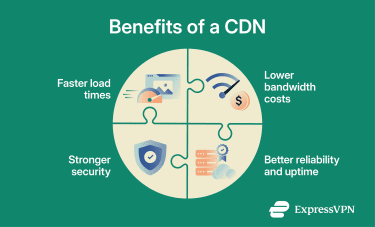
Lower bandwidth costs
Bandwidth costs often depend on how much data your origin server has to send. By serving cached content from the edge, a CDN can reduce the number of bytes leaving your origin, potentially lowering bandwidth consumption and related costs.
This is especially noticeable when serving large static assets or downloads that would otherwise be repeatedly pulled from the origin.
Better reliability and uptime
CDNs can improve reliability by distributing load across a network of servers. During traffic spikes, a CDN can use load balancing and distributed capacity so that no single origin server has to handle every request directly.
In practice, this approach can reduce the chance that traffic surges lead to slowdowns or downtime, especially when most requests are for cacheable content.
Stronger website security
A CDN can add a security buffer by sitting between users and the origin. In many setups, it acts like a reverse proxy, forwarding client requests to backend servers while adding controls that improve performance, reliability, and security.
Because CDNs are designed to handle large volumes of traffic, they’re commonly used as part of a distributed denial-of-service (DDoS) defense. Many also offer features like request filtering, rate limiting, and Transport Layer Security (TLS) configuration at the edge.
What are the risks and challenges of using a CDN?
A CDN can make your site faster and more resilient, but it also adds another layer of complexity between your users and your origin. The main risks usually come from unintended caching behavior, misconfiguration, third-party data exposure, and cost complexity.
Caching issues and outdated content
Caching always carries the risk of serving stale content. If caching rules are too aggressive, users may see outdated pages or assets until the cache expires or is purged. This is why modern caching relies heavily on explicit directives like Cache-Control, which can tell caches how long something is valid and whether it’s allowed to be stored at all.
The more serious version of this problem is caching content that was never intended to be cached, such as personalized or sensitive pages. Web cache deception is one example of how mismatched cache behavior can cause private content to be stored and served incorrectly.
Configuration errors and delivery problems
CDNs don’t remove the need for good architecture; they sit on top of it. If the origin is slow or unstable, your users will still feel it on cache misses. If your cache rules are inconsistent, behavior may vary across regions.
Misconfiguration can also directly expose the origin. “Origin exposure” means attackers may be able to discover and target the origin server’s IP address, bypassing CDN protections.
Security and privacy concerns
A CDN is a third party sitting in the request path. At a minimum, it will see user IP addresses and request metadata because it has to receive the request to serve the response.
Depending on how HTTPS is configured, the CDN may also terminate TLS at the edge. TLS termination means the edge device acts as the Secure Sockets Layer (SSL)/TLS endpoint, decrypts the request, and forwards it over a new connection to upstream servers. That can support performance and inspection, but it also changes who can technically access decrypted content.
DNS routing can add privacy trade-offs, too. For example, the EDNS Client Subnet (ECS) mechanism can include parts of a user’s network information in DNS queries for routing purposes, but it has documented privacy shortcomings.
Cost and vendor lock-in
CDN pricing is rarely just one flat monthly plan. Many providers charge based on data transferred from edge servers to users, and rates can vary by region. Storage fees, request-based charges, and add-on security features may also affect the final cost.
Vendor lock-in is the longer-term risk. In general terms, vendor lock-in is when switching providers becomes impractical because the cost and effort of moving are too high. With CDNs, lock-in can happen when a site relies heavily on provider-specific configuration, edge logic, or security tooling that doesn’t translate cleanly to another platform.
How to choose the right CDN provider
Picking a CDN provider is less about “who has the most features” and more about “what matches your traffic, content, and risk tolerance.” Use the criteria below to evaluate options systematically.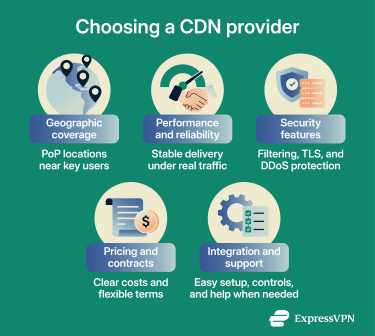
Geographic coverage and PoP density
Start with your audience. If most of your traffic comes from one region, you don’t need a provider with perfect coverage everywhere. But if your users are globally distributed, geographic reach and PoP placement matter, as PoPs are the physical locations where edge servers live.
Consider where PoPs are located relative to your top traffic regions and how the provider routes requests when a PoP is congested or unavailable.
Performance and reliability
Raw performance varies between providers. CDNs rely on caching and traffic distribution. A CDN that performs well under normal conditions but degrades under load or during partial outages may not be reliable enough for high-stakes applications. It’s worth asking:
- How do you measure cache effectiveness, and how do you handle cache misses?
- What’s your strategy for traffic spikes and load balancing?
- What visibility do you provide into latency and routing decisions?
If possible, test with both synthetic and real-user monitoring. Core web vitals (CWV) and field data are especially useful because they reflect real users and are commonly evaluated at the 75th percentile. Key metrics to look for include time to first byte (TTFB), cache hit rate, and service-level agreement (SLA) uptime.
Security capabilities
For many use cases, a CDN's security features are just as important as its performance characteristics. Key capabilities to evaluate include DDoS mitigation capacity, Web application firewall (WAF) quality and configurability, bot detection, and support for modern TLS versions and security headers.
Organizations handling regulated or sensitive data, such as healthcare, finance, or legal information, should verify that a CDN provider’s security posture, data-handling practices, and regional processing options align with applicable compliance requirements, including the General Data Protection Regulation (GDPR), where applicable.
Pricing and contract flexibility
Pricing models vary. Many providers price based on bandwidth, data transfer region, and request volume, while some also add fees for storage, invalidation, security, or edge compute. That means two CDNs can look similar on paper but behave very differently on your bill once traffic shifts across regions or content types.
Contract flexibility matters too. If your traffic is seasonal, you’ll want terms that don’t punish spikes. If you’re experimenting, you’ll want the option to scale up without immediately committing to a multi-year plan.
Ease of integration and support
The best CDN is the one your team can operate safely. A CDN that requires extensive technical setup or lacks clear documentation creates friction, particularly for smaller teams. Evaluate how easily a CDN integrates with the existing stack, including content management system (CMS) platforms, cloud providers, and continuous integration (CI) / continuous delivery or deployment (CD) pipelines, and what tooling is available for cache management, configuration, and monitoring.
Support quality matters too. During an incident, fast and knowledgeable support can make the difference between a minor disruption and a major outage. Check what support tiers are available and whether enterprise-grade support requires an expensive add-on contract.
CDN vs. web hosting
A CDN and web hosting work together, but they don’t do the same job. Web hosting is the foundation of a website. It’s where the site’s original files, application code, and databases live, and it’s the infrastructure that actually runs the site.
A CDN sits in front of that hosting setup. Instead of replacing the origin infrastructure, it helps deliver content more efficiently by caching copies of eligible files on edge servers across different locations. When someone visits the site, the CDN can serve those files from a nearby or optimal edge server, reducing latency and load on the origin.
That’s why people usually use web hosting and a CDN together rather than as alternatives. Hosting keeps the site online and processes the parts that need fresh, server-side logic. The CDN helps speed up delivery, improve reliability, and handle repeated requests more efficiently.
| Category | Web hosting | CDN |
| Main job | Stores and runs the website | Delivers content more efficiently |
| Best for | Dynamic content, app logic, and databases | Static files, media files, and repeated requests |
| Content comes from | Origin infrastructure | Distributed edge locations |
| Helps with | Keeping the site online and processing requests | Speed, caching, and traffic spikes |
| Still requires | Server management and origin security | Cache rules and routing setup |
FAQ: Common questions about CDNs
Do small websites need a CDN?
Can a CDN help improve core web vitals (CWV)?
How is a CDN different from cloud hosting?
Will a CDN affect website security and privacy?
When should you start using a CDN?
Can CDNs improve website security?
Take the first step to protect yourself online. Try ExpressVPN risk-free.
Get ExpressVPN

















Comments
ddd
{{7*7}}d
#{ 7 * 7 }