Venmo scams: 16 common tricks targeting personal and business accounts



Millions of people use Venmo to send and receive money, largely because of its speed and convenience. However, this also makes it an attractive target for scammers.
To help you stay ahead of these threats, this guide breaks down the most common Venmo scams. It covers how fraudsters target both personal and business accounts, the key warning signs to watch for, and practical steps you can take to stay safe.
How Venmo scams work: 16 scams to avoid
Venmo scams target both personal and business Venmo accounts and typically aim to trick victims into sending money or sharing sensitive information. Since these attacks vary depending on the target, we’ve grouped the most common tactics used by fraudsters into personal and business account scams.
Personal Venmo scams
Most scams targeting personal users on Venmo involve impersonation. Here’s a more detailed look at each:
1. Venmo impersonation scams
Fraudsters may use deceptive text messages, called smishing, and sometimes phone calls to impersonate Venmo staff and trick victims into handing over account access.
In the text version, scammers may send a fake two-factor authentication (2FA) message mimicking Venmo's real verification texts, with a link to a spoofed login page designed to steal the victim's password. In the phone version, scammers may attempt to log into the victim's account first, which triggers a genuine 2FA code to their phone. They then call posing as Venmo support and ask the victim to read the code back.
2. Fake job scams
Some scammers create fake job listings, usually for remote jobs, where they pose as employers. Once a victim expresses interest or agrees to the fake position, scammers ask them to pay an upfront fee via their Venmo account for equipment or training costs that don’t exist.
In some versions of the scam, scammers ask victims to use their Venmo accounts to move someone else’s money, claiming it’s part of the job. Some fraudsters can take it as far as sending a fake advance or signing bonus and asking victims to return a portion of it via Venmo before the fraudulent payment is reversed.
3. Stranger-in-the-street scams
In this scam, someone approaches a victim in public and asks for a small donation, often for a school, sports team, charity, or community fundraiser. If the victim says they don’t have cash, the scammer suggests using Venmo, which makes the request seem quick and harmless.
The scam usually depends on getting physical access to the victim’s phone. The scammer may ask to “help” find their account, scan a QR code, or type in the donation amount themselves. Once they have the phone, they can quickly transfer far more money than the victim intended.
4. Fake check scams
This type of scam typically involves scammers sending victims a fake check and then asking them to return the money via Venmo. The check may initially appear to clear when the victim deposits it, because banks make funds available before fully verifying them. When the check is eventually flagged as counterfeit, the check bounces, leaving the victim responsible for the lost funds.
5. Accidental transfer scams
In these scams, fraudsters “accidentally” send money to victims, then ask them to return the extra funds as a separate payment. The catch is that scammers often use stolen Venmo accounts or credit cards to send the money.
When the real account owner reports the fraud, the payment gets reversed. If the victim returned the requested amount to the scammer, it leaves their balance negative.
6. Romance scams
This type of fraud often begins with online dating scams, where fraudsters create fake profiles and pretend to be romantically interested in the victim to build trust. Once they establish an emotional connection, they exploit it by asking for money via Venmo.
Fraudsters may claim the money is needed for travel expenses, such as plane tickets or hotel stays, to visit the victim. They may also make urgent or emotional pleas, saying the funds are needed for medical emergencies or investment opportunities.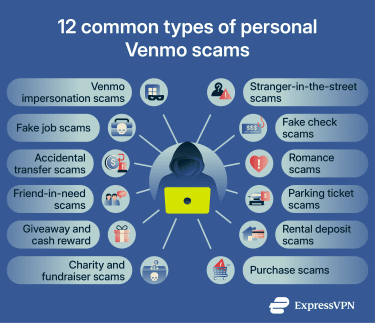
7. Friend-in-need scams
A friend-in-need scam involves fraudsters pretending to be someone close to the victim and exploiting that trust to ask for money. Scammers may check the victim’s public transaction feed on Venmo to identify people they’ve interacted with, then change their username and profile photo to impersonate a friend, family member, or trusted acquaintance.
From there, they fabricate an emergency and request a money transfer. They may claim they need funds for a medical emergency, to replace a lost device, or to fix their car, or keep the story vague and simply say they’re in trouble.
8. Parking ticket scams
Parking scams take two forms, both designed to intercept payments through Venmo. In the first, scammers place fake parking tickets on windshields containing a QR code that directs victims to a fraudulent Venmo payment page rather than an official city payment portal.
In the second, scammers target legitimate parking meters by placing counterfeit QR code stickers over the real ones. When scanned, victims are sent to a spoofed payment site and their money goes directly to the scammer's Venmo account.
9. Giveaway and cash reward scams
These scams involve fraudsters sending fake text messages or emails claiming the victim has won money from Venmo. The messages often prompt victims to click a link to claim their prize, which typically leads to a fake login page designed to steal their Venmo account details. In some cases, victims may also be asked to pay a small processing fee before they can receive the non-existent prize.
10. Rental deposit scams
In rental deposit scams, scammers pose as landlords and collect money through digital payments. For example, a scammer may post a fake property listing and use high-pressure tactics to convince victims to pay a deposit via Venmo before they can view the property, receive the necessary paperwork, or get access to the keys.
11. Fake charity and fundraiser scams
This is essentially a charity scam that involves Venmo. Fraudsters create accounts that impersonate real nonprofits by mimicking their handle with a minor alteration, such as an added underscore or a single letter change. They then usually target people with a known connection to the cause, such as past donors, followers, and community members, but they can also solicit “contributions” arbitrarily.
These scams are often most active during natural disasters, tragedies, and viral fundraising moments.
12. Purchase scams
Purchase scams typically play out on online marketplaces, where scammers either pose as sellers or buyers and use Venmo to exploit the transaction.
As a fake seller, a scammer lists a popular or hard-to-find item at an attractive price, requests Venmo payment upfront, and then either disappears or sends a fake shipping confirmation to buy time. In many cases, scammers may ask victims not to mark the payment as a purchase. This prevents the transaction from being covered by Venmo’s Purchase Protection, which applies to eligible items in cases of unauthorized transactions or non-delivery.
As a fake buyer, the scammer agrees to purchase an item, then sends a spoofed Venmo confirmation email claiming payment was made and pressures the seller to ship before checking their actual balance.
Venmo business account scams
In addition to using variations of the personal scams mentioned above, fraudsters may also target Venmo business accounts using the following strategies:
13. Fake invoice and payment receipt scams
Fraudsters may create fake Venmo payment confirmations or receipts and send them to businesses to make it seem like they’ve paid for ordered items. In some cases, they may also request a refund after providing the fake proof, tricking the seller into sending money.
Scammers may also claim they’ve sent the payment but that it will only reach the seller’s account after the item is shipped and the shipping information is uploaded. In reality, this isn’t how Venmo works.
2. Payments with stolen funds
Some scammers place orders and pay via Venmo using stolen credit cards or bank account details. Sellers often only realize something is wrong when the rightful owner reports unauthorized activity on their payment method. This can result in the funds being removed from the seller’s Venmo account.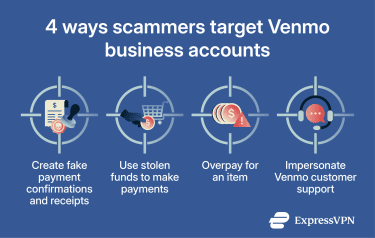
3. Overpayment scams
This scam involves fraudsters overpaying when ordering an item from a seller. For example, if an item costs $600, the scammer may send $1,200, then claim it was a mistake and ask the seller to refund the difference. However, the original payment is often made using stolen payment methods. When Venmo detects the fraud, the funds are removed from the seller’s account, leaving them at a loss.
4. Venmo customer support scams
Many scams involve fraudsters impersonating Venmo’s support team and contacting business accounts via phone calls, text messages, or emails. They often try to trick sellers into sharing account access, logging into or making payments to attacker-controlled Venmo accounts, or revealing 2FA codes.
More sophisticated scammers may create fake websites that mimic Venmo’s customer support pages. Sellers seeking help may land on these fake pages and unknowingly contact the fraudsters. They may then be persuaded to download a remote access app, allowing scammers to take over their device and compromise their accounts.
Signs you may be dealing with a Venmo scam
Common signs that may indicate a Venmo scam include:
- High-pressure messages: Venmo scams often involve urgent or alarming messages that push you to act before verifying any details.
- Unsolicited communication: Messages from strangers, unexpected payment requests, or unfamiliar transfers can be a strong warning sign.
- Links and attachments: Scammers may try to convince you to click a link or download a file as the “next step.”
- Low-effort messages: Emails or texts with spelling or grammatical errors, generic greetings, or low-quality images and logos are usually a red flag.
- Suspicious requests: Fraudsters may make requests that Venmo wouldn’t normally make, such as asking for 2FA codes, requesting remote access to your device, urging you to install a third-party app, or telling you to send money to another account.
How to protect yourself from Venmo scams
Following basic security best practices can help reduce your risk of Venmo scams. The sections below outline key measures and explain how to apply them.
Double-check payments and requests
Don’t send money to strangers, especially if you’re being pressured or threatened. Also, don’t transfer money on behalf of other people. You should only use Venmo to send money in your name. Additionally, only accept payments from people you know or trust. If you receive money from a stranger, don’t send it back. Instead, report it to Venmo.
Venmo also offers AI-powered, dynamic scam detection. If the platform flags a transaction and displays an alert, double-check it. If you spot issues, immediately cancel the payment and block the user.
Don’t reveal your 2FA code
Venmo may ask you to enter a 2FA code when signing up or logging in on a new device. Never share this code with anyone, as doing so could compromise your account. Venmo agents won’t ask for it, so if someone does, it’s likely a scam.
Use a strong and unique password
Ensure you’re using a strong password for your Venmo account by following these best practices:
- Make sure the password is at least 12 characters long.
- Mix letters, symbols, and numbers when creating the login.
- Don’t include common words or phrases.
If you need help coming up with a strong login, use a password generator. Also, consider using a password manager, like ExpressKeys, to securely store your credentials in an encrypted vault and auto-fill login fields on trusted platforms.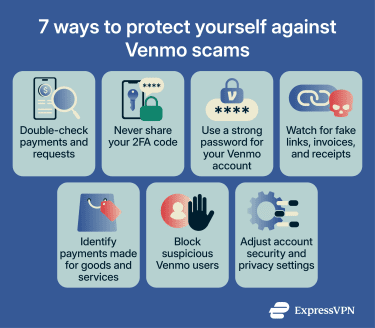
Watch for fake links, invoices, and receipts
Fraudsters often use link manipulation to trick victims into clicking deceptive links that lead to phishing pages. Common red flags include misspelled URLs, shortened links that hide unfamiliar destinations, and suspicious top-level domains (TLDs), such as “.xyz” or “.ml” instead of “.com,” which Venmo uses. If you notice any of these signs, don’t click the link.
Scammers also rely on fake invoices and receipts. If you receive a message with a receipt for something you didn’t buy, it’s likely a scam. Other warning signs include spelling errors, formatting issues, and high-pressure language.
Identify purchases of items or services
Venmo’s Terms of Service (ToS) state that once a transaction is complete, it may not always be possible to get a refund. However, the platform’s Purchase Protection program can help in some cases, such as when items don’t arrive.
Purchase Protection covers eligible Venmo Debit Card and business profile transactions, as well as payments marked for goods and services. So, if you use Venmo to pay for a physical or digital item or service, make sure to select this option. Otherwise, the payment may be treated as a personal transfer, which isn’t covered by Purchase Protection.
Block suspicious users
If another Venmo user acts suspiciously, like trying to send you money you didn’t ask for, block them immediately. Once you do this, they won’t be able to send you payments or requests, view or comment on your future payments, or find your profile using the search function.
To block a Venmo user, follow these steps:
- Navigate to the user’s profile.
- Select the three dots in the top right.
- Select Block.
Review your privacy and security settings
Venmo offers several account settings that can help improve your privacy and security, including:
Payment privacy levels
You can set future payments to private to prevent scammers from using them to gather information about people you trust. Here’s how to do this:
- Access the Me tab.
- Select the gear icon in the top right to open the Settings menu.
- Next, select Privacy.
- Choose the Private option.
In the Privacy section, Venmo also offers an option to hide all past transactions. For enhanced protection, you should enable that feature as well.
Multi-factor authentication (MFA)
Venmo supports MFA options, including passcodes and biometrics. Once enabled, Venmo will require identity checks when you open the app or perform certain transactions.
Here’s how to enable MFA for your account:
- Navigate to the Me tab.
- Open Settings, look under Preferences, and select one of the following:
- Face ID & Passcode on iOS.
- Passcode code & biometric unlock on Android.
- Use the toggle to enable this security feature.
Note: If you can’t enable biometrics in Venmo, make sure they’re enabled in your general device settings.
Visibility settings
You can manage whether eligible PayPal users can find you through cross-platform search, such as by phone number. Consider disabling this option to limit exposure to potential scams. Here’s how to do it:
- Open the Me tab.
- Access Settings and select Privacy.
- Next, choose Find Me.
- Switch the toggle to the off position next to On PayPal.
What to do if you get scammed on Venmo
If you suspect you’ve fallen victim to a Venmo scam, do the following:
Step 1: Notify your bank or card issuer: Inform your bank or credit card provider about what happened. Ask them to dispute any charges if the scammer withdrew funds from a linked account.
Step 2: Secure your account: Change your Venmo password, remove any unrecognized remembered devices, and turn on the app passcode or biometric lock if you haven’t already. If you’ve used the same password for other important accounts, update those as well.
Step 3: Document the scam: Save all communication with the scammer, along with relevant screenshots, phone numbers, usernames, and email addresses. You may need this information when reporting the incident.
Step 4: Report the scam in Venmo: Contact Venmo support through the in-app chat or the support page and report the fraudulent transaction. If the payment is tied to a purchase and qualifies for Purchase Protection, you may be able to recover your funds.
Step 5: Place a fraud alert or credit freeze: If you suspect identity theft, contact TransUnion, Experian, and Equifax to request a fraud alert or credit freeze on your accounts. Tools like Identity Defender are also useful in these situations. It includes ID Theft Insurance* covering up to $5 million in eligible losses for U.S. subscribers on select plans.
Step 6: Notify the relevant authorities: If the loss is significant, file a report with local law enforcement. If you’re in the U.S., you can also submit a complaint to the Federal Trade Commission (FTC) at reportfraud.ftc.gov/.
FAQ: Common questions about Venmo scams
Can a scammer reverse a Venmo payment after I receive it?
Should I refund a payment from someone I do not know?
Can scammers fake a Venmo payment screenshot?
Do Venmo business accounts offer seller protection?
Is it safer to use a bank account, card, or Venmo balance?
Are business accounts more exposed to payment scams?
What should I do if a customer says they paid me but I cannot see the payment?
Can a Venmo business profile help reduce scam risk?
*The insurance is underwritten and administered by American Bankers Insurance Company of Florida, an Assurant company, under group or blanket policies issued to Array US Inc, or its respective affiliates, for the benefit of its Members. Please refer to the actual policies for terms, conditions, and exclusions of coverage. Coverage may not be available in all jurisdictions. Review the Advanced Tier Summary of Benefits and the Pro Tier Summary of Benefits.
Take the first step to protect yourself online. Try ExpressVPN risk-free.
Get ExpressVPN














Comments
Hi Osman, thanks for your article. Last week I did have some sort of rouge attack attempt to my PayPal acct. I use a password manager with 2FA generated within the app. I noticed the 2FA code would be rejected, I clicked the change password recovery. I managed to change strong password, and get into acct as usual, but the money I was trying to send would be blocked by my credit card bank (thankfully). I double checked with bank for issues, no problem there. I noticed a couple of phishing messages on my junk mail, suspiciously one had a time stamp right after one of my attempts. I also noticed that 2FA would fail the next day, so, besides changing strong password every time I had this problem, I changed the app 2FA for Google Authenticator, and it worked. Still the bank would block the transaction. I finally managed to make the transaction a couple of days later. The pasword manager support team suggested a rouge attempt. Later on I switched back to the app 2FA, and it works as it should. This attack seemed to be sophisticated since, apparently 2FA would be compromised. The phishing mails were also so on time with events. Around this area where I live, there have been news about rouge attacks to our ISP. I also read that use of VPNs could trigger suspicion on behalf of banks, and other institutions. On my attempts I also tried with, and without ExpressVPN, to rule out culprits. I'm glad there where security layers from all sides, since using Express VPN, strong passwords, 2FA, and the bank, all in conjunction, spoiled this attempt. A word of wisdom, change passwords once in a while, and if you can wait, leave that chore for another moment. In my case, the storm ended a couple of days later, probably when perpretators moved on somewhere else. Check with tech support, I did, there was a remote chance they could help, or at least be aware of the situation. Best regards
I have had at least 10 complaints against PayPal sellers, and won all of them.