

Augmented reality vs. virtual reality: What’s the difference and why does it matter?


Augmented reality (AR) and virtual reality (VR) are often grouped together, but they offer very different experiences and are used in different ways. AR adds digital elements to your surroundings, while VR replaces the real world entirely with a simulated environment.
Understanding the difference helps clarify where each technology is most useful, from everyday apps to specialized tools. This guide explains how AR and VR work, how they differ, their main benefits and drawbacks, and common use cases across different industries and sectors.
What is augmented reality?
AR is a technology that blends digital information with the physical world in real time. It uses a combination of hardware and software to overlay and anchor virtual content onto a user’s view of their environment, sometimes aligning it with real-world objects or surfaces.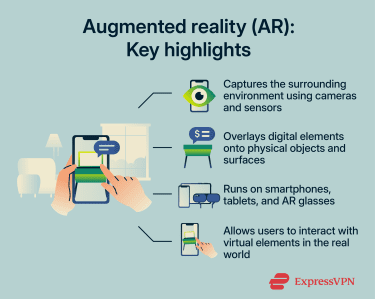
How augmented reality works
AR typically requires camera-equipped devices such as smartphones, tablets, or smart glasses, along with AR software that processes the environment and positions virtual elements within it. The AR process generally follows these steps:
- Sensing and tracking: The AR device captures video of the surrounding environment using its camera and collects data from sensors such as gyroscopes and accelerometers. These sensors measure the device’s movement and orientation, allowing the system to track how the device moves through the physical environment.
- Processing and recognition: AR software processes the collected data to understand the environment and determine where digital elements can be placed. This typically involves computer vision techniques such as Simultaneous Localization and Mapping (SLAM), which help map the environment, detect surfaces, and track the device’s position in relation to the surrounding space. Depending on the application, the system may also use AI to recognize physical objects, access 3D models stored in the cloud, or connect to a digital twin, which is a live virtual replica of a real-world object or system.
- Rendering and display: The AR app then generates computer-created content and sends it to the AR device for display. The device renders the information with the correct perspective and orientation so the digital element appears to exist naturally within the user’s field of vision.
- User input: Users interact with the AR experience through different input methods such as touching the screen, making hand gestures, moving the device, or using voice commands. The AR software processes these inputs and updates the digital elements accordingly.
Common types of augmented reality
AR can be classified in different ways depending on what aspect of the technology is being considered. One common classification is based on the tracking method used to anchor digital content:
- Marker-based AR: Uses predefined visual markers, such as QR codes, an image, or an object, to trigger a digital content overlay. When the system detects the marker through the device camera, it anchors digital elements to that marker.
- Marker-less AR: Relies on the device’s camera and device sensors to analyze the surrounding environment and determine where digital elements should appear.
AR can also be classified based on how the augmented experience is triggered or applied:
- Location-based AR: Uses geographic data such as GPS and compass sensors to trigger digital content at specific real-world locations.
- Projection-based AR: Projects digital images directly onto real-world surfaces using a projector so the augmented content appears on the physical environment, such as interactive projection tables used in museums or exhibitions.
- Superimposition-based AR: Replaces or enhances part of a real-world object or view with digital elements. For example, allowing furniture apps to show how a sofa or table would look inside a room.
What is virtual reality?
VR is a technology that creates computer-generated environments that users can explore and interact with. Instead of viewing the physical world, users experience a simulated space that can replicate real environments or create entirely fictional ones.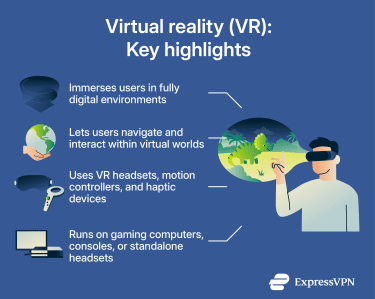
How virtual reality works
VR systems generate interactive 3D environments using computer graphics and simulation software. These environments update continuously based on user inputs, allowing users to explore and interact with the simulation in real time.
Many modern VR systems use a combination of specialized hardware and software components, including:
- VR headsets: Devices worn over the eyes that display the virtual environment using high-resolution screens and lenses that create a stereoscopic 3D effect and a wide field of view. Many headsets also include cameras and motion sensors that track the user’s head movement and position.
- Input devices: Users interact with the VR environment using input devices such as motion controllers, haptic gloves, omnidirectional treadmills, and eye or hand trackers. These devices allow users to navigate virtual environments, manipulate digital objects, and perform actions or gestures within the simulation.
- Motion tracking: VR headsets and input devices include sensors such as gyroscopes and accelerometers that track the user’s movements, including head orientation, body position, and hand gestures. Some systems also use cameras or external sensors to track the user’s position in physical space, allowing the virtual environment to respond in real time.
- Software: Applications that generate the VR environment, continuously render the simulation, and control how the digital world responds to user inputs. VR software also synchronizes the user’s real-world movements with the virtual environment and manages what happens when tracking is lost or when the user moves outside the system’s defined boundaries.
- Processing hardware: Devices that run the VR software and process the graphics needed to render virtual environments. These can include desktop computers connected to VR headsets, gaming consoles, or standalone devices, such as smartphones placed inside mobile VR headsets.
Common types of virtual reality
Depending on how it’s implemented, VR can be divided into several common types:
- Non-immersive VR: Displays a virtual environment on a standard screen, such as a desktop monitor, while the user remains aware of the physical world. Interaction typically occurs through a keyboard, mouse, or game controller. Many simulation or strategy games, such as The Sims, fall into this category.
- Semi-immersive VR: Provides a more engaging experience using large screens, projection systems, or specialized displays that partially surround the user. These systems are commonly used in professional training simulations, such as racing simulators used by teams in Formula One.
- Fully immersive VR: Completely surrounds the user with a digital environment using a VR headset and motion-tracking technology. Users can move and interact within the virtual world through controllers and sensors, as seen in VR games played on headsets like Meta Quest 3 or PlayStation VR2.
Augmented reality vs. virtual reality: Key differences
Although AR and VR are often grouped together as immersive technologies, they differ significantly in how they deliver digital experiences and the technology required to support them. The main differences lie in their level of immersion, the devices used to access them, and the types of interactions they enable.
Here’s a quick look at how AR and VR differ: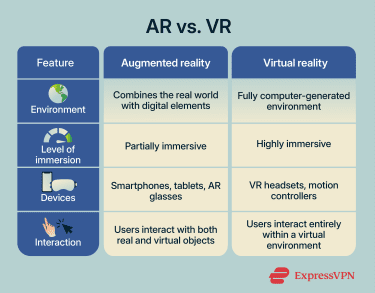
Immersion and user experience
AR and VR differ mainly in how much they separate users from the physical world. AR keeps the real environment visible and adds digital elements to it, allowing users to interact with both physical and virtual objects at the same time. This makes AR useful in situations where users still need awareness of their surroundings.
VR instead places users inside a fully simulated environment where all interaction occurs within the virtual space. Because the real world is removed from view, VR can create a stronger sense of presence in digital environments.
Devices and technology
AR is more accessible because it can run on devices most people already own, like smartphones or tablets. Some systems use specialized hardware such as AR glasses, but most AR experiences don’t require dedicated equipment.
VR systems typically rely on dedicated hardware, including VR headsets and motion controllers, to create immersive environments. Some systems also use powerful computers or gaming consoles to render virtual worlds. Plus, using VR typically means having enough physical space for users to move safely while wearing a headset.
Tracking and spatial awareness
AR and VR rely on different tracking systems because they interact with the physical world in different ways. To position digital elements correctly within the user's field of view, AR systems must analyze the surrounding environment. This typically involves cameras, depth sensors, and computer vision algorithms that detect surfaces, objects, and device movement.
VR systems focus on tracking the user rather than the environment. Headsets and controllers use motion sensors and cameras to monitor head position, orientation, and hand movements so the virtual environment can update as the user moves.
Performance requirements
Both AR and VR require real-time rendering, but their performance demands differ. VR systems must maintain very low latency and high frame rates to preserve immersion and prevent motion sickness. Even small delays between user movement and visual updates can disrupt the experience.
AR systems face a different challenge: keeping digital elements accurately aligned with the real environment. This requires continuous processing of camera data and spatial information so virtual objects remain correctly positioned as the user or device moves.
Common AR and VR use cases
AR and VR have applications across many sectors, including business, education, entertainment, healthcare, and training. In some cases, the two technologies are used together to achieve better results.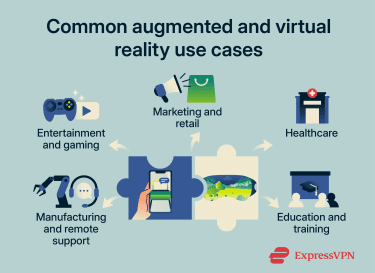
Entertainment and gaming
AR integrates digital elements with the real world, allowing players to interact with virtual objects in their physical surroundings. Common examples include mobile games that place characters or objects into the player’s environment so players can interact with them, and live-streaming effects like face filters or background overlays.
VR, on the other hand, creates fully digital gaming environments where players can explore and interact with virtual worlds, non-playable characters, and other players. It’s widely used in immersive game genres such as rhythm, action-adventure, and first-person shooters. VR is also used for media streaming, enabling users to watch shows and live streams in virtual, immersive viewing environments.
Marketing and retail applications
AR is commonly used to help customers visualize products in their real environment before buying. For example, shoppers can see how furniture would look in their home before purchasing it, virtually try on clothing or accessories, or preview how customization options would look in their new cars.
VR can be used to create fully virtual stores or showrooms where people can walk around, examine, or purchase items, take behind-the-scenes tours, and have immersive product demonstrations.
Healthcare applications
AR supports real-world medical tasks by superimposing digital information onto physical environments. Its applications include visualizing human veins for blood-drawing procedures, assisting with surgical planning, or displaying critical data during operations.
VR can be used for simulation and therapy in healthcare. It allows medical professionals to practice procedures in controlled virtual environments and can also be used to support treatments, such as helping patients manage pain or anxiety through immersive experiences.
Education and training applications
AR enhances learning by adding interactive digital content to real-world materials. Students can explore 3D models, examine objects without physical access, or receive contextual information during hands-on activities.
VR provides fully simulated learning environments where users can gain practical experience. It’s commonly used for scenarios that are difficult to replicate in real life, such as virtual classrooms, complex simulations, or skill-based training in controlled settings.
Manufacturing and remote support
AR is used to support real-world workflows by overlaying instructions, diagrams, or system data directly onto equipment and environments. This helps with tasks like maintenance, assembly, and on-site troubleshooting, as well as remote assistance.
VR is used for planning and pre-production by allowing teams to visualize and test designs in fully virtual environments. Engineers can simulate workflows, identify issues before construction, and refine processes without interacting with physical systems.
Security and privacy considerations for AR and VR
AR and VR systems raise security and privacy considerations because they rely on sensors, cameras, and user data to function. While some concerns overlap, others depend on how each technology interacts with users and their environments.
The points below focus on considerations specific to AR and VR systems. General cybersecurity best practices, such as using trusted apps, remain important across all digital technologies.
Augmented reality risks
- Environmental data collection: AR applications capture large amounts of environmental data through cameras and sensors. This may reveal details about private spaces, nearby individuals, or sensitive locations.
- Reliance on external content: AR overlays may come from external providers or applications. Inaccurate or manipulated content could mislead users, especially when digital information appears integrated with the physical world.
Virtual reality risks
- Biometric data collection: VR systems may collect highly personal data such as hand movements, facial geometry, eye tracking, and voice patterns. This information can reveal sensitive behavioral characteristics and raises concerns about how biometric data is stored or used.
- Behavioral data and profiling: Motion-tracking data can reveal unique patterns of movement, attention, and reactions. Over time, these patterns could be used to profile users or potentially identify individuals.
The future of augmented reality and virtual reality
Common examples of AR and VR trends that may get more traction in the following years include:
- Advanced haptic devices: More sophisticated full-body suits and haptic sleeves that provide stronger physical feedback, improving immersion when gaming, watching movies, or experiencing other virtual content.
- AI integration: The use of AI systems within AR and VR to generate content such as virtual characters, levels, and environments, and to provide helpful information like directions, translations, or summaries.
- 5G integration: The high-speed connectivity, low latency, and high throughput of 5G can reduce technical bottlenecks and offload heavy processing to the cloud, helping future AR and VR devices become lighter and more affordable.
FAQ: Common questions about augmented and virtual reality
What is the difference between augmented reality and virtual reality?
Is augmented reality better than virtual reality?
What are the disadvantages of augmented reality?
What are the disadvantages of virtual reality?
What is an example of augmented reality and virtual reality?
How do AR and VR improve healthcare?
What is mixed reality?
Explore the web with greater privacy
Get ExpressVPNSign up today for a chance to win FIFA World Cup 2026™ tickets.