Pharming vs. phishing: What’s the real difference?



Pharming and phishing are both forms of cyberattack that aim to steal sensitive information, but they achieve this in different ways. Phishing relies on victims directly providing information, while pharming secretly reroutes their internet traffic.
In this guide, we’ll explain the difference between pharming and phishing so you can understand how each attack works, what real-world examples look like, and why some warning signs are easy to miss. We’ll also provide tips for how to protect yourself against these credential harvesting techniques.
What is pharming?
Pharming is an online scam in which attackers manipulate how web addresses are resolved. They redirect users from legitimate websites to fraudulent ones, which are designed to steal login credentials or other sensitive information.
How pharming works
Pharming targets the systems that help your browser reach a website in the first place. When you type a web address into your browser, the Domain Name System (DNS) translates that name into an IP address so your device knows where to connect. Under normal conditions, this process sends you to the correct site every time.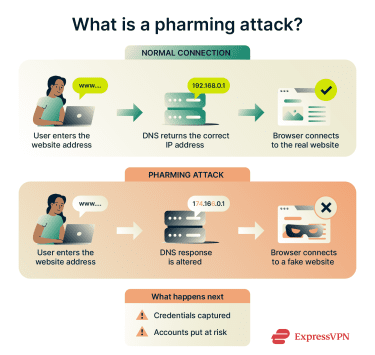
A pharming attack manipulates this lookup process by compromising DNS servers, network devices, or local configurations. Instead of pointing your browser to the real website, it sends you to a fake one that closely copies the original. From your perspective, everything looks normal. The address often appears correct, and the page may load as expected.
However, if you enter login details or other sensitive information on that page, attackers can capture it and use it to access your real accounts. Because the redirection happens before the page loads, pharming often works without any obvious warning signs or unusual behavior.
Common pharming techniques
There are several techniques that bad actors use to carry out a pharming attack.
Malware-based pharming and name-resolution attacks
Malware-based pharming starts when the user inadvertently downloads malware, such as a Trojan or a virus. The malware can alter local settings, modify the hosts file, or redirect traffic through rogue DNS servers. As a result, when the user attempts to visit a legitimate website, the device is redirected to a fake site controlled by the attacker.
DNS server poisoning
DNS poisoning targets the systems that translate website names into IP addresses. When attackers corrupt a DNS server, it returns false address information for legitimate websites. Any device that relies on that server can get redirected to a fraudulent site without installing malware or clicking a suspicious link. Because a single DNS server can serve many users, this technique allows attackers to reach large numbers of users at once.
Local and network-level cache poisoning
In some cases, attackers inject false DNS records into caches used by routers, local resolvers, or servers. Once this incorrect information is stored, devices continue to reuse it and repeatedly connect to the wrong website until the cache expires or is cleared. Because cached data is trusted by default, these attacks can persist even after the original issue is resolved, making them harder to detect. They often affect shared environments such as home networks or unsecured public Wi-Fi.
DNS cache poisoning vs. DNS hijacking
From a user’s perspective, DNS cache poisoning and DNS hijacking often look the same. You type a URL in your browser and get redirected to a spoofed site that appears legitimate. There’s usually no warning, no suspicious link, and no obvious sign that anything went wrong.
The difference comes down to where the manipulation happens. DNS cache poisoning works by inserting false address information into a DNS cache. Once that data is stored, the system keeps reusing it and continues sending traffic to the wrong site until the cache is cleared or expires.
DNS hijacking takes control of the DNS lookup process itself. Instead of inserting false records into a cache, attackers interfere with how DNS queries are resolved or where they’re sent. This can happen in several ways, including changing DNS settings on a router, compromising DNS servers, or forcing devices to use rogue DNS resolvers controlled by the attacker.
Unlike cache poisoning, DNS hijacking is not always a real-time attack. In many cases, it involves frequent configuration changes that continue redirecting traffic until the settings are corrected. As long as the hijacked resolution path remains in place, every request for a targeted domain can be silently redirected to a spoofed site.
What is phishing?
Phishing is one of the most common cyberattacks. It’s an attempt to trick people into sending sensitive information, such as login credentials, credit card numbers, and other personally identifiable information. The attackers impersonate another person or entity to trick their victims into sending this information.
How phishing works
Phishing attacks rely on deception rather than technical exploits. Attackers impersonate trusted people or organizations, such as employers, banks, or service providers, and use social engineering tactics to manipulate behavior. These messages often create urgency, fear, or curiosity, and they aim to push victims into acting quickly without verifying the source.
A phishing message typically prompts the victim to click a link, open an attachment, reply with sensitive information, or approve a request such as a login or payment. Those actions either send information directly to the attacker or lead the victim to a fake website designed to capture credentials, financial details, or other personal data.
Common phishing techniques include:
- Email phishing: Messages that imitate coworkers, companies, or services and push users to click a link or sign in.
- Spear phishing: Targeted phishing messages tailored to a specific individual, role, or organization, often using personal or contextual details to appear more convincing.
- SMS phishing (smishing): Text messages that claim an account issue or delivery problem and include a malicious link.
- Voice phishing (vishing): Phone calls that impersonate support teams or financial institutions.
- Social media phishing: Fake profiles or direct messages that share malicious links or impersonate real contacts.
Key differences between pharming and phishing
Pharming evolved from phishing to create a more focused method of stealing personal information that’s harder to detect and block.
Attack methodology
- Phishing works by prompting action: Attackers send a message that tries to persuade you to click, reply, or sign in. The attack only succeeds if the user engages.
- Pharming works by altering the route your traffic takes: Instead of asking you to do something unusual, it redirects you silently. You can type the correct web address and still end up on a spoofed site without realizing it. Once you enter your login credentials (or credit card details if it’s an e-commerce site), that data goes to the attackers instead of the secure website you thought you were on.
Tools and techniques used
- Phishing relies on communication tools: Attackers use emails, text messages, phone calls, or direct messages that imitate people or services you recognize. Once a user engages, attackers may capture information in several ways, including fake websites, direct replies, malicious attachments, or fraudulent requests.
- Pharming relies on technical manipulation: It targets DNS systems, routers, or local device settings to change where traffic goes. The attack happens before a page loads, which makes it harder to notice.
Scale of impact
- Phishing usually affects individuals one at a time: Attackers may send messages to thousands of recipients, but each compromised account affects one person at a time. The damage grows gradually as more users fall for the scam. That said, in corporate environments, a single compromised account from a successful phishing attack can sometimes provide lateral access to internal systems, allowing one attack to scale beyond the initial target.
- Pharming can affect many users at once: When attackers compromise shared infrastructure, a single change can redirect traffic for many users at once. Attackers can redirect traffic for entire networks, offices, or customer groups without requiring any action from individual users.
Target audience (individual vs. organization)
- Phishing targets individuals directly, but not always in a personalized way: Some attacks are highly targeted, such as spear phishing campaigns tailored to a person’s role, habits, or recent activity. However, many phishing campaigns are broad and use generic messages designed to reach large audiences at scale.
- Pharming more commonly impacts organizations, service providers, or networks: While individuals still suffer the consequences, the attack surface usually sits at a higher level.
Pharming vs. phishing at a glance
| Aspect | Pharming | Phishing |
| How it starts | Traffic redirection caused by manipulation of DNS, routing, or local resolution settings | Deceptive messages via email, text, calls, or online platforms |
| User interaction required | No deliberate action to reach the malicious site; redirection happens automatically | Yes, users must engage by clicking, replying, signing in, or approving a request |
| Primary attack surface | DNS infrastructure, routers, network devices, or local system settings | Communication channels such as email, SMS, phone calls, and social platforms |
| Visibility to the user | Low; the website often appears legitimate, and the URL may look correct | Often noticeable: messages, links, or requests may raise suspicion |
| Typical scale | Infrastructure-level: a single compromise can redirect traffic for many users at once | Account-level: typically affects one account at a time, but can escalate in organizations |
Recognizing the signs of each attack
Avoiding phishing and pharming starts with spotting the warning signs before you hand over sensitive information. With phishing attacks, those signs are often more obvious. The attacker has to ask for information directly or push you toward a link that leads to a spoofed site.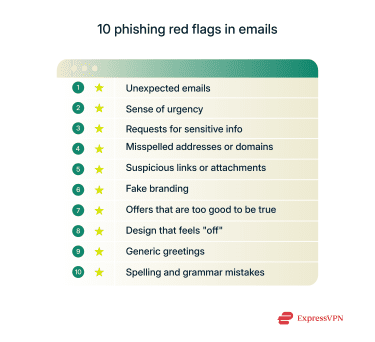
Pharming attacks are harder to recognize because they happen in the background, often without any obvious signs. In these attacks, the URL appears correct, removing one of the most common cues people rely on to detect scams. In well-executed pharming attacks, users may not notice any visible difference at all, as attackers can directly copy the legitimate site’s design and content.
In some cases, small technical or behavioral clues may still appear. The connection might behave unexpectedly, or the site may trigger browser security warnings related to certificates or encrypted connections. Properly configured websites that use protections like HTTP Strict Transport Security (HSTS) are designed to block HTTPS downgrades and enforce stricter handling of certificate-related changes. However, if a user’s device or network configuration has been compromised, those safeguards may also be tampered with, meaning even these warnings may not appear.
Spoofing: A related threat
Spoofing is a technique attackers use to falsify the identity of a trusted source, making communications or websites appear legitimate. Rather than being a standalone attack, spoofing supports both phishing and pharming by creating a sense of familiarity and trust that lowers suspicion.
In phishing attacks, spoofing often takes the form of email spoofing, where the sender address is forged to look like it belongs to a real person, company, or service. In these cases, attackers manipulate the sender name or email address shown to the recipient so the message appears legitimate at a glance. While email authentication checks may fail behind the scenes, those warnings are not always visible to users, especially in inbox previews or on mobile devices. As a result, the deception relies on what the user sees, not on the email actually being sent by the claimed organization.
Spoofing can also support pharming through website impersonation rather than email deception alone. In these scenarios, attackers first tamper with DNS resolution, for example, by compromising a router, device, or DNS server. They may then send a phishing email from a lookalike domain that contains a legitimate-looking link. When the user clicks it, the browser requests the correct domain name, but the compromised DNS system silently redirects that request to a spoofed website instead of the real one. From the user’s perspective, the link looks normal and the address bar appears correct, but the destination is controlled by the attacker. The deception happens at the network level, not because the user clicked a malicious URL.
In organizational or enterprise environments, email spoofing can become significantly more dangerous. Instead of merely deceiving the recipient, attackers may compromise or manipulate the DNS infrastructure used by an organization’s email servers. Because email authentication mechanisms like SPF, DKIM, and DMARC rely on DNS records, this can allow spoofed emails to pass verification checks and be treated as fully legitimate by the receiving mail system. Unlike consumer-focused spoofing, where warning signs may still exist, these attacks can leave both the email system and the user with no obvious indication that anything is wrong.
How to protect yourself from pharming and phishing
It's better to be proactive and reduce risk before an attack than to be reactive and limit damage after. This approach focuses on strengthening everyday defenses and putting safeguards in place that help catch problems early.
General cyber hygiene
Good online security habits reduce the chances of both phishing and pharming attacks succeeding. Keeping your operating system, browser, and apps up to date helps close known security gaps that attackers rely on. Don’t use the default password for your router, and always update to the latest firmware and DNS settings.
Using reputable anti-malware software adds another layer of protection by detecting malicious files and unwanted changes before they can cause harm. However, attacks that manipulate DNS or network routing may bypass these tools, so additional safeguards are necessary.
Two-factor authentication (2FA), too, plays an important role in reducing the impact of phishing and pharming, but its effectiveness depends on the method used. Basic 2FA, such as SMS codes or authenticator apps, can be bypassed in real-time phishing attacks where credentials and verification codes are relayed to the legitimate site. However, these methods still prevent many automated and delayed account takeovers. Stronger options like hardware security keys and passkeys offer phishing-resistant protection by verifying the website’s domain before authentication, which helps block access even when a user is tricked into visiting a fake site.
Using a password manager can also reduce your risk of falling victim to phishing and pharming attacks by limiting how and where your credentials are entered. Password managers typically autofill login details only on the exact domain they’re saved for, which means they won’t populate credentials on spoofed or look-alike websites. This can act as an early warning sign that something is wrong before any information is submitted. In addition, password managers make it practical to use long, unique passwords for every account, reducing the impact of a single compromised login and helping contain damage if one service or site is breached.
Anti-phishing tools and extensions
Most browsers and email services include built-in phishing protections designed to catch common threats before you interact with them. These features often go beyond basic spam filtering and can include link scanning, warning prompts for suspicious messages, and automatic blocking of known malicious domains. Keeping these protections enabled and your software up to date helps ensure they work as intended.
For additional security, browser and email extensions can add another layer of defense. Anti-phishing add-ons can highlight suspicious URLs, flag risky websites, and block known phishing domains in real time as you browse. Email-focused extensions may also detect unusual sender behavior, unsafe attachments, or patterns commonly associated with phishing campaigns.
Using a combination of built-in protections and trusted extensions reduces reliance on spotting every red flag yourself. Features like ExpressVPN Advanced Protection complement these tools by blocking access to known malicious sites at the network level before a page even loads.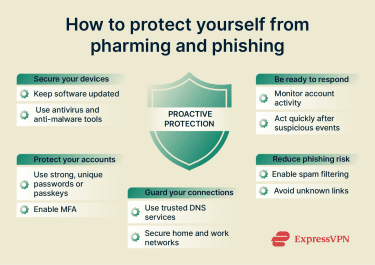
DNS protection strategies
DNS protection adds a layer of defense between users and the internet by stopping harmful connections before a site loads. Instead of relying on users to spot a fake page, secure DNS services block known malicious domains automatically. This helps reduce exposure to pharming attacks that rely on silent redirection.
Behind the scenes, DNS protection works by checking each request against threat intelligence. If a domain is flagged as suspicious, the request never completes, and the site doesn’t load. By cutting off access early, DNS protection limits the chance of credential theft and malicious redirects without adding extra steps for users.
Tips for organizations and enterprises
Organizations face elevated risk because a single compromised system, account, or infrastructure component can affect large numbers of users simultaneously, potentially leading to operational disruption, data breaches, or reputational damage. Reducing that risk means combining basic security controls with clear processes that limit damage when something goes wrong.
- Harden network infrastructure and access controls: Routers, access points, and network devices often ship with default credentials or outdated configurations. Replacing default passwords, restricting administrative access, and keeping network firmware up to date helps prevent attackers from abusing these entry points, a common factor in DNS-based pharming attacks.
- Secure remote access and name resolution paths: Organizations should ensure that remote access solutions and internal networks rely on trusted, monitored DNS resolvers. This reduces exposure to DNS manipulation when employees work remotely or connect from unmanaged networks.
- Adopt phishing-resistant authentication methods: Passwords alone are not sufficient at an enterprise scale. Using phishing-resistant multi-factor authentication (MFA) methods, such as hardware-backed authentication or certificate-based access, helps prevent account compromise even when credentials are exposed through phishing or pharming.
- Centralize DNS security and monitoring: Relying solely on default internet service provider (ISP) DNS services limits visibility. Security-focused DNS solutions allow organizations to block known malicious domains, monitor unusual resolution patterns, and respond quickly to redirection-based attacks across office and remote environments.
- Train employees and formalize incident response: Employee awareness still matters, but it must be paired with clear reporting and response workflows. Staff should know how to report suspicious messages or website behavior, and security teams should have defined procedures to investigate, contain, and remediate incidents quickly.
FAQ: Common questions about pharming and phishing
Is pharming more dangerous than phishing?
Pharming can be more difficult to detect than phishing, which makes it more likely to succeed. However, while the methods differ, the risks and potential damage they can each inflict are similar. Once the attacker has the data they’re after, they can access a user’s account or even steal their identity.
How can I tell if a website has been pharmed if the URL looks correct?
In many cases, you can’t tell immediately. In a pharming attack, the web address in your browser may be completely correct because the manipulation happens at the Doman Name System (DNS) or network level, not in the URL itself.
That said, there are a few warning signs that may indicate something is wrong:
- Your browser shows a certificate warning or security alert, or the HTTPS lock behaves unexpectedly.
- The page layout looks slightly off, outdated, or inconsistent with the real site.
- Links beyond the login page are broken or missing.
- The site asks for information it normally wouldn’t, such as recovery codes or full payment details during sign-in.
None of these signs are guaranteed indicators, but they’re often the only visible clues in DNS-based attacks.
What should I do if I suspect a site has been pharmed?
If something feels wrong, stop immediately and don’t enter any personal information. Then take these steps:
- Close the page and try again from a different network, such as switching from Wi-Fi to mobile data. If the site looks normal there, the issue may be tied to your local network or Domain Name System (DNS) settings.
- Restart your router and device, which can clear temporary DNS or routing issues.
- Flush your DNS cache on your device to remove potentially poisoned entries.
- Check your DNS settings and consider switching to a reputable public DNS provider.
- Report the issue to the affected website, especially if you encountered certificate warnings or unusual behavior.
What should I do if I fall victim to a pharming or phishing scam?
Act quickly. Change passwords for affected accounts, starting with email and financial services. Enable multi-factor authentication (MFA) if it’s not already active. If the incident involves work accounts, report it immediately so access can be reviewed and contained. Monitoring accounts for unusual activity in the following days is also important.
Are there security tools to detect phishing and pharming?
There are some tools that can help protect you from pharming and phishing attacks. Some browsers and email services include built-in protections that warn about known phishing sites, and Domain Name System (DNS)-based security tools can help block malicious redirects linked to pharming. Antivirus and anti-malware software also plays a role by detecting unwanted changes that could enable redirection.
How prevalent are these attacks today?
Phishing remains one of the most common online threats because it is easy to scale and adapt. Pharming is less common and obvious, but it’s still relevant, especially as attackers look for ways to bypass user awareness. Both continue to evolve, which is why layered defenses and proactive habits matter more than relying on a single warning sign.
Take the first step to protect yourself online. Try ExpressVPN risk-free.
Get ExpressVPN