Netflix scams: How to spot fake emails, texts, and billing alerts



A text says your Netflix payment failed. An email warns your account will be suspended tonight. A pop-up on your TV tells you to call support immediately.
These are all common Netflix scams. The messages are designed to feel routine and just urgent enough that you react before you stop to question them. The goal is usually to steal your Netflix login, payment details, or other personal information.
What are Netflix scams?
A Netflix scam is any message (an email, text, pop-up, or even a QR code) that impersonates Netflix to trick you into handing over your login, card details, or both. Netflix itself hasn't been hacked when these messages go out. Scammers just copy the brand because almost everyone recognizes it, just like they also impersonate Amazon, PayPal, or any other well-known company.
Imposter scams are the single-most-reported fraud category to the U.S. Federal Trade Commission (FTC), and Netflix, with its wide user base, is a recurring target in brand impersonation scams.
Why scammers target Netflix users
Three key things make Netflix particularly attractive to scammers:
- Reach: With hundreds of millions of subscribers, the odds of a scam blast reaching an actual Netflix customer are high. Even a 0.1% success rate at that scale can be profitable.
- Routine billing: Subscribers genuinely expect emails about payments, plan changes, password resets, and login alerts. A fake one can easily slot in without seeming suspicious.
- Resale value: A working Netflix login can easily be sold on dark-web markets, and the same email-and-password combo often unlocks other accounts where people reused the credentials.
Common Netflix scams
Most Netflix scam messages fall into one of a few patterns. Some create panic around billing or account access. Others try to lure people in with rewards or free subscriptions.
Fake billing problems and payment failures
This is one of the biggest Netflix phishing scams. Targets get an email or text claiming their card was declined, their subscription has been suspended, or their billing details need updating. There's a button or link, but clicking it doesn't take you to Netflix. It leads to a fake website built to steal whatever you type into it.
What makes this scam effective is that it sounds believable and creates enough pressure to make you act quickly.
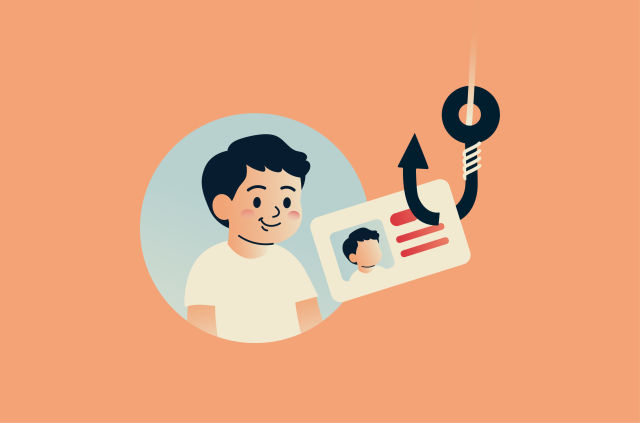
A more sophisticated variant goes a step further. After you hand over your card details, the fake page asks you to take a selfie holding your ID to "verify your identity." That's identity-theft material, not a legitimate Netflix request.
Some of these scams use a PDF attachment instead. It's the PDF that contains the phishing link. It's a way to work around spam filters that scan email body text but don't always inspect what's inside attachments.
The best thing to do when you receive a message like this is ignore it. Open your Netflix app or type netflix.com into your browser yourself. If there's a real billing problem, it'll show up inside your account. If you don't see anything, the message was a fake.
Suspicious sign-in and account takeover alerts
This one works well because Netflix really does send genuine new-device alerts, warning that someone has signed into your account from an unfamiliar device or location. The fake version copies the format almost perfectly, then routes you to a look-alike login page where "securing your account" means handing over your password.
Legitimate Netflix security alerts usually include details like the approximate location, device type, and time of access. But even if an email looks convincing, don't trust the message itself. The same rule applies: don't click the email. Open Netflix yourself and check your recent account activity. If there was a real sign-in, you'd see it there.
Free Netflix, gift card, and surveys
Not every scam uses fear. Some use rewards. These messages promise things like:
- A free year of Netflix.
- A gift card for completing a short survey.
- A "loyalty reward" or prize for a competition you didn't enter.
Clicking through can land users on a page asking for their Netflix login, address, and, sooner or later, their card details "to cover shipping" or "verify your identity." These are spread widely through social media and messaging apps, often dressed up with real Netflix branding, fake testimonials, and "limited-time" warnings.
Netflix does occasionally send research surveys, but it never asks for your password or payment information to take one. If a "Netflix offer" wants either, it's not Netflix.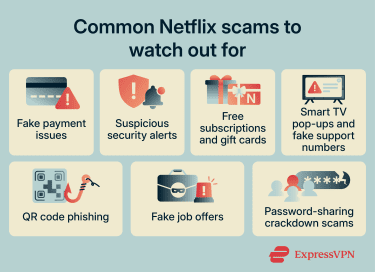
Smart TV pop-ups and fake support numbers
Some Netflix scams appear directly on smart TVs or streaming devices. This usually happens after mistakenly installing an unofficial app, visiting a suspicious website through the TV's browser, or being redirected through a malicious ad.
A fake Netflix-branded pop-up appears on-screen, claiming there's a problem with your Netflix account and urging you to call the "support" number provided.
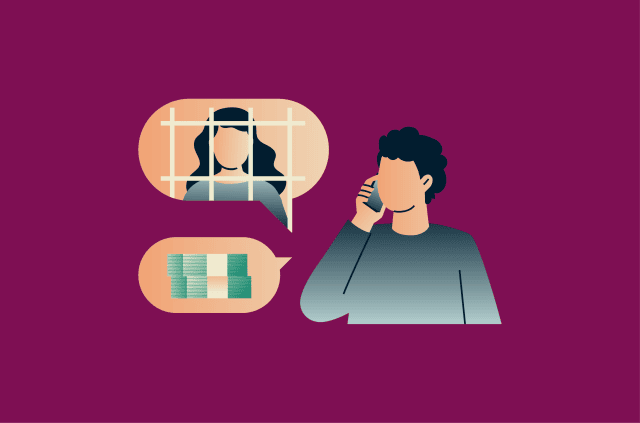
Calling the number connects you to a scammer posing as a Netflix support agent, a classic characteristic of tech support scams. The "agent" might ask for your Netflix login details, request payment information to "verify" or "restore" your account, try to convince you to buy gift cards and read the codes over the phone, or walk you through steps to install malicious software.
Netflix doesn't push support phone numbers through on-screen pop-ups. If you see a message like this on your TV, don't call the number. If you have an issue with your account, go to the Help section within the Netflix app or visit help.netflix.com.
Other tactics worth knowing about
While less common, here are some other tactics Netflix scammers use:
- QR code phishing (quishing): Some scam messages swap the clickable link for a QR code. People often scan these without thinking twice, and the destination URL is harder to inspect in advance. Most modern phones allow you to preview the link before opening it. Pause for two seconds and read it before tapping.
- Fake Netflix job offers: "Remote content reviewer, $35/hour, no experience needed." The pattern: an offer with no real interview, then a request for personal information or upfront payment for "training equipment" or "onboarding software." Netflix posts all real openings on jobs.netflix.com and doesn't recruit through unsolicited texts or social media messages.
- Password-sharing crackdown scams: After Netflix rolled out paid sharing globally in 2023, scammers started sending fake "household verification" or "policy violation" notices, often demanding a fee to keep the account active. Netflix communicates policy changes inside the app and on its website. It doesn't threaten suspension by SMS.
- Refund scams: Unfortunately, scammers sometimes target people who've already lost money once, assuming they'll be desperate to fix it. These recovery scams could appear as a fake "refund" message, a "Netflix fraud team" call offering to recover your money, or a "support agent" asking you to confirm what happened. Treat any unexpected follow-up the same way you'd treat the original.
How to tell a real Netflix message from a fake one
Modern Netflix scams can look convincing, especially now that scammers can use AI to write polished, natural-sounding messages. That means you may not be able to reliably spot a fake by looking for bad grammar, strange formatting, or an obvious mistake in the sender name.
The safest approach is simpler: don't click links in the message; go directly to Netflix instead. Also remember what Netflix will never ask you to do in a message. These two checks are more reliable than trying to decide whether an email, text, pop-up, or QR code "looks real."
Compare the message with your account
Type netflix.com into your browser, open the Netflix app, or use your password manager to open your saved Netflix login. A password manager can also help because it will only autofill your Netflix credentials on the correct saved website.
Once you're in your account, check whether the message matches what Netflix is showing you.
If your payment is up to date, your account is active, and you don't see any relevant warning inside Netflix, treat the message as fake.
Making this a habit removes the need to judge whether a message looks authentic. The account is the source of truth, not the message.
What Netflix will never ask you to do
According to Netflix's official guidance, Netflix won't ask you to share your password, full card number, or bank details by email or text. It also won't ask you to pay through a third-party website or vendor.
You should also be suspicious of any message, pop-up, app, or website that tells you to call an unexpected "Netflix support" number, download software, pay by gift card or wire transfer, or enter sensitive information outside Netflix's official website or app.
Additional checks
The checks below can help you investigate a suspicious message, especially if you want to understand how the scam works or learn more about URL phishing. But they should be treated as secondary checks, not as proof that a message is safe. They take more time, they require close attention, and some tricks, as you'll see below in the examples, are almost impossible to spot reliably at a glance.
Check the sender address, not the display name
The display name may say "Netflix" or "Netflix support," but that's just a label scammers can set to anything. Official Netflix emails generally come from addresses ending with the netflix.com domain (or netflixpreviewclub.com). Scammers use addresses that look close enough at first glance, such as netflix-support.com or netflix.billing-update.com. If you see anything with extra words, hyphens, or a different ending, it's a scam.
On phones, tap the sender's name to expand the full address. On a desktop, hover or click the small arrow next to the name. Don't rely on what shows in the preview.
For text messages, this check doesn't work, as texts have no domain, which makes SMS-based phishing (smishing) scams even harder to verify. Netflix generally doesn't send urgent billing or password requests by SMS, so treat any text asking you to click a link with extra suspicion.
Hover over links before clicking
On a computer, you can hover your mouse over the button or link. The real URL will appear at the bottom of the screen. On a phone, press and hold the link to preview it. Genuine Netflix links go to netflix.com (but customer surveys are an exception since they are hosted by third-party providers). Watch for tricks like:
- Extra words: Such as netflix-billing.com or secure-netflix.help.
- Random subdomains on cloud-hosting services: Such as netflix.account-update.s3.amazonaws.com.
- Look-alike characters: For example, netfIix.com uses a capital "I" instead of a lowercase "l." Some scammers go further and use letters from other alphabets that render identically to English ones: a Cyrillic "e" looks the same, but the address takes you somewhere else entirely.
Related: What is URL phishing? Everything you need to know
Look for phishing red flags
For years, one of the main phishing red flags was "look for typos and awkward language." It still spots some scams, but generative AI has more or less eliminated the obvious grammar tells. Modern phishing reads as smoothly as a real Netflix email. Subject-line punctuation might be off, branding might be slightly dated, or the greeting might say "Dear customer" instead of your name, but don't make a decision based on grammar alone.
Other signs of a phishing email include:
- Excessive urgency, with threats that your account will close today.
- Requests for sensitive information.
- Requests for unusual payment methods.
- Offers that are too good to be true.
A professional-looking message can still be fake, but obvious inconsistencies are often a strong warning sign.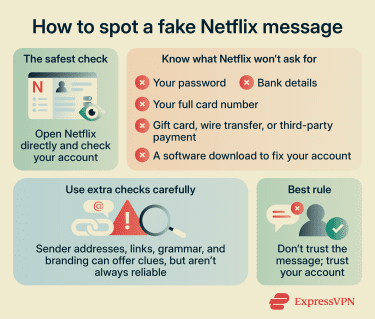
How to protect your Netflix account
Most Netflix account takeovers don't come from Netflix being breached. They come from people reusing the same password across multiple sites. When scammers gain access to one of those sites, they run those email-and-password combinations against Netflix accounts and walk straight in.
A few habits make a big difference:
- Use a long, unique password: At least 12–16 characters, and not one you've used anywhere else. A password manager like ExpressKeys handles this automatically. You remember one master password, and it generates everything else.
- Check if your email was in a breach: Visit Have I Been Pwned and enter your address. Eligible ExpressVPN U.S. users can also use ExpressVPN Identity Defender's ID Alerts for broader monitoring of exposed personal information. If your credentials show up in a known breach, change any passwords you reused across sites.
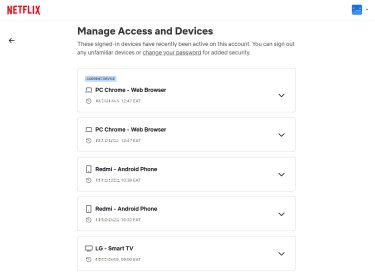
- Review your devices regularly: Open Account > Security & Privacy > Manage access and devices. Netflix's Manage Access and Devices page shows devices with recent streaming activity (although some devices can take up to 48 hours to show up). If you don't recognize a device, sign it out from that page. "Sign out from all devices" is one click and a useful option if you want to reset your password.
- Update payment details only inside the app or on netflix.com: Not through "verify your card" messages. If you need to change a card, go to Netflix directly.
What to do if you've been scammed
If you've already clicked or shared something, act quickly:
- If you entered card details, call your bank: Ask them to block the card and watch for unauthorized charges.
- Change your Netflix password: Log into your account through the official website or app and reset it to something strong and unique you haven't used anywhere else.
- Sign out of every device: From Manage access and devices, click Sign out of all devices. Then sign back in only on the ones you trust.
- Secure your email account: Change passwords on any account that shares the old Netflix password, starting with your email. If a scammer gets into your email, they can reset every other account you own.
- Run a malware scan: If you downloaded an attachment or installed anything as part of the scam, scan your device using a reputable security tool.
- Check for unauthorized activity: Review your Netflix account and bank statements for unfamiliar charges, profile changes, or plan upgrades you didn't make.
- Report the phishing attempt: Forward the original message to phishing@netflix.com and then report it to the right authority, depending on where you live:
- U.S.: reportfraud.ftc.gov; for cybercrime with financial loss, ic3.gov.
- U.K.: reportfraud.police.uk or forward suspicious texts to 7726 and emails to report@phishing.gov.uk.
- Canada: antifraudcentre.ca.
- Australia: scamwatch.gov.au.
- EU: Report to your national reporting website.
FAQ
Can scammers access my Netflix account with only my email address?
Should I click a Netflix link to fix a billing issue?
Can a fake Netflix page steal my payment details?
Is a Netflix refund message always a scam?
How do I check recent account activity on Netflix?
Can I recover my Netflix account after a scam?