Is Stripe safe? Security, risks, and what to know


Stripe is a payment platform that helps businesses accept online payments, manage money movement, and support payment methods such as cards, digital wallets, bank debits, and Link's one-click checkout.
Because it handles sensitive payment and identity data, businesses and customers may have questions about how Stripe protects transactions, helps prevent fraud, and manages account reviews, payout timing, and disputes.
Note: This article is for general educational purposes only and not financial, legal, or professional advice.
Is Stripe safe at a glance
- Platform-level security: Stripe is certified as a Payment Card Industry (PCI) Service Provider Level 1 and uses encryption, fraud detection, and other security controls to help protect transactions and data.
- Account protection: Account security is strengthened by strong passwords, two-factor authentication (2FA), and caution around phishing attempts.
- Reviews and delays: Payments or payouts may sometimes be reviewed, delayed, or held to help manage fraud and dispute risk.
How Stripe keeps payments secure
Stripe's security framework spans data protection, fraud prevention, and account-level controls, each addressing a distinct part of the payment process.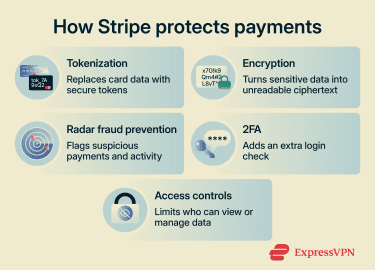
PCI DSS compliance and tokenization
Stripe's PCI certification reflects its compliance with the PCI Data Security Standard (PCI DSS), a global security standard for securing payment data. Its requirements include protecting stored card details, encrypting data in transit, limiting access by role, authenticating users, and monitoring and testing networks.
This platform also uses payment tokenization to reduce the risk of exposing sensitive card data. Tokenization replaces sensitive payment information with unique tokens that don't contain the original card details. Because tokens are not encrypted versions of the original card number, they cannot simply be decrypted back into card data. These tokens act as limited-use references within the payment system, reducing the value of the data if exposed.
Also read: Token-based authentication explained: How it works, benefits, and best practices.
Encryption
Encryption converts readable data into unreadable ciphertext. According to Stripe's published security documentation, it uses Advanced Encryption Standard (AES)-256 encryption to protect card numbers at rest and stores decryption keys on separate machines. It also requires Transport Layer Security (TLS) for data moving between systems and the Stripe API.
Specifically, Stripe mandates at least TLS 1.2 and automatically blocks older, weaker versions of the protocol. Internal server-to-server communications use mutual TLS (mTLS), while HTTP Strict Transport Security (HSTS) helps ensure browsers interact with Stripe only over HTTPS.
Fraud prevention with Stripe Radar
Stripe Radar is the platform's fraud prevention system. Radar's AI scans every payment and account using hundreds of signals from across the Stripe network to help detect signs of fraud. Its models are trained on more than a trillion dollars in annual payment volume, and Stripe reports that Radar reduces fraud by 32% on average.
Businesses can set custom rules in Radar to review, allow, or block payments based on factors such as payment amount, location signals, customer details, or business-specific metadata. Like any fraud-prevention tool, Radar can reduce risk but cannot eliminate fraud entirely.
2FA and account protection
2FA adds a second verification step when users log in, strengthening account security in the event of password compromise. Stripe supports passkeys, security keys, authenticator apps, and SMS for 2FA, recommending passkeys and security keys because they're more resistant to phishing. SMS-based 2FA is supported, but it's more vulnerable to SIM swapping and interception, so it is best treated as a fallback option.
Access controls and API security
Stripe gives account owners role-based access controls. Businesses can assign roles and permissions to control who can access sensitive account functions and data. Administrators can also review team member activity from the past 180 days in Security history.
For programmatic access, Stripe lets users create restricted API keys that grant specific privileges to people or systems, tightening control over data access. Stripe also scans the internet for exposed API keys and, when it detects one, notifies users and asks them to rotate it.
Why Stripe collects sensitive information
Stripe collects certain data to process payments, help prevent fraud, and meet regulatory, financial partner, and compliance requirements.
Verification requirements
Payment processors like Stripe may need to verify people and businesses on their platform to meet know your customer (KYC), anti-money laundering (AML), financial partner, and risk requirements.
Depending on the account and country, Stripe may collect names, contact details, dates of birth, tax identification numbers such as Social Security numbers (SSNs) in the U.S., government-issued ID information or documents, proof of address, and business ownership records.
When a business signs up to use Stripe, it goes through verification. Stripe attempts to verify the information provided and may request additional documents, such as a government-issued ID or proof of address, if it needs more information.
How Stripe handles sensitive data
Stripe's payment tools can help businesses keep sensitive payment details out of their own systems. For example, client-side tokenization lets Stripe collect card, bank account, or personally identifiable information directly and return a token to the business's server. Keeping raw payment details out of more systems can reduce the attack surface, since each additional system may create another potential point of compromise.
Stripe also states (in its security documentation) that it encrypts sensitive data in transit and at rest. Some data sharing is necessary to provide payment services, authenticate transactions, prevent fraud, manage disputes, meet legal or regulatory obligations, and support AML checks. Other uses may depend on consent or applicable privacy-law requirements
Business users can use Stripe tools to delete or redact certain personal data from the Dashboard and API, subject to product limits, legal obligations, and retention requirements. They can also manage access through role-based permissions and restricted API keys.
Are Stripe payment methods safe?
Stripe offers a range of payment methods, from credit and debit cards to Link, Stripe's digital wallet for faster checkout, each protected through different security measures.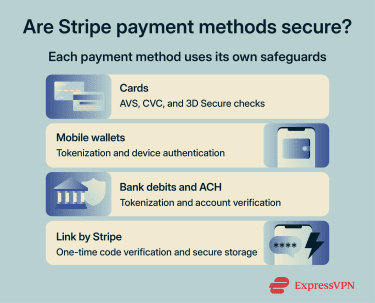
Credit and debit cards
When merchants collect billing details and card verification code (CVC) during checkout, Stripe can send this information to the card issuer for address verification system (AVS) checks, where supported. These checks can help detect suspicious transactions, including attempted payments with stolen card details.
Stripe also supports 3D Secure (3DS) authentication, which prompts the cardholder to confirm the transaction through their bank, typically via a one-time code, a banking app, or a biometric check. In the European Economic Area (EEA) and the U.K., Strong Customer Authentication (SCA) rules may require 3DS for card payments, although exemptions can apply.
Mobile wallets
Mobile wallets like Apple Pay and Google Pay reduce the need to share actual card details directly with merchants. When a customer adds a card to their wallet, the wallet setup process uses tokenization, allowing payments to be made with a device-specific account number or token instead of the actual card number.
For Apple Pay, the bank, the bank's authorized service provider, or the card issuer creates the device-specific Device Account Number, encrypts it, and sends it to Apple along with other data, such as the key used to generate dynamic security codes unique to each transaction.
For Google Pay, Google Wallet creates a device-specific virtual account number, or device token, for each payment method added, so the real card number is not stored on the device or shared with merchants.
Each wallet payment typically requires device authentication, such as Face ID, Touch ID, fingerprint, passcode, PIN, or another verification method, though some features, such as Apple Pay Express Mode, may work differently.
Bank debits and ACH payments
Bank debits and automated clearing house (ACH) payments pull funds directly from a customer's bank account.
Stripe requires bank account verification before debiting the account, either via Financial Connections for instant verification or via microdeposits, in which small test transfers are confirmed by the customer. Stripe can also use tokenization so sensitive bank account details are represented by tokens rather than handled directly by the business.
ACH Direct Debit is a delayed-notification payment method, so funds aren't immediately available after payment. Stripe says ACH payments typically take four business days to arrive, with faster settlement available in some cases.
Also read: How to make secure online payments: Top 10 payment methods reviewed.
Link by Stripe
Link is Stripe's digital wallet for repeat customers. Users can save their preferred payment methods once and reuse them for faster checkout across hundreds of thousands of Link-enabled businesses.
Link autofills saved payment details after the customer enters their email address and verifies their identity. When customers use Link on a new site or device, Stripe receives a one-time code via SMS to help keep their payment information secure.
Common risks and limitations
While Stripe runs on secure infrastructure, risks can still occur outside the platform's technical controls, including phishing attempts, unauthorized payments, and operational friction such as payout delays, reserves, or account verification requests.
Phishing
Phishing is one of the biggest threats to payment platform users. Fraudsters may create fake Stripe login pages, spoofed emails posing as Stripe, or fraudulent payment links to trick people into sharing payment details or account credentials.
These attacks rely on impersonation and social engineering rather than exploiting technical weaknesses in the platform. As a result, platform-level security controls alone cannot prevent every phishing attempt.
Unauthorized payments and chargebacks
Stripe's security systems can reduce, but not entirely eliminate, the risk of unauthorized payments. Stolen cards, account takeovers, or friendly fraud, where a cardholder disputes a legitimate purchase, can all lead to transactions being challenged. If that happens, the cardholder may ask their bank or payment provider to reverse the charge, commonly known as a chargeback.
Merchants can issue refunds through Stripe, but Stripe generally doesn't determine whether a customer is entitled to one. For chargebacks and disputes, Stripe provides dispute workflows and evidence-submission tools, while the cardholder's bank or payment method provider typically determines the outcome.
Account reviews, holds, and delayed payouts
Stripe may place a reserve on a portion of a business's funds, delay or pause payouts, or request additional documentation. This can happen for reasons such as fraud or dispute risk, refund exposure, incomplete verification, industry risk level, or country-specific payout timing. These controls help reduce fraud, disputes, refunds, and compliance risk across the payment process.
For merchants, the potential trade-off is operational friction. Verification can take time, and newer accounts often experience longer payout windows. Stripe says the first payout is typically scheduled 7–14 days after the first successful payment, though timing can vary by country and industry risk level. This can affect cash flow during the early stages of using the platform.
How to use Stripe safely
Businesses and customers can take practical steps to protect accounts, payments, and personal data when using Stripe.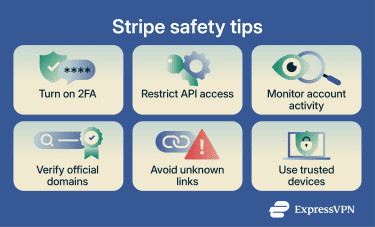
For businesses
- Enable 2FA: Require 2FA for all team members, preferably with passkeys or security keys.
- Restrict API keys: Use restricted keys to limit access to only the resources and actions each integration needs.
- Manage team access: Assign only the minimum necessary roles and remove access promptly when employees leave.
- Verify webhooks: Validate webhook signatures and allowlist Stripe IP addresses to confirm events are genuinely from Stripe.
- Monitor transactions: Review unusual payments and Radar alerts to quickly investigate suspicious activity.
For customers
- Verify payment pages: Check that the domain name is an official Stripe or Link domain, such as stripe.com, stripe.dev, stripe.events, stripe.global, or link.com.
- Avoid suspicious links: Don't click unexpected payment or login links sent by email, SMS, social media, or messaging apps.
- Use trusted devices: Avoid shared or public devices, and use Face ID, fingerprint, passcode, or PIN verification where available.
- Check statements regularly: Review bank and card statements to catch unauthorized charges early.
Is Stripe a good fit for your business?
Stripe can be a strong choice for many businesses, but some may prefer another payment platform depending on their industry, technical needs, region, and cash flow requirements. Assessing these needs can help businesses choose the right option.
When Stripe makes sense
- Your business would benefit from customizable checkout flows and marketplace-style payments, or deeper payment integrations, not just a simple payment link or button.
- You want strong developer tools and API flexibility to integrate payments into websites and apps.
- You prefer a branded checkout experience, with the option to embed payments or use a customizable hosted checkout.
- You want to offer a range of payment methods, including cards, bank debits, one-click checkouts, and mobile wallets.
- You want built-in fraud prevention tools with the option to set custom rules.
When alternatives may be better
- Your business needs a simple hosted checkout or payment button and prioritizes a familiar wallet experience over deeper customization.
- Your business operates in an industry where payout delays, reserves, or verification requests could create cash flow challenges.
- Your customers prefer to pay through a familiar, branded wallet and may hesitate to enter payment information on merchant websites.
- Your business model involves a higher-than-average risk of disputes or refunds, which could increase the likelihood of reserves, payout delays, or additional verification.
FAQ
How can I tell if a Stripe payment page is real?
Does Stripe store full card numbers?
Can Stripe refund unauthorized charges?
Why was my Stripe payout delayed?
What should I do if I get a Stripe verification email?
For email link verification, Stripe may require that the link be opened on the same device and in the same browser as the original session. If the email was unexpected, avoid clicking links or attachments and go directly to Stripe through the official website instead.
What do I do if my Stripe account is compromised?
Is Stripe safe for international payments?