 Celebrate with up to 80% off
Is Duolingo safe? Privacy, security, and child safety explained


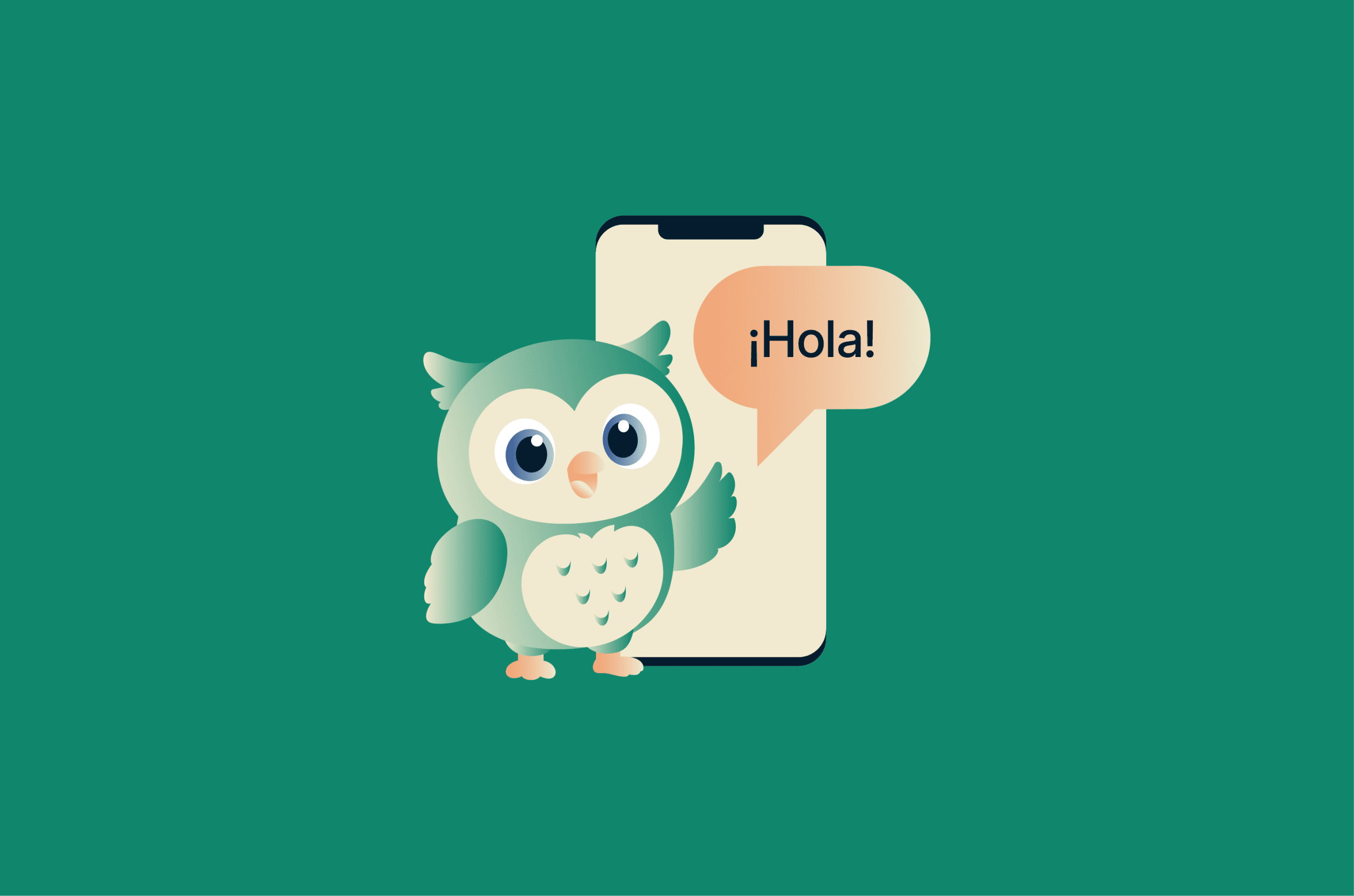
Duolingo is one of the most popular language-learning apps in the world. As of Q1 2026, it had 137.8 million monthly active users. Its short lessons, streaks, and gamified progress tools are designed to keep users engaged and returning regularly.
But despite its popularity and engaging design, it’s still an app that collects data, runs ads, and bolts on social features and AI tools. Which raises a fair question: is Duolingo safe to use, and what are you handing over in exchange for those daily lessons?
What is Duolingo, and how does it work?
Duolingo teaches languages through short, bite-sized lessons. It offers over 40 language courses (plus math, music, and chess), and in 2025, it launched an additional 148 courses using generative AI. It runs on mobile and desktop, and most of it is free.
Lessons are split into small exercises covering reading, writing, listening, and speaking, with instant feedback after every answer. The app is designed to feel less like studying and more like a game you don’t want to put down with features such as:
- Streaks: Track how many days in a row you’ve practiced.
- Experience points (XP) and leagues: Turn progress into points and rank you against other users.
- Hearts or Energy: Limit how much free users can practice before waiting, earning more, or subscribing.
There’s a free tier supported by ads, a Super subscription that removes ads and unlocks extras, and Max, the premium tier built around AI features. There’s also Duolingo for Schools, a classroom-managed version where teachers set lessons and track progress.
Is Duolingo safe for children?
Duolingo is generally safer than traditional social media apps. There’s no open messaging system, public commenting is limited, and the platform includes extensive age-based privacy protections.
That said, it’s still a data-driven app with social features and, increasingly, AI you can talk to. It’s worth understanding what that means.
How Duolingo handles child accounts
Duolingo’s terms of service set a minimum age of 13 for a standard account. Children under 13 aren’t locked out, but they do have to provide a parent’s email address to verify consent.
However, Duolingo doesn’t actually verify a user’s age. A 10-year-old who types in the wrong birth year could end up with a standard account with full social features. For that reason, parents are advised to help their child sign up and make sure they enter the right age.
In the EU, the age of digital consent is higher in some countries compared to the U.S., and Duolingo says it applies child account restrictions in those jurisdictions accordingly. The legal frameworks behind this are the Children's Online Privacy Protection Act (COPPA) in the U.S., the General Data Protection Regulation (GDPR) in the EU, and the U.K.’s Age Appropriate Design Code.
These regulations limit how companies collect, use, and share children’s personal data.
Duolingo’s Privacy Policy spells out a fairly specific set of protections for “Child Users” (under-13s in the U.S., or under the local age of digital consent elsewhere). These include:
- No real names, location, contact information, or profile pictures are allowed on the profile. Profiles use avatars instead.
- Advertising is set to non-personalized and family-safe content.
- Third-party behavioral tracking and analytics are disabled.
- Speech data is not shared with Duolingo.
- No user-generated content (so no submitting comments on lessons or other profiles).
Social features parents should know about
Duolingo includes lightweight social features designed to keep users engaged and motivated. Child Users can still:
- Appear in leaderboards
- Follow other users and be followed.
- Like or react to other users’ achievements.
However, the platform limits interaction in a few important ways:
- There’s no direct messaging channel between users.
- You can set a profile to private, which limits who can interact with it.
- Children’s accounts are harder to discover (you need the exact username or a referral link).
- Adult users are not actively suggested as connections to Child Users.
However, profiles are public by default. Someone could, in principle, use this visibility to start a conversation that later moves to another platform. Realistically, the day-to-day risk on Duolingo itself is low: there's no messaging, comments are moderated, and the activity is mostly about XP and streaks. But it's worth knowing the visibility is there, and switching the profile to private removes most of it.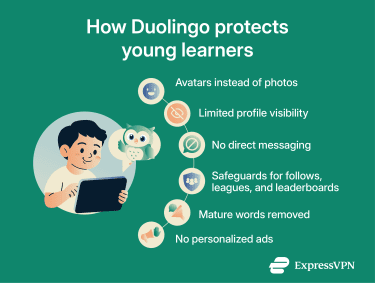
Duolingo for Schools
Duolingo for Schools is a more controlled setup. Teachers manage student accounts, assign lessons, and see progress data such as activity, time spent, and XP earned. Teachers can also turn social features or mature content on or off for the whole class. By default, mature words are hidden from all Duolingo for Schools students.
Because students are inside a managed classroom group, exposure to the wider Duolingo user base is more limited. It’s worth noting that Duolingo doesn’t sign formal Student Data Privacy Agreements with individual schools or districts. Schools rely on the standard privacy policy and terms of service.
AI features and what users should know
Duolingo Max launched in March 2023 with the following AI features designed to make lessons feel more conversational and interactive:
- Roleplay: Text-based scenarios where you “talk” to AI characters, for example, ordering coffee or asking for directions.
- Explain My Answer: GPT-powered explanations of why you got something wrong. (Available to all users, not just Max subscribers.)
- Voice Call with Lily: An animated AI character you have spoken conversations with.
So, what’s actually happening under the hood? Your text and audio go to a third-party AI provider. In this case, it’s OpenAI for Roleplay and Video Call and Google, Apple, or Amazon Web Services (AWS) for the speech recognition used in regular speaking exercises. Duolingo warns against sharing any personal or sensitive information when using AI features and notes that these interactions may be recorded and stored to improve services and support AI functionality.
That last bit is the important one for parents. The conversations are open-ended, so children might share things they might not in a fixed exercise, such as their school name, location, or what they did last weekend.
How parents can make Duolingo safer
Here are a few small and simple changes that genuinely help:
- Set the account to private.
- Disable Friend Streaks if you don’t want your child linked to other users.
- Create a username that doesn’t reveal personal information.
- Have a quick chat with your kid about not sharing personal details in Roleplay or Video Call.
- Check the profile and recent activity now and again.
Duolingo privacy: What data does the app collect?
According to Duolingo’s privacy policy, the app collects:
- Account information: Such as your email and age at registration and social login data if you sign in with Google or Facebook.
- Profile and learning data: Including your username, profile details, progress, mistakes, and streaks.
- Device and usage data: Such as IP address, device type, and app activity.
- Voice data: Recordings from speaking exercises, which are sent to third-party providers.
- AI interaction data: The text and audio data from conversational features.
Duolingo says it uses the data to operate and improve the service. In practice, that covers personalizing lessons, improving features (including the AI tools), supporting the free tier through advertising, and running analytics.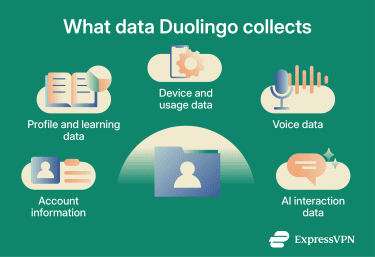
Can you control what Duolingo collects?
You can’t switch off data collection entirely, as some is needed for the app to work, but you can dial it back.
At the device level, you can manage app permissions such as the microphone (needed for speaking exercises and Video Call), notifications, and contacts (only relevant if you’ve turned on social features).
You can refuse them all, but you’ll lose speaking exercises and Video Call if you block the mic, and you won’t get practice reminders without notifications. Pick what’s necessary for what you actually want.
Within the app, you can:
- Make your profile private.
- Disable personalized ads in some regions.
- Hide activity from other users.
- Request account deletion or data access under laws like the GDPR.
In practice, however, general usage analytics are deeply tied to how the platform operates. You can’t realistically disable these without limiting the service itself.
Duolingo security: How protected is your account?
Duolingo offers standard account security: email and password or sign-in through Google, Facebook, or Apple.
Duolingo doesn’t offer two-factor authentication (2FA) for account holders. That makes password hygiene particularly important. Avoid reusing passwords from other services and create a strong password. If you use a social account to log in, make sure that account is well-protected. It’s now the master key.
Duolingo also manages user sessions to keep accounts signed in across devices, which improves usability but makes it important to log out of shared or public devices.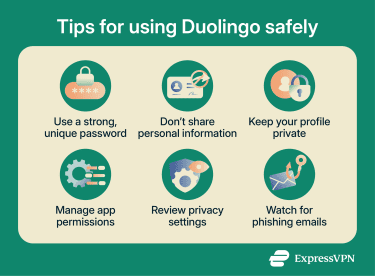
The Duolingo 2023 scraping incident
In January 2023, a dataset of around 2.6 million Duolingo user records was put up for sale on a hacking forum for $1,500. In August 2023, the same dataset was released essentially for free on BreachForums. The published dataset included usernames, real names, email addresses, and various profile and learning-related fields.
This was not a traditional breach of Duolingo’s servers. Instead, the attacker appears to have used email addresses obtained from other sources and checked them against Duolingo’s API. When an email address matched a Duolingo account, the API could return related profile information.
The result was a combined dataset that linked outside email addresses with Duolingo profile details, including names, usernames, and learning activity. That kind of linked data can make phishing attempts more convincing. For example, an attacker who knows a person’s email address, name, and Duolingo username could send a more personalized message pretending to be from Duolingo or referring to their account.
How to make Duolingo more private
You can adjust some settings in the app, but the full set lives on the website. It’s worth doing both.
In a browser
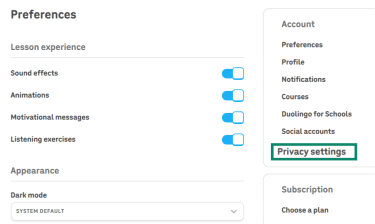
- Log into your account, hover over More in the sidebar, then click Settings.
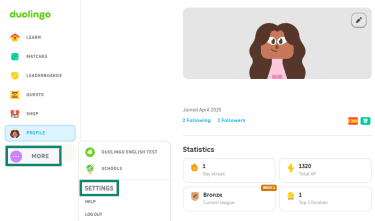
- Click Privacy settings on the right.
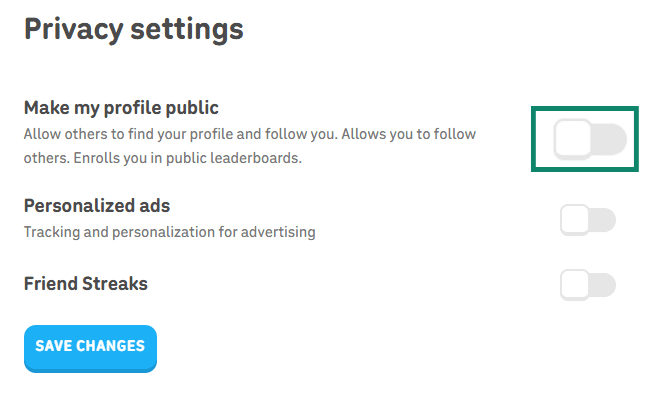
- Turn off Make my profile public. While there, also turn off Personalized ads and Friend Streaks for enhanced privacy.
In the app
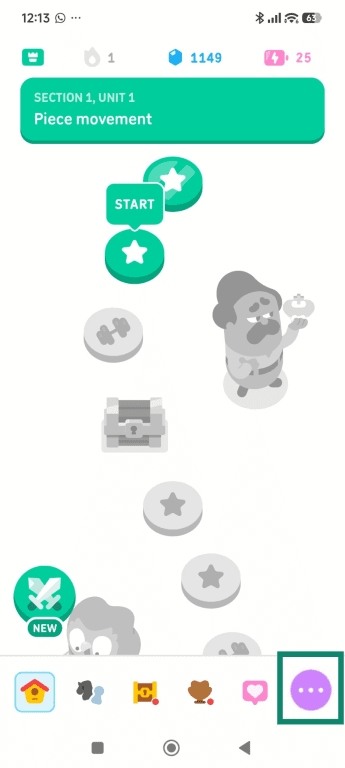
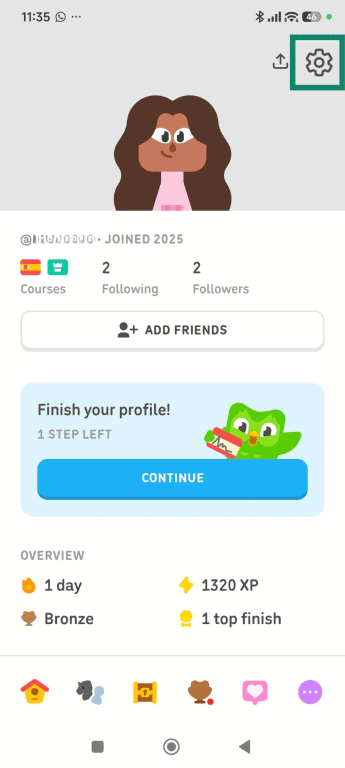
- Open the Duolingo app and tap on the circle with 3 dots.
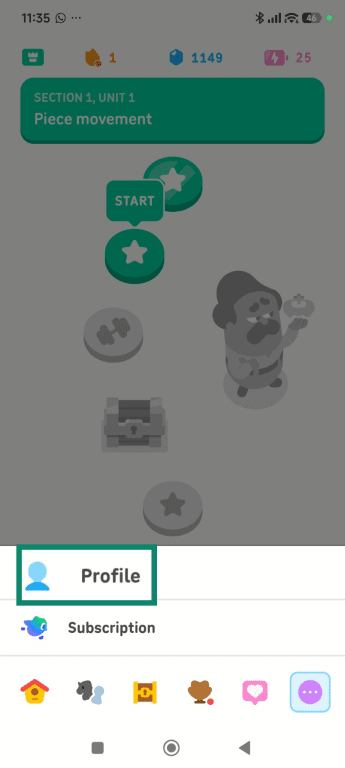
- Tap Profile.
- Click the gear icon in the top right.
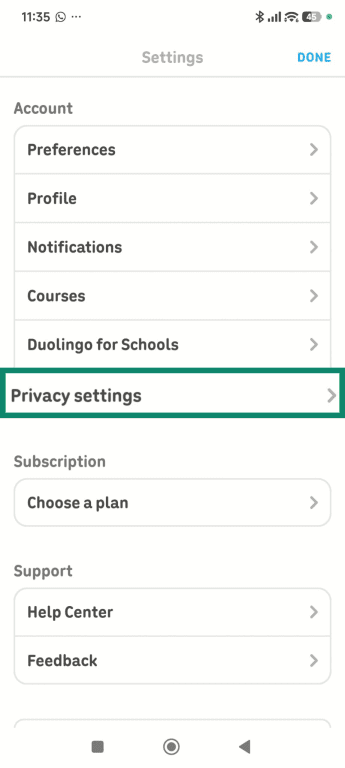
- Go to Privacy settings.
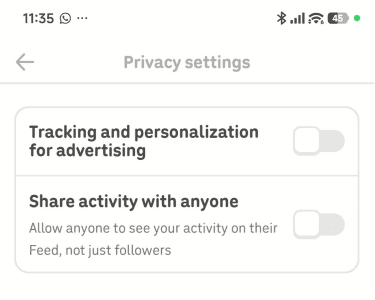
- Turn off Track and personalization for advertising and Share activity with anyone.
Final verdict: Is Duolingo safe?
Duolingo is generally safer than platforms built around open social interaction. It limits direct communication, includes child privacy protections, and uses standard account security measures. But it is still a modern data-driven app. It collects behavioral information, encourages social engagement, and increasingly relies on AI-powered systems that process user input.
None of that automatically makes the app unsafe. It just means users should understand the tradeoffs.
For adults, the biggest concerns are usually data privacy, advertising, and account security. For children, the main issues are profile visibility, social features, and how much time they spend inside the app.
Used thoughtfully, Duolingo can be a helpful and relatively low-risk learning tool. A few privacy adjustments and basic account safeguards go a long way.
FAQ
Can strangers contact my child on Duolingo?
Does Duolingo use my data to train AI models?
Can I delete my Duolingo account and data?
Can I use Duolingo without giving a real name or email?
Is Duolingo for Schools safer than the regular app?
Should parents monitor how children use Duolingo?