Does a VPN protect you from viruses? What you need to know


A virtual private network (VPN) is an important online privacy tool and an integral part of an overall cybersecurity posture. It encrypts your internet traffic, helping protect your data on untrusted networks, and masks your IP address to reduce tracking.
However, it isn’t designed to protect against viruses or other malware. For that task, you need antivirus software, which you should always use alongside the VPN.
How a VPN helps protect you online
When you connect to a VPN, your internet traffic passes through a secure remote server before it reaches websites, apps, and online services. There are several benefits to this.
Encrypting your internet connection
A VPN creates an encrypted tunnel between your device and the VPN server. Data that travels through this tunnel is encrypted using strong cryptographic protocols, making it extremely difficult for outsiders to read, intercept, or alter your data while it’s in transit.
Most modern websites already use encryption (HTTPS), which protects data between your browser and the website. However, a VPN adds an extra layer of protection, especially on untrusted networks, by encrypting traffic before it leaves your device.
On unsecured or compromised networks, attackers may still attempt to intercept or manipulate traffic, particularly if connections aren’t properly secured. Without strong encryption, this can include:
- Intercepting login credentials.
- Injecting malicious code into web pages.
- Redirecting you to spoofed versions of legitimate websites.
Encryption reduces these risks by making your data unreadable and harder to tamper with while it’s in transit. That said, encryption doesn’t stop threats on your device. It doesn’t scan for malicious code or block you from downloading potentially dangerous files. This is because VPNs operate at the network level, securing data in transit, while threats like malware are handled at the device level.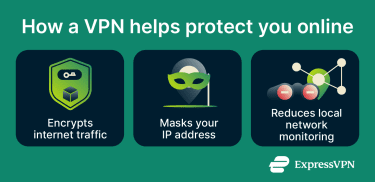
Masking your IP address
When you use a VPN, you disguise your real IP address by replacing it with the VPN server’s IP address. Websites and online services see the VPN server’s IP address instead of your real one. As a result, it becomes harder for websites, advertisers, internet service providers (ISPs), and others to link your online activity directly to your device or location.
IP masking can improve privacy and reduce some forms of tracking, especially tracking tied to your network connection or location. However, it doesn’t make you completely anonymous online. Websites can still use other methods such as browser fingerprinting, cookies, account logins, and device identifiers to recognize or track users.
A VPN also doesn’t hide activity from websites you choose to sign into. For example, if you log into a social media account or online service, that platform can still associate your activity with your account.
When VPN features can block malicious sites
Some premium VPNs offer additional features or add-ons to provide some protection against malicious sites. ExpressVPN, for example, has advanced protection features that can block known malware-hosting websites..
This can reduce your exposure to phishing pages and sites that attempt to deliver malware. However, these protections typically rely on threat databases and known indicators, so they can’t block every attack. Newly created phishing sites, zero-day threats, and targeted malware may still bypass these filters before security teams identify them and add them to blocklists.
Many antivirus tools, on the other hand, also use heuristic and behavioral analysis to detect suspicious activity. Instead of relying on known threat databases or blocklists, they look for patterns commonly associated with malicious behavior. This can help identify previously unknown or newly emerging threats that haven’t yet been added to security databases.
Why a VPN doesn’t stop viruses
A VPN isn’t supposed to stop viruses. It’s a privacy tool that works at the network level to secure your connection and improve your internet privacy. It doesn’t scan files, analyze downloads, or maintain databases of known viruses.
Malware infects devices, not network traffic
Malware and viruses infect your device, not your internet connection. Once a malicious file is downloaded or executed, whether through a compromised app, phishing link, or external device, it runs locally on your system. Because VPNs operate at the network layer, they don’t inspect or control files or applications running on your device.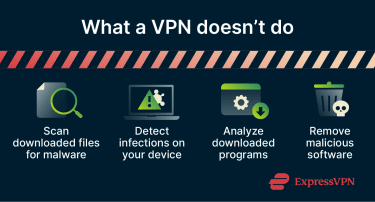
How phishing and downloads bypass VPN protection
Many common threats rely on user actions rather than network interception. If someone clicks a phishing link in an email or SMS and enters their credentials on a fake website, a VPN alone won’t necessarily prevent this from happening. The connection may still be encrypted, but the scam takes place on the malicious website itself. In other words, some threats can still reach a device regardless of whether a VPN is in use.
Common risk factors include:
- Downloading software from unverified sources: Software from unofficial websites or file-sharing platforms may contain hidden malware, bundled spyware, or modified installers. Even apps that appear legitimate can expose devices to unnecessary risk if they come from untrusted sources.
- Opening unexpected email attachments or links: These tactics are commonly used in phishing attacks. Attackers often imitate trusted companies, coworkers, or familiar contacts to make malicious links and files appear legitimate.
- Entering details into deceptive websites: Fake sites can trick users into entering passwords, payment details, or other sensitive information. In some cases, these sites may also attempt to deliver malware through fake downloads or fraudulent update prompts. Learning how to identify a safe website can help reduce this risk.
- Ignoring warnings about unsafe sites or suspicious downloads: Browser warnings are there to flag potential threats; dismissing them increases the risk of visiting compromised pages or installing harmful content.
VPN vs. antivirus: What’s the difference?
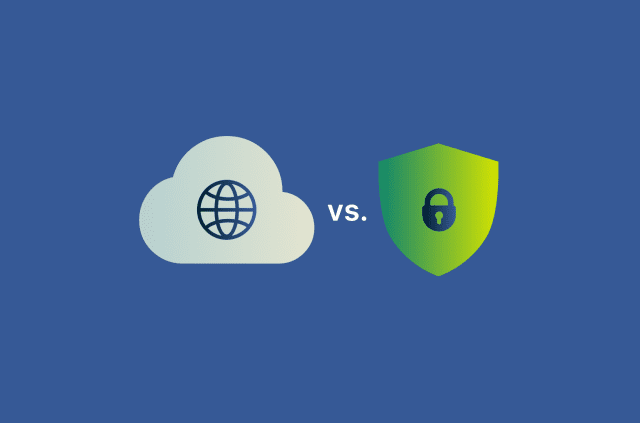
This isn’t really a case of one software versus the other. As we’ve established, VPNs and antivirus software are both useful cybersecurity tools, but they serve different functions. Understanding how they work helps explain why one can’t replace the other.
What a VPN protects you from
A VPN protects your data while it travels across the internet. It focuses on privacy and network-level security rather than threats on your device. You can think of it like a home security system. If you have cameras watching the exterior of your house, they won’t detect issues within the house. Similarly, a VPN focuses on what’s happening outside the device, but not the device itself.
What antivirus software protects you from
Antivirus software protects your device. It’s designed to detect, quarantine, block, and remove malicious software. Antivirus tools can help protect against:
- Viruses, ransomware, and other types of malware.
- Infected downloads and malicious attachments.
- Suspicious or potentially unwanted programs (PUPs).
- Some new and emerging threats (using behavior-based and heuristic detection).
Unlike a VPN, antivirus software actively monitors your system and responds to threats that reach your device.
Why they work best together
Using a VPN and antivirus software together provides you with protection at both the network and the device level. Each tool addresses different parts of the security chain, and when combined, they provide broader protection.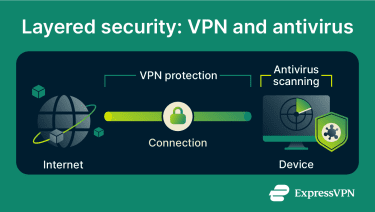
What security features are worth looking for in a VPN?
While a VPN isn’t a replacement for antivirus software, VPNs like ExpressVPN include additional tools that can improve privacy and reduce exposure to common online threats. As well as the malicious site protection mentioned above, there are a few other things to consider.
Strong encryption and secure VPN protocols
A VPN’s security depends heavily on how it encrypts data and manages connections. Reputable VPNs use modern encryption standards and secure protocols designed to protect data while it travels between your device and the VPN server. Protocols such as OpenVPN, WireGuard, and ExpressVPN’s Lightway are more secure and efficient than older protocols with known weaknesses.
Privacy policies and transparency
Because VPN traffic passes through the provider’s servers, trust and transparency matter. It’s worth looking for VPNs that clearly explain:
- What data they collect.
- Whether connection logs are stored.
- How they respond to legal requests.
- Whether their systems or policies have been independently audited.
Look for a comprehensive no-logs policy and independent security audits, which can provide additional reassurance that a provider’s claims match its actual practices.
Additional security tools
Some VPN services also bundle extra protections, such as:
- Password managers: ExpressVPN includes a built-in password manager called ExpressKeys on its Advanced and Express Pro plans. This means users can store, generate, and autofill strong passwords across devices. Autofill can help protect against phishing, as credentials are only entered on the exact matching website, making it harder for fake or lookalike sites to trick users into revealing details.
- Identity monitoring: ExpressVPN’s Identity Defender tools are available to U.S. users on the Advanced and Express Pro plans. They scan for potential exposure of personal data, such as email addresses or credentials appearing in known data breaches or on the dark web.
- Parental controls: These controls are typically implemented through domain filtering and work across connected devices when enabled; they’re useful for safety, but they’re not a substitute for device-level security tools. ExpressVPN includes an adult site blocker on select plans.
Note that while these tools are all helpful and can improve overall digital security, they still don’t replace dedicated antivirus software or safe browsing habits.
How to reduce your risk of viruses and malware
No single tool can protect against every virus. Even the most reliable antivirus software has limitations, especially when threats rely on outdated software, phishing attacks, unsafe downloads, or user error. Reducing the risk of malware comes down to a combination of good security practices and the right tools.
Keep your system and apps updated
Regular updates fix security vulnerabilities that attackers actively look for. Outdated operating systems, browsers, and apps are one of the most common entry points for malware.
Keeping software up to date helps:
- Patch known security flaws.
- Improve built-in protections.
- Reduce exposure to exploits targeting older versions.
Turn on automatic updates for your software where possible; this is especially important for browsers and extensions, which are frequent targets for attacks.
Avoid suspicious links and downloads
Many malware infections start with a simple interaction, such as opening a link or downloading a file. The risk is higher when content comes from unknown or unverified sources. This includes:
- Unexpected email or SMS links.
- Attachments from unknown senders.
- Downloads from unofficial websites or file-sharing platforms.
Even legitimate-looking messages can be deceptive; attackers often mimic trusted brands or contacts to make links appear safe. To reduce your risk, verify unexpected messages through another communication channel and only download files from official or reputable sources.
Use trusted security tools and settings
A layered security setup provides stronger protection than relying on a single tool.
This typically includes:
- Antivirus software to detect and remove malware.
- A VPN to protect data in transit and reduce exposure to network-based threats.
- Built-in browser protections that warn about unsafe sites.
- Security tools such as firewalls.
It’s also worth reviewing default settings on your apps. Disabling unnecessary permissions and limiting which apps can access sensitive data can reduce the impact of a potential infection.
Used together, these tools and settings create multiple layers of defense, making it harder for threats to succeed.
FAQ
Can I still get malware while using a VPN?
What should I do if my device is infected?
Is a VPN enough for safe browsing every day?