Password entropy explained: How to create stronger, safer passwords


Passwords remain one of the most common ways to protect online accounts, yet not all of them offer the same level of security. Entropy is one way to describe password unpredictability, especially for randomly generated passwords, and understanding it can help explain why some passwords are harder to guess than others.
This article explains what password entropy means, how it's calculated, and how it relates to overall password strength. It also covers practical ways to create stronger passwords and protect accounts more effectively.
What is password entropy?
In cybersecurity, entropy describes the level of uncertainty an attacker faces when trying to guess a secret value, such as a password, PIN, or encryption key. Higher entropy means a larger set of possible values to test before finding a match.
Password entropy is often used as a rough indicator of password quality, but it doesn't tell the full story. Human-created passwords often follow predictable patterns that can make them weaker than their calculated entropy would suggest.
Also read: What is password cracking and how can you prevent it?
Why password entropy matters
Password entropy matters because modern brute-force attacks use high-speed automated guessing. If password hashes are exposed in a data breach, attackers can test guesses offline on their own hardware, without being slowed by login lockouts or rate limits.
A password with more possible combinations generally takes more time and computing power to crack. In practice, though, length is often the most important factor, especially for passwords created by people rather than generated randomly. The National Institute of Standards and Technology (NIST) now emphasizes password length over traditional complexity rules for this reason.
To put this into perspective: a short password using only lowercase letters has a relatively small number of possible combinations and could be guessed with modern hardware. A much longer password or passphrase dramatically increases the search space, making brute-force guessing more time-consuming.
Note: Cracking time estimates typically represent the maximum time needed to test every possible combination. In practice, an attacker may find the correct password much earlier by chance, without needing to work through the entire set.
The difference between entropy and password strength
Password entropy and password strength are closely related, but they're not the same thing.
Entropy is a mathematical concept often used to describe the unpredictability of a password, especially when the password is generated randomly. Password strength is broader: it includes length, uniqueness, resistance to common guessing patterns, and whether the password appears in lists of compromised or commonly used credentials.
This distinction matters because the entropy-based estimates can be misleading when applied to human-chosen passwords. A password like myAcc0untp4ssw0rd! uses a wide character set and may look good on paper, but it relies on common word patterns, with predictable substitutions (o→0, a→4) and a symbol tacked on at the end. Cracking tools are designed to test exactly these patterns, which means the password's real-world strength is much lower than its calculated entropy suggests.
What affects password entropy?
Two key factors that determine password entropy are the password's length and the size of the character set it draws from.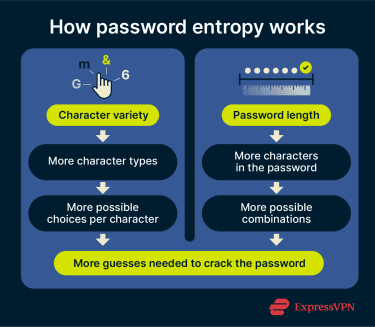
Character variety increases the pool of possible values that can be combined to form a password. A password made only of numbers draws from 10 possible characters. One that also includes uppercase and lowercase letters, digits, and symbols can draw from a much larger set, such as the printable American Standard Code for Information Interchange (ASCII) characters available on a standard keyboard.
That said, length has a much bigger impact on entropy than character variety alone. Each additional character multiplies the total number of possible combinations, which means even small increases in length can dramatically raise the difficulty of a brute-force attack. A 6-character password using numbers, letters, and symbols will still be far easier to crack than a 24-character password using the same character set.
This is why current NIST guidance focuses primarily on password length and advises against forcing users to mix character types. In practice, longer passwords improve security more reliably than composition rules alone.
How to calculate password entropy
You can estimate password entropy using the following formula:
E = L x log₂(S)
Where:
- E is the entropy, measured in bits.
- L is the length of the password (total number of characters).
- S is the size of the character pool (the total number of possible characters the password could draw from).
- log₂ converts the number of possible combinations into bits.
To determine S, add up the character sets being used. Here's a quick reference:
| Character set | Example value range | Pool size |
| Numbers | 0-9 | 10 |
| Lowercase letters | a-z | 26 |
| Uppercase letters | A-Z | 26 |
| Special characters | `~!@#$%... | 33 |
Let’s take this password as an example: @)#vW8)(=T>c?w[3N$
It's 18 characters long (L = 18) and uses all four character sets, giving a pool of 95 (10 + 26 + 26 + 33 = S).
E = 18 x log₂(95) = 118.1 bits
Note: This formula gives a rough estimate and works best for randomly generated passwords.
What are bits of entropy?
Entropy is measured in bits because each bit doubles the number of possible combinations. Three bits of entropy means 2³ = 8 possible combinations. Ten bits means 2¹⁰ = 1,024. The growth is exponential, which is why even small increases in entropy can make a password dramatically harder to crack.
In the example above, 118 bits of entropy translates to roughly 2¹¹⁸ possible combinations. For a randomly generated password, the search space is extremely large and would take an impractically long time to exhaust with brute force.
How many bits of entropy should my password have?
In practice, there is no universally agreed-upon minimum number of bits for a strong password, and NIST’s current guidance focuses more on password length and resistance to common or predictable choices than on specific entropy targets.
That said, long, randomly generated passwords or passphrases usually provide far more protection than short or patterned ones. For example, an 8-character password using all common keyboard character types has about 52 bits of entropy under a simple random-character model. A much longer random password can raise that estimate substantially.
Password strength assessment
Entropy reflects a password’s theoretical resistance to guessing attacks, but real-world security depends on more than just the math.
Is entropy enough to measure security?
Entropy is useful for estimating how a password would hold up in offline cracking scenarios. But in practice, most online services also restrict repeated failed login attempts through rate limiting or temporary lockouts, which makes automated guessing far less practical.
More often, account compromise relies on other password attack methods, where entropy alone can’t fully guarantee security.
- Common patterns that weaken passwords: A long password with various character types can score high in calculated entropy, but predictable patterns still make it vulnerable. These include sequential or repeating characters (e.g., 1234, qwerty, zzz), common words with predictable substitutions (e.g., p@ssw()rd), personal information like birthdays or names, and predictable formatting like capitalizing only the first letter.
- Data breaches: If attackers obtain plaintext passwords from a leaked database, the passwords are already exposed. If they obtain hashed passwords instead, short or predictable passwords may still be cracked offline, as earlier sections explain.
- Password reuse: Using the same password across multiple sites means that a single breach can compromise all accounts associated with that credential.
- Phishing: Rather than cracking passwords, attackers often trick users into revealing them via fraudulent emails and login pages. According to the FBI’s 2024 Internet Crime Report, phishing/spoofing was the most commonly reported complaint category, with over 193,000 complaints.
- Malware: Malicious software, such as keyloggers, can record keystrokes and steal credentials directly, bypassing password strength entirely.
Learn more: Read our detailed guide on credential stuffing.
How to create a strong password
Maintaining strong, unique passwords across many accounts is hard. Each one should be long, random, and different, but managing that complexity often pushes people toward predictable shortcuts or reuse. These strategies help.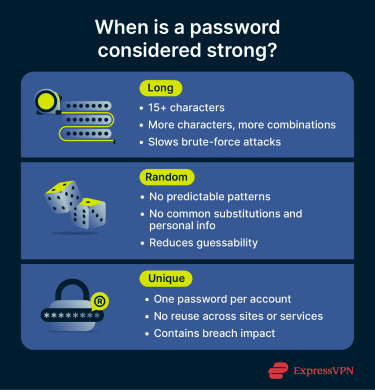
Three random words
The three-word rule is a simple way to create long, hard-to-guess passwords that are still easy to remember. This method is recommended by the U.K.’s National Cyber Security Centre (NCSC).
Instead of a hard-to-remember string of symbols, you pick three random, unrelated words and combine them into a passphrase like SpontaneousPhilosophySandwich. The key is that the words should not be obvious or personally meaningful in a way that makes them easy to guess.
Adding special characters can help, but long passphrases often benefit most from their length rather than complexity rules alone.
Read more: Diceware passwords: How to create secure and memorable passphrases.
Password generators
A random password generator creates strong, unique passwords based on your chosen character types and length. Many support passwords of up to 50 characters, allowing a mix of numbers, letters, and symbols.
This approach eliminates predictable patterns and works well for generating high-entropy passwords. Most generators also estimate strength, and some let you test your existing passwords.
Mnemonics
Mnemonics turn memorable sentences into seemingly random password strings. Take a sentence like "Winter is the best time to go on a snowboarding trip, especially after a fresh snowfall." This becomes “WitBTtgoaST,eaaFS”, an 18-character password where nouns and adjectives are capitalized, remaining words use lowercase, and punctuation stays intact.
Mnemonic-based passwords can be easier to remember, but they may still follow predictable patterns if they are built from familiar phrases or formatting rules.
Password managers
Password managers, like ExpressKeys, are often the most practical way to create, store, and use multiple strong passwords. These tools combine generation, management, and autofill in a single app, reducing the need to memorize or manually enter credentials.
They also store passwords in encrypted vaults for added security. This option may involve a subscription, but it's one of the most convenient ways to manage unique passwords across different platforms.
Protecting accounts beyond password strength
Strong passwords are essential, but many platforms offer additional safeguards that reduce the risk of unauthorized access, whether from brute-force attacks, phishing, or stolen credentials.
- Multi-factor authentication (MFA): MFA requires an additional verification step beyond the password, such as a one-time code or a device-based authenticator. Even if an attacker obtains the correct password, MFA can significantly reduce the chance of account takeover.
- Email login alerts. Platforms like Google and Microsoft can notify you when your account is accessed from an unfamiliar device or location. This can help you spot suspicious activity early and secure your account if needed.
- Breach monitoring: Some security tools include breach monitoring that flags when your email or other personal data appears in known leaks. ExpressVPN's Identity Defender, for example, is currently available to new U.S. customers on the Advanced and Pro plans, with features varying by plan.
- Antivirus and virtual private networks (VPNs): Antivirus software can help detect and block malware, such as keyloggers, before they can steal credentials, while a VPN encrypts your internet traffic to reduce the risk of interception over unsecured networks. Used together, they can add protection beyond password strength alone, though they do not replace MFA or protect against every type of attack.
FAQ: Common questions about password entropy
What does entropy mean in cybersecurity?
Is 128 bits of entropy good?
What is considered a weak password?
Are there tools to calculate password entropy?
How much entropy do I need for a secure password?
How can I improve my password strength?
Take the first step to protect yourself online. Try ExpressVPN risk-free.
Get ExpressVPN