What is a private network, and why do you need it?


Some networks are built for open access. Others are built to restrict access: containing traffic, limiting entry points, and controlling who and what can connect. That difference affects whether internal systems are exposed to the public internet, how securely organizations can share resources, and what outsiders can see.
In this guide, we’ll explore how private networks work, the different types available, and when to use them.
What is a private network?
A private network limits which devices, services, or users can connect to it. Instead of being open to anyone on the internet, it’s typically intended for an organization’s or household’s internal systems and trusted connections.
A network is considered private when one or more of the following is true:
- Devices use private, non-public IP addresses.
- Only approved users or devices can connect.
- Traffic stays off the public internet when possible, or is protected by encryption when it must traverse public networks.
Private network vs. public network
A public network is accessible to anyone, often without the network owner's approval. The public internet is the most obvious example, but open Wi-Fi networks, such as public hotspots, also fall into this category.
Here are the core differences between public and private networks:
| Private network | Public network | |
| Access | Limited to approved users/devices | Open to broad access |
| Visibility of devices and services | Not internet-reachable unless exposed | Public services may be reachable; devices are often protected by firewalls/Network Address Translation (NAT) |
| Purpose | Internal communication and controlled access | Open access to information and services |
| Common examples | Home networks, company networks, private cloud networks | The public internet, open Wi-Fi networks |
How a private network works
Private networks often use private IP addresses to separate internal communications from the public internet. Let’s explore the process in more detail.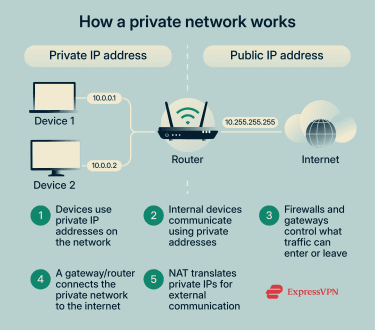
Private IP addressing
Devices on a private network can use IPv4 IP addresses reserved for internal use under Request for Comments (RFC) 1918. These addresses aren't publicly routable on the global internet, so outside systems can't connect to them directly.
The three ranges of RFC 1918 are:
- 10.0.0.0–10.255.255.255
- 172.16.0.0–172.31.255.255
- 192.168.0.0–192.168.255.255
Different private networks can reuse the same addresses. For example, your home network can use 192.168.1.1, and so can a company network across town. This is possible because those addresses only work within each network and aren’t exposed to each other or the public internet.
Devices on the same private network use these addresses to communicate with each other, keeping the traffic within the internal network.
Network isolation and access control
Traffic typically only moves in or out of a private network when permitted by policy. Outsiders can’t connect to a device on your home or work network unless you deliberately make it accessible. This network architecture prevents unwanted connections.
A few mechanisms enforce this control:
- Firewalls: Apply rules that allow or block traffic entering or leaving the network.
- NAT: Enables devices to access external services without revealing their private IP addresses. NAT sends requests to the internet using a public IP address rather than the device’s private IP address. When the response returns, the network forwards it to the correct internal device. To outside systems, all traffic appears to come from a single public address.
- Restricted entry points: Only specific gateways or services accept inbound connections.
Learn more: Understand how to make your network more secure with network topology best practices.
Types of private networks
Some private networks operate within a single location, such as a home or office. Others span multiple sites, and some exist entirely in cloud environments.
Home and local area networks (LAN)
A LAN operates within a limited area, often a single building. In many home LAN's, a router assigns private IP addresses to devices. Devices can communicate directly within the network. For example, a laptop can send a file to a printer or stream media to a TV without routing that data through the internet.
Corporate and enterprise networks
Corporate networks can connect users, devices, and systems across multiple locations. Employees can access internal applications and share files without exposing sensitive work data to external risks.
To manage access at this scale, organizations separate parts of the network so that systems and users can access only what they're authorized to. For example, employee devices may reside on one segment, while sensitive systems reside on another.
Some organizations also use private cellular networks based on LTE or 5G. These provide controlled connectivity across large sites, campuses, or industrial areas where Wi-Fi isn’t practical or reliable.
Virtual private cloud (VPC)
A VPC is a private network within a public cloud. The cloud provider isolates each customer’s environment using software controls, so others can’t see or connect to those systems.
Users can run servers, databases, and applications within a VPC. Often, these resources aren't accessible from the public internet. You must explicitly enable access through firewall rules or gateways.
VPCs are popular for hosting applications and services that need private communication while still benefiting from cloud flexibility. For example, e-commerce platforms and analytics databases.
Virtual private networks (VPNs)
A VPN creates an encrypted tunnel over another network. When active, a VPN can route traffic through its server first, depending on the setup. VPN protocols define how data is encrypted and transmitted. From the VPN server, traffic flows to its destination, such as a website or application. During transit, encryption prevents others from intercepting or reading the data. However, once traffic reaches its destination, the VPN encryption ends.
This is particularly useful on untrusted networks like public Wi-Fi, where other users or the network operator could otherwise monitor traffic.
Organizations commonly use remote-access VPNs to let employees connect securely to internal resources, and site-to-site VPNs to connect entire networks (such as a branch office and headquarters).
Benefits of private networks
Private networks offer several advantages in terms of security, control, and performance.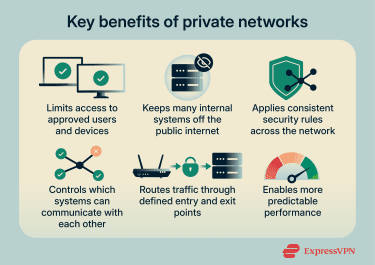
Security and privacy
Private networks can reduce network security risks by preventing unauthorized connections, as internal devices and services aren’t directly accessible from the public internet. Administrators can set network-wide policies that define who can connect and under what conditions.
While this doesn’t make a private network secure on its own, it reduces exposure compared to public networks.
Control over network traffic
Private networks let administrators control which systems communicate with each other. For example, a payroll system might only communicate with a small set of approved services rather than being accessible to every device on the network.
Traffic typically enters and leaves through defined entry points, which can make it easier to monitor data flow and detect anomalies. Administrators can see which systems are communicating, notice unusual patterns, and adjust access without reconfiguring individual systems.
Performance in trusted environments
Because access is controlled and traffic patterns are more predictable, private networks can deliver more consistent performance for applications that require steady connections. A private network isn’t inherently faster, but it often provides more predictable behavior than a shared public environment.
Drawbacks of private networks
Private networks offer more control, but that control comes with some trade-offs.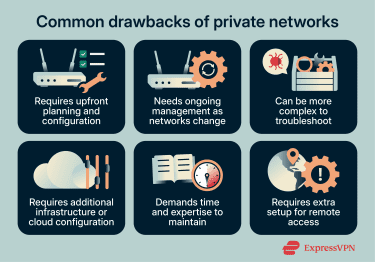
Setup and maintenance complexity
Private networks require upfront planning of how devices connect, how traffic moves, and who has access. Initial setup takes time, and configuration becomes more complex as the network grows.
Ongoing maintenance includes managing network rules, IP addressing, and access controls. As devices are added, removed, or relocated, configurations must be updated.
Troubleshooting can also be more frequent and complex because issues may involve interactions between firewalls, routing rules, and access controls. Reliability and recovery depend on how the network is designed and operated, for example, redundancy and failover.
Infrastructure and cost
Private networks require infrastructure like routers, firewalls, and specialized hardware and software. Even in cloud environments, you need to configure network components rather than use default settings.
Costs scale with network size and complexity. While running small private networks can be inexpensive, larger or cloud-based deployments can demand significant investments.
Limited remote access
Private networks don’t typically support remote access automatically. Connecting from outside often requires a remote-access VPN (for users) or site-to-site VPN connections (for linking networks), which adds configuration and operational overhead for distributed teams.
Do you need a private network or a VPN?
A VPN and a private network solve different problems. Here’s how to determine which one you might need.
Private networks vs. VPNs: Key differences
| Private network | VPN | |
| Purpose | Define and manage an internal network | Secure connections over public networks |
| Access scope | Covers the entire network environment | Secures connectivity to a remote network and/or specific services |
| Infrastructure required | Requires network hardware or cloud resources | Requires VPN client software and a VPN server/gateway |
| Ownership and control | Administrators control the network and its resources | Administrators control how access is authorized and protected |
| Common users | Organizations, teams, households | Individuals, remote employees |
| Common use cases | Internal systems, shared resources | Remote access (corporate VPNs), secure connectivity over public networks |
In many setups, the two work together. A private network defines the infrastructure and access rules, while a VPN provides secure remote access to that network.
When to use a private network
A private network acts as a foundation for connectivity. It helps define how systems interact, but it doesn’t replace the need for other security controls.
Use a private network when:
- You run systems or services that should only be accessible to specific users or devices.
- You need to control how different parts of the network interact, including segmenting systems and defining routing rules.
- You host applications that depend on predictable, controlled internal communication.
When to use a VPN
VPNs can operate independently or in parallel with private networks.
Use a VPN when:
- You’re connecting through untrusted networks like public Wi-Fi, where traffic could be intercepted, for example, while traveling.
- You want a simple way to secure individual device connections without network-level infrastructure.
- You work remotely and need access to your organization’s private network from outside the office.
In short, a VPN doesn't replace a private network; it secures connections over public networks.
FAQ: Common questions about private networks
Is 192.168 a private network?
No. 192.168 is an IPv4 IP address range, not a network in its own right. It’s one of the private IP ranges reserved for internal use. When you see addresses like 192.168.1.1, they’re typically part of a private network, such as a home or office local area network (LAN).
How secure are private networks?
Private networks reduce exposure by limiting access and keeping internal systems non-public unless intentionally exposed. However, a private network isn’t automatically secure. You still need proper access controls, monitoring, and security practices to protect it.
What are common types of private networks?
Common types of private networks include home and local area networks (LANs), enterprise networks, and virtual private clouds (VPCs) in cloud environments. Many organizations use corporate VPNs for remote access: secure tunnels that let users connect to internal resources over public networks. Each type serves a different purpose but follows the same principle of restricted access.
What’s the difference between a private network and a VPN?
A private network defines how systems connect and communicate within a controlled environment. A VPN secures connections to that environment (or between endpoints) over public networks, like the internet. VPNs can work independently to secure connections or in conjunction with private networks to enable remote access.
Take the first step to protect yourself online. Try ExpressVPN risk-free.
Get ExpressVPN
















 Support Center
  FAQ
FAQ  VPN Setup Tutorials


