How to permanently delete Instagram: A step-by-step guide



Maybe the algorithm has finally worn you out. Maybe you’re worried about how much Meta knows about you, or you just want fewer apps demanding your attention. Whatever the reason, walking away from Instagram can be more involved than simply tapping a button.
This guide covers all of it: how to permanently delete Instagram, how to temporarily deactivate it if you’re not sure, how to back up your photos and messages first, and what happens to your data afterward.
Before you delete: Things worth trying first
If you’re not sure you want to leave for good, try one of these first. Deleting is permanent, and you don’t want to regret it.
- Switch to private: Only people you approve can see your posts. It cuts your audience down to who you actually want there.
- Mute the accounts that wear you out: You stay friends with them; their posts just stop showing up. They are not notified about it.
- Turn on Daily Limit and Quiet Mode: They’re both built for being on Instagram less without leaving.
- Log out for a week: No app, no browser. Some people who think they want to delete really just want a break, and a week off makes that clear one way or another.
- Make a fresh secondary account: If your current feed has gone weird (too many ads, wrong recommendations, or old interests you’ve outgrown), starting clean is sometimes more useful than deleting the whole thing.
If you’ve tried these and you’re still done, keep reading.
Deactivating vs. permanently deleting Instagram: What’s the difference?
Before you delete your Instagram account permanently, there’s an alternative: account deactivation.
Deactivating your Instagram account is a pause. It temporarily hides your profile, posts, comments, and likes from other users. Nothing is deleted, and you can restore your account at any time by logging back in. Worth knowing: you can only deactivate once every seven days.
Deleting your account is a one-way door. After a 30-day grace period, your photos, videos, comments, followers, and other account data are gone. Completely removing all your data can take another 90 days after that. A quick mental model of the timeline:
- Day 0: You confirm deletion. Your profile vanishes from public view immediately.
- Days 1–30: Hidden but potentially recoverable. Log in once and follow the instructions to cancel the deletion.
- Day 30: The account becomes unrecoverable.
- Days 30–120: Instagram clears your data from active servers and backup, although it may keep some information for legal, security, or fraud prevention reasons.
Note that uninstalling the app isn’t the same as deleting your account. Removing Instagram from your device just removes the app. Your account and your data are still active.
If you’re unsure, deactivating the account is usually the safer option.
What to do before deleting Instagram
Once your account is gone, it’s gone and can’t be recovered. Before deleting Instagram permanently, it’s a good idea to save anything you may want later and clean up any connected services.
Download your Instagram data
Instagram lets you export a copy of your account data, including things like photos, videos, stories, messages, search history, account information, and profile details. Here’s how to request a copy from your browser.
- After you log into your Instagram account, click More in the bottom-left corner and then select Settings.
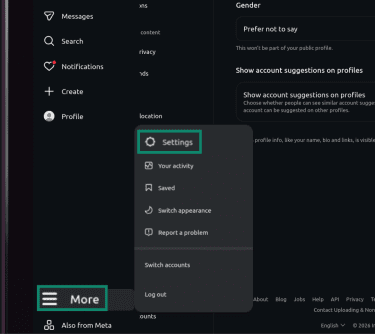
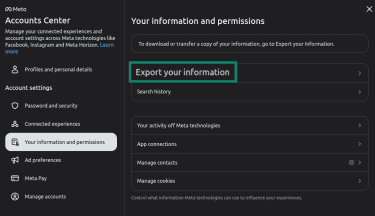
- Select See more in Accounts Center in the left-hand side menu.
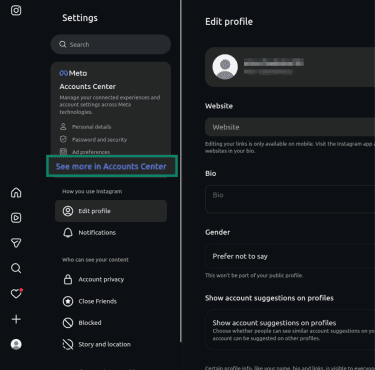
- Select Your information and permissions in the left-hand menu.
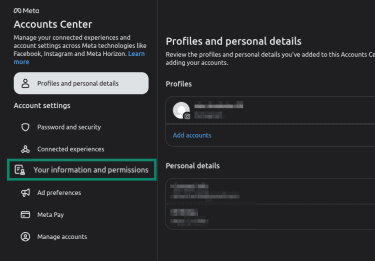
- Click Export your information in the center menu panel.
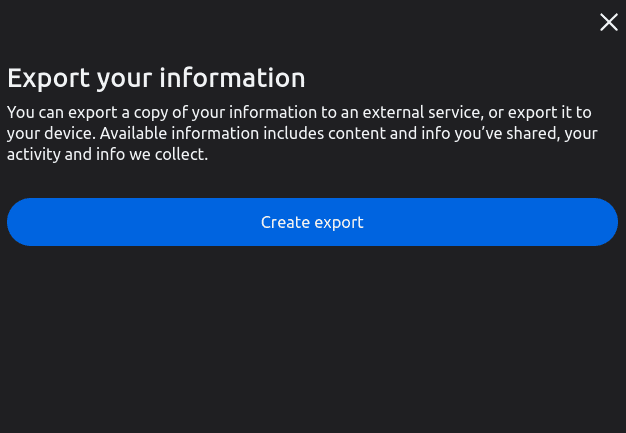
- Click Create export.
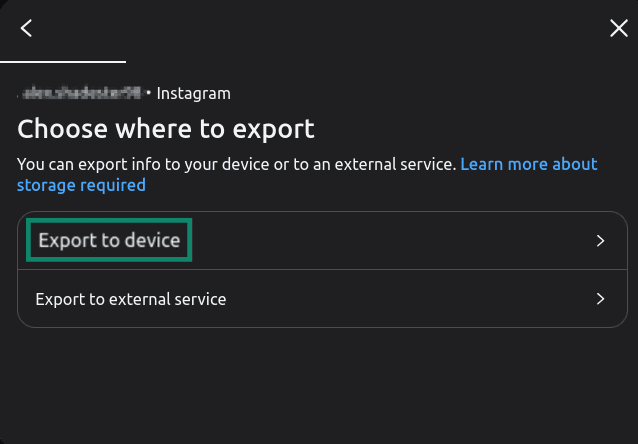
- Select Export to device to save the copied data to the device you’re using, or Export to external device if you want to save it to a USB drive or external HDD.
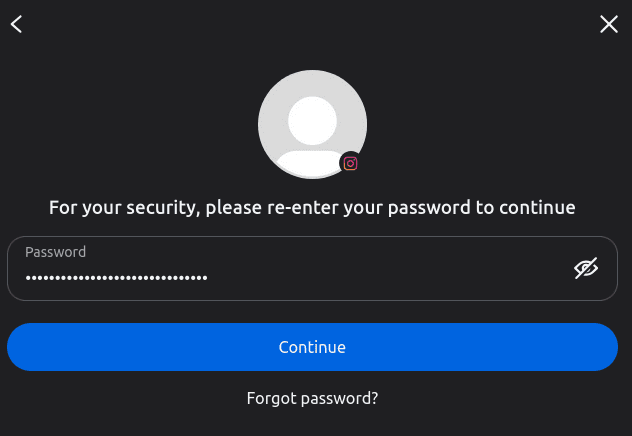
- Enter your password to confirm.
- Customize your export options, like data range, format (HTML or JSON), and media quality. Then tap Start export.
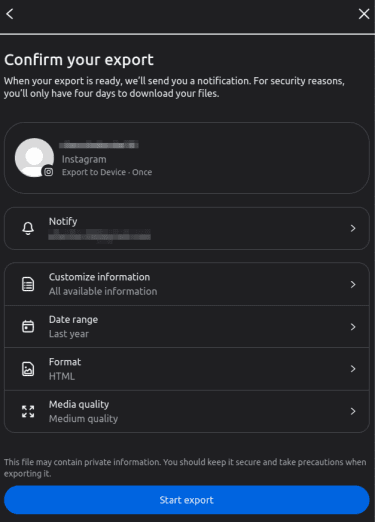
Instagram will email you a download link when it’s ready. Depending on the size of the account, this can take anywhere from a few minutes to several days. The link expires after four days, so download the files as soon as you can.
Remove connected apps and services
If you’ve ever logged into a tool, scheduler, dating, or shopping app using your Instagram account, that app probably still has access. Deleting Instagram doesn’t always cut those connections, so it’s best to do it yourself manually.
Go to the ☰ menu (bottom left) > Settings > scroll to Your app and media > Website permissions > Apps and websites > Tap the Active tab. These are the ones with current access. Tap Remove next to anything you don't recognize or no longer use. (The Expired and Removed tabs are just history, so you don't need to do anything there.)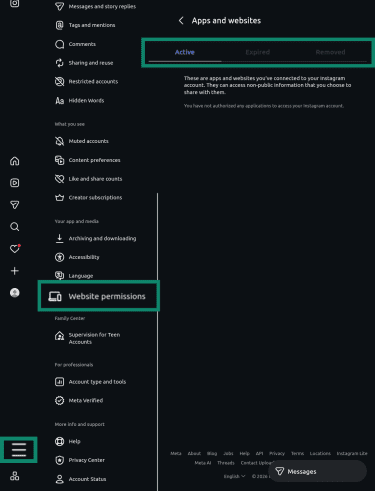
While you’re cleaning up, if your Instagram account is connected to Facebook or other Meta accounts through the Accounts Center, you may want to unlink them.
Deleting Instagram doesn’t delete Facebook, but some shared login features, connected profiles, or synced settings may stop working. Here’s how to unlink a Meta account from the Accounts Center:
- Select Settings.
- Click Accounts Center.
- Go to Manage accounts.
- Click Manage for the account you want to unlink.
- Select Move out of this Accounts Center.
- Confirm your choice.
Related read: How to delete your Facebook account: A step-by-step guide
How to permanently delete Instagram using a web browser
Here’s how to delete your Instagram account using a desktop web browser.
- After logging into Instagram, select Settings in the Instagram menu (the More option in the bottom left).
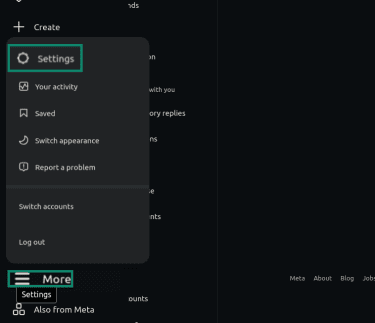
- Click See more in Accounts Center.
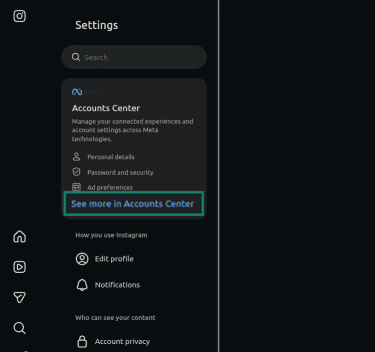
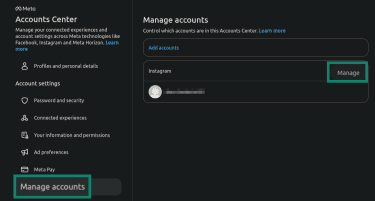
- Select Manage accounts, then find your Instagram account and click Manage.
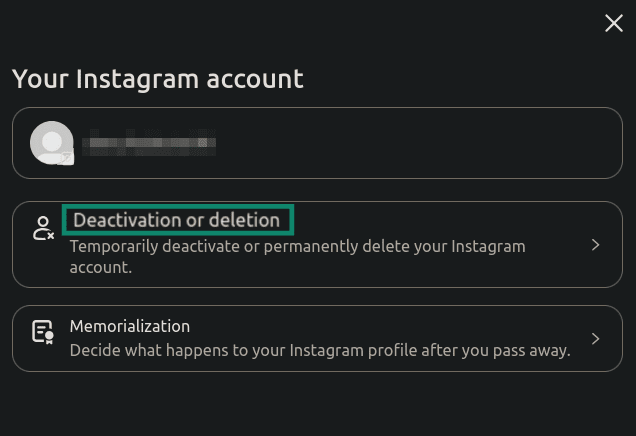
- Select Deactivation or deletion.
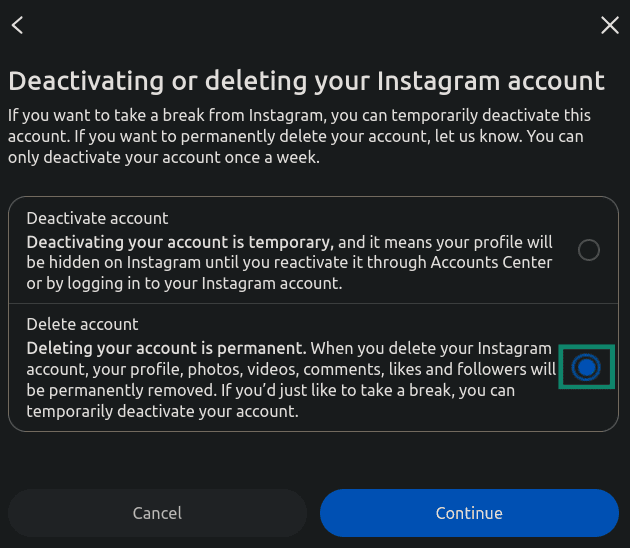
- Check the Delete account box.
- Choose a reason for deletion and select Continue.
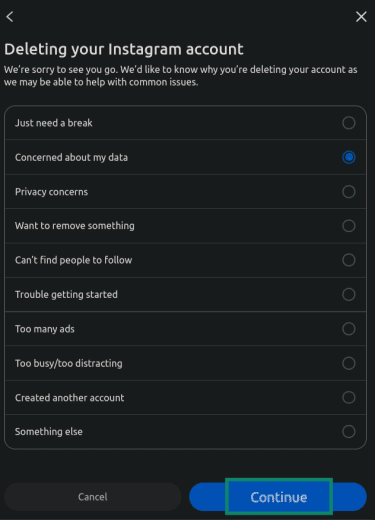
- Select Continue to confirm the deletion request.
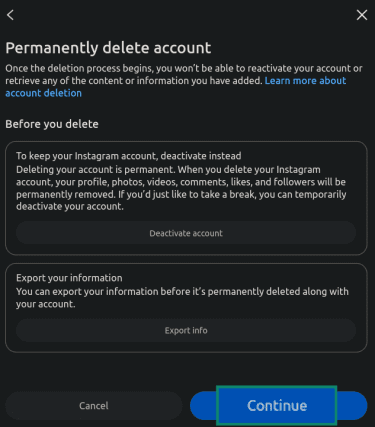
After that, Instagram starts the 30-day recovery process.
How to permanently delete Instagram on Android or iPhone
- Open Instagram and tap your profile picture in the bottom-right corner.
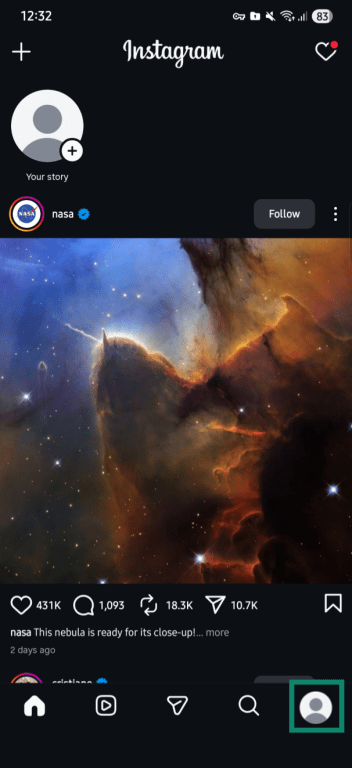
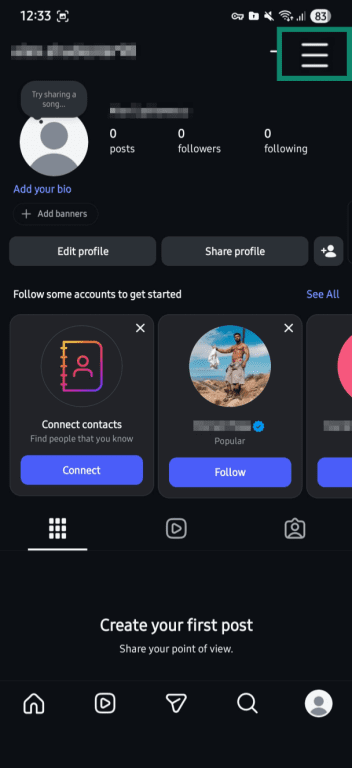
- Select the three-line icon in the top-right corner.
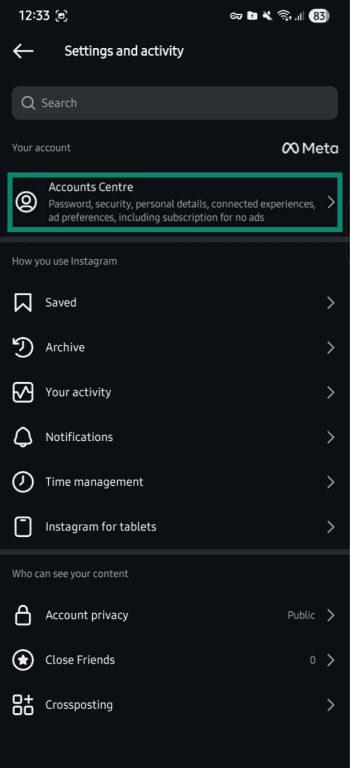
- Select Accounts Centre.
- Select Manage accounts.
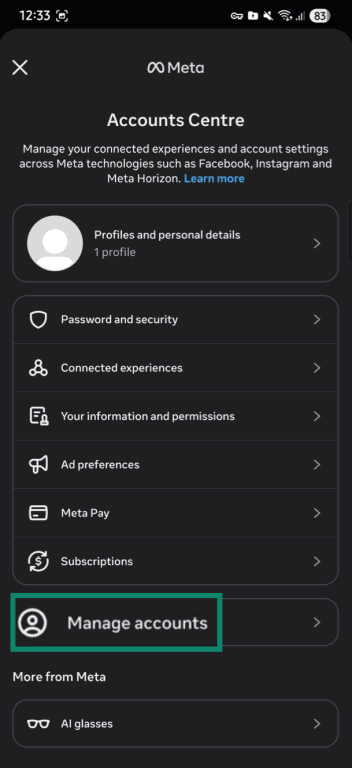
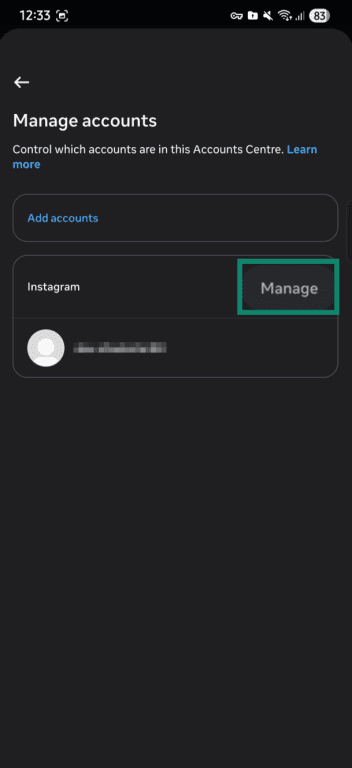
- Select Manage.
- Tap Deactivation or deletion.
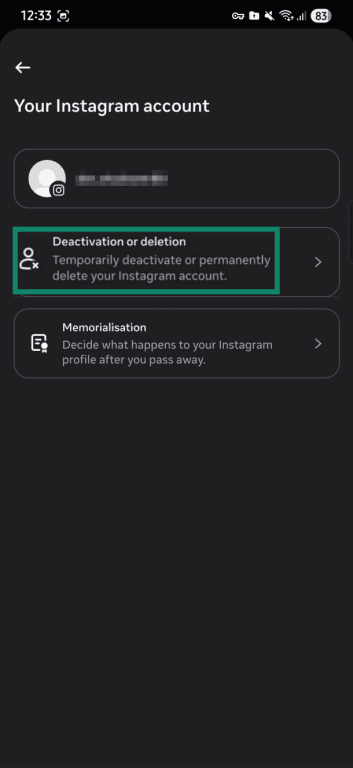
The next steps follow the same format as for a web browser described above: tap Delete account, select a reason for deleting the account, and tap Continue.
Can you delete an Instagram account you can’t log into?
You can’t delete an Instagram account without logging in, as Instagram needs to confirm you’re the owner. If you can’t access the account, you’ll usually need to recover access first before deleting it.
If you’ve forgotten the password
Here’s how you can recover a lost password if you still have access to the email address associated with the account:
- Click Forgot password? on the Instagram login screen.
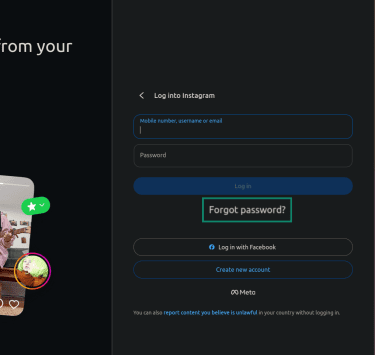
- Enter the email address, phone number, or username linked to the account and click Continue.
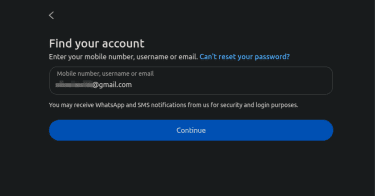
- Open the email Instagram sends you and either log in via the link or reset the password.
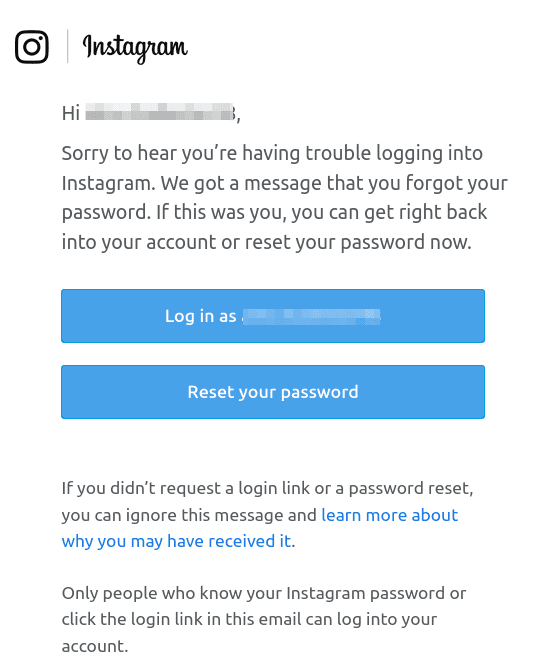
The reset option is the safer choice, as you may need to access your account more than once during the deletion process.
If the account was compromised
If you can’t access the email or phone on the account, or someone has taken over the account, visit instagram.com/hacked to secure the account. Instagram will walk you through identity verification.
If you have photos of yourself on the account, a reliable route is the video selfie option. You record a short clip of your face from a few angles, and Instagram’s reviewers match it against your photos. It usually takes a few days to hear back.
Using Meta Accounts Center
If your Instagram account is linked to Facebook through the Meta Accounts Center, you may still be able to manage it from your Facebook settings.
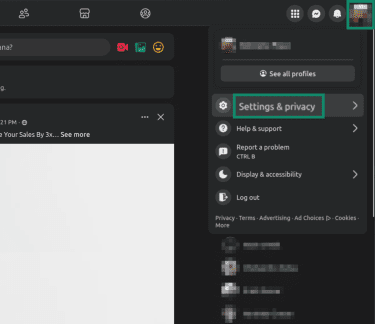
- Log into Facebook and click Settings & privacy.
- Select Settings.
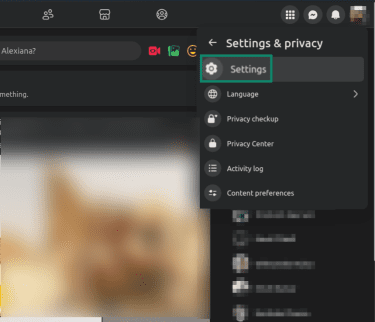
- Click See more in Accounts Center and look for the linked Instagram account.
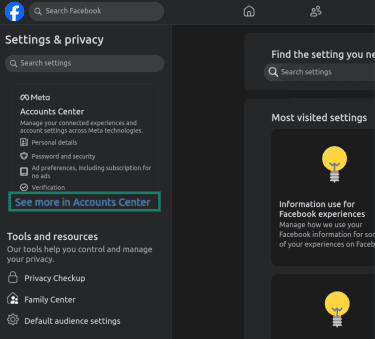
From there, the deletion steps are the same as described above.
How to deactivate your Instagram account
If Instagram is still logged in on another device, browser, or linked third-party app, it could reactivate your account. To avoid this, log out everywhere and remove saved credentials before you deactivate.
Deactivating your Instagram account follows the same path as deleting it, but you choose a different option at the end:
- Go to Settings > Accounts Center > Manage accounts.
- Pick your account and click Manage > Deactivation or deletion > Deactivate account.
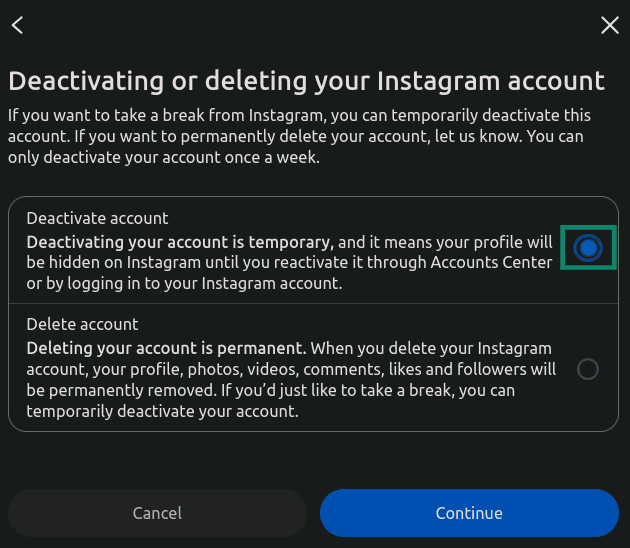
- Re-enter your password, pick a reason, and confirm.
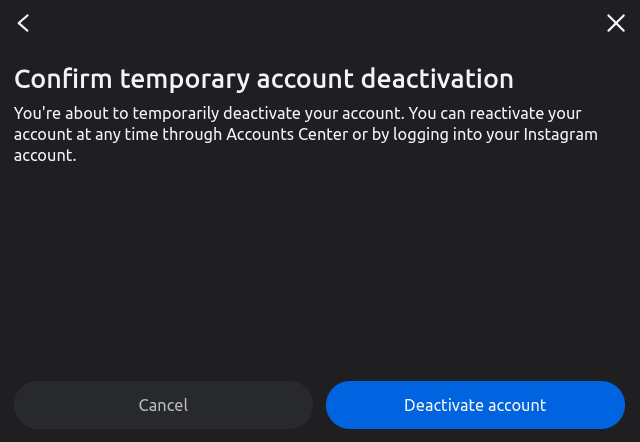
Instagram will hide your profile, photos, comments, and likes until you reactivate your account by logging back in.
What happens after you delete your Instagram account?
Immediately after, your profile disappears from search and from other people’s follower lists. Your posts, reels, stories, comments, and likes all vanish from public view. People who try to visit your profile will see a “user not found” page.
During the 30-day window, your data is hidden but not gone. Logging back in during that time can cancel the deletion. Opening the Instagram app on a phone where you’re still signed in can do this without you meaning to. So can a third-party app that has access. Sign out everywhere first.
After day 30, permanent deletion begins. You can’t get the account back. Instagram works through your data on its active servers and backups for another 90 days. However, some information may stick around even after deletion:
- Direct messages you sent to other users: Deleting your account doesn’t remove messages you sent from other people’s inboxes. If you want to remove a message from both sides of a chat, you need to unsend it before deleting the account. Instagram’s unsend feature works message by message, so this can be time-consuming if there are many old chats.
- Aggregated and anonymized data: Information that’s been stripped of your identity and combined with other users’ data may stay in Meta’s system for analytics.
- Backup copies of your data: These exist for up to 90 more days for legal and disaster-recovery reasons.
Deletion can also affect other Meta features tied to your Instagram account:
- You’re a Meta Verified subscriber: If you subscribe to Meta Verified, cancel it through the same billing path you used to sign up, such as Apple, Google Play, or Meta’s subscription settings. Meta says subscriptions need to be canceled where they were purchased.
- You’ve got a business or creator account: If you use a professional account, check your ads, Insights, shop setup, payouts, and monetization tools before deleting. This avoids losing access to account-specific tools or leaving scheduled campaigns or payments unresolved.
- You also use Threads: Deleting Instagram also deletes the Threads profile connected to it. If you only want to leave Threads, delete your Threads profile instead.
FAQ: Common questions about permanently deleting Instagram
How long does it take to permanently delete Instagram?
Will my Instagram messages disappear from other people’s inboxes?
Does deleting Instagram also delete my Threads or Facebook account?
Can someone else see my Instagram profile after I delete it?
Take the first step to protect yourself online. Try ExpressVPN risk-free.
Get ExpressVPN