How to unsubscribe from Quora: Complete guide to stop emails and notifications


Managing Quora notifications can be confusing because the platform sends updates from several different email categories and addresses. Unsubscribing from one type of message doesn’t always stop other digests, session alerts, or activity summaries from arriving, which can leave users wondering why new messages keep appearing when they think they’ve opted out.
This guide provides a clear, structured explanation of every method for stopping Quora emails and notifications. It covers the settings inside your Quora account, additional blocking options, and the privacy considerations behind these messages. You’ll also find troubleshooting steps for situations where emails continue coming even after you unsubscribe.
How to unsubscribe directly on Quora
Quora has a long list of emails and notification types (possibly dozens, depending on how many features you use), covering everything from daily or weekly digests to activity related to your network, spaces, and things Quora thinks you may like.
If you don’t want to receive multiple emails a day from Quora, unsubscribing from certain lists, categories, or all emails is a practical solution. (That said, if you’ve decided that you don’t want to use Quora at all anymore, you can delete your Quora account. This will also stop all emails.)
You can unsubscribe from Quora through the platform’s website or app. This is handled through your account settings, where you have the option to unsubscribe from all Quora content-based email and notification categories or customize them based on which ones you still want to receive.
Note that there are some types of emails that you can’t opt out of, such as updates to Quora’s privacy policy and terms of use, because the company is legally obligated to send them to all registered users. Additionally, Space admins can’t unsubscribe from notifications regarding the Space without removing their admin rights. Otherwise, follow the steps below to unsubscribe from specific email categories.
Change your email preferences (step-by-step)
You can adjust your Quora email preference settings on the website and app. Here’s a step-by-step guide for how to unsubscribe from Quora emails.
On the Quora website
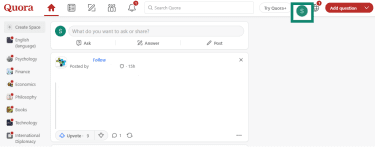
- Go to Quora.com, log into your account, and click your avatar.
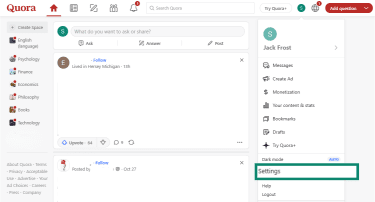
- The user menu will open. Click the Settings option.
- Click on the Email & Notifications option.
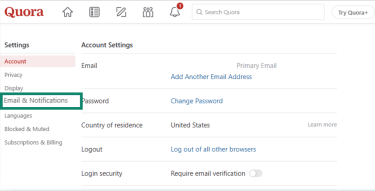
- Move the sliders to unsubscribe from the email categories you want to unsubscribe from. The options are as follows.
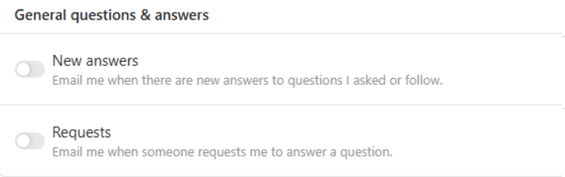
- General questions & answers: You can turn off all emails related to new answers to questions that you’ve asked or followed and to when someone asks you to answer a question.
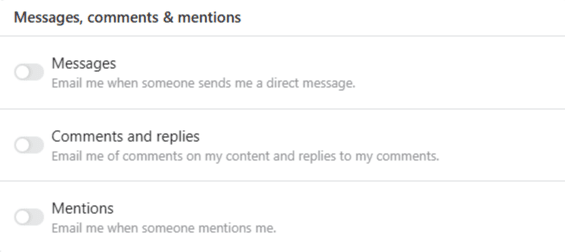
- Messages, comments & mentions: Unsubscribe from all emails relating to direct messages (DMs), comments, or replies on your content, and when you get mentioned.
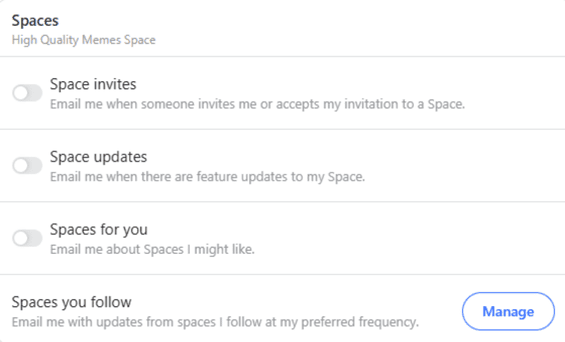
- Spaces: You can unsubscribe from Spaces invitations, feature updates, and different Spaces that Quora thinks you’ll like.
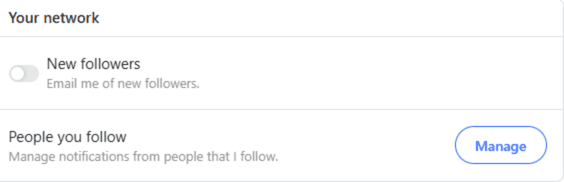
- Your network: Turn off emails that alert you to new followers.
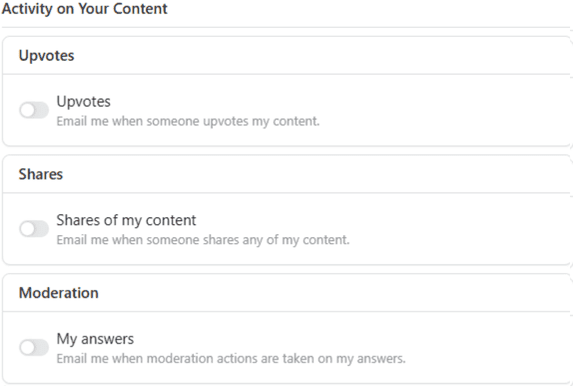
- Activity on your content: You can stop emails that update you each time your content is upvoted, shared, or has moderation activity.
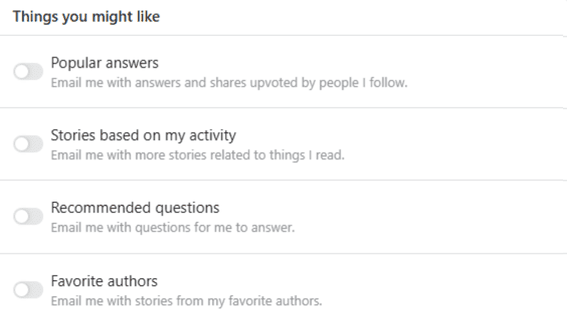
- Things you might like: The Quora algorithm sends emails about content it thinks you might like based on your activity. You can turn off popular answers by people you follow, stories, recommended questions, and your favorite authors.
On the mobile app
- Open the Quora app and tap your avatar to open the user menu.
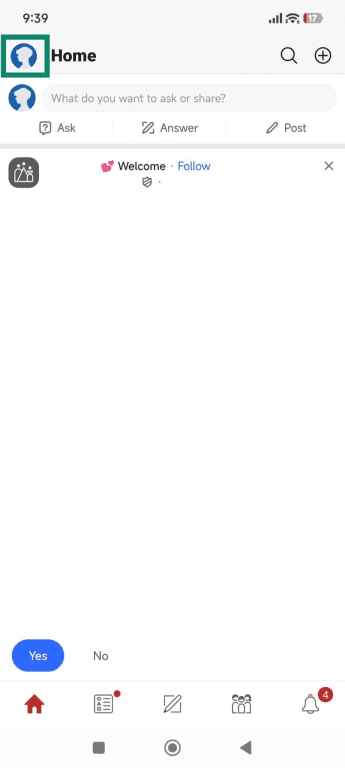
- Tap Settings.
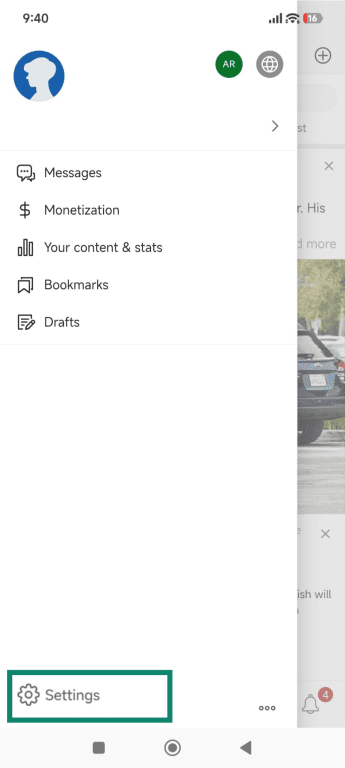
- Tap Email & Notifications.
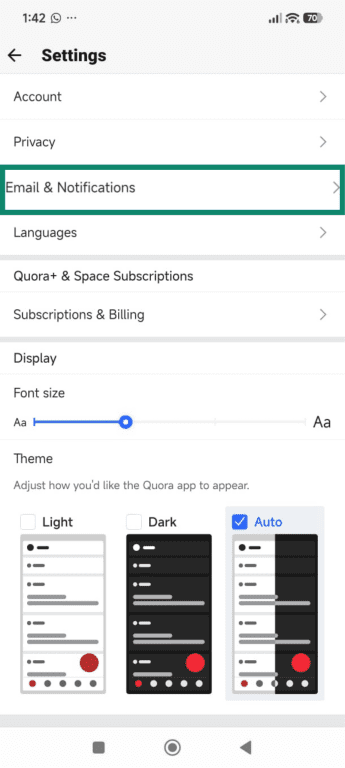
- Choose Email.
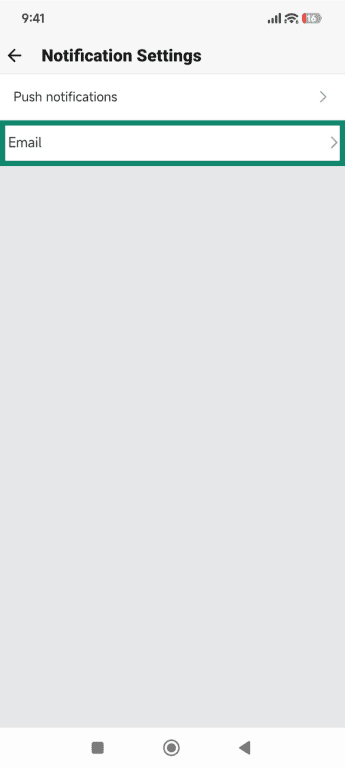
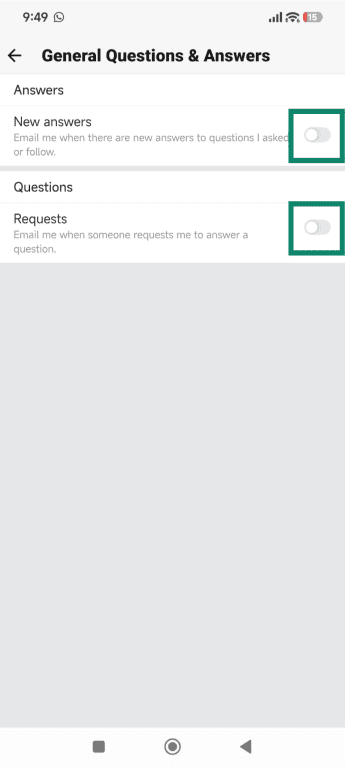
- Tap General questions & answers.
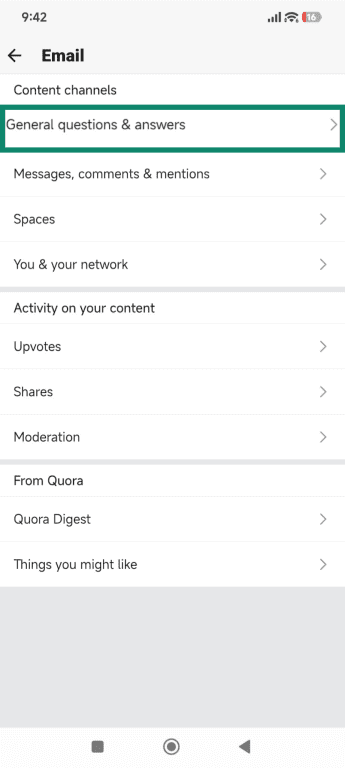
- Adjust the slider to turn off emails for New answers and Requests. Repeat this step for each of the remaining categories.
Turn off Quora notifications
Quora sends push notifications to your phone and updates to your email based on activity from the people and Spaces you follow. You can adjust these settings in the same section that you used to manage the emails.
On the Quora website
- In the Email & Notifications section of the Settings menu, scroll down to the Spaces section and click the Manage button.
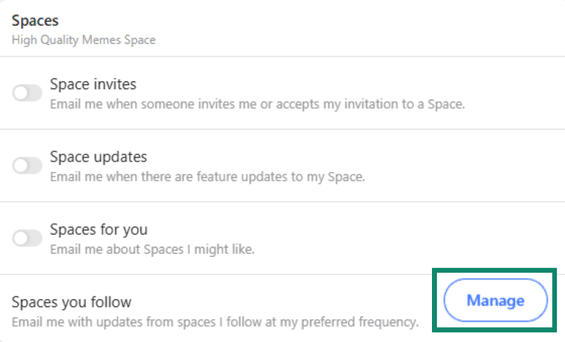
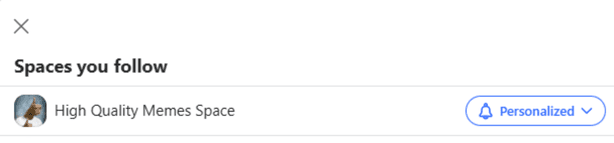
- A window will open with a list of all the spaces you follow. Click the Personalized button next to each Space you want to adjust the notifications for.
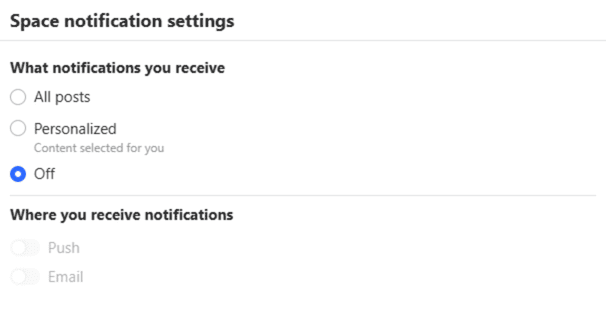
- Choose the option to turn Off all Space notifications.
- Just under the Space settings is the Your Network section. Click on the Manage button next to People you follow.
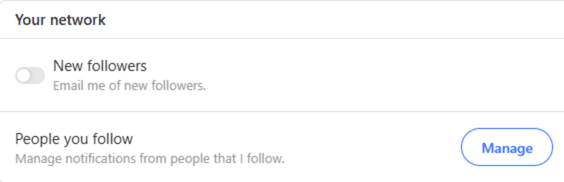
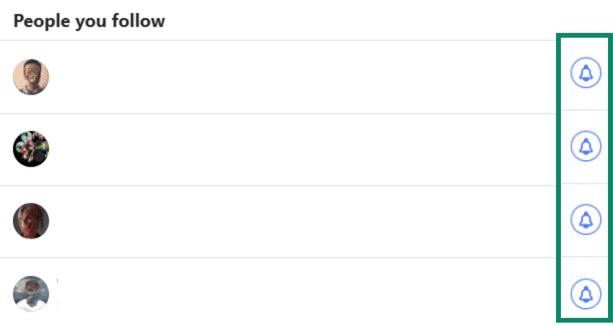
- Click the bell next to each name to turn off the notifications.
On the mobile app
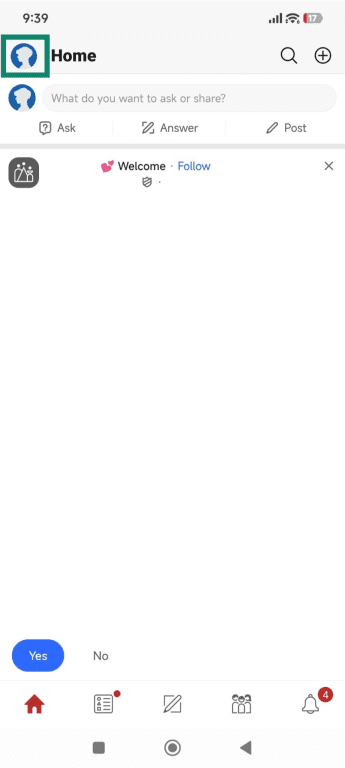
- Open the Quora app and tap your avatar to open the user menu.
- Tap Settings.
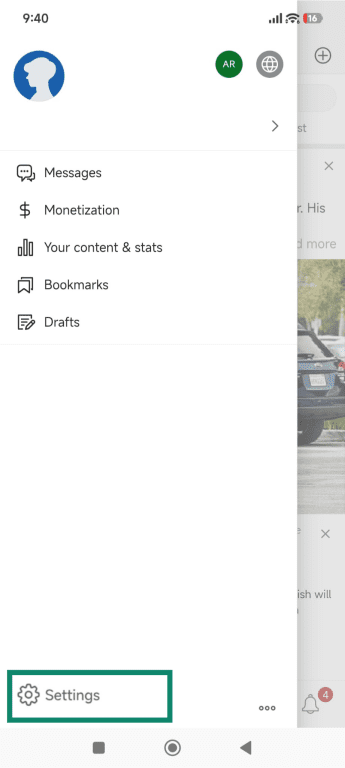
- Tap Email & Notifications.
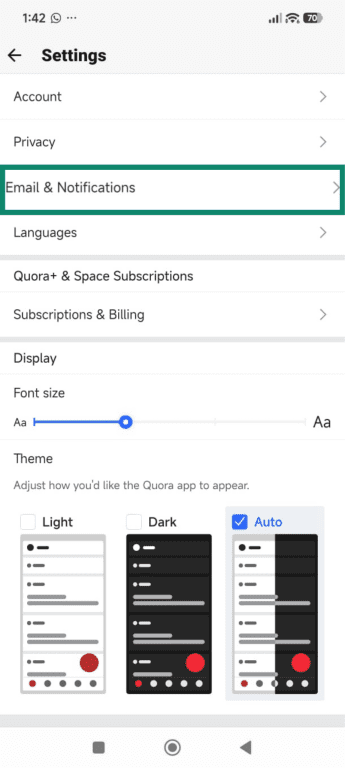
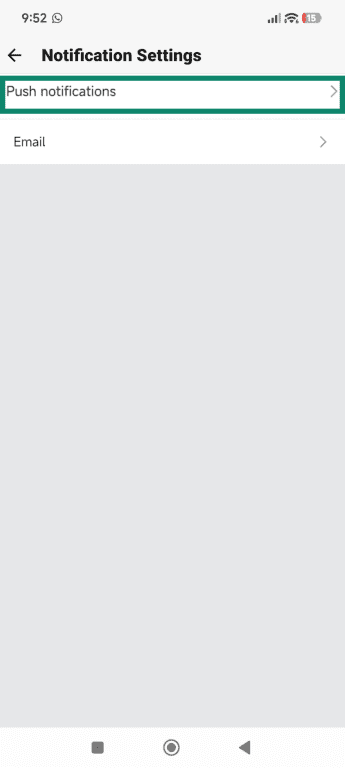
- Choose Push notifications.
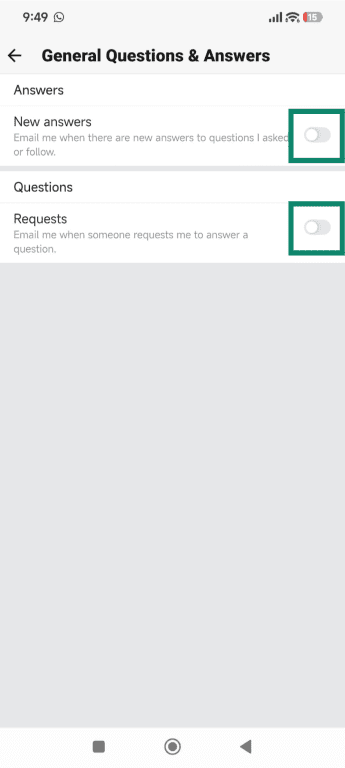
- Tap General questions & answers and adjust the slider to turn off notifications for New answers and Requests. Repeat this step for each of the remaining categories.
Quora Digest emails
Quora Digest is a newsletter that Quora sends to highlight activity it believes you’ll find relevant. The recommendations come from the topics you read, the authors you follow, and the questions or Spaces you interact with. The Digest typically includes a curated selection of popular answers, trending discussions, and posts that match your past browsing patterns.
Its purpose is to give you a snapshot of what’s happening across the platform without requiring you to check Quora directly. Because it relies on multiple personal preference signals, the Digest can vary significantly from one person to another. It’s also one of the most frequent types of emails Quora delivers, which is why many people choose to disable or adjust it when managing their inbox.
Stop Digest emails
You can stop the Quora Digest emails in the Email & Notifications section of the Quora settings as well. Simply scroll down to the From Quora section and adjust the slider to turn off emails about the top stories from Quora.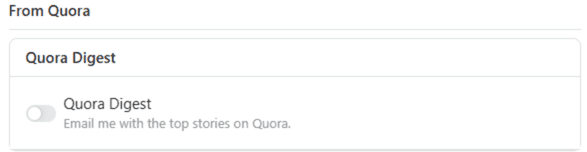
Adjust Digest frequency
Scroll down to the Quora Digest section, and make sure that you enable the emails. This step will open an additional section with 3 options: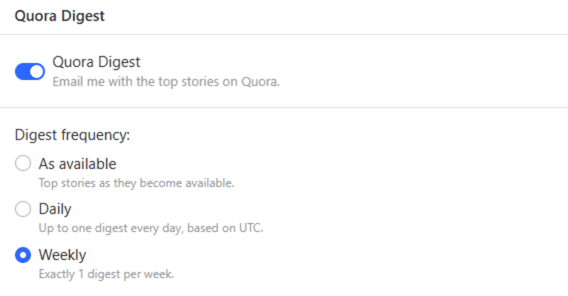
- As Available: Receive a new Digest when top stories become available. Quora doesn’t publish a fixed delivery schedule for As Available Digests, and frequency may vary.
- Daily: Get one Quora Digest email per day, as long as there is new content or updates to share.
- Weekly: Receive one Quora Digest email per week.
How to filter Quora emails in your email client
For Quora emails, the Unsubscribe option in Gmail opens a dialogue box that includes a button to open the unsubscribe page in Quora. It’s not the exact same page as the general Email & notification settings pages shown above but is dedicated to the specific email you’re trying to unsubscribe from.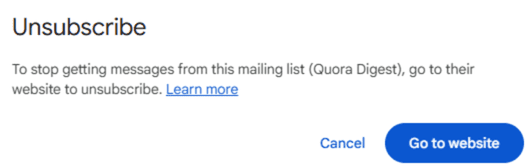
The only way to stop Quora emails through your email platform without adjusting your Quora account settings is to block or filter the emails. The challenge is that Quora sends email updates from many different sender addresses. Even if you block or unsubscribe from one, others continue to reach your inbox.
This means that it’s not enough to block or filter the specific sender. The most effective approach is to filter or redirect all messages from the @quora.com domain. Most email providers allow you to route these messages into a dedicated folder or delete them automatically so they never appear in your primary inbox.
Domain-level filtering guarantees consistent handling of every Quora message, even when you receive emails from new categories or addresses.
How to filter emails on Gmail
- Open your Gmail and click on the icon at the right end of the search bar.
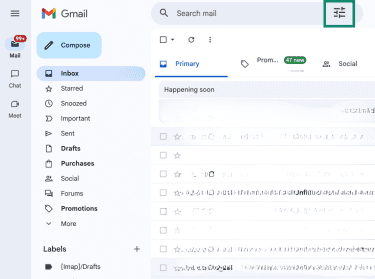
- In the From section, type in @quora.com and click the Create filter button.
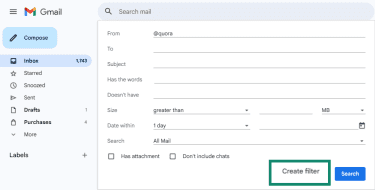
- Set the rules you want to apply to all Quora emails. If you want to delete them automatically, you can check the box next to Delete it. Click the Create filter button to save your settings.
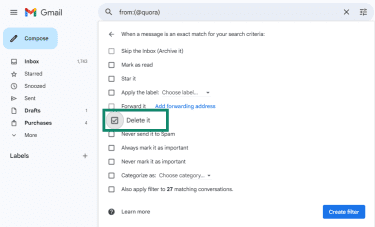
Most other email providers offer similar rules-based or filtering features that allow you to automatically manage or delete emails from specific senders, such as Quora. The exact steps and terminology may vary, but the functionality is ultimately the same.
Troubleshooting (if you still get emails)
Here’s what to do in case you continue receiving messages even after adjusting your email and notification settings as described above.
Review your Quora privacy and notification settings
Go back to your Quora account and double-check the email and notification settings. As we detailed above, there are more than a dozen categories of emails, and one may have been left unchecked.
Another possibility is that you started following a new user or Space. In this case, you have to manually adjust the personalization settings for each one. To confirm this, go to the Spaces you follow section and verify the personalization settings for each one. Similarly, go to the list of users you follow and verify that every notification bell is turned off.
Check your email provider filters
As noted earlier, Quora uses different email addresses for each type of email notification. Check that instead of just blocking a specific sender or group of senders, you have the entire Quora domain blocked.
Contact Quora support
If you’re still receiving emails, you can submit a ticket through the Quora contact form. There’s no specific option for stopping emails, but you can send the request through the General Feedback or Report a Bug options.
Privacy tips to reduce tracking
As stated in its Cookie Policy, Quora uses cookies and other tracking measures to collect information about your activity on the Quora platform, how you interact with Quora emails, and some activity outside Quora through third-party tools. This can include actions such as opening Digest emails, clicking links, reading or engaging with content on Quora, and signals used for remarketing across the web. These signals help personalize recommendations, support remarketing, and tailor the content you see on the platform.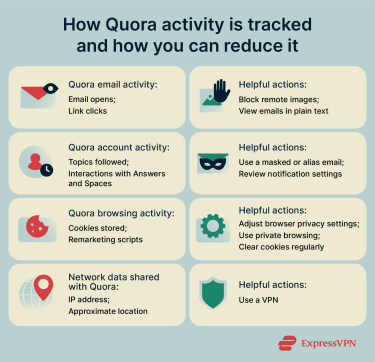
Here are several tips to limit the amount of information Quora and other third parties can collect:
- Block remote images: This prevents tracking pixels from loading when you open emails. Most email providers have an option in the settings where you can choose not to display external images. Bear in mind though that this won’t block all the tracking; some email clients may send back metadata, such as “message delivered,” even if the image pixels are blocked.
- Use masked or alias emails: This reduces the amount of personal information linked to your account. However, if you log in with the same account on multiple devices, the activity associated with that account can still be linked back to you.
- Adjust browser privacy settings: Limit cookies, scripts, and identifiers used for remarketing.
- Use private browsing windows: Reduce long-term tracking tied to persistent cookies.
- Clear cookies regularly: Prevent cross-site identifiers from building a long-term profile of you.
How a VPN helps reduce tracking
A virtual private network (VPN) does not prevent tracking pixels, cookies, or link analytics from loading, and it does not protect information you willingly share with Quora while logged into your account. However, it can reduce the amount of network-level information associated with your activity.
When you open an email or click a link that leads to Quora, a VPN helps protect your network identity in several ways:
- IP masking and location privacy: Replaces your real IP address with the VPN server’s IP address, limiting exposure of your true geographic location.
- Encrypted connections: Prevents network observers, such as internet service providers (ISPs) or public Wi-Fi operators, from seeing which websites you access.
- Reduced reliance on IP-based remarketing signals: Makes it harder for advertising systems to associate activity across sites using network identifiers alone.
- Limited exposure of network metadata: Reduces how much browsing behavior can be linked to you through IP-based signals outside of logged-in accounts.
When you’re logged into Quora, the platform can still associate your actions with your account, and a VPN does not change that. Its primary role is to limit exposure of your IP address and other network-level metadata, which are commonly used for tracking and advertising purposes outside of direct account activity.
FAQ: Common questions about unsubscribing from Quora
How do I remove my Gmail account from Quora?
If your Quora account is registered with a Gmail address, you can change the email address associated with your account in Settings > Account. Once you add and confirm the new email address, set it as your primary contact email. Then, you can remove your Gmail address.
How do I cancel a paid Quora subscription vs. just email notifications?
A paid Quora subscription, such as Quora+, is managed separately from email communication settings. You can cancel the subscription under Settings by opening the Subscriptions & Billing section. This stops billing and access to subscription features, but as long as you don’t delete your account, you’ll still receive the emails connected to the free account.
Email alerts, Digests, and notifications are controlled under Email & Notifications, and disabling those settings won’t cancel a paid subscription.
Can I unsubscribe from Quora without logging in?
Email providers can’t adjust Quora’s internal notification settings. Quora requires all subscription and notification changes to be made within the account itself. While you can filter or redirect messages through your email provider, true unsubscription from Quora emails, including Digests and activity alerts, can’t be completed without logging into your account.
How long does it take for changes to apply?
There’s no official notification for how long it takes for the changes to your Quora email preferences to take effect. In practice, the changes are made right away. That said, you may receive a few pending emails already in the queue.
Take the first step to protect yourself online. Try ExpressVPN risk-free.
Get ExpressVPN