What is email encryption, and why does it matter?


Email encryption is a security method that protects the contents of an email. It matters because, without encryption, emails would travel across the internet in plaintext, making it easy for third parties to access and exploit sensitive information.
Many email services encrypt emails while they’re in transit between mail servers. In these cases, the provider manages the keys and can decrypt the message once it reaches the inbox.
Some email services support end-to-end encryption (E2EE), which means only the sender and intended recipient hold the keys needed to read the message.
This article explores how email encryption works, the main types available, and the risks of sending unencrypted messages.
What email encryption protects
Email encryption protects confidential or sensitive information that you might send in an email. This can include:
- Names
- Addresses
- Phone numbers
- Financial information
- Account login credentials
- Patient health information (PHI)
- Customer or employee information
- Legal contracts
- Intellectual property
- Other personally identifiable information (PII)
How does email encryption work?
Email encryption converts readable text (plaintext) into an unreadable format (ciphertext) using cryptographic algorithms such as Advanced Encryption Standard (AES) and Rivest–Shamir–Adleman (RSA).
While an email is in transit, it remains in ciphertext, which prevents unauthorized parties from reading it. When it reaches its destination, the recipient’s device or email server (depending on the encryption method) uses the corresponding decryption key to convert the ciphertext back into readable plaintext.
Types of email encryption
There are two main methods used in email encryption: in-transit encryption and E2EE. Each method secures emails in a different way. However, you can’t usually choose between them. Your email provider, the recipient’s provider, and their security settings determine what type of encryption applies.
In-transit encryption
In-transit encryption protects emails while they travel between email servers. It uses a security protocol called Transport Layer Security (TLS) to encrypt messages and verify the identity of the servers that handle them.
The process starts with a TLS handshake between the sending mail server and the receiving mail server. During this handshake, the servers authenticate each other and establish temporary session keys used to encrypt the connection.
The message is then transferred using the Simple Mail Transfer Protocol (SMTP). During this journey, the message may pass through several email servers. Each server establishes its own TLS-encrypted connection to the next server before forwarding the message.
This step-by-step protection helps secure the email at each stage of its journey. However, it doesn’t prevent email providers or servers that process the message from accessing the content.
Because in-transit encryption works automatically between servers and doesn’t require users to manage encryption keys, it remains the standard approach for most email services.
The role of STARTTLS and STLS
STARTTLS and STLS are commands used by email protocols to upgrade an existing plaintext connection to encrypted communication while messages travel between systems.
STARTTLS applies this upgrade for internet protocols like SMTP, which is used for sending emails from a mail client to a server or between mail servers.
STLS performs a similar role for Post Office Protocol 3 (POP3), which email clients use to retrieve emails from a mail server.
Both improve security for server-to-server or client-to-server connections but don’t encrypt the content end-to-end the way PGP or S/MIME do.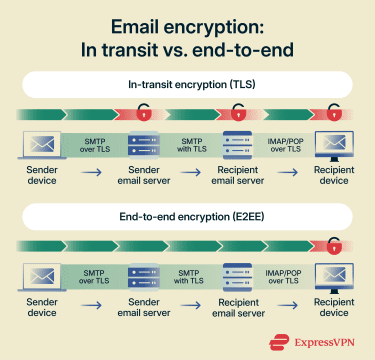
End-to-end encryption
E2EE protects emails from the moment they’re encrypted on the sender’s device until the recipient opens them using their private key. Email servers and service providers that handle the message cannot read its contents.
This method uses public key encryption to secure the message with the recipient’s public key. The corresponding private key unlocks it after delivery. The email remains encrypted as it travels across the internet, even if it passes through multiple servers.
Because intermediate systems cannot decrypt the message, E2EE provides stronger privacy. However, it requires both the sender and recipient to use compatible encryption systems and manage cryptographic keys, which makes it harder to implement across email services.
End-to-end encryption standards
End-to-end email encryption can be implemented using several standards and protocols.
Pretty Good Privacy (PGP) and OpenPGP
Pretty Good Privacy (PGP) and OpenPGP are E2E email encryption systems. PGP is proprietary software, while OpenPGP is an open standard that anyone can implement. Both use a combination of asymmetric and symmetric encryption to secure messages.
- Asymmetric encryption uses a pair of keys: a public key that can be shared and a private key that remains secret.
- Symmetric encryption uses a single temporary key, often called a session key, to encrypt and decrypt the message itself.
With PGP, the recipient generates a public and private key pair. The public key is shared, while the private key stays on the recipient’s device. When someone sends an email, their application uses the recipient’s public key to encrypt a temporary session key. That session key then encrypts the message content. After delivery, the recipient’s private key unlocks the session key, which decrypts the message.
PGP can also be used to verify authenticity. The sender creates a digital signature using their private key. The recipient then uses the sender’s public key to confirm that the message came from the claimed sender and wasn’t altered in transit.
Secure/Multipurpose Internet Mail Extensions (S/MIME)
Like PGP, Secure/Multipurpose Internet Mail Extensions (S/MIME) also uses E2EE. However, S/MIME uses digital certificates issued by trusted certificate authorities (CAs) to verify sender and recipient identities, whereas PGP relies on user-generated signatures. S/MIME’s approach enables centralized trust and simpler identity verification that’s well suited for large organizations.
Many popular email clients like Outlook and Apple Mail support S/MIME, making it a widely adopted choice for secure communication.
Choosing email encryption tools
The type of email encryption you get depends on the tool you choose, whether it’s built into an email provider or offered by a standalone encryption service.
Some email encryption tools focus on individual privacy and ease of use, while others support business compliance and advanced security controls. The right choice depends on your risk level, how many people use it, and how easy it is to deploy and manage.
Factors to consider when selecting an email encryption tool
Before you choose an email encryption tool, consider these factors to ensure it meets your security needs and fits into your daily workflow:
- Security strength and methods: Look at what encryption method the tool uses and how it protects your messages. Some systems offer E2EE, while others only secure the connection between servers. Also consider how the tool generates, stores, and revokes encryption keys, as weak key management can undermine otherwise strong encryption.
- Ease of use and setup: Choose tools that are easy to install and use. Solutions that require complex key management or manual configuration can lead to mistakes. Simple interfaces and clear workflows reduce errors and increase adoption.
- Compatibility with your email provider: If you opt for a third-party tool, ensure it works with the email software or service you already use. Some tools integrate easily with common email clients like Gmail and Outlook. Others may require special plugins or custom setups.
- Compliance and legal requirements: If you work in industries with data protection rules, such as healthcare or finance, verify that the encryption meets regulations like the General Data Protection Regulation (GDPR) or the Health Insurance Portability and Accountability Act (HIPAA).
- Policy-based encryption filters: Look for tools that automatically encrypt emails based on rules or policies. These filters can trigger encryption when an email includes sensitive data like financial details or personal identifiers.
- Scalability: Scalable tools support more users, higher email volumes, and additional security features without requiring a complete system change. This matters for growing teams and businesses that anticipate their email usage expanding over time.
Email encryption options for individuals and businesses
The options below highlight common approaches for both individuals and businesses.
Individual-focused options
Services like Proton Mail and Tutanota offer E2EE and anonymous signup.
These options generate and manage keys for you, so you don’t need technical knowledge to use them.
If you want to add a third-party encryption tool, SecureMyEmail integrates with various email providers, including Gmail, Yahoo, Outlook, and Microsoft 365.
Business-focused options
Businesses often need encryption that scales across many users, integrates with enterprise systems, and complies with legal regulations. Platforms like Virtru integrate with Microsoft 365 and Google Workspace, providing E2EE and access controls that help businesses meet GDPR, HIPAA, and other regulatory requirements.
Risks of not using email encryption
Email travels across many networks and servers. Without strong encryption, anyone who gains access to those systems can read or alter your information. The consequences range from personal data breaches to severe legal and regulatory problems.
Sensitive information exposure
Without encryption, attackers can intercept email content as it travels between your device and the recipient through techniques such as man-in-the-middle (MITM) attacks. In these scenarios, malicious actors secretly position themselves between the sender and receiver, allowing them to read, copy, or even modify messages in transit.
This puts private details, such as account numbers, personal identification, or business secrets, at serious risk. If this data falls into the wrong hands, it can lead to identity theft, financial loss, or corporate espionage.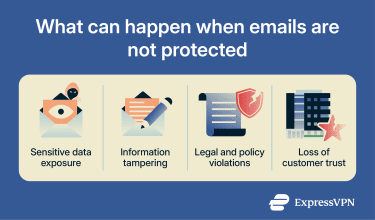
Compliance and regulatory risks
Many data protection laws require organizations to secure any sensitive information they transmit or store. Regulations like GDPR and HIPAA set standards for protecting personal and financial data, and failing to encrypt email can violate these rules. Noncompliance can result in hefty fines and legal penalties.
Reputation damage
Unencrypted emails can lead to data breaches, which can damage trust with customers, partners, or clients. This loss of trust can result in canceled contracts, reduced sales, or long-term customer churn. In many email clients, a lock icon next to the message or recipient indicates that the email was encrypted in transit using Transport Layer Security (TLS). If there’s no lock icon or a warning symbol appears, the connection may not have been encrypted. Some services provide more detailed information in the message header. For example, Gmail lets you open the message details to see whether the email used standard encryption (TLS) or enhanced encryption with Secure/Multipurpose Internet Mail Extensions (S/MIME). Messages that use stronger encryption methods such as S/MIME or Pretty Good Privacy (PGP) may also display a certificate or digital signature icon. Keep in mind that most everyday emails are protected only by in-transit encryption, which secures the message while it travels between servers but doesn’t prevent the email provider from accessing it. End-to-end encryption (E2EE) is less common and typically requires additional tools or specific email services.
FAQ: Common questions about email encryption
How do you encrypt an email?
Is Gmail an encrypted email service?
What’s the difference between S/MIME and PGP?
How can I tell if my email is encrypted?
What are the most secure email encryption methods?
Are there free tools for encrypting email?
Take the first step to protect yourself online. Try ExpressVPN risk-free.
Get ExpressVPN












 Support Center
  FAQ
FAQ  VPN Setup Tutorials


