Coupon fraud explained: How to spot fake deals and shop safely


Online coupons are a popular way to save money. However, not every coupon is genuine. Some offers are designed to look legitimate but are actually part of broader online coupon fraud schemes that aim to steal your data or your money.
Coupon fraud takes various forms, from fake discount codes and cloned shopping websites to misleading ads and browser extensions that track your activity. Sometimes, these scams rely on subtle details, such as slightly altered website domains or offers that don’t quite match official promotions. Understanding how these tactics work makes it easier to recognize them.
This guide explains what coupon fraud is, where these scams appear, and how to tell the difference between a real deal and a fake one. It also covers practical steps to use coupons safely and how to respond if something seems wrong.
What is coupon fraud?
Coupon fraud is the use of fake or misleading discounts to trick shoppers. Instead of helping you save money, these counterfeit coupons might collect personal information, redirect you to imitation websites designed to look like real stores, or trick you into downloading malware.
Why do criminals create fake coupons?
In most cases, scammers use fake coupons as bait. The promise of a discount can encourage users to take an action they wouldn't otherwise take, such as clicking an unfamiliar link or entering their card number on a malicious site.
Common motivations include:
- Data harvesting: Some fake coupon pages are designed to capture email addresses, phone numbers, login credentials, payment details, or other sensitive data that can be used for identity theft or fraud.
- Malware delivery: Some scams prompt users to download a coupon app, browser extension, or file. These downloads may contain malicious data-stealing software.
- Subscription traps: Some sites require users to “verify” eligibility by entering payment details, then quietly enroll them in recurring charges.
Coupon scams tend to increase during high-traffic shopping periods, when people are actively searching for deals and are more likely to act quickly. These spikes often occur around events like Black Friday, Cyber Monday, and major holiday seasons.
During these periods, scammers take advantage of higher shopper activity, increased urgency around limited-time deals, and a flood of legitimate promotions that make fake ones harder to spot.
Legitimate coupons vs. fraudulent ones
Many retailers offer genuine discounts through their official websites, emails, or trusted partners. The key difference is where the coupon comes from and what it asks you to do.
- Legitimate coupons: Come from official or well-known sources and work as expected at checkout.
- Fraudulent coupons: Often come from unfamiliar sources, make unrealistic promises, or require extra steps unrelated to the purchase.
Understanding this distinction helps you use genuine coupons with confidence while avoiding offers that could put your data or money at risk.
Where coupon scams appear online
Coupon scams often appear in places where shoppers are already looking for deals, so they’re easy to stumble across. Here's where they most commonly show up.
Fake websites and cloned retailer pages
One common place for coupon scams is scam or cloned online stores and websites. These pages typically look like legitimate online stores or well-known brands. They often include familiar logos, layouts, and even product listings. A small change in the website address, such as a misspelled domain name, is often the only visible sign that something’s wrong.
Emails, messages, and phishing links
Coupon scams commonly appear in emails, SMS messages, or direct messages. These messages may claim to offer exclusive discounts or limited-time deals from a retailer you recognize. They often include a link to a landing page that might prompt you to log in to unlock the coupon or enter personal or payment details.
In reality, these emails and messages are phishing attempts using the coupon as an incentive to get you to share information.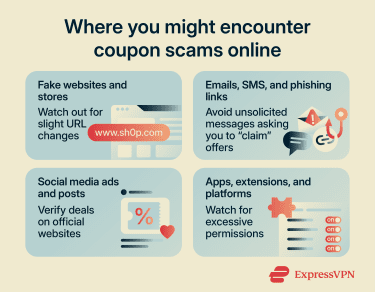
Social media ads and influencer-style posts
Social media platforms are another common place for coupon scams. Fraudulent vouchers might appear in sponsored ads and posts or even in comments under popular content.
Some scams use eye-catching promotions, such as unusually high discounts or giveaways, to encourage quick clicks. Others may appear through accounts that imitate real brands or individuals. Clicking the post may lead to a site or form that asks for personal details or to a checkout page where the promised discount never actually applies.
Because social media content moves quickly, these offers can spread and reach large audiences within a very short time. If you see a discount code promoted on social media, it's worth verifying it directly on the retailer's official website before using it.
Apps, extensions, and coupon platforms
Coupon scams can also appear through fake mobile apps, browser extensions, or coupon aggregator websites. While many tools in this category are legitimate, some may:
- List fake or outdated coupon codes.
- Redirect you to third-party sites without clear disclosure.
- Request access to your data or account activity.
Browser extensions, in particular, can have broad permissions. Some may track your activity across websites or inject their own affiliate links during checkout.
Before installing any app or extension, check reviews and the developer’s reputation.
How to spot a fake coupon
Scammers usually put effort into making fake offers look convincing, but there are some patterns that can help you identify a fraudulent coupon before you share sensitive information.
Suspicious links, redirects, and domains
One of the clearest warning signs is the link itself. Fake coupons are often shared through URLs that don’t match the official retailer’s website.
Before clicking any link, hover over it to preview the URL. Look out for:
- Misspelled or altered domains: These include extra letters or slight variations in a brand name.
- Unusual subdomains: Links that add extra words before or after the main domain.
- Shortened links: URLs that hide the destination, making it harder to verify.
If a coupon link doesn’t clearly lead to a retailer’s official site, it’s best to avoid interacting with it.
Unrealistic discounts and too-good-to-be-true offers
Coupons are meant to offer savings, but there are limits to what retailers typically provide. Extreme discounts can be a sign that the offer isn’t genuine. Be cautious if you see:
- Discounts that are significantly higher than usual promotions.
- Exclusive deals that aren’t mentioned on the retailer’s official channels.
- Offers that apply to all products without restrictions.
- Promotions that appear repeatedly across unrelated websites.
While occasional large sales do happen, they’re usually supported by clear terms and appear on official platforms.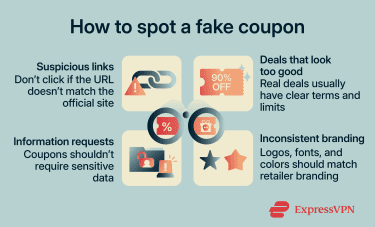
Requests for personal or payment information
A coupon code shouldn’t require your credit card details, Social Security number (SSN), or bank account information to be revealed or activated. If a site asks for any of this before showing you a discount, it's a strong indicator that the offer isn't genuine.
Be cautious about subtler requests too. Being asked to create an account, verify your identity, or complete a survey to access a promo code may seem reasonable, but these steps can be used to harvest your email address, phone number, or login credentials.
Providing an email address to access a coupon is common practice on legitimate platforms, but it’s still worth limiting how often a real inbox is exposed since legitimate businesses get breached, too. ExpressVPN, for example, offers ExpressMailGuard, an email masking service that helps shield a personal email address when signing up for discounts, newsletters, or one-time offers.
Missing or inconsistent branding
Genuine coupons tend to follow a consistent visual style, including recognizable logos, clear formatting, and details that match the retailer’s usual branding. Fake coupons often miss these elements or get them slightly wrong. This can make them look unpolished or inconsistent, even if the offer itself seems appealing.
That said, AI tools have made it easier for scammers to create highly convincing coupons and websites, so a professional look and feel is no guarantee of legitimacy.
How to check if a coupon is real
Knowing how to verify an offer gives you an extra layer of confidence before you shop. These steps can help you confirm whether a discount is legitimate.
Verify offers on the official brand website
Go directly to the retailer's official website; most brands publish their current promotions directly on their homepage, product pages, or dedicated deals or offers page. Any active discount codes will typically be listed there. If you can’t find any mention of the offer on the official site, it might not be legitimate.
This also applies to promotional emails. If you receive an offer by email, don't click the link in the message. Instead, open a new browser tab, navigate directly to the retailer's website, and check whether the promotion is listed there. This removes the risk of being directed to a cloned page through a phishing link.
When verifying a coupon, don’t just check whether it’s listed on the retailer’s official website. You should also confirm that the discount terms, such as the discount percentage, expiry date, and conditions, match exactly.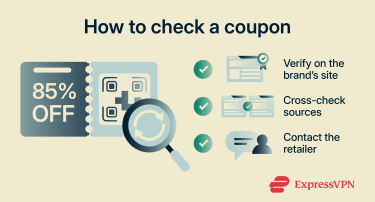
Compare with trusted coupon sources
Reputable coupon platforms can be useful for cross-checking an offer, especially when they show when a code was last verified.
If a coupon code appears on an obscure site but can't be found on any reputable platform, that’s a red flag. Conversely, if the same code appears across multiple trusted sources and matches what the retailer is advertising, it's more likely to be legitimate.
It's also worth checking the date. Expired coupon codes are common on lower-quality sites that don't update their listings regularly. An expired code isn't necessarily a sign of digital coupon fraud, but it may indicate the source isn't reliable.
Contact customer support
If you're unsure whether a coupon is legitimate, contacting the retailer's customer support team directly is a straightforward way to get a definitive answer. Most retailers can confirm whether a specific promo code is active and whether it applies to the products you're buying. This is particularly useful for high-value purchases.
Contact details for customer support are always available on the retailer's official website; avoid using contact information provided in the same message or on the same page as the coupon itself, as these may also be fraudulent.
Are coupon browser extensions safe?
Coupon browser extensions are tools that automatically find and apply discount codes while you shop. They're widely used and, in many cases, genuinely useful. However, because they interact directly with your browser, it’s important to understand what they can access and how they handle your data.
What extensions can access
When you install a coupon browser extension, you grant it a set of permissions that determine what it can see and do in your browser. Coupon extensions typically request access to the websites you visit so they can detect when you're on a retailer's page and surface relevant deals.
In practice, this often means the extension can read the content of every page you visit, not just shopping sites. Some extensions also request the ability to read and modify data on websites, which can allow them to interact with page content.
These permissions aren't automatically a sign of malicious intent; many legitimate extensions require broad access to function properly. The issue is that the same level of access that allows an extension to find you a discount also allows a malicious extension to collect sensitive data without your knowledge. That’s why it’s important to install only extensions you trust.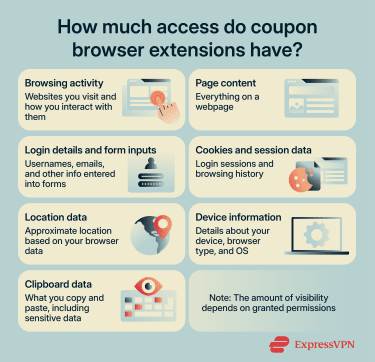
Related: Is Honey legit? A comprehensive review of PayPal Honey
Privacy and tracking risks
Several coupon tools have been found to collect detailed data about users' browsing habits, including the pages they visit, the products they view, and the purchases they make.
This data is often used for targeted advertising or sold to third parties. In some cases, it's shared with affiliate networks that use it to track purchasing behavior across the web. This might not always be clearly disclosed in the extension's privacy policy, and users are sometimes unaware that it's happening.
Before installing any coupon extension, it's worth reading its privacy policy to understand what data it collects, how it's used, and whether it's shared with third parties.
Signs of a trustworthy extension
Before installing a coupon extension, look for indicators that it’s reliable and transparent:
- Available through an official browser store, such as the Chrome Web Store or Apple App Store.
- Has a clear developer identity and established reputation.
- Consistent, genuine user reviews across the browser store.
- Has a detailed privacy policy explaining what data is collected.
- Gets regular updates and active maintenance.
- Its permissions match the extension’s stated purpose.
Extensions that meet these criteria are more likely to operate as expected without unnecessary data collection.
When to avoid using an extension
There are situations where using a coupon extension introduces more risk than it's worth. If you're visiting a site that handles sensitive personal or financial information, such as a healthcare provider, a government service, or a financial institution, it's advisable to disable your extensions before proceeding. The broad page-access permissions that many extensions hold mean they could theoretically read data entered on those pages.
How to use online coupons safely
Online coupons can help you save money, but it’s important to use them in a way that protects your data and avoids unnecessary risks. The following online shopping safety practices can help you take advantage of genuine deals without unnecessarily exposing your personal or financial information.
- Only use coupons from the retailer’s official website, app, or a reputable coupon platform. Treat unsolicited offers in emails or messages with caution.
- Don’t provide payment details, your phone number, date of birth, or home address to unlock a coupon. An email address is typically all a legitimate offer will ask for.
- Use a dedicated email address for promotional sign-ups to limit exposure if it’s ever shared with third parties.
- Use strong, unique passwords and two-factor authentication (2FA) on any account linked to coupon platforms or online shopping.
- Keep your browser, operating system, and security software updated, and only install extensions from official stores.
- Make sure you’re on the correct domain and that the checkout behaves as expected before entering payment details. Leave if anything feels off.
- Periodically review and remove any coupon extensions you no longer use.
What to do if you fall for a coupon scam
If you’ve interacted with a suspicious coupon, it’s important to act quickly to limit any potential impact.
Stop interaction and secure your accounts
The first step is to stop engaging with the scam immediately. Close the tab or app, don't click any further links, and don't provide any additional information if prompted.
If you entered login credentials on a fake page, change your password for that account straight away, and for any other accounts where you use the same password. Enable 2FA on those accounts if you haven't already. This makes it significantly harder for someone who has obtained your password to access your account.
If the scam involved a fake retailer page or coupon site that asked you to create an account, check whether you used the same email and password combination elsewhere. Prioritize updating credentials for accounts that store financial or personal information, such as online banking, email, and shopping accounts.
Contact your bank or payment provider
If you entered payment information or completed a purchase through a questionable site, it’s a good idea to notify your bank or payment provider. You can:
- Report the transaction as potentially fraudulent.
- Request to have your card monitored or temporarily frozen if needed.
- Ask about reversing or disputing unauthorized charges.
- Review recent transactions for any unusual activity.
Banks and payment services often have processes in place to help resolve these situations, especially when reported early.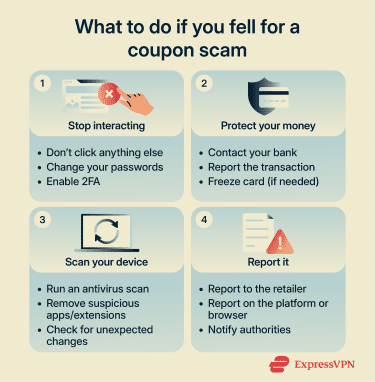
Scan your device for threats
If you downloaded anything as part of the interaction, such as an app, a file, or a browser extension, you should run a full scan using a reputable antivirus to remove anything suspicious.
You should also look for signs of unwanted changes in your browser. These can include new or unfamiliar extensions, homepage or search engine changes, or unexpected pop-ups. These behaviors may indicate that something was installed or modified without your knowledge.
If you're unsure whether your device has been affected, err on the side of caution and run a scan regardless. Catching a threat early is easier than dealing with the consequences of one that's been active for some time.
Report the scam
Reporting a coupon scam can help prevent others from encountering the same issue.
You can report scams to:
- The retailer being impersonated (through its official website).
- The platform where you saw the coupon (email provider, social media site, or app store).
- Your browser provider; browsers like Chrome allow you to report malicious sites or extensions directly through the browser.
- Consumer protection or cybersecurity authorities in your region. In the U.S., these are the Federal Trade Commission (FTC) and the Internet Crime Complaint Center (IC3).
FAQs: Common questions about coupon fraud
Can fake coupons steal your credit card details?
Can coupon scams install malware on your device?
Should you trust coupon codes from social media?
Are coupon browser extensions tracking your activity?
Take the first step to protect yourself online. Try ExpressVPN risk-free.
Get ExpressVPN