Amazon refund text scam: How to stay safe from fake refund messages


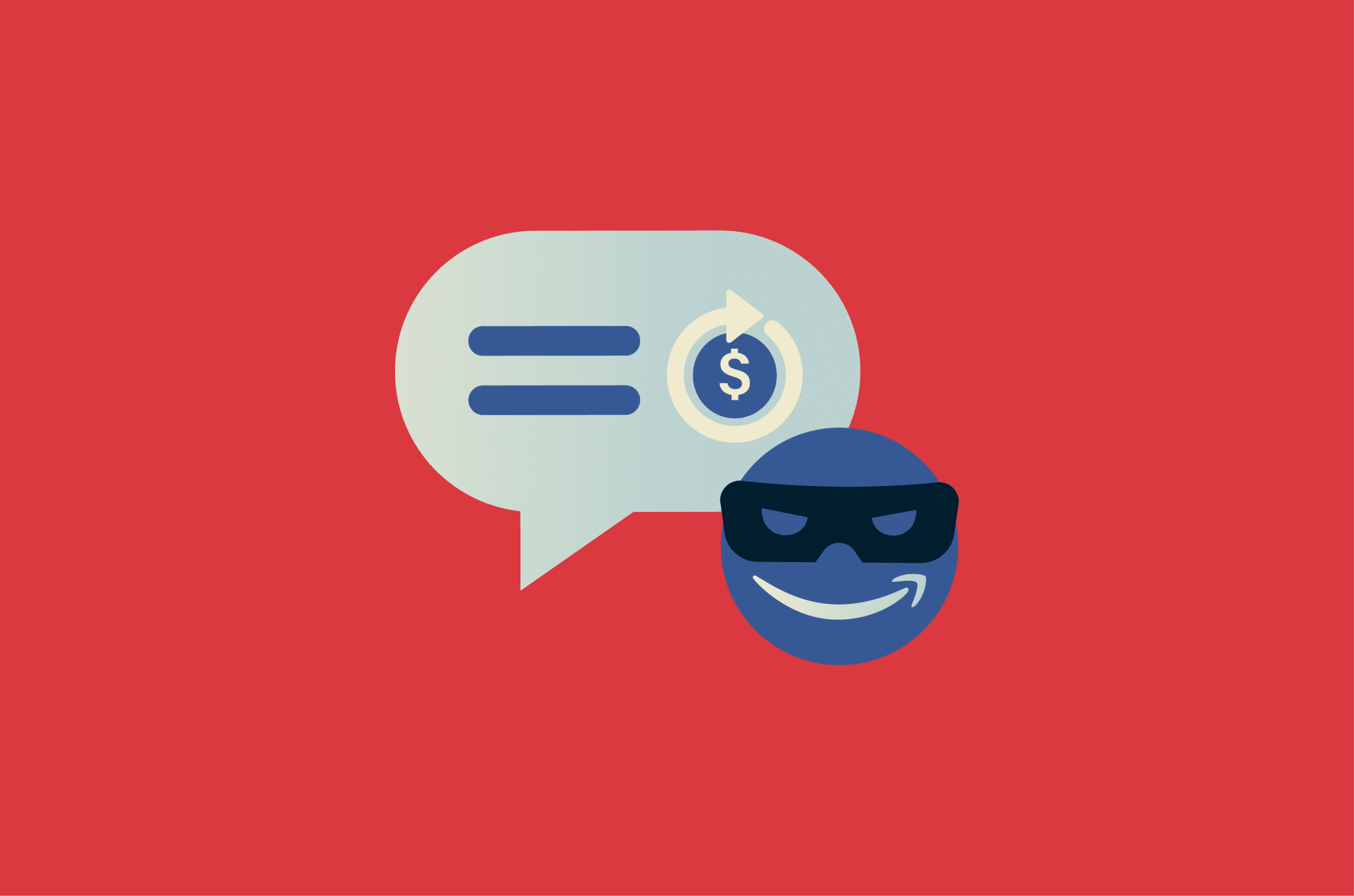
An Amazon refund text can seem like good news, especially if it says you’re owed money for a recent order.
But some of those messages are fake, sent by scammers who use refund claims to collect login details, payment information, or other personal data.
This guide explains what the Amazon refund text scam is, how it works, how to spot fake refund messages, and what to do after receiving one.
What is the Amazon refund text scam?
The Amazon refund text scam is an impersonation scam in which a message appears to come from Amazon but is actually sent by a scammer. The message may claim there’s an issue with an order, product quality, refund eligibility, account activity, or a recalled item.
The goal is to get the recipient to interact outside Amazon’s official website or app, often by opening a phishing link or entering account, payment, or personal information.
Because these messages arrive by text, they are a form of smishing: phishing carried out over SMS or text messaging.
However, not every Amazon-related text is fake. Amazon may send legitimate messages, such as delivery updates, account security alerts, order-related notices, or two-step verification codes. Amazon also provides scam-reporting tools and account security features, but scammers may still try to impersonate the company through messages, links, or websites outside Amazon’s official channels.
Also read: Is Amazon safe? A complete guide for smart shopping.
How the Amazon refund text scam works
The scam usually follows a simple path: a message creates a reason to act, a link leads to a fake site, and a spoofed page collects information. From there, the scammer may try to access accounts, commit payment fraud, or run follow-up scams.
The message may feel less alarming than other scam texts because it offers a refund rather than starting with a threat.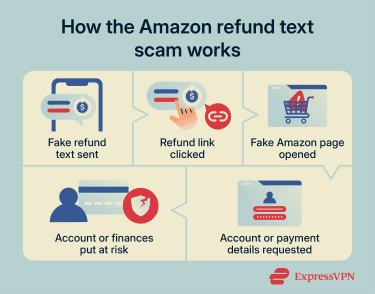
Fake refund notifications
Fake Amazon refund notifications often use order or product issues as the hook. According to the Federal Trade Commission (FTC), a common version claims that a recent purchase failed a quality inspection, doesn't meet Amazon’s standards, or was recalled, and then offers a refund via a link.
Some versions make the offer sound more enticing by claiming there’s no need to return the item. The text may also use official-sounding wording about a refund, order review, or account update to make the request seem routine.
Phishing links and fake login pages
The link in a fake refund text may open a page that appears to be an Amazon sign-in screen, refund form, or order support page. Spoofed websites often copy logos, colors, and layouts from real companies to look familiar. Some versions may redirect to a third-party website unrelated to Amazon.
These pages may ask the recipient to log in, confirm a card, update payment details, or verify the account before the refund can be processed. If the information is entered, it goes to the scammer-controlled page instead of Amazon.
Requests for personal information
A fake refund page may ask for an Amazon password, phone number, address, card details, bank account information, or Social Security number (SSN). Some also ask for a one-time code sent to the account owner’s phone or email.
Each request serves a different purpose. A password can help a scammer try to access the account. Card or bank details can be used for payment fraud. Personal details can support identity theft or make follow-up scams more convincing.
One-time codes are especially sensitive because scammers use them to confirm a login, reset a password, or approve account changes. If a scammer already has the password and obtains the code, they may be able to complete the sign-in process even when two-factor authentication (2FA) is enabled.
Receiving the text alone doesn’t expose this information. The risk appears when the recipient clicks through and enters details on the malicious page.
Also read: Can you get hacked by replying to a text? What you need to know.
How to tell if an Amazon refund text is fake
A fake Amazon refund text isn’t always obvious. Some messages are poorly written, but others copy familiar wording, branding, or order-related language well enough to seem believable.
Use the signs below as a quick check. One suspicious detail may be enough to treat the message with caution.
Suspicious links
A suspicious link is one of the clearest signs of an Amazon refund text scam. The message may include a link that resembles Amazon’s real website but uses misspellings, extra characters, a strange domain, a shortened URL, or an IP-like string.
On desktop, hovering over a link can show the actual destination before it opens. On mobile, pressing and holding the link may reveal a preview or the full URL, depending on the messaging app and device. The full address can still be harder to inspect on mobile, especially when a link is shortened or cut off by the screen.
Scam links may also include “amazon” in a misleading part of the address. In its 2026 scam trends report, Amazon says legitimate Amazon sites use “amazon.com" or the local Amazon store equivalent, but scammers can imitate familiar wording in a link. A message should not be judged by the link alone.
Urgent requests
Scam texts often make the decision feel time-sensitive, prompting the recipient to claim the refund now, confirm details quickly, or act before the offer expires.
Amazon also warns in the scam trend report that fake messages often use false urgency to pressure people into doing what the scammer asks.
Unexpected money promises
Unexpected money, such as a refund, replacement, or a gift card, is another common hook. Because the message offers a benefit rather than a warning, it may seem less suspicious at first.
An unexpected refund is still worth checking carefully, especially if the details don’t match a recognized order.
Unknown sender numbers
A fake Amazon refund text may come from an unusual sender ID, a number with a foreign country code, or even an email-to-text address. These details don’t prove a message is fake on their own, but they’re worth noting.
Scam campaigns can rotate numbers or use different sending methods, and a familiar-looking sender name doesn’t automatically make a message legitimate.
Orders you don’t recognize
Amazon warns that scammers may send fake texts impersonating Amazon, including messages about orders, account activity, or other issues that should be checked through Amazon’s official website or app.
A real order issue should appear in the Amazon account. If the text refers to an item, refund, or delivery that doesn’t appear in the order history or account messages, that’s a warning sign.
Poor grammar or formatting
Poor grammar, odd spacing, strange capitalization, mixed fonts, or awkward wording can all indicate a fake Amazon refund text. Some messages also use substituted characters that resemble normal letters to appear official at a glance.
That said, some scam messages are polished, and some legitimate automated messages can be brief or plain. Still, a clean message isn’t automatically safe.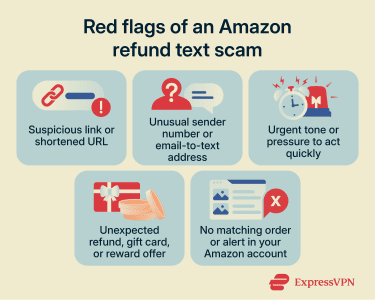
What to do if you get an Amazon refund scam text
If you receive a suspicious Amazon refund text and haven’t clicked anything:
- Don’t open the link, download files, or reply to the sender. Even replying “STOP” can be risky if the message is suspicious. It may confirm that your number is active, which can lead to more scam attempts.
- Open Amazon directly through the official app or by typing the website address into your browser.
- Review your order history, account messages, and product safety alerts. A real order issue, refund update, or product safety notice should be verifiable through your Amazon account or Amazon’s Product Safety and Recalls pages.
- Keep the message long enough to report it. Report suspicious Amazon messages directly via Amazon’s Report a Scam page or by emailing reportascam@amazon.com. Amazon says these reports help it identify bad actors and take action against suspicious messages, websites, and phone numbers.
- Use your phone’s built-in report junk or spam option, where available. On iPhone, this may appear as “Report Junk” in Messages. On Android, it may appear as “Report spam” or “Block & report spam,” depending on the device, carrier, and messaging app.
- Report the message to the relevant fraud, consumer protection, or cybercrime authority in your country.
- After reporting, block the sender and delete the message.
In the U.S., scams can be reported to the FTC at ReportFraud.ftc.gov. In Australia, scams can be reported to Scamwatch. In the UK, suspicious texts can be forwarded to 7726, and fraud can be reported through Report Fraud. In Canada and New Zealand, suspicious texts can also be forwarded to 7726.
What to do if you clicked a fake Amazon refund link
Clicking a fake Amazon refund link doesn’t always mean your phone or account is compromised. What matters most is what happened after you clicked.
| What happened | What to do next |
| You clicked, but didn’t enter anything | Close the page, report the text, and watch for follow-up messages. |
| You entered your Amazon login | Change your Amazon password, enable 2FA, review account activity, and secure the linked email account. |
| You entered card details | Contact your card issuer and ask about replacing the card, disputing charges, and monitoring activity. |
| You entered your bank details or an SSN | Contact your bank, report identity theft if needed, and consider fraud alerts or a credit freeze. |
| You shared a one-time code | Change your password, review 2FA and recovery settings, and sign out of active sessions where available. |
| You downloaded a file, installed an app, or gave remote access | Disconnect the session, remove suspicious apps or files, run a security scan, and contact Amazon or your bank if account or payment details were exposed. |
Change your Amazon password
If an Amazon password was entered on a suspicious page, change it immediately. Use a new password that isn’t used anywhere else.
Reused passwords can turn one compromised account into several. If the same password is used for email, banking, shopping, or social media accounts, change it there too. Prioritize your Amazon-linked email account, since email access can be used to reset passwords for other services.
After changing your password, review your Amazon Login and Security settings, account details, and signed-in devices or access settings where available.
Turn on two-factor authentication
If 2FA isn’t already active on your Amazon account, enable it after changing your password. It adds a second check after the password, typically through a code, prompt, or authenticator app, making it harder for someone to access your account with a stolen password alone.
It isn't foolproof, though. Never share a one-time code over text, call, email, or web form. Codes are used to verify a sign-in or account action, not to hand over to someone else. Where supported by the account or device, phishing-resistant sign-in methods can offer stronger protection by reducing the risk of entering credentials on fake websites.
Review your account activity
After securing your login, review your Amazon account for anything you don’t recognize. Check recent orders, archived orders, saved addresses, payment methods, gift card balance, subscriptions, and account messages.
Look for signs that someone changed a delivery address, added a payment method, placed an order, used a gift card balance, or modified account details. Also, check whether the message that prompted the click appears in Amazon's Message Center or order history.
If something looks wrong, contact Amazon through its official website or app. Keep screenshots or notes of suspicious activity in case Amazon, your bank, or a fraud-reporting service asks for details.
Contact your bank
Contact your bank or card issuer right away if you entered payment details, if your bank account information is involved, or if an unfamiliar transaction is involved. Ask whether the card or account should be frozen, replaced, or monitored for fraud.
If you entered credit or debit card details, your card issuer can explain how to dispute unauthorized charges and whether a replacement card is needed. If you entered bank account details, your bank may recommend additional monitoring or account changes.
If you shared your SSN or other identity details, take steps to prevent identity theft as well. In the U.S., the FTC’s IdentityTheft.gov can help you create a recovery plan, and a fraud alert or credit freeze can reduce the risk of someone opening accounts in your name. Outside the U.S., report the incident to the relevant identity theft, fraud, cybercrime, or credit-reporting authority in your country.
Your bank, card issuer, Amazon, and official government reporting tools are the safest places to start. Avoid any source that promises a guaranteed refund or instant recovery.
How to protect yourself from Amazon text scams
The most effective habit is a simple one: never act on an unexpected message directly. Verify any claim about your account, order, or refund by opening Amazon yourself before doing anything else.
A few additional steps reduce the risk further:
- Use 2FA: Where possible, choose an authenticator app over SMS-based codes. SMS verification is better than relying solely on a password, but text messages can be intercepted or redirected through SIM swap attacks. If anyone contacts you to request a one-time code, treat it as suspicious. Where supported, passkeys can also reduce reliance on passwords and one-time codes.
- Keep your apps and device updated: Updates apply security fixes and may improve built-in warnings, browser protections, and spam-detection features.
- Check whether your mobile carrier offers scam text blocking: Some carriers provide spam or scam filtering, though availability, cost, and setup vary by country, carrier, and plan.
- Watch for follow-up contact: Some scams evolve from a text into a phone call or email. Be especially wary of anyone who asks for remote access to your device, wants you to install an app, or claims they need to fix a refund problem.
Amazon says it uses technology, customer education, and scam-reporting tools to help identify and reduce impersonation scams. Customer reports can also help Amazon investigate suspicious messages, websites, and phone numbers that misuse its name.
FAQ: Common questions about Amazon scams
Does Amazon send refund notifications by text?
Can a scammer steal money from one text message?
Should I reply STOP to a suspicious Amazon text?
Why do I keep getting fake Amazon refund texts?
How can I check if a refund is real?