Will AI replace lawyers? How AI is being used in the legal profession


Concerns about AI replacing jobs are well-documented, and similar questions are emerging in the legal profession.
AI isn’t eliminating the need for lawyers, but it’s influencing legal workflows. AI tools can assist with tasks such as document review, summarization, legal research, and drafting support, potentially improving efficiency and reducing time spent on repetitive work. However, these systems still require human oversight because outputs may contain inaccuracies, fabricated citations, or confidentiality risks.
This guide explores what AI can and can’t do in law, where risks may arise, and why human judgment remains central to legal practice.
Please note: This article is for general informational purposes only and is not intended as legal or professional advice.
What AI can already do in legal work
AI is being adopted as a support tool in some law firms to assist with routine and time-intensive tasks. Its use isn’t universal, and adoption varies by firm size, resources, and risk tolerance.
Where it’s used, AI typically supports administrative or preparatory work, such as document review, legal research, and drafting.
Review contracts and large document sets
AI can scan and compare large volumes of documents in a short time. It can flag inconsistencies, uncommon language, or deviations from standard contract templates.
According to a survey from Thomson Reuters, among legal professionals currently using AI tools, 77% use them for document review and 74% for document summarization.
Assist with legal research and first-draft writing
AI tools can search large databases of laws, cases, and regulations and suggest relevant material. They can also help produce first drafts of simple documents, such as standard agreements or legal summaries.
In the same Thomson Reuters report, 59% of attorneys who reported they use AI said they use AI to help draft briefs or memos. However, legal ethics guidelines generally emphasize that lawyers need to verify citations, legal reasoning, and accuracy.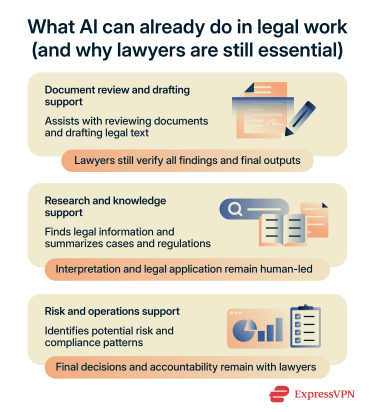
Help with admin, summaries, and knowledge management
AI may help with administrative tasks by summarizing correspondence and organizing case files or internal knowledge. These tasks aren’t unique to law and appear in many email-heavy, document-driven roles.
However, some lawyers are cautious about using AI for these tasks due to concerns around accuracy, confidentiality, and professional responsibility. As a result, firms that use AI for administrative tasks may limit it to specific workflows, depending on the sensitivity of the task and the level of human review required.
Predictive analytics and compliance
AI may also help identify patterns in large sets of legal and business data to support forecasting and risk assessment. This is often called predictive analytics. In legal contexts, predictive analytics generally refers to using historical data to identify patterns or correlations that may help inform decision-making.
These tools may help flag unusual contract language, inconsistencies, or patterns that warrant additional human review. It can also support compliance work by flagging areas where documents may not align with regulatory requirements.
Invoice review and legal spend management
Some organizations use AI to support invoice review and cost management by summarizing invoices, identifying unusual billing patterns, and flagging potential issues such as duplicated work or unexpectedly high time entries.
Why AI isn’t replacing lawyers
Despite the growing use of AI in the legal industry, lawyers generally remain responsible for the accuracy and quality of the work they produce. That limits how AI can be used in practice.
Additionally, tasks such as negotiation, advocacy, and client advising depend on context, strategy, professional judgment, and interpersonal skills that current AI systems cannot independently replicate.
Limited accuracy
AI can process large amounts of information quickly, but it doesn’t guarantee the accuracy required in legal practice. It may produce outdated, incomplete, incorrect legal information, or fabricated citations, especially when dealing with complex or jurisdiction-specific issues.
This limitation isn’t unique to law. Across many professions, AI systems can produce confident but flawed results because they generate outputs based on patterns in training data rather than verifying the facts. Human oversight remains essential to ensure that information is correct and appropriate for the specific case.
Legal judgment, strategy, and accountability require human oversight
Legal cases often involve unclear facts and conflicting evidence, and the law usually provides a framework rather than a fixed outcome. Applying those rules requires interpretation and careful consideration of context.
This can lead to different conclusions depending on individual circumstances, such as a client’s specific situation, risk tolerance, or long-term objectives. A solution that works in one case may not work in another.
AI systems can generate suggestions or draft responses when prompted. However, legal and professional rules across jurisdictions require that lawyers exercise independent judgment and take responsibility for advice given to clients.
For example, the Federal Court of Canada generally requires all parties to disclose when AI-generated content has been used in court documents and urges caution when relying on AI-generated legal analysis or references.
Advocacy and negotiation aren’t automatable
Legal work involves more than reading documents or producing written material. Lawyers are also responsible for advising clients, negotiating with opposing parties, representing clients in court, and making strategic decisions in complex situations.
These responsibilities depend on professional judgment, communication, and accountability. While AI tools may assist with preparation or research, legal representation still requires human oversight and decision-making.
Courts and bar rules still expect human review
Legal systems are built around human responsibility. Courts and professional conduct rules generally require lawyers to review and sign off on legal work. Even when AI tools are used, a lawyer remains responsible for verifying the accuracy of the final output.
In practice, existing duties such as competence, diligence, and candor to the court already require lawyers to review and take responsibility for the accuracy of court filings, regardless of how they were produced.
The biggest risks of AI for lawyers
Courts have already seen real cases where the improper use of AI has led to errors, sanctions, and reputational damage. For example, courts in the U.S. have sanctioned lawyers for submitting filings that included AI-generated false citations or inaccurate legal references that hadn’t been verified.
These examples highlight a consistent pattern: the risk comes from how AI is used. Without proper verification, oversight, and clear workflows, even well-intentioned use can lead to serious consequences.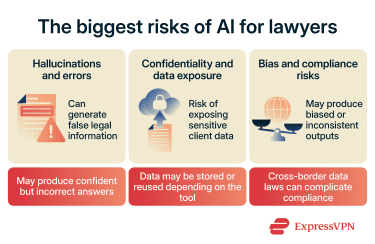
Hallucinated citations and factual errors
AI systems can generate information that sounds correct but is actually wrong. This is commonly known as a “hallucination.” In legal work, this can include made-up case law, incorrect legal references, or inaccurate summaries of statutes.
The problem is that the output often looks confident and well-written, which makes mistakes harder to spot. A qualified lawyer is expected to verify sources, check citations, and ensure that legal arguments are accurate and appropriate for the case. If incorrect information is used, the responsibility falls on the lawyer.
Confidentiality and client data exposure
Legal work often involves highly sensitive information, including personal data, financial records, and business strategy. When this information is entered into an AI system, it may be stored, processed, or used to improve the model depending on the tool’s settings and policies.
In many cases, sensitive information is protected by professional conduct rules and data protection laws. Lawyers are generally required to protect client confidentiality and take reasonable steps to ensure the tools they use meet applicable professional and legal obligations. Entering sensitive client information into systems that don’t provide clear safeguards can breach those duties.
A qualified legal professional must decide what information can be used, where it can be shared, and whether it complies with applicable rules and standards.
Bias, compliance, and governance
AI systems learn from large datasets, and those datasets can contain bias. This means the system may produce outputs that unfairly favor or disadvantage certain groups, if used to evaluate patterns, assess risk, or support predictive analytics.
There are also legal compliance challenges. For example, data protection laws like the General Data Protection Regulation (GDPR) in the European Union set strict rules on how personal data can be processed and transferred. In the U.S., protections exist at the state level, such as the California Consumer Privacy Act (CCPA), which gives people more control over how their personal data is collected and used.
Many legal AI tools are designed for professional use and may include privacy, security, or data-governance safeguards. However, law firms still need to understand how client data is stored, processed, and shared when using third-party AI services.
Risks can arise if sensitive information is entered into tools without appropriate safeguards, contractual protections, or internal review policies.
How lawyers can use AI more safely
AI can be helpful in legal work, but safe use depends on human oversight at every stage, from input to final output.
Please note: This article is for general informational purposes only and is not intended as legal or professional advice.
Verify every output and citation
AI can produce text that looks correct but contains mistakes, including incorrect legal references or fabricated case names. Because of this, AI-generated legal material can’t be used as-is. Every claim, citation, or legal reference must be reviewed and validated against trusted legal sources.
Minimize or anonymize sensitive inputs
AI systems rely on the data they’re given, so sensitive client information shouldn’t be entered without safeguards. Lawyers can reduce risk by minimizing the amount of data shared and removing or anonymizing identifying details where possible.
Even when information is minimized or abstracted, it must retain the legal context needed for the task. Striking this balance depends on the specifics of each case and requires human judgment.
Set firm-wide AI policies and supervision rules
Clear internal rules help prevent inconsistent or inappropriate use of AI across a law firm. Without guidance, different team members may use different tools in different ways, which increases risk. A simple policy can define:
- What types of data can be entered into AI systems.
- Which tools are approved for use.
- When human review is required.
Choose tools with stronger privacy protections
Not all AI tools handle data in the same way. Some store user inputs, while others are designed to reduce or eliminate long-term data retention.
Law firms should look for tools that clearly explain how data is processed, whether it's stored, and whether it's used for training future models. Tools with stronger data privacy controls reduce the risk of accidental exposure and help support compliance with data regulations.
FAQ: Common questions about AI replacing lawyers
Can AI give legal advice?
Can AI replace paralegals before lawyers?
Is it safe to upload client documents to AI tools?
Client documents often contain sensitive information, so lawyers should evaluate whether a tool’s data handling practices align with their professional obligations before using it for client information.
Can AI write court filings on its own?
What should lawyers look for in an AI tool?
Take the first step to protect yourself online. Try ExpressVPN risk-free.
Get ExpressVPN