What is QUIC? The QUIC network protocol explained


When you load a webpage, your browser has to connect to a server, set up encryption, and then start sending and receiving data. These steps are governed by a network protocol.
For most web traffic, that protocol has generally been Transmission Control Protocol (TCP). It’s reliable and still widely used, but it was built for more stable connections. Today, webpages load many resources at once, and many users browse on Wi-Fi or mobile data, where brief interruptions and dropped data are common. When that happens, TCP can pause or slow down the entire connection before it continues.
Quick UDP Internet Connections (QUIC) is a newer network protocol introduced to reduce these delays. This guide explains what QUIC is, how it works, how it differs from TCP, and when disabling it may make sense.
What is the QUIC protocol?
QUIC is a transport protocol that controls how a browser and a server establish a connection and exchange data.
It was developed by Google as an alternative to TCP, the long-established transport protocol used by earlier versions of HTTP. The goal was to reduce delays that occur when a connection is first set up. With TCP, connection setup and encryption happen in separate stages. QUIC brings both into a single protocol, allowing secure data transfer to begin sooner.
QUIC was standardized in 2021, and it now serves as the transport layer for HTTP/3, the latest version of HTTP. Unlike traditional HTTPS, which runs Transport Layer Security (TLS) on top of TCP, QUIC integrates TLS 1.3 directly into its handshake, combining transport and encryption setup into a single step.
Background of QUIC development
QUIC began as a Google project in the early 2010s. Early versions, called gQUIC, were built for Google's internal systems and used primarily between Chrome and Google services. As interest grew, Google submitted QUIC to the Internet Engineering Task Force (IETF) for standardization.
Standardization enabled QUIC to be implemented consistently across different browsers, servers, and networks, rather than remaining tied to Google's ecosystem. During that process, Google-specific design decisions were removed, and the protocol was generalized to support applications beyond web browsing.
The final specification was published in 2021 as RFC 9000, and HTTP running over QUIC became HTTP/3.
How QUIC works
How QUIC uses UDP
QUIC is built on the User Datagram Protocol (UDP), which, along with TCP, is one of the two main transport protocols used on the internet. UDP sends data without establishing a connection first and doesn’t check whether packets arrive or are in order.
TCP works differently. Before sending data, it establishes a connection. It delivers packets in a strict order, resends any that are lost, and slows down sending when the network becomes congested. All data on a TCP connection follows these rules.
QUIC uses UDP as a base but implements its own reliability features. It keeps track of packets, detects missing data, resends it, and adjusts the sending speed when network conditions change. By building on UDP instead of TCP, QUIC can define these behaviors itself rather than inheriting TCP’s built-in rules, which were designed decades ago.
Because QUIC is implemented in application software such as browsers and servers, it can evolve more quickly. Improvements can be delivered through regular software updates, rather than waiting for broader system changes.
Connection establishment
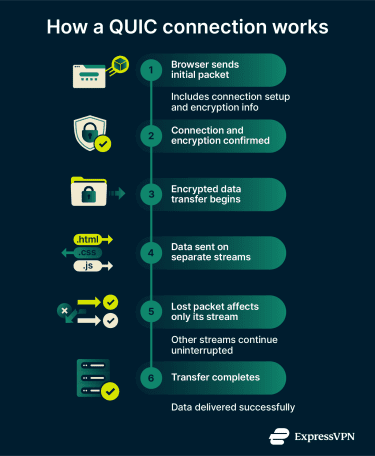
With TCP, starting a connection and setting up encryption happen in separate steps. First, the browser and server exchange messages to establish the connection and agree on how data will be sent. This is called the handshake. Then they complete a second exchange to set up encryption. Data can only flow after both steps finish.
On slower or long-distance networks, these back-and-forth exchanges can add noticeable delay before any content loads.
QUIC combines both steps into a single exchange. The browser sends a single message that covers both connection setup and encryption. After a single round trip, encrypted data can flow.
If the browser has connected to the server before and still has valid session information, QUIC can skip even that step. It sends encrypted data in its very first message. This is called zero round-trip time (0-RTT), and it’s only used when the server allows it and prior session information is still valid.
0-RTT has a tradeoff. Because data is sent before the connection is fully confirmed, an attacker who records the message could attempt to resend it to the server. For this reason, 0-RTT is typically limited to requests that are safe to repeat, such as loading a previously visited page.
Stream multiplexing
A webpage loads many resources at once, including HTML, stylesheets, scripts, images, and fonts.
When these resources share a TCP connection, a single lost packet can delay everything that follows, even if the missing data affects only one resource. This is known as head-of-line blocking. It results from TCP’s strict in-order delivery, which applies to all data on a connection, even when resources are logically separate. For example, a missing image packet can delay stylesheets or scripts that arrived intact.
QUIC avoids this by using independent streams within a single connection. Each resource is sent on its own stream. If a packet is lost on one stream, only that stream pauses while it’s recovered. Other streams continue without delay.
This makes a noticeable difference on mobile networks and congested Wi-Fi, where packet loss is more common.
Related: How to fix packet loss?
Built-in encryption
With TCP, encryption is handled by TLS. TLS encrypts the content being transferred, but TCP’s own metadata remains visible on the network. This includes information such as packet numbers and connection state.
QUIC encrypts nearly all transport metadata after the initial handshake, exposing only the minimum information required for routing (such as packet size and certain header fields). Unlike TCP, QUIC connections don’t support an unencrypted mode; they always use TLS 1.3.
As a result, less information about the connection is visible on the network, and intermediate devices have fewer opportunities to inspect or alter the protocol's behavior.
Connection migration
TCP connections are identified by IP addresses and port numbers. If either changes, the connection breaks.
This is common on mobile devices. Switching from Wi-Fi to cellular, or moving between networks, can change a device’s IP address. With TCP, active connections drop and must restart.
QUIC identifies connections differently. Instead of relying on IP addresses, it assigns each connection a unique ID. When the network changes, the browser continues the same connection using that ID, and the server resumes where it left off.
To prevent tracking, QUIC rotates connection IDs. After a network change, the browser switches to a new ID that only the server can link to the original connection.
As a result, downloads, streams, and sessions can continue uninterrupted during brief network disruptions. Not all servers support connection migration, especially in environments where traffic is routed by IP address, but support is growing.
Key benefits of QUIC
Performance benefits
Early large-scale deployments of QUIC, including rollout across Google services, reported improvements in connection setup time and reduced buffering, particularly on mobile and high-latency networks. These gains are most noticeable on connections where packet loss or brief interruptions are common.
These improvements are more visible on mobile connections and shared Wi-Fi, where network quality can change during a session.
Security benefits
QUIC encrypts connections by default and exposes less connection metadata on the network. Intermediaries can see that data is being sent, but not how the connection is managed internally.
Because these protocol details are encrypted, network devices can’t inspect or modify QUIC traffic in the same way they can with TCP. This reduces breakage caused by middleboxes and helps connections behave consistently across different networks.
Where QUIC is used
QUIC adoption has grown steadily since standardization, and HTTP/3 is now widely supported.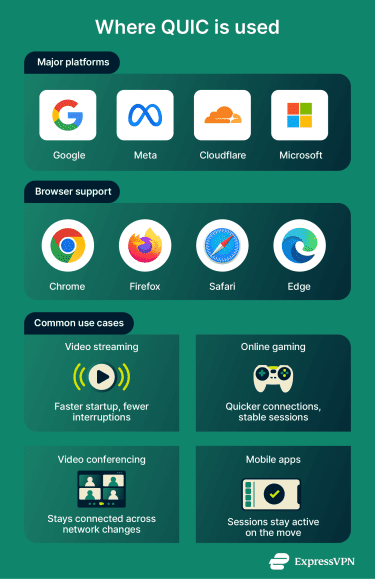
Major platforms
- Google: As the originator of QUIC, Google was the first major deployer. Search, YouTube, Gmail, and other Google services use QUIC.
- Meta: Facebook and Instagram support QUIC and HTTP/3 for serving user traffic. Meta has described QUIC as a core transport protocol for its internet-facing services and continues to expand its use.
- Cloudflare: A major content delivery network, Cloudflare supports HTTP/3 for millions of websites. Sites using Cloudflare can enable QUIC with a single setting.
- Microsoft: Azure and Windows platforms support HTTP/3 and QUIC.
Learn more: What is DNS over QUIC (DoQ)?
Browser support
All major modern browsers support HTTP/3 and enable it by default in standard configurations, including:
- Chrome (since 2020)
- Firefox (since 2021)
- Safari (since Safari 16)
- Edge, Brave, Opera, and Vivaldi (all Chromium-based and use Chrome’s HTTP/3 implementation)
Common use cases
- Video streaming: Faster startup and fewer interruptions on unstable connections.
- Online gaming: Faster session setup and fewer disconnects during network changes.
- Video conferencing: Calls can continue when switching between Wi-Fi and cellular.
- Mobile apps: Sessions are less likely to reset when the network changes.
Related: How to lower ping in video games?
QUIC vs. TCP
The table below compares TCP and QUIC across a few key areas.
| TCP | QUIC | |
| Connection setup | Separate setup and encryption | Combined setup and encryption |
| Multiple resource delivery | Single ordered stream | Independent parallel streams |
| Packet loss impact | One loss blocks all streams | Loss is isolated to one stream |
| Connection visibility | Metadata visible on the network | Minimal metadata exposed |
| Network changes | Connection breaks on IP change | Connection survives IP change |
| How updates are delivered | Operating system updates | Browser or app updates |
| HTTP versions | HTTP/1.1, HTTP/2 | HTTP/3 |
Should you disable QUIC?
For most users, QUIC improves page loading and doesn’t require any configuration. Browsers enable it by default and automatically fall back to TCP if QUIC isn’t available.
However, there are situations where disabling QUIC makes sense.
Network monitoring and compliance
In enterprise or managed networks, administrators may need to examine web traffic as it passes through their systems. This is common in workplaces that enforce security rules, data policies, or regulatory requirements.
With TCP-based connections, some enterprise security tools can inspect encrypted traffic as it passes through the network, then allow it to continue to its destination. QUIC makes traditional network-based TLS interception more difficult, particularly passive or middlebox-style inspection.
In environments where traffic inspection is required, blocking QUIC forces browsers to fall back to TCP, where those tools still work.
Firewall and network compatibility
QUIC uses UDP on port 443, which is traditionally used for HTTPS traffic over TCP. Some firewalls and network devices are configured to assume that web traffic on this port uses TCP. When they encounter UDP instead, they may block it or handle it incorrectly.
Browsers will switch back to TCP if QUIC fails, but repeated failed attempts can add delay. On networks where QUIC consistently causes issues, disabling it can result in more reliable connections.
How to disable QUIC
Disabling QUIC is usually only necessary on managed or restricted networks.
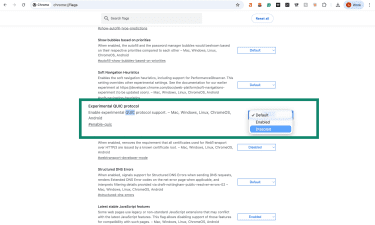
- Chrome: Type chrome://flags in the address bar, search for Experimental QUIC protocol, and set the option to Disabled.
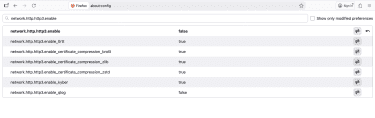
- Firefox: Type about:config in the address bar and set network.http.http3.enable to false.
- Managed devices: Administrators can disable QUIC using browser or device management policies.
FAQ: Common questions about QUIC
What is the purpose of QUIC?
What applications use QUIC?
Should I block QUIC?
Blocking QUIC can make sense in managed networks where traffic inspection is required or where network equipment doesn’t handle QUIC reliably. In those cases, browsers will automatically fall back to Transmission Control Protocol (TCP).
What problems does QUIC solve?
How does QUIC improve web performance?
Are there any disadvantages of using QUIC?
What technology companies have adopted QUIC?
How can I enable QUIC in my network?
On managed networks, QUIC can be enabled or disabled through firewall rules or browser policies, depending on whether the network allows User Datagram Protocol (UDP) traffic on standard web ports.
Take the first step to protect yourself online. Try ExpressVPN risk-free.
Get ExpressVPN






 Support Center
  Live Chat
  FAQ
FAQ 


