How to optimize your VPN data usage effectively


Using a virtual private network (VPN) adds a layer of encryption to your internet traffic, which can slightly increase data usage. The difference isn’t large, but it can be noticeable in a monthly data total.
This guide explains how a VPN affects your data usage, the main factors that shape those changes, and the adjustments you can make to lower your data usage while still getting the privacy benefits of a VPN.
Ways to reduce VPN data usage
The most effective way to lower your data usage is simply to do fewer data-heavy activities. That said, there are still a few things you can do with your VPN to make sure it isn’t adding unnecessary overhead and pushing you closer to any data caps your internet plan might have.
Here are some practical tactics to reduce your data usage while your VPN is connected.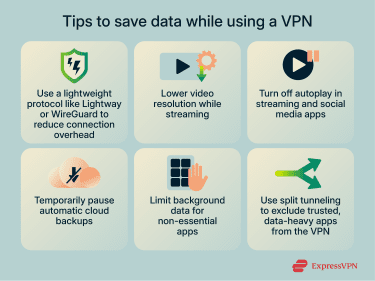
Settings that minimize VPN data use
These tips can help reduce your data usage while using your VPN:
- Choose a lightweight VPN protocol: VPN protocols vary in how efficiently they encrypt and transmit data. Modern protocols are designed to reduce overhead by using streamlined encryption methods and more efficient packet handling. Where available, using lightweight protocols like WireGuard or Lightway can help minimize the VPN’s impact on your data consumption.
- Use split tunneling: Split tunneling allows you to choose which apps or websites use the VPN and which connect directly to the internet. If your VPN app supports it, you can keep high-volume, low-risk apps (like streaming platforms) outside the VPN while encrypting everything else. This reduces the amount of data going through the VPN without sacrificing security on more sensitive apps.
- Selectively disable the VPN: If you’re on a metered connection (such as mobile data, a hotspot, or a home Wi-Fi plan with monthly data limits), pausing the VPN for low-risk tasks can help reduce how much traffic the VPN needs to encrypt. However, it’s recommended that you keep the VPN on for sensitive tasks or any time you leave trusted networks.
Related: Do I need a VPN? Why, when, and on what devices
Additional tips to save on overall data usage
- Lower video resolution when streaming: Streaming at a higher resolution (1080p) can eat through your data quickly. For example, Netflix states in its Help Center that HD video could use 3 gigabytes per hour (GB/h) compared to 0.3GB/h for its lowest quality setting.
- Turn off autoplay in video and social media apps: Autoplay can potentially be a huge data drain. Many streaming platforms, social media apps, and media websites offer settings to disable it, which can help reduce unnecessary data use. Browsers and device settings often also provide controls to prevent videos from playing automatically without your input.
- Disable automatic cloud backups: This is especially important for mobile users, as automatic backups can consume a significant amount of mobile data. Limiting backups to Wi-Fi connections can help avoid unexpected data usage.
- Stop background app refresh for apps you rarely open: On mobile, you may experience background data usage through apps that refresh without your input. On desktop, most apps don't refresh automatically in the same way, but some services may still auto-update in the background.
How VPNs affect data usage
A VPN encrypts your traffic before it leaves your device. This encryption adds a small amount of extra data to each transmission. The increase is modest, but it becomes more noticeable as apps send or receive more data. This effect is especially true during streaming, downloading, or gaming.
VPN protocols and data usage
The VPN protocol you choose affects how your traffic is encrypted, encapsulated, and transmitted, which introduces protocol overhead, additional data transmitted beyond the original traffic. Modern, lightweight protocols like WireGuard and Lightway minimize this overhead through streamlined encryption and efficient packet handling, resulting in a lower data consumption than some other VPN protocols.
For example, in a 2025 academic study for Middle Technical University in Baghdad, researchers found that OpenVPN utilized significantly more CPU than WireGuard. WireGuard also has a smaller codebase, around 4,000 lines, compared with OpenVPN’s 70,000+. These features could contribute to lower protocol overhead and help reduce data usage.
Similarly, ExpressVPN’s Lightway is written in Rust, a programming language known for its speed and efficiency. Lightway’s lightweight architecture is designed to maintain strong security while optimizing connection speed and reducing the data overhead typically associated with VPN protocols.
Protocols like Internet Key Exchange version 2 with Internet Protocol Security (IKEv2/IPsec) and OpenVPN generally introduce greater overhead due to more complex encryption mechanisms and packet encapsulation processes, so the same online activity results in a little more data being transmitted. Some older protocols, like Layer 2 Tunneling Protocol with Internet Protocol Security (L2TP/IPsec), add extra encapsulation and headers, increasing overhead compared with modern options.
Point-to-Point Tunneling Protocol (PPTP), on the other hand, is very lightweight, but its well-documented vulnerabilities mean it’s generally considered insecure and not recommended.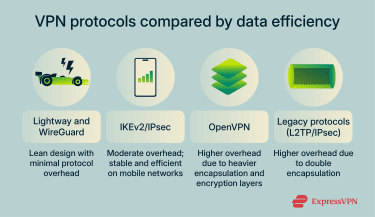
How to estimate your VPN data needs
Estimating your VPN data usage isn’t a one-size-fits-all calculation; it depends on several factors, including your VPN provider, your connections, and your online activities. However, it’s possible to do some testing on your own to come up with a rough estimate.
First, check your device’s data statistics for a recent month when you weren’t using a VPN. This baseline reflects the amount of traffic your apps typically generate.
Next, track your usage with the VPN on and compare it to a similar period without it. This will give you an individualized data overhead figure based on your specific activities.
How VPN encryption impacts data usage
How encryption overhead works
Encryption changes the way your data is packaged before it travels across the internet. When you use a VPN, your device encrypts the traffic between your device and the VPN server to keep it private while it's being transmitted. This encryption adds a small amount of extra information to each data packet, which helps the VPN server recognize it, verify that it hasn't been tampered with, and decrypt it safely.
Battery vs. data trade-offs when using VPNs
On mobile devices, the protocol choice affects both battery life and data usage. Lightweight protocols like Lightway or WireGuard require less processing power to encrypt traffic, which helps conserve battery and keeps overhead low. In contrast, older protocols can consume more power and add extra data overhead.
Troubleshooting VPN data issues
Setting alerts and monitoring VPN data
Many smartphones offer built-in tools to track mobile data usage, including data used by your VPN. On Android devices, you can even set data warnings or limits or use your carrier’s app for alerts. If you're using a VPN on a home network, your router may also provide usage statistics.
VPN performance when data is throttled
If your connection becomes noticeably slower while using a VPN, throttling is one possible cause. When a carrier or internet service provider (ISP) lowers your speed because you reached a data cap, the VPN can’t bypass that limit.
To confirm what’s happening:
- Test without the VPN: Turn off the VPN briefly and run a quick speed test. If the connection is still slow, the issue could be throttling or a network problem. You may want to try testing at different times of day to rule out congestion.
- Check for background activity: Apps downloading updates or uploading files in the background can eat up bandwidth, making a slow connection feel even worse.
- Try a new protocol: Switching to a lighter protocol can sometimes improve responsiveness if something apart from throttling is causing the slowdown.
You can also make broader network adjustments to optimize your connection. For more details on how your connection handles speed limits, you can read about the differences between throughput and bandwidth. There are also some potential ways to improve bandwidth on your connection.
While a VPN can’t bypass throttling that happens when you hit a data cap, it can help prevent activity-based throttling. By encrypting your traffic, a VPN hides your online activities, making it harder for your provider to slow your connection based on what you’re doing, like streaming or gaming.
FAQ: Common questions about optimizing VPN data usage
Can I use a VPN without mobile data?
Yes. A VPN works on any active internet connection, including Wi-Fi. If you’re not using mobile data, the VPN will secure and encrypt your traffic over whatever network you’re connected to.
Does a VPN drain data faster?
A VPN can slightly increase data usage, but it usually has a minimal effect. It's influenced by factors like encryption overhead, packet fragmentation, and the way internet service providers (ISPs) count data usage. On limited mobile plans, this increase can be more noticeable, especially if your provider measures data in fixed increments or rounds up small packet sizes.
Can a VPN lower data usage in any scenario?
No. Modern websites and apps already compress their content before sending it to your device. A VPN can’t shrink that content further.
Is it better to leave a VPN on all the time?
Yes, in most situations, it’s better to keep your VPN on. It encrypts your traffic, protecting it from potential onlookers. The main time you might pause a VPN to save data is when you’re using a trusted network and your online activities don’t involve sensitive information.
Will a VPN help me bypass data caps?
No. Even while using a VPN, your mobile carrier or internet service provider (ISP) can still see how much data you use, even if they can’t see the contents of your traffic. All traffic, even encrypted traffic, counts toward your internet plan’s allowance.
Does a VPN compress data to reduce usage?
No, VPNs don’t reduce data usage by compression. VPNs primarily encrypt your internet traffic, which can actually add a small amount of extra data called overhead. Generally, content compression is handled by websites and apps before the data reaches your device, not by the VPN.
Take the first step to protect yourself online. Try ExpressVPN risk-free.
Get ExpressVPN













 Support Center
  FAQ
FAQ  VPN Setup Tutorials


