Is Snapchat safe? A complete guide for parents and teens


With hundreds of millions of daily active users, many of them teenagers, Snapchat is a hugely popular platform. But there are risks. Features like disappearing messages can give you a false sense of security. Snaps can still be saved, screenshotted, or captured by others, and like any messaging app, it's not completely immune to scammers, cyberbullying, inappropriate content, or unwanted contact.
This guide explains how the platform works, outlines common risks, and describes the tools and protections available to help you and your teen make informed choices.
What is Snapchat, and how does it work?
Snapchat is a social media platform where users can communicate with friends, meet new people, explore others’ content, and become creators themselves. Available in most countries, Snapchat is a mobile-first platform with apps for iOS and Android. It can also be accessed through browsers, though some features may be limited or unavailable.
Though generally free to use, Snapchat makes money through ads, the sale of virtual goods, and premium Snapchat+ subscriptions. Adult users in supported regions can earn money through the monetization program.
Snapchatters can post or discover publicly available content, chat privately, share media, connect with friends and strangers alike, and find location-based content.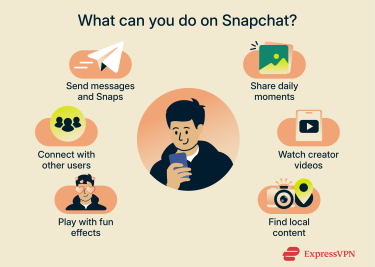
What makes Snapchat different from other apps?
Snapchat stands out for its disappearing messages and real-time, visual communication style. Most Snaps vanish after they’re viewed, which lowers the pressure to be polished and encourages users to share everyday moments more freely. The app is mostly built around close-friend interactions, making it feel more private and personal than many other social platforms.
Its playful, creative tools also set it apart. Snapchat pioneered advanced augmented reality (AR) filters, lenses, and Bitmoji avatars, giving users fun and expressive ways to customize their photos and videos.
Core Snapchat features explained
Here’s a closer look at what users get up to in the app:
- Snaps: At the core of the Snapchat experience are Snaps. These are images and short videos edited using a built-in toolkit and shared between users. Snaps disappear after they're viewed, giving the feeling of a moment experienced in real time. The sender decides how long the snaps remain visible (1 to 10 seconds or 'no limit').
- Stories: A collection of Snaps that stay visible for 24 hours. You can share them just with close friends (Private Stories) or with a broader audience (Public Stories), depending on your settings.
- Chat: Snapchat’s built-in messaging system for sending texts and attachments. You can set a chat to delete immediately after viewing, after 24 hours, after 7 days, or never.
- Bitmoji: A cartoon-style avatar that represents a user on Snapchat. Bitmoji creates personalized stickers for chats and serves as each user’s default profile picture.
- Spotlight: A public feed of user-submitted Snaps selected by Snapchat's algorithm. It works like a scrollable video feed, showing short, entertaining clips from across the community.
- Lenses and Filters: Snapchat’s creative effects that let users transform photos and videos with AR tools, face effects, and visual overlays. They’re a central part of how people personalize and share Snaps.
- Snap Map: A location-sharing feature that shows where friends are on a real-world map and lets users browse public Snaps posted from different places.
- Memories: While most Snaps disappear, this feature lets you save Snaps and Stories within the app, so you can revisit or repost them later.
- My Eyes Only: A password-protected, encrypted folder within Memories designed for storing Snaps you want to keep private.
- Streaks (snapstreaks): A gamified feature that rewards two users for sending Snaps to each other every day.
What is the minimum age to use Snapchat?
According to Snapchat’s Terms of Service, users must be 13 or older to create an account. In some regions, the minimum age is higher. For example, Australia has announced the new age-verification rules for social media, restricting access for users under 16. In response, from 10 December 2025, Snapchat will lock or limit accounts for Australian users who cannot confirm they meet the required age threshold.
Snapchat applies additional privacy and safety protections to all users under 18, though the exact rules vary by region. Teen accounts (ages 13–17) have stricter visibility defaults, including not appearing in recommendations to users without mutual connections. Private messaging is also restricted: teens can receive messages only from users they have added as friends, unless they opt in to receive messages from phone contacts. If a teen attempts to message an adult who is not a friend, Snapchat displays a caution prompt.
Older teens (generally 16–17, depending on region) may be able to create Public Profiles, but these come with limitations. Even with a Public Profile, their Stories typically appear only to friends, followers, or users with shared connections. Additional restrictions for minors can include limited Story replies, anonymity on the public Snap Map, and reduced access to Snapchat+ or monetization features, depending on local laws.
Although Snapchat asks users to enter their real age, there are currently few mechanisms to stop younger teens from claiming to be adults. Snapchat has stated that it is exploring privacy-preserving age-verification methods, but enforcement currently largely depends on user reports or regional legal requirements.
What are the risks of using Snapchat?
Like many social platforms, Snapchat can expose younger users to certain risks. Among other concerns, parents have reason to worry about their teens being exposed to cyberbullying, grooming, explicit content, scams, and peer pressure.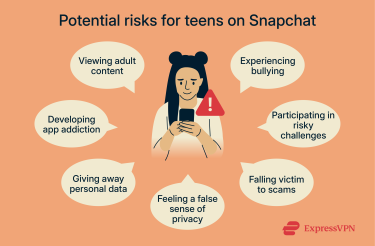
Inappropriate content
Snapchat includes a range of protections and default settings intended to limit minors' exposure to age-inappropriate or harmful content, such as stricter privacy settings and Community Guidelines that prohibit sexual content involving anyone under 18. Still, these measures are by no means 100% effective. Snapchat may suspend or delete accounts that send explicit content to minors, using both user reports and automated detection systems.
Unfortunately, minors may still come across inappropriate content simply by browsing Snapchat’s publicly available feeds or exploring the Snap Map. Because Snapchat does not require age verification in most regions, younger users can create accounts by entering an older birthdate, which can affect how these protections apply.
Cyberbullying and peer pressure
Just like any app or website where teens can communicate, cyberbullying is common on Snapchat. In its January to June 2025 transparency report, Snapchat claims to have acted on over 700,000 cyberbullying and harassment cases, usually responding within minutes.
Snapchat is actively moderated, and accounts that are reported for bullying are disabled. But the reality is that making a new account is easy, and the large number of users makes closed moderation impossible.
Like with many social media apps, teens have used Snapchat to share videos of risky, illegal, or otherwise inappropriate activities. Snapchat’s Guidelines prohibit such behaviors, but that doesn’t mean posting such content never happens.
Scams
Scammers are active on social media platforms like Snapchat. They use a variety of methods to part Snapchatters from their money and steal personal information. Understanding how these scams work can help families better recognize suspicious activity.
Common scams to be aware of include:
- Phishing: Scammers send links that appear legitimate but lead to fake login pages designed to capture passwords, payment information, or other personal data.
- Romance scams: Fraudsters build trust by pretending to form an online relationship. Once a user feels comfortable, the scammer asks for money or personal details.
- Cyber extortion: This can involve threat actors persuading users to share sensitive (often intimate) images and then threatening to release them unless money is paid or more content is shared.
- Job scams: Many of these schemes promise opportunities in content creation or influencer work. Instead of offering real guidance, scammers use the setup to extract money, login details, or personal information.
The myth of disappearing messages
Even on Snapchat, content isn’t guaranteed to disappear. Anything you send passes through Snapchat’s servers, and anyone who views it can save, copy, or share it in ways you may not expect or intend.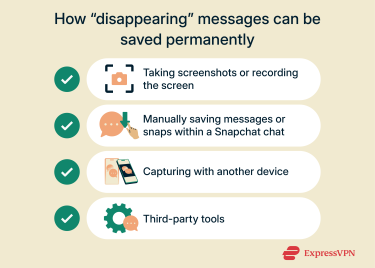
Screenshots and screen recordings
Snapchatters can save direct chat messages or media to their device before they are deleted. Users can also capture temporary content using their device’s native tools, such as screenshots or screen recordings.
Snapchat generally notifies a sender when a screenshot or save occurs, but these alerts are not guaranteed. Technical issues, such as bugs or connectivity problems, may prevent notifications from appearing or keep content accessible longer than intended.
Some methods can save Snaps without alerting the sender. These include photographing the screen with another device, using specific system-level tools, or accessing Snapchat through platforms where screenshot detection may not always function reliably.
Privacy issues and data collection
Snapchat requires specific device permissions to function and automatically collects information about every user. This is not unusual for a social media app, but it might raise privacy concerns.
How Snapchat collects and uses your data
To function, Snapchat will collect information about a user’s device type, approximate physical location, and how they use the app. These are the app’s minimum requirements, per Snapchat's privacy policy.
Access to the camera and microphone is necessary for creating photos and videos, and permission to access saved contacts helps users connect with people they already know and trust.
If users open links inside Snapchat’s in-app browser, the app may collect information about those interactions. It also uses cookies and similar technologies for ad-related analytics when users interact with Snapchat ads across the web. In addition, content shared on Snapchat may be used to train and improve its AI generative models. You can opt out of this by going to Settings > Privacy Controls > Manage My Information.
To create an account, Snapchat requests certain personal details, including:
- Email address (required)
- Birth date (required)
- Phone number (optional)
- Physical address (optional)
- Selfie to create a personalized Bitmoji (optional)
Snapchat states that it doesn’t sell user data. Instead, it uses the information it collects to support app functionality, personalize content, deliver relevant ads, and help delete spam or fraudulent activity. Even so, some users may still have concerns and choose to delete their Snapchat account or request that Snapchat remove the data it has stored about them.
Disappearing messages and replays
Snapchat states that it deletes Snaps from its servers after they've been opened or once they expire. Unopened Snaps are typically deleted after 31 days (or 7 days in group chats).
Some types of content can be replayed, and Snapchat removes these only after the available replays have been used. The platform also retains content when legally required or needed for active moderation or safety investigations.
While the actual content is deleted swiftly, Snapchat may retain metadata such as timestamps and sender/receiver information for longer periods. This means the service can keep a record of when a Snap was sent and to whom, even if the image or video is no longer stored.
Exceptions to the rule are Memories and My Eyes Only content. Snapchat stores media saved using these features until the user manually deletes it. My Eyes Only content is further protected by a passcode and end-to-end encryption (E2EE), meaning only the account holder can access it. Snapchat cannot view or decrypt items stored in this folder.
Location sharing and Snap Map
Location data supports many app functions, with the most prominent being Snap Map. Snap Map is an interactive world map that helps users find content posted by those nearby and points them toward “content hotspots.”
Managing location settings
The app uses your IP address to determine your approximate physical location. Using a virtual private network (VPN) improves your privacy by encrypting your traffic and changing your IP address by routing your data through a private server. However, this may affect location-based features and the content that you see.
Snapchat will also ask to track each user’s exact location using GPS, though this is optional. If you use a VPN but grant the app GPS access, it will still see your actual location, and the app’s functionality will not be affected. Snapchatters can choose whether to share location data with other users. Enabling Ghost Mode prevents other users from seeing your location. You can turn it on and off, or set a timer for when it should switch off.
The platform notes that limiting location sharing can reduce certain risks and provides settings to control how widely a user’s location is visible.
Note: If a country bans either service, using a VPN with Snapchat may violate the law. Always check your local laws before using a VPN with the platform.
Time management and screen addiction
Snapchat offers a range of interactive, game-like features that can encourage frequent use. Features like Streaks reward regular activity, which may contribute to users spending more time on the app.
The platform also sends various notifications about new messages, content updates, and friend activity. Depending on a user’s settings, these alerts can appear throughout the day, even when they are not actively using the app.
Snapchat safety features and controls
Parents who want additional oversight can adjust various settings and use specific tools designed to increase visibility into how the app is used. Snapchat’s Safety Center and Privacy Center provide up-to-date information on how the app manages user privacy and safety.
Overview of Snapchat’s parental control tools
Family Center is Snapchat’s built-in parental supervision tool. It allows parents and legal guardians to see who their teen is friends with, view recent interactions (without showing message content), and set certain restrictions and reporting. A parent or guardian must invite their teen, and the teen must accept the invitation before Family Center features become available.
How to use Family Center
Parents must first have their own Snapchat account, so create one if you haven’t already. Note that the Family Center can’t be accessed through a browser, so you’ll need the mobile app.
From there:
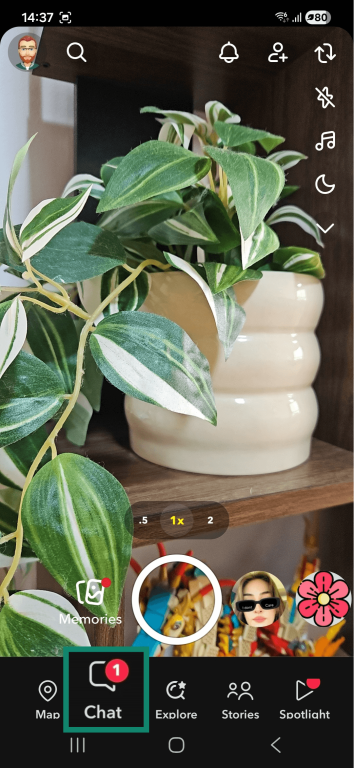
- Navigate to Chat at the bottom of the screen.
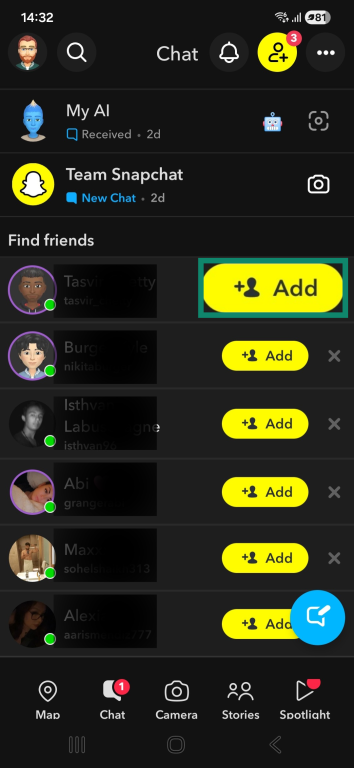
- Find your teen’s contact in the list and press Add to invite them as a friend. You must be mutual friends for this to work.
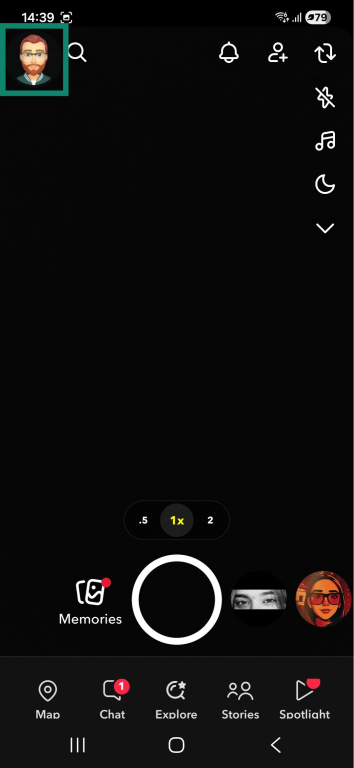
- Select the profile icon in the top left corner.
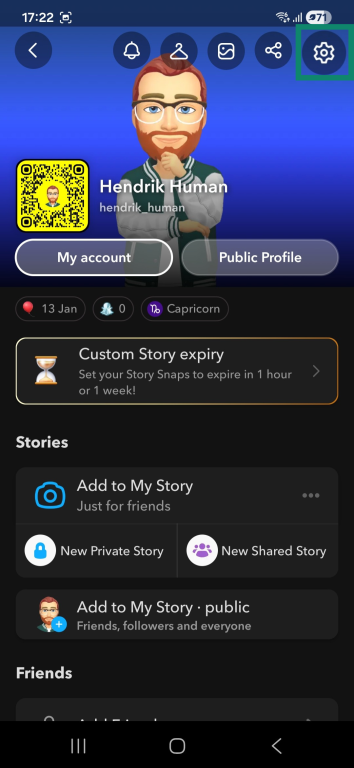
- Tap the gear icon in the top-right corner to open Settings.
- Find Family Center using the search function. Alternatively, you may find it under App & privacy.
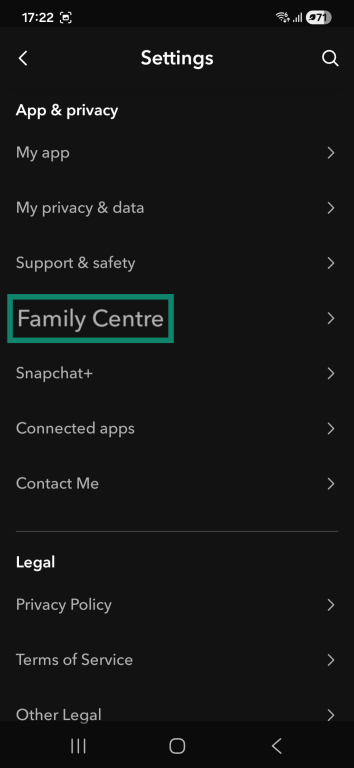
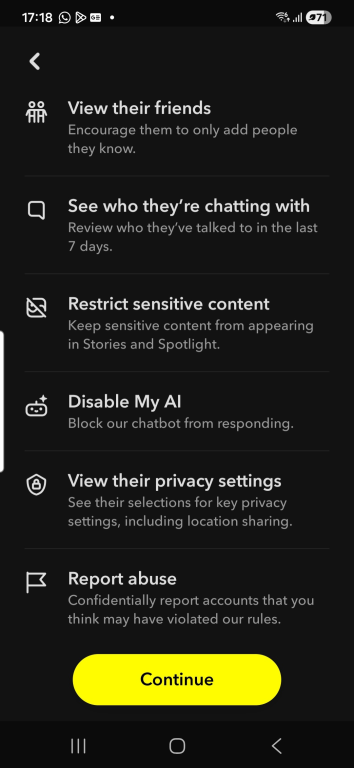
- Press the Continue button on the next screen.
- Look for your teen’s account in the contact list and tap Send Invitation.
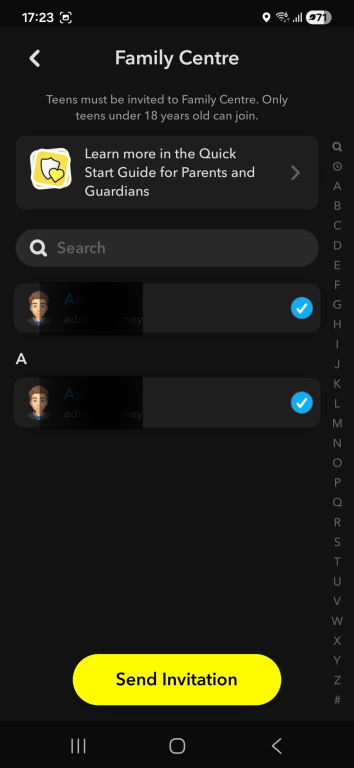
- Ask your teen to log in to their app and accept the invitation. Note that your teen needs to accept the invite before it expires, and Snapchat will also show them what content you can see.
As a parent, you can now see the following by returning to the Family Center:
- List of friends and users they’ve chatted with.
- Their account privacy settings.
- Whether or not location sharing is enabled.
- What Stories and Spotlights they can see.
- The option to report suspected abuse.
Privacy and content settings
Snapchat offers a wide range of privacy and security settings. Here are some of the most important settings you can adjust to improve privacy on Snapchat.
Choose who can contact you on Snapchat:
- Go to Profile and Settings.
- Open Contact Me under App & privacy.
- Choose Friends to limit who can contact you directly with Snaps or Chats.
Control who can view and respond to your Stories:
- Go to My privacy & data under Apps & privacy.
- Open View My Story under Who can see.
- Tick Friends Only to hide it from the public, or Custom to select only individual friends.
- You can change this for individual Stories by pressing Send To instead of Stories when uploading them.
Specify how and with whom your precise location is shared by Snapchat:
- Go to My privacy & data, then Who can see, and tap See My Location.
- Click the Settings button next to Update for real-time sharing and select the level of tracking you’re comfortable with.
- Enable Ghost Mode to make your location invisible to everyone.
- Even if you disable Ghost Mode, you can make it so that only specific users will see your location.
Remove public content you’re not comfortable with:
- Go to Settings and tap your name under Public Profile Settings.
- Scroll to the bottom and tap Clear Public Profile.
- This will remove all existing publicly visible content, but posting public content again will reactivate it.
There are many other privacy options to explore under your profile settings, including disabling AI training data, managing blocked contacts, deleting data, and more.
How to report inappropriate behavior
You can report Stories, Spotlights, Snaps, and other messages sent in direct chats as well as entire user profiles. Here’s how:
- Stories/Spotlights/Snap Map: Long-press the content or tap the three dots at the bottom of the screen and select Report.
- Chat messages: Tap and hold on the message, then choose Report.
- Snapchatter profiles: Go to the profile and tap the three dots. From the menu, select Manage Friendship and choose Block, Report, or Remove Friend.
Expert safety tips for parents
Supporting teen safety on Snapchat often involves a combination of parental controls, awareness of how the platform works, and open communication about online experiences. You might find it helpful to share some best practices for online safety with your teens.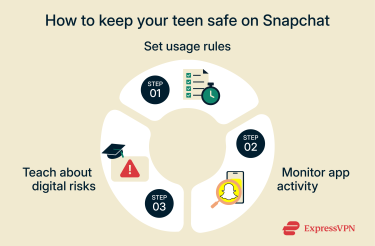
Set clear usage rules
Some households choose to establish guidelines around Snapchat use, such as when the app can be used, who can be added as a friend, and how privacy or location settings are configured. Conversations about what types of content are appropriate to view or share can also help set expectations within the family.
Monitor app activity regularly
Parents who want greater visibility of their teen’s interactions may use tools like Family Center to see friend lists and recent contacts. Others check privacy and location settings together from time to time or discuss new friend requests as they come in. Changes in behavior or social patterns sometimes prompt further discussion.
Educate teens about digital risks
Many families incorporate broader online safety topics into their conversations. Examples include how easily Snaps can be saved or shared, how strangers may misrepresent themselves, and why location sharing can carry risks. Teens may also feel more comfortable navigating challenges when they know they can ask questions or raise concerns without judgment.
FAQ: Common questions about Snapchat safety
Is Snapchat safe for a 12-Year-Old?
The minimum age to use Snapchat is 13, largely due to the platform's compliance with the Children's Online Privacy Protection Act (COPPA), a U.S. law governing online services directed at children. Age requirements may vary by country and change as new regulations take effect. Accounts created by users under the minimum age violate Snapchat’s terms and may be removed if identified.
Can Snapchat be trusted for private photos?
Snapchat is not designed to guarantee complete privacy for shared photos. Although most Snaps disappear after viewing, recipients can still save or capture them using screenshots or other methods. The app typically notifies senders when a screenshot is taken, but this detection is not always reliable and can be bypassed in certain circumstances. As a result, content shared on Snapchat may persist beyond its intended viewing window.
How do I report abuse or misuse on Snapchat?
You can report Snaps, Stories, chats, or accounts directly in the app by pressing and holding the content and selecting Report snap. You can also contact support staff through the Safety Center on Snapchat’s website.
What are the best parental controls on Snapchat?
All of Snapchat’s parental controls are found in the Family Center within the app. The feature provides visibility into a teen’s friends, recent contacts, and specific privacy settings, giving parents or guardians an overview of how the account is being used. It also includes options to apply content restrictions, depending on regional availability.
Can Snapchat be hacked?
Cybercriminals do sometimes gain access to individual Snapchat accounts, usually through phishing, stolen credentials, or the misuse of third-party apps. Law-enforcement agencies, including the FBI, have investigated cases where criminals accessed private images after compromising user accounts. These incidents typically involve social engineering or credential theft rather than a direct breach of Snapchat’s systems.
Snapchat itself has also faced security incidents over the years. Past reports have included exposed usernames and phone numbers due to API misuse, as well as phishing attacks that compromised employee data. While these incidents did not involve a breach of Snapchat’s core platform, they demonstrate that, like many online platforms, the service can be targeted by cybercriminals.
Take the first step to protect yourself online. Try ExpressVPN risk-free.
Get ExpressVPN














 Support Center
  FAQ
FAQ  VPN Setup Tutorials


