
A VPN on your router protects all your home devices


If you’re already using a VPN, you’ll know it comes with many benefits, from keeping your online activity private to helping you safely stream all your favorite shows on any network and gain unrestricted access to the internet.
Even VPN apps have their limits though. They can be installed on numerous devices, like desktops and mobile phones, but not on certain smart appliances and gadgets, such as smart fridges, security cameras, and some smart TVs. These items are often left vulnerable to hackers and snoops.
VPN services will also typically limit the number of simultaneous connections you can make with one account. An ExpressVPN subscription, for example, lets you connect to VPN servers on up to eight devices at once, which is plenty for most people, but there may be times when you’d like to connect more.
The good news? You can remove both of these limitations in one move—by setting up ExpressVPN on your router or using Aircove: ExpressVPN’s Wi-Fi 6 router with built-in VPN. There are no downsides.
Read more: ExpressVPN launches Aircove, a Wi-Fi 6 router with built-in VPN
Benefits of setting up ExpressVPN on your existing router
Configuring ExpressVPN on your router is the simplest and most effective way to cover everything in your network with a VPN connection. Here are some of the best things about using a router with ExpressVPN:
It protects all your smart devices
That includes ones that can’t run a VPN app directly, like your gaming consoles, certain smart TVs, and home appliances. If you have more than eight devices on your home network, your router can protect all of them while only counting as one VPN connection. Bonus: Any guests who connect to your router will automatically be protected without needing the ExpressVPN app on their devices.
It’s easy to use
No need to open up your terminal or stress over different options and settings. Once you’ve set up ExpressVPN on your router, or purchased a router preconfigured with ExpressVPN, you only have to handle the interface through your browser—it’s intuitive, unintimidating, and as simple as joining a Wi-Fi network.
Read more: Find out if your router is compatible and how to get one that is.
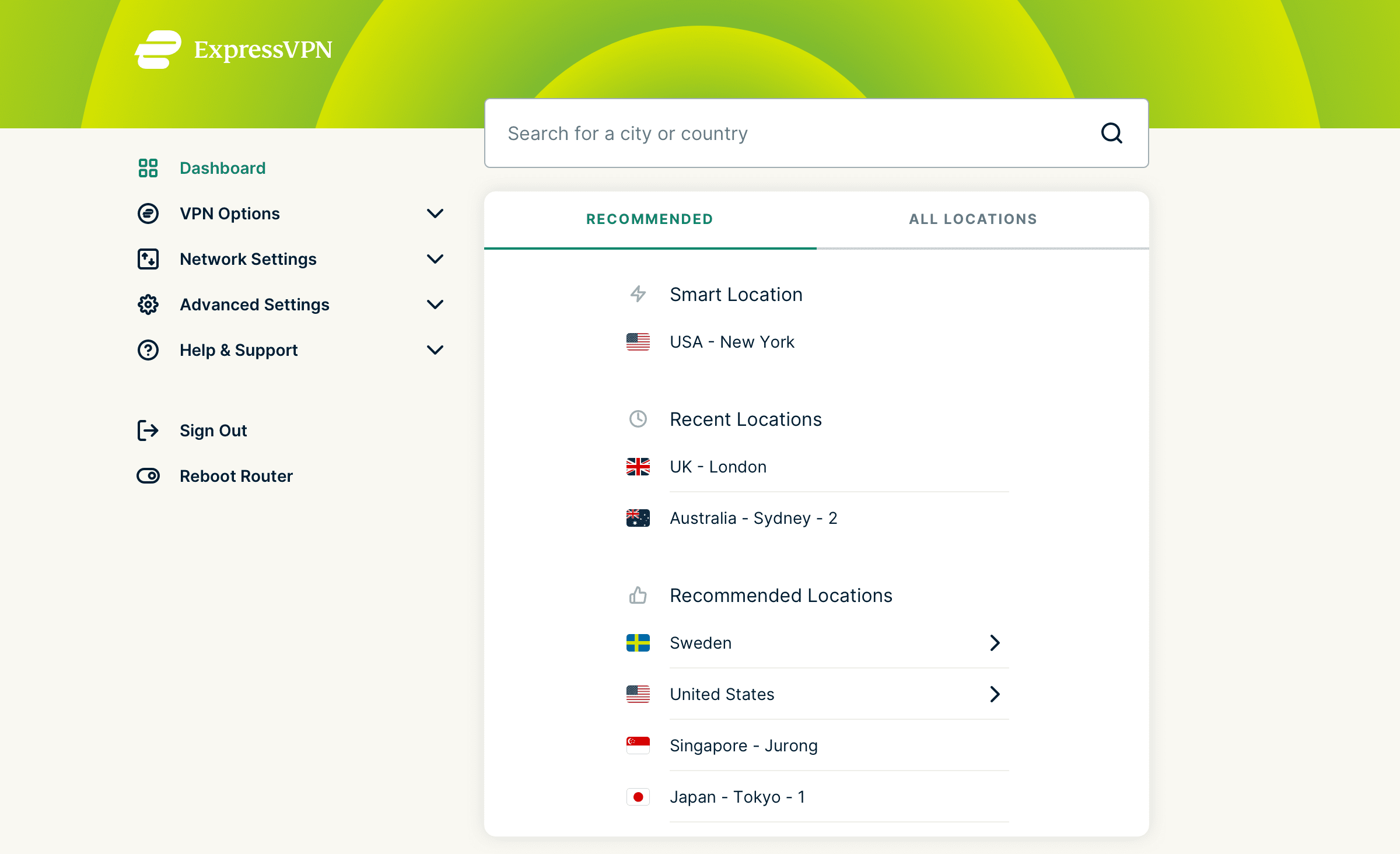
It’s customizable to your needs
A VPN router connects all your devices to ExpressVPN automatically, but what if you want your smart TV connected to the U.S. while your laptop connects to Australia? Or, maybe you want your desktop connected to the router but without a VPN. Thanks to Device Groups, a feature available only on ExpressVPN for routers, you get to create groups—up to five of them—for your devices, with each group connected to a specific VPN location. Create one group for family or friends, another group connected to a permanent location, or even a group to exclude from the VPN network. All this is done on a browser on your phone or computer.
Benefits of using ExpressVPN’s Aircove router
In addition to the benefits listed above, Aircove provides the following advantages:
You’ll be protected in minutes
Setting up and activating Aircove is a breeze. With ExpressVPN already set up, you don’t have to worry about downloading or configuring any apps on the router.
Wide coverage
Aircove’s coverage spans areas of up to 1,600 square feet of stable and speedy dual-band Wi-Fi.
Exceptional speed
Aircove uses the Wi-Fi 6 standard which can deliver speeds of up to 600 Mbps for 2.4GHz and 1,200 Mbps for 5 GHz. Even when connected to a VPN, multiple devices can comfortably stream in 4K HD.
Note: An active ExpressVPN subscription is required to use VPN functionality.
Stay connected and protected in the comfort of your home
With more of us working at home or even remotely from abroad, keeping your devices secure at home shouldn’t have to be a chore, and it doesn’t have to be. Configuring ExpressVPN on your router or getting ExpressVPN Aircove to protect all your devices is the smartest thing you can do for your smart devices.
After subscribing to ExpressVPN, you start setting up the VPN on your router or buy ExpressVPN Aircove on Amazon U.S. or FlashRouters.



















Comments
How many years does this router get updates support?
Show more Show lessSign me up for free router please
Show more Show lessI'd like to be signed up for free router too, thank you.
Show more Show lessSign me up for free router please
Show more Show lessThanks for this giveaway! I’d like to get complete protection of all my devices at home, through ExpressVPN-compatible Linksys WRT3200ACM router for free, with a 12-month ExpressVPN subscription to boot. Since Installing the latest ExpressVPN app on my router is the simplest and most effective way to cover everything in my network with a VPN connection. I would like to Win this Great ExpressVPN-compatible Linksys WRT3200ACM router , with a 12-month ExpressVPN subscription!
Show more Show lessWould love to win the free router and 12 months free Expres VPN thanks
Show more Show lessIf it works better than the on-again/off-again PC program, it's worth a try...what's it cost to operate?
Show more Show lessHi Jack, you just need a regular ExpressVPN subscription (and the router)!
Show more Show lessnone so far
Show more Show lessSign me up for a free router too, please. Thank you.
Show more Show lessSign me up for the free router, please.
Show more Show lessEnter me for the free router, please.
Show more Show lessSign me up for a free router.
Show more Show lessGREATTTTT..... SIGN ME UP AND TONT TOO
Show more Show lessI would love to have a router for my ExpressVPN.
Show more Show lessExpress VPN is the best !! I signed on many years ago and have been tempted with cheaper priced VPNs during their trial periods and not a single one can compare to the service Express offers!!! I would love to win the router and 12 free months
Show more Show lessPlease sign me up for free router
Show more Show lessSign me up for a free 12 months please
Show more Show lesssign me up
Show more Show lessSign me up for the router and membership
Show more Show lessSign me up for free router please. Current expressvpn user. Bill
Show more Show lessSign me up for a free routers!
Show more Show lessI'd like to join the contest as well. Tks!
Show more Show lessI want to join the contest.
Show more Show lessAll these people commenting "sign me up for a free router" on this post instead of actually entering the drawing by clicking the link makes me wonder if these folks would really be able to figure out how to get ExpressVPN running on the router anyhow. If you can't follow the instructions for entering the drawing, how are you going to follow the much more complex instructions for administering an open source router?
Show more Show lessCouldn’t have said better Todd: 👍
Show more Show lessDo you know if the current router from Deutsche Telekom (Speedport) can support ExpressVPN?
Show more Show lessEnter me for a free router.
Show more Show lessxpress VPN is the best and that gives me the best protection on all of mine units 100%. Please Sign me up for free router.
Show more Show lessVery informative articles. Was not aware of the Toronto one, although I do live in Canada and not that far away. I do have a router and was in the process of purchasing one compatible with ExVPN last week. I will wait for results of who were fortunate to win one. Hopefully, I'll get lucky and be on the list. If not, ExVPN will definitely be my security provider
Show more Show lessDoes this work in Australia with NBN?
Show more Show lessI would like the free router and service aswell.
Show more Show lessI would love to win the router and 12 months. Sign me up
Show more Show lessYes, sign me up to win the free router and 12 months free Expres VPN
Show more Show lessHappy new year to all and thank you for those give aways. Please sign me up.
Show more Show lessSign me up please.
Show more Show lessI’d like to be signed up for free router too, thank you.
Show more Show lesssign me and me children up for the free sir..please
Show more Show lessComment sign up free router and established website. Thanks !
Show more Show lessVPN on your router is great for protection. But: This disables Netflix or location dependent providers, when you don’t live in the country where your router’s VPN is connected to. That means you have to connect two routers to your modem. One for Netflix without VPN and the rest through The ExpressVPN router.
Show more Show lessI’m going to give the split tunnelling functionality a try to see if I can exclude my AppleTV from the VPN connection for Netflix. However, then I’ll need two AppleTV’s, as my home country content provider requires a VPN to make it believe I’m connected from that country.
Show more Show lessHi Gerhard, you can select which devices connect to the VPN, and which do not.
Show more Show lessHad an annoying kid thinking he was funny by doing something, sadly, very easy as obtaining our IP through an Xbox party that my little brother was in and progressively sending DDOS attacks... Had to restart my router over and over constantly as Microsoft support wouldn't do anything about it. This VPN actually saved me a headache and won't allow this little troll to stress my network anymore.
Show more Show lessHELLO i been using expressVPN on my iPhone. Now I want my router protected with express vpn. Renting the Fios 1 gig router until now,,, I bought the Linksys 3200 acm from Best Buy. I installed it with a Ethernet cable provided by Verizon from ONT to Ethernet port on router. Then I used the Ethernet cable from 3200 to my iMac. Speeds are up 800 mbps. Problem is I lost all the info on my set top boxes and my On demand channel for Verizon. How do I get that to work with my 3200 router. Also how do I install the con router app to my router ?
Show more Show lessOur Support team can help you. Please contact them via live chat or email. https://www.expressvpn.com/support/
Show more Show lessWould be nice if Express VPN supported routers supporting WiFi6 (the "ax" standard). These are commonplace now, but Express VPN only supports older routers. Come on, Express VPN! How much longer do we have to wait till you support WiFi6? You can do better.
Show more Show less