Why scams can be harder to spot when you’re new at work


Your first few weeks at a new job are full of things you don’t understand yet. You don’t know how your boss normally writes, which login pages are genuine, whether Finance really does send urgent requests on Slack, or why everyone seems to understand an acronym you’ve never heard before.
That uncertainty is usually just part of being new. It also gives scammers useful cover. A request that would immediately look strange to someone who has worked at the company for three years can look perfectly plausible to someone on day four.
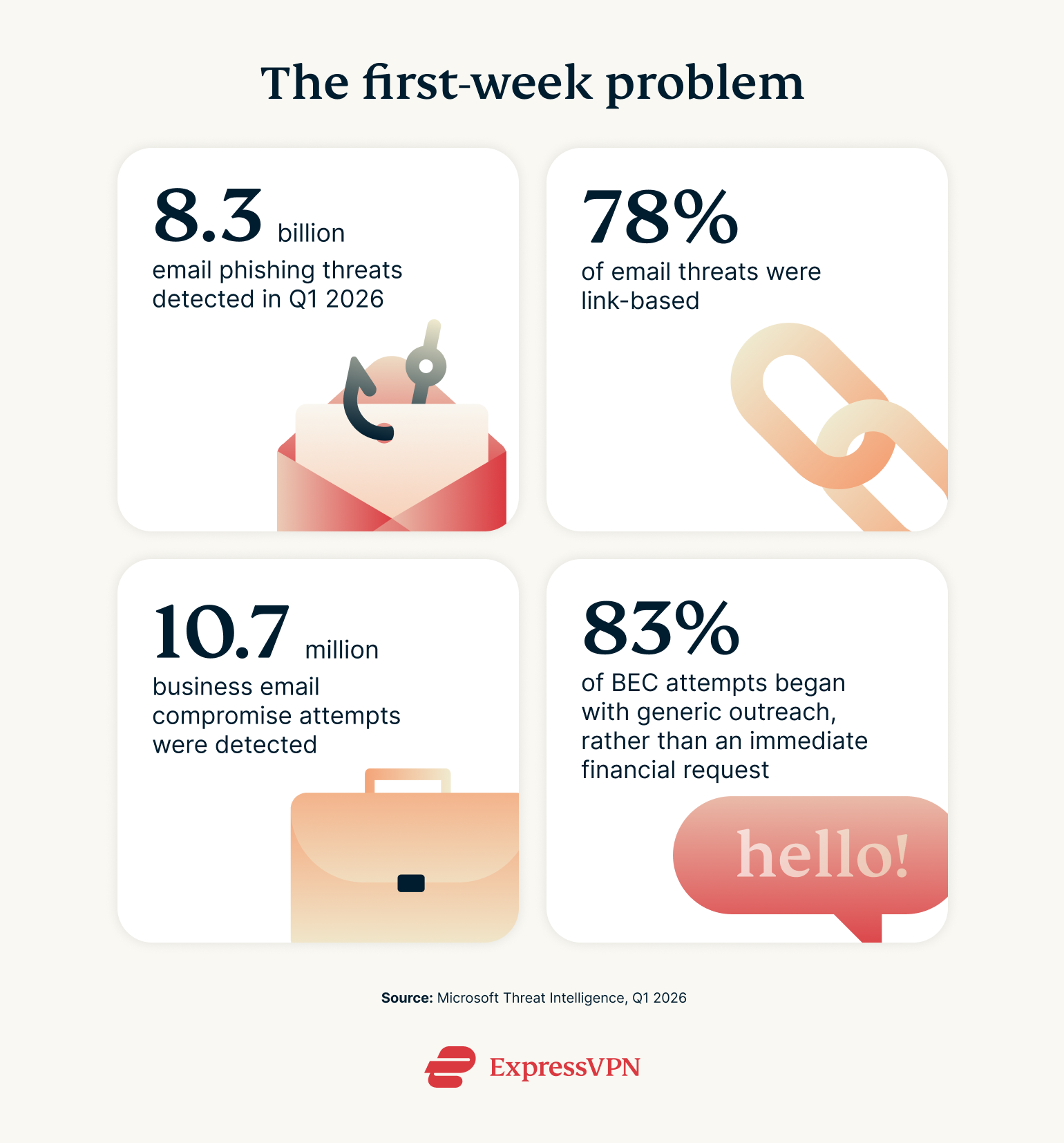
Attackers have plenty of opportunities to test that confusion. Microsoft detected about 8.3 billion email-based phishing threats during the first three months of 2026. Around 78% relied on links, while business email compromise scams, where attackers pose as colleagues or trusted contacts, accounted for roughly 10.7 million attempts.
What’s interesting is how those business email scams begin. More than eight in 10 of the attempts Microsoft observed started with generic outreach rather than an immediate demand for money. Payroll changes, invoice requests and gift-card asks made up a much smaller share.
In other words, the first message may look completely ordinary. And ordinary is difficult to judge when you’ve only just arrived.
Aaron Engel, Chief Information Security Officer at ExpressVPN, says new employees should use the first few weeks to learn how their company communicates as well as how to do the job. Knowing what a normal request looks like makes the abnormal ones much easier to spot.
The scam may look exactly like onboarding
Think about the messages arriving during a first week. Set up your payroll, log into the benefits portal, review this document, reset your password, join this workspace, and confirm your details.
Those are also useful disguises for phishing. Microsoft has recently tracked phishing campaigns dressed up as HR messages, password resets, shared documents and other routine workplace notifications. Some were designed to look as though they had been sent from inside the organisation itself.
That overlap is important because new starters are expecting unfamiliar emails and unfamiliar websites. They may have no idea what the company’s genuine HR portal looks like yet, or whether somebody from Finance would normally contact them directly.
If a request feels unusual, check it somewhere else
If someone asks you to transfer money, buy gift cards, send sensitive information, or step outside the process you’ve been shown, verify the request through another company-approved channel. Message the person through the usual workplace chat or call them rather than replying to the same email.
The same goes for links. Hovering over a link on a computer will usually show where it leads before you click. If the address looks strange, open the service through a bookmark, company portal, or known website instead.
As Engel puts it, “A legitimate request can survive a quick phone call.”
Be especially careful with the boring stuff
Payroll and HR messages don’t have to look frightening to work. Microsoft found that payroll-update requests were among the financial themes used in business email compromise campaigns in early 2026. It has also investigated attacks where criminals gained access to employee accounts and tried to redirect salary payments through legitimate HR systems.
That makes a mundane request to “confirm your direct deposit details” worth treating just as carefully as an obviously suspicious attachment.
Then comes the account avalanche
Email is usually only the beginning. Within a few days, there may be HR, expenses, messaging, project management, cloud storage, benefits, and several internal systems to set up.
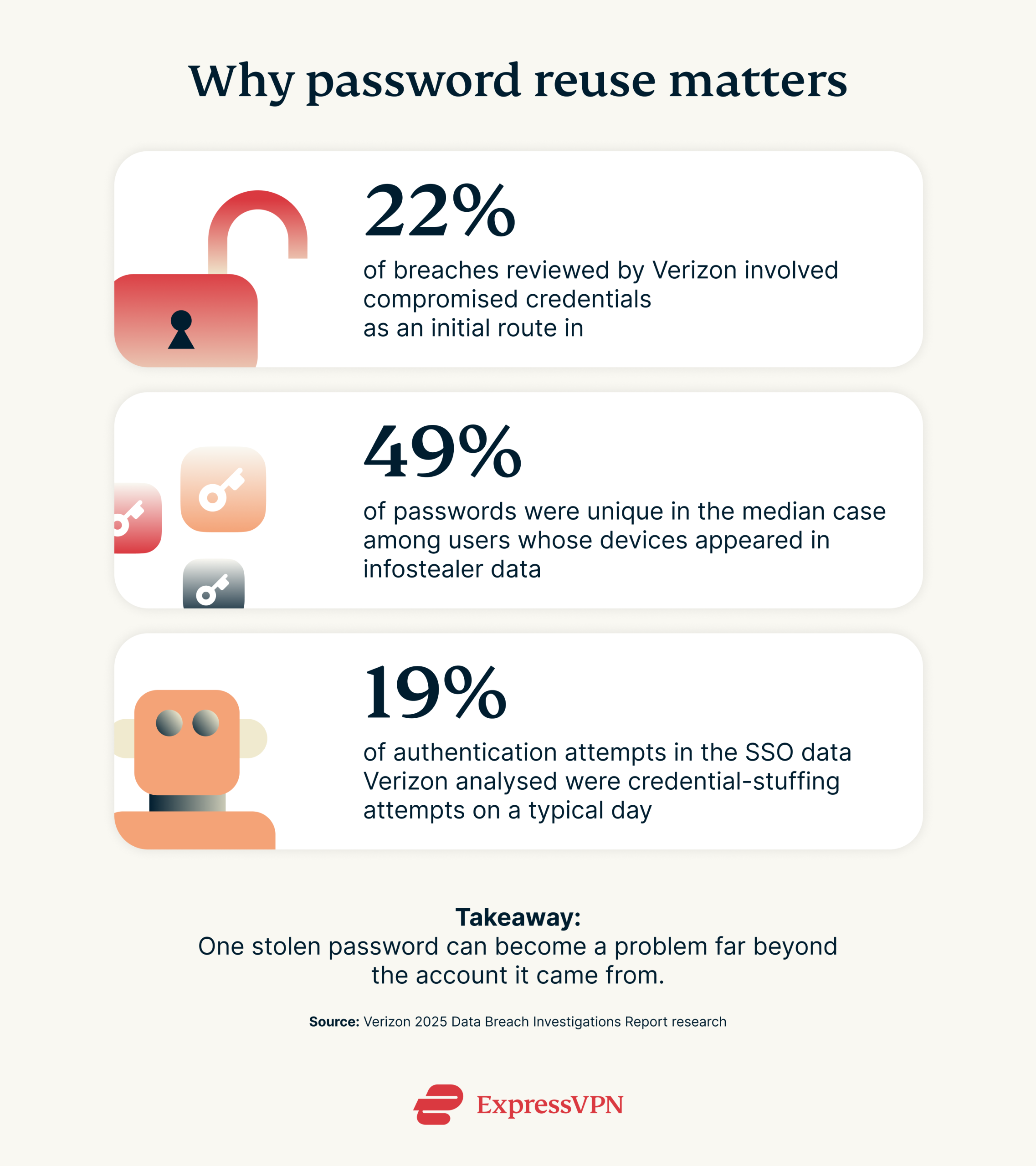
Reusing a familiar password starts to look attractive when yet another signup page appears. The problem is that stolen credentials remain a common way into company systems. Verizon’s 2025 breach research found compromised credentials were the initial route into 22% of the breaches it examined. In its analysis of passwords found through infostealer malware, only 49% of a typical user’s passwords were unique across different services.
Your first-week account rules
- Use the password manager your employer provides. Give every account its own password rather than recycling one from university or a personal service.
- Turn on MFA where it’s offered. If your company supports passkeys or another phishing-resistant method, follow its setup guidance.
- Protect your personal email too. It may still be linked to recruitment sites, benefits, payroll information or account recovery.
- Lock your screen when you leave it. Yes, it’s boring. It also takes about a second.
Ask about AI before feeding it your work
There’s now another question that belongs in first-week onboarding. Which AI tools are employees actually allowed to use?
Company policies differ, and a tool being easily available doesn’t mean company material belongs in it. Internal emails, meeting transcripts, customer information, source code, financial documents, and unreleased plans may contain information an employer doesn’t permit employees to share with an external service.
The simplest approach is to ask which tools are approved and what information can be entered into them. That question is much easier to ask before uploading something than after.
Before pasting something into an AI tool, check three things
- Is this tool approved by my employer?
- Does this contain company, customer, or colleague information?
- Do I know what the company policy allows me to share here?
If the answer to the first or third question is “I don’t know,” find out first.
Working from anywhere still needs some ground rules
A first office job may involve surprisingly little time in an office. New employees can find themselves working from home, cafés, co-working spaces, trains or temporary locations while travelling.
Company policy comes first. Use the security tools your employer provides and check the correct Wi-Fi name before connecting to an unfamiliar network. A reputable VPN can encrypt traffic between your device and the VPN server, but it won’t tell you whether the login page you opened is genuine.
The physical basics matter too. Keep work devices with you in public and lock the screen when you step away. Somebody doesn’t need an elaborate cyberattack if an unlocked laptop is sitting in front of them.
What to do when you think you messed up
This may be the most useful thing to learn during cybersecurity training, and it’s also one of the easiest things to forget.
By the end of onboarding, you should know who to contact after clicking a suspicious link, where phishing emails should be reported, what happens if a device is lost, and which team handles a possible account compromise. Government cyber guidance for businesses makes the same point: incident plans reduce the time employees spend figuring out what to do after something happens.
Reporting quickly gives the security team a chance to investigate, reset credentials, or take other action. Waiting because you’re embarrassed gives the problem more time.
The five things worth knowing before your first Friday
- Who do I report a suspicious email to?
- Where should I go to access HR and payroll without using an emailed link?
- Which password manager and MFA method does the company use?
- Which AI tools am I allowed to use for work?
- Who do I contact if I click something I shouldn’t have?
New employees aren’t expected to recognize every system or know every company process immediately. That’s exactly why checking something unfamiliar is sensible.
A few months into the job, you’ll probably know how your boss writes, which systems Finance uses, and whether that senior executive really does send messages consisting entirely of “quick question.” During the first few weeks, asking is part of learning how the place works.
Starting work while you’re still a student or recent grad?
ExpressVPN works with Student Beans, UNiDAYS, and Student Edge to give eligible students access to exclusive savings, which can be used alongside eligible ExpressVPN promotions.
Check the exclusive savings:
- UNiDAYS: U.S. | Rest of world