Dictionary attack: How it works and how to prevent it


Dictionary attacks are a simple yet effective technique cybercriminals use to gain access to online accounts by systematically guessing passwords from a list of likely candidates. They exploit the fact that many people rely on weak or predictable passwords.
In this article, we’ll explain how dictionary attacks work, the damage they can cause, and how you can prevent and mitigate them.
What is a dictionary attack?
A dictionary attack is a type of brute-force attack where malicious parties use a set of likely passwords to break into an account. These passwords are often pulled from lists of commonly used passwords.
Attackers use automation tools to send repeated password requests to the target system until one of the combinations works. Once inside, they can access sensitive information, impersonate the user, and cause financial losses.
Types of dictionary attack
Dictionary attacks can be classified into two broad categories: online and offline.
Online dictionary attack
An online dictionary attack is when an attacker tries to guess passwords on a live authentication system, such as a website login page or Secure Shell (SSH) server.
Since there’s real-time interaction involved, these attacks are easier to detect, as repeated password guessing can trigger account lockouts and rate limiting.
Offline dictionary attack
An offline dictionary attack occurs when attackers first obtain hashed passwords and then try to recover plaintext passwords.
Since this attack doesn’t happen in real time, it doesn’t trigger authentication defenses and can be difficult to detect early. Plus, there’s virtually no limit on the number of password guesses the attacker can make, as there are no account lockouts.
Dictionary attacks vs. other password attacks
Understanding how dictionary attacks compare to other password attack methods helps clarify how attackers operate and which defenses are most effective in each scenario.
Dictionary attack vs. password spraying
A dictionary attack involves trying multiple passwords to break into a single account, while password spraying uses one or a small set of common passwords to attempt access across many accounts.
Password spraying can be particularly effective because it avoids triggering account lockouts.
Dictionary attack vs. rainbow table
While online dictionary attacks and password spraying are online login attacks, rainbow table attacks and offline dictionary attacks happen offline, after attackers have obtained a database of hashed passwords.
In an offline dictionary attack, attackers take a list of likely passwords, hash each guess, and compare it to the stolen hashes until they find a match.
A rainbow table attack uses a different method. Instead of hashing each guess during the attack, it relies on precomputed tables that map hashes back to possible plaintext passwords. This allows attackers to look up matches instead of generating new hashes each time, making the process faster.
Although both techniques are used to crack hashed passwords, they are alternative approaches:
- Offline dictionary attacks compute hashes for each guess.
- Rainbow table attacks use precomputed hash lookups.
How dictionary attacks work
Here’s a detailed rundown on how an attacker executes a dictionary attack:
- Wordlist preparation: The attacker prepares a list of passwords to be used.
- Selecting target: The attacker chooses a target that accepts password inputs, such as a website login page, a Representational State Transfer Application Programming Interface (REST API), or an SSH server.
- Choosing the right tools: Since dictionary attacks require testing thousands of passwords, they’re not done manually. Attackers choose specific tools to automate the process and route traffic through proxies or botnets to avoid detection.
- Monitoring the attack: Each password from the list is automatically tested against the target, and the results are monitored.
- Attack termination: If successful, the tool notifies the attacker of the credentials that worked. If no match is found, the attack fails. If attackers face account lockouts, they may slow down attempts or switch IPs to evade detection.
Common tools used in a dictionary attack
Because of their scale and trial-and-error nature, dictionary attacks rely on automated tools for effectiveness.
Please note: This content is for educational purposes only. Unauthorized dictionary attacks are illegal and unethical.
- Offline hash crackers: These tools recover plaintext passwords from a given database of password hashes by testing each word from a predetermined wordlist.
- Online protocol guessers: These automate live login attempts on online systems like SSH, Remote Desktop Protocol (RDP), or File Transfer Protocol (FTP). For example, an attacker who knows the username of an employee (say user@corp.com) may use an online protocol guesser to try a list of likely passwords to log into their remote desktop.
- Wordlist generators: These generate custom wordlists for the attack database by adding other characters or mangling rules. They can typically produce thousands of permutations of a given word, such as turning “newyork” into “newyork123” or “newyork#321.”
- Web form and API automation: These automate login attempts against web applications and APIs by sending repeated authentication requests during a dictionary attack.
- Wireless and Internet of Things (IoT) password crackers: These include network security tools that analyze captured Wi-Fi handshakes (authentication exchanges between devices and the network) to recover passwords. The dictionary attack then runs offline without needing to interact with the Wi-Fi network.
Common passwords used in a dictionary attack
Dictionary attacks can use commonly used and weak passwords, as well as customized lists of passwords based on the target. Knowing which types of passwords are the most common targets helps you avoid becoming a victim of a successful dictionary attack.
- Common passwords: Most used passwords such as “password1,” “abc123,” “Password123456,” “Iloveyou,” “qwertyuiop,” “123456,” “monkey,” “dragon,” and so on. Most people tend to use these easy-to-remember passwords, not realizing that they’re extremely easy to guess, too.
- Password repositories: These can host millions of leaked passwords from past breaches.
- Pattern-based passwords: Some passwords in the database are also customized based on predictable patterns, such as “company name + year + symbol” or “location + team + number.”
- Keyboard walk patterns: These sequences follow routes, shapes, or repeating patterns across a keyboard. They’re often visually recognizable, such as zigzags, straight lines, or squares made from adjacent keys. Examples include “qwerty” and “q2w3e4r.”
What can cybercriminals do after a dictionary attack?
A dictionary attack is an initial break-in mechanism where the attacker’s only aim is to guess the password. Once inside, attackers deploy other malicious tools to cause further damage.
Account takeover
Account takeover happens when an attacker gains control of a legitimate user account (e.g., company portal, bank, social media) after a successful dictionary attack.
Once inside the account, the attacker may change the password and recovery details to lock the user out. Account takeovers can also lead to financial losses, as the attacker may also gain access to stored payment card information and use it to make unauthorized purchases or transfers.
Access to personal or sensitive data
Even if no payment information is stored in the compromised account, the attacker may be able to access other sensitive data, such as Social Security numbers (SSNs), phone numbers, and email addresses. They can then exploit this sensitive information for identity theft. The attacker may use these credentials to take out new loans, swap SIM cards, or change billing addresses.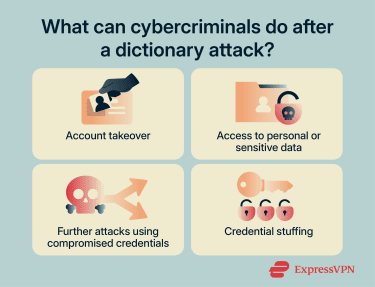
Further attacks using compromised credentials
Once user credentials have been compromised within a corporate environment, the attacker can use them to move laterally within the organization through tools like Mimikatz, which can access credential proofs such as password hashes and Kerberos tickets from Windows Local Security Authority Subsystem Service (LSASS) memory.
These stolen credentials can then be used to escalate privileges inside the organization and gain access to more valuable accounts, such as those of admins or domain controllers.
Credential stuffing
Users have a tendency to reuse the same passwords across multiple accounts, and cybercriminals are aware of this. Once someone’s credentials are exposed after a dictionary attack, attackers can use the same authentication details to break into other accounts, such as email or online banking profiles. This is known as credential stuffing.
How to detect a dictionary attack
Detecting a dictionary attack depends on your level of access. While individual users may only see limited warning signs, administrators and organizations can monitor systems more closely to identify suspicious activity.
For individual users
Regular users typically won’t see attack attempts directly, but there are a few signs that may indicate someone is trying to access your account:
- Unexpected login alerts: Notifications about login attempts from unfamiliar locations or devices.
- Account lockouts: Getting locked out after multiple failed login attempts you didn’t make.
- Password reset emails you didn’t request: This may indicate someone is trying to gain access.
For administrators and organizations
Administrators have access to logs and monitoring tools that make it easier to detect dictionary attacks at scale. Common indicators include:
- High number of failed login attempts on a single account: A strong sign of a dictionary attack targeting one user.
- Repeated login attempts over a short period: Automated tools often generate rapid or continuous login requests.
- Spikes in authentication traffic: Sudden increases in login activity across the system can indicate an ongoing attack.
- Suspicious IP activity: Multiple failed attempts originating from the same IP address, IP range, or unusual geographic locations.
- Account lockout patterns: Repeated cycles of failed attempts followed by account lockouts and retries.
How to prevent and mitigate dictionary attacks
Preventive measures for dictionary attacks largely revolve around following adequate password hygiene. Below are some ways individuals and organizations can mitigate these attacks.
What individuals can do
Use password managers
Since dictionary attacks rely on weak or reused passwords, using a password manager like ExpressKeys can be an effective way to generate and store strong passwords and mitigate these attacks.
Use passphrases
If you’d rather memorize your passwords, you might consider using passphrases instead of one- or two-word passwords. These are fairly easy to remember but almost impossible to guess due to the sheer number of permutations.
You can also generate stronger passphrases using the Diceware method. It works by rolling a six-sided die five times (or rolling five dice at once) to form a five-digit number that corresponds to a word from the Diceware wordlist. You repeat this process to generate at least five words that you can use as a secure, memorable passphrase.
Use multi-factor authentication
Protecting your accounts through multi-factor authentication (MFA) ensures that even if your password is guessed during a dictionary attack, the attacker still can’t get in, as it would require a second temporary authentication. This could be biometric, such as your fingerprint or Face ID, or a one-time password sent to an authentication app.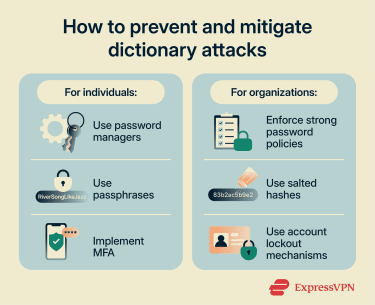
What organizations can do
Enforce strong password policies
Password policies refer to the rules around the creation, management, reuse, and monitoring of all account passwords within an organization. Each organization can design its own password policies. However, the National Institute of Standards and Technology (NIST) emphasizes that password length is the single most important factor and recommends using passwords that are at least 15 characters long.
Use salted hashes
Passwords are generally stored as cryptographic hashes. However, if two or more users use the same password, it will result in the same hash, making them vulnerable to lookup-based attacks.
Using salted hashes adds a string of random characters, called a salt, to each password before hashing. This means that even if two people use the same password, the resulting hashes will be completely different. This prevents the reuse of precomputed hashes (rainbow tables).
Besides this, using slow hashing algorithms such as scrypt, bcrypt, or Argon2 increases the hash computation time for each password. This slows down dictionary attacks when attackers are trying to guess millions of passwords per second.
Use account lockout mechanisms
Account lockout mechanism is a policy under which an account is automatically locked after a certain number of failed login attempts within a predetermined period of time. For instance, an admin can choose to lock out an account after 10 failed attempts within 30 minutes.
You can also decide the period for which the account will remain locked out, say one or two hours, or until an administrator reactivates the account. This prevents attackers from continuing to test hundreds of passwords against a single account, effectively stopping a dictionary attack attempt.
FAQ: Common questions about dictionary attacks
What is the difference between a dictionary attack and brute force?
A dictionary attack takes a more targeted approach by trying a predefined list of likely passwords first. These lists are often based on commonly used passwords, leaked credentials, and predictable patterns, making the attack more efficient when users rely on weak or reused passwords.
Are dictionary attacks still effective today?
What are the most common passwords for dictionary attacks?
How do password managers prevent dictionary attacks?
Can two-factor authentication stop dictionary attacks?
What should I do if my account is compromised?
Take the first step to protect yourself online. Try ExpressVPN risk-free.
Get ExpressVPN