What is a deauthentication attack, and how do you protect yourself?



If you’ve ever been kicked off a network repeatedly, experienced sudden slowdowns, or watched all devices disconnect at once, the cause may not be a weak signal or router issue. It could be a deauthentication attack.
In this article, you’ll learn what a deauthentication attack is, how it works, and why it’s a threat. We’ll also cover common signs of a deauthentication attack and practical steps to protect yourself.
What is a deauthentication attack?
A deauthentication attack forces devices off a wireless network, usually as a first step for more serious exploits. It doesn’t require highly sophisticated tools and can be carried out using widely available Wi-Fi software.
How deauthentication disrupts Wi-Fi connections
In a typical Wi-Fi setup, clients (like a smartphone) and the access point (like a router) exchange management frames, which are control messages used to establish, maintain, and end a wireless connection. These include authentication frames (to verify a device), association frames (to join the network), and deauthentication messages (to signal that a connection should be terminated).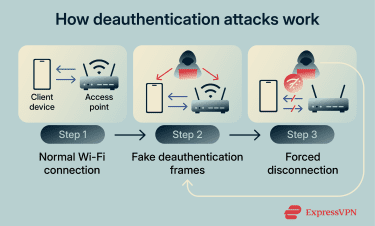
When a device joins a Wi-Fi network, it first completes authentication and association. The device presents its identity, and the access point checks whether it’s allowed to connect.
Under normal circumstances, a client sends a deauthentication frame when it leaves a network, or an access point sends one to remove an inactive or unauthorized device.
However, an attacker can exploit this process by sending forged deauthentication frames to either the client or the access point. In older Wi-Fi standards, these management frames are not cryptographically protected, which allows attackers to spoof them without being detected.
As a result, the receiving device treats the message as legitimate and disconnects. By repeatedly sending these fake frames, an attacker can continuously force users off the network and prevent them from reconnecting.
Why attackers use deauthentication techniques
Attackers use deauthentication to create opportunities for financial gain, surveillance, or sabotage. The impact depends on what the attacker does after the disconnection.
Financial gain
Attackers can use deauthentication as a first step in credential theft or transaction interception. They force victims off legitimate networks, then trick them into reconnecting to look-alike networks under attacker control.
Once connected, victims may log into services such as online banking, cryptocurrency wallets, or e-commerce platforms. Attackers then capture login credentials, session cookies, or one-time authentication codes.
With these details, attackers can access victims’ accounts and transfer money, make fraudulent purchases, or drain digital wallets.
Surveillance and spying
In some cases, attackers use deauthentication for long-term monitoring instead of immediate harm. By controlling the infrastructure victims reconnect to, attackers gain visibility into browsing history, network traffic patterns, and unencrypted communications.
This enables targeted surveillance, such as monitoring browsing patterns, tracking communications metadata, or gathering intelligence on high-value targets.
Corporate espionage and data theft
In business environments, deauthentication helps attackers access internal systems. Employees may be forced off a corporate Wi-Fi network and reconnect through a malicious access point that mimics the legitimate one. When employees authenticate, attackers capture their network credentials, virtual private network (VPN) authentication details, or active session tokens.
Attackers can then access internal systems or confidential documents using those credentials. This allows them to bypass perimeter defenses and extract sensitive business data without directly exploiting corporate servers.
Sabotage and harassment
Sometimes, disruption of connectivity is the end goal or a deauthentication attack. By repeatedly forcing devices offline, attackers create a persistent denial of service (DoS).
This technique is commonly used to sabotage activities that depend on uninterrupted connectivity, such as remote work, online classes, competitive gaming, or live streaming. For example, attackers may target individual players or opposing teams during a gaming competition.
Common scenarios where deauthentication occurs
Deauthentication attacks exploit a weakness in the Wi-Fi protocol that lets attackers disconnect devices even from access points with a network security key. They range from opportunistic attacks in public spaces like airports to targeted exploits against specific users or organizations.
A recent security study of 50,000 wireless networks found that only 6% use Management Frame Protection (MFP), an IEEE 802.11w standard that protects management frames. This suggests that many home and business networks are vulnerable to deauthentication attacks.
Attacks on public Wi-Fi networks
Public Wi-Fi networks are convenient, but they’re also open, shared, and often poorly secured from attackers who can spy on users, manipulate traffic, or push devices onto malicious networks. Deauthentication attacks are frequently used as a stepping stone in these scenarios.
Rogue access points and fake networks
Cybercriminals often set up fake Wi-Fi networks that appear legitimate. For example, they might name a hotspot 'CoffeeShop_WiFi' to blend in at a café. These networks are called evil twins, a type of rogue access point.
If the attacker has set up an evil twin, the device may reconnect to it instead of the original network. Once the device connects to this rogue access point, the attacker gets access to their online activities and can steal usernames, passwords, and other unencrypted data.
The attacker can also manipulate traffic by injecting malicious code or redirecting the victim to fake websites that steal information.
Man-in-the-middle (MITM) attempts
Deauthentication attacks alone only disconnect a device from a Wi-Fi network. However, attackers often use them to set up more dangerous attacks.
For example, an attacker may force a device off the real network, then position themselves between the victim and a fake network to inspect or alter traffic. This type of man-in-the-middle (MITM) attack lets the attacker intercept or modify data that the user believes is going directly to a legitimate site.
Intentional Wi-Fi blocking by businesses
In some cases, Wi-Fi disruption has come from businesses themselves rather than external attackers. In 2014, the Federal Communications Commission (FCC) reached a $600,000 settlement with Marriott International, one of the world’s largest hotel and hospitality companies, after investigating interference with guests’ personal Wi-Fi hotspots at a U.S. convention hotel.
According to the FCC’s Enforcement Bureau, hotel staff used Wi-Fi monitoring system features to prevent attendees from connecting to the internet through their own mobile hotspots in conference facilities.
The FCC also fined Smart City Holdings $750,000 after determining that the company blocked consumers from using their own mobile hotspots at convention centers where it provided paid Wi-Fi services.
Why unauthorized deauthentication is dangerous and prohibited
When someone runs a deauthentication attack without permission, they do more than experiment with Wi-Fi signals. Below are some of the consequences.
- Damage to networks and services: Even short interruptions can harm businesses, public services, and critical infrastructure that rely on wireless connectivity.
- Harm to users: Knocking people offline interrupts their work and can affect safety-critical systems.
- Privacy risks: Deauthentication can expose private data or make networks more vulnerable to follow-on attacks like rogue access points or MITM.
- Violation of ethical standards: Security testing without clear permission violates professional ethics. Legitimate penetration testers always get written consent before running active tests.
How to detect a deauthentication attack
Deauthentication attacks don’t look dramatic, but they cause noticeable disruption. Once you know the signs, these attacks are easier to spot.
Signs to look for
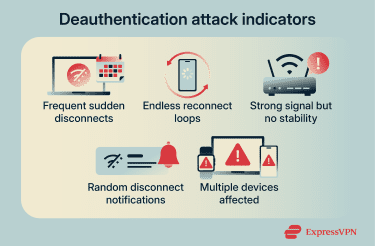
Here are signs that suggest that you may be facing a deauthentication attack:
- Frequent sudden disconnects: Your device drops off Wi-Fi without warning, even when you don’t change locations.
- Endless reconnect loops: Your device reconnects automatically, only to disconnect again within seconds.
- Strong signal but no stability: You see full or near-full signal strength, yet the connection keeps failing.
- Random disconnect notifications: Your device shows messages like “Wi-Fi disconnected” or “Network unavailable” with no clear cause.
- Multiple devices affected at once: Several devices on the same Wi-Fi network lose connection simultaneously.
Tools that detect deauthentication attacks
Security systems use monitoring tools that analyze traffic for abnormal patterns. These tools can spot an unusually high number of disconnect frames or malformed packets that suggest someone is attempting a deauthentication attack.
Examples include network packet analyzers like Wireshark, which can identify deauthentication packets in real time. Intrusion detection systems (IDS) like Snort can also alert administrators to anomalies and block suspicious traffic.
What to do if you suspect an active deauthentication attack
If you think you’re under a deauthentication attack, focus on limiting exposure and restoring a secure connection. Here are immediate steps to take.
- Disconnect from the affected Wi-Fi network: Avoid repeatedly reconnecting, as this keeps your device stuck in repeated connection attempts that an attacker can easily disrupt.
- Forget the network on your device: Removing it prevents automatic reconnection attempts while the attack may still be ongoing.
- Check other devices on the network: An attacker may attempt to exploit weaker devices even if your main device is protected.
- Enable a VPN: Turn on a VPN before connecting to another network. While it won’t stop disconnections, it encrypts your internet traffic, reducing the risk of interception if you’re pushed onto a malicious or insecure network.
- Switch to a trusted alternative connection: Use a mobile hotspot, wired Ethernet connection, or a known secure network. Avoid unfamiliar public networks that could be controlled by an attacker.
- Restart your router (for home networks): This can temporarily disrupt opportunistic attacks and reset active connections, though it won’t stop a determined attacker on its own.
How to prevent deauthentication attacks on your home network
You can't prevent deauthentication attacks entirely, but you can make them harder to execute on your own network. Follow the tips below.
Use Wi-Fi encryption
Enable the strongest encryption your router offers. Wi-Fi Protected Access 3 (WPA3) is the most secure standard because it includes protections against fake disconnect signals. If your router doesn’t support WPA3, use WPA2. Most importantly, avoid outdated protocols like Wired Equivalent Privacy (WEP) or WPA.
Update your router’s firmware
Manufacturers release firmware updates to patch security flaws. Old firmware leaves your router vulnerable to exploits that let attackers send fake deauthentication signals undetected.
Check your router settings regularly for firmware updates and install them promptly. Some routers support automatic updates. If your Wi-Fi doesn’t offer modern security measures like WPA3 encryption, consider switching to a different router that does.
Set up a guest network
A guest network keeps less trusted devices separate from your main network. This protects your personal devices and files from potential attacks or accidental malware spread.
Give the guest network its own strong password and encryption. Additionally, enable network isolation to prevent guest devices from communicating with your main devices. This way, even if someone compromises the guest network, they can't reach your primary network.
FAQ: Common questions about deauthentication attacks
Can you prevent a deauthentication attack completely?
No. The Wi-Fi protocol allows deauthentication frames by design, and attackers can spoof them easily. However, you can reduce the risk by using Wi-Fi Protected Access 3 (WPA3), which protects management frames.
How can I tell if my device is being deauthenticated?
Look for repeated, unexpected Wi-Fi disconnections. Pay special attention if your device can't stay connected despite strong signal strength.
What are the risks of rogue access points?
Rogue access points let attackers intercept or alter your traffic, redirect you to phishing sites, or capture credentials.
Can a VPN prevent deauthentication attacks?
A VPN does not prevent deauthentication attacks or stop Wi-Fi disconnections. However, it can help protect your data if an attacker uses deauthentication to push your device onto a malicious or insecure network.
What should I avoid when connecting to public Wi-Fi?
Avoid connecting to unsecured or unfamiliar Wi-Fi networks, particularly when performing sensitive tasks like banking. Don’t auto-connect to hotspots without checking their legitimacy. If you use a public Wi-Fi, use a VPN to encrypt your traffic.
Can a deauthentication attack damage my device?
No. A deauthentication attack does not damage your device or install malware by itself. It only disrupts the Wi-Fi connection. The risk comes from what happens after the disconnection, such as reconnecting to a malicious network or exposing traffic on an insecure connection.
Is a deauthentication attack the same as Wi-Fi jamming?
No. Deauthentication attacks exploit Wi-Fi protocol behavior to force devices to disconnect, while Wi-Fi jamming uses radio interference to block signals entirely. Jamming is more disruptive and also easier to detect, whereas deauthentication abuses legitimate Wi-Fi control messages.
Take the first step to protect yourself online. Try ExpressVPN risk-free.
Get ExpressVPN


















 Support Center
  FAQ
FAQ  VPN Setup Tutorials


