Is ChatGPT safe? Risks, privacy, and how to use it safely


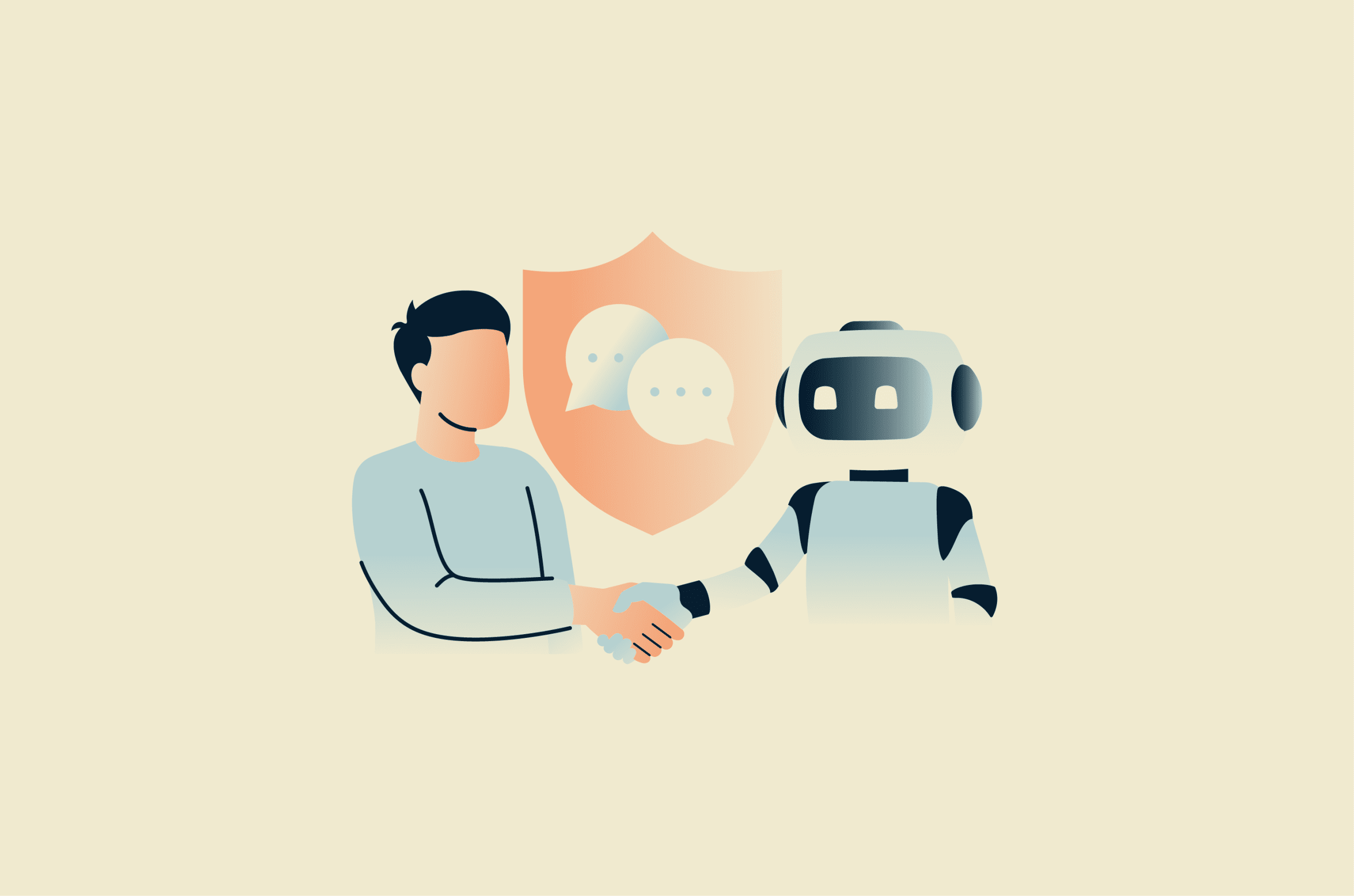
ChatGPT is an AI chatbot powered by large language models (LLMs) that generate human-like responses based on patterns learned from large amounts of text and other training data. OpenAI launched ChatGPT in late 2022.
People now use this generative AI tool for everything from work tasks to personal questions, raising concerns about privacy, security, and the handling of user data. In this article, we examine these concerns and outline practical steps to help reduce privacy risks when using ChatGPT.
Is ChatGPT safe? The short answer
ChatGPT is generally safe for many everyday uses, as long as users avoid sharing highly sensitive information and understand its limitations. OpenAI provides privacy and security controls, including data export and deletion options, Temporary Chat, and memory controls.
However, no system is perfectly secure or risk-free. For ChatGPT Free, Plus, and Pro users, conversations may be used to improve OpenAI’s models unless model training is turned off. Overreliance on AI chatbots for answers, emotional support, or companionship can also create risks, especially when the topic involves health, safety, legal, or financial decisions.
How ChatGPT protects users
ChatGPT stores and processes large amounts of user data, so OpenAI uses multiple safeguards to reduce the risk of unauthorized access, breaches, and misuse.
Below is an overview of key security and privacy measures. To learn more about how ChatGPT protects user data, visit OpenAI’s Trust Portal and review its privacy policy.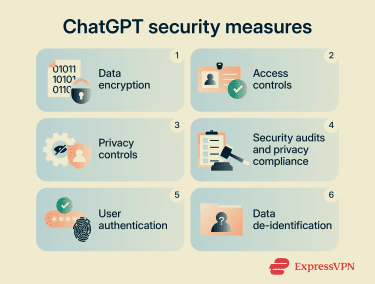
Data encryption
Content between users and OpenAI, and between OpenAI and its service providers, is encrypted at rest and in transit. For business products, OpenAI uses 256-bit Advanced Encryption Standard (AES) encryption at rest and Transport Layer Security (TLS) 1.2 or higher in transit.
Encryption is a cryptographic process that transforms readable data into an unreadable format. Only parties with the correct decryption key can reverse the process and access the original information.
Access control
OpenAI uses security controls, testing, and monitoring to help reduce the risk of unauthorized access, data exposure, and misuse. Its security and compliance documentation, including third-party audit information, is available through OpenAI’s Trust Portal.
Security audits and regulatory compliance
OpenAI supports compliance with privacy laws, including the General Data Protection Regulation (GDPR) and the California Consumer Privacy Act (CCPA). OpenAI’s Trust Portal provides access to compliance documentation, including Service Organization Control 2 (SOC 2) Type 2 reporting and International Organization for Standardization (ISO) certifications.
Independent auditors have also assessed the systems behind its API and business-focused ChatGPT offerings, including Enterprise, Business, Edu, for Teachers, and Healthcare. These reports help show whether OpenAI’s controls align with recognized industry standards for areas such as security, confidentiality, privacy, and availability.
Privacy settings and data controls
In ChatGPT’s settings, users can choose whether OpenAI can use their conversations and files to improve its AI models. ChatGPT also offers Temporary Chats. These conversations don’t appear in chat history, don’t create memories, and aren’t used for model training. Temporary Chats may still be reviewed for abuse and are automatically deleted from their systems within 30 days.
Businesses using the enterprise customers may have access to additional privacy, retention, and security controls. OpenAI doesn't train on organization data by default for business products, offers enhanced data-retention controls for qualifying organizations, supports zero data retention for eligible API use cases, and offers Enterprise Key Management for customers that need control over encryption keys.
Deleting a chat doesn't necessarily remove it from OpenAI’s systems immediately. Retention depends on the type of data, how it's used, and account settings, and that data may be retained when needed for legitimate business purposes, safety or security reasons, legal obligations, or dispute resolution.
User authentication
OpenAI supports multi-factor authentication (MFA), which requires an additional verification step at login. This reduces the risk that a stolen password alone will give an attacker access to the account, though it doesn't eliminate the risk of account takeover entirely.
Data de-identification
OpenAI takes steps to reduce the amount of personal information in training datasets before they're used to improve and train models. Its Privacy Policy also says OpenAI may aggregate or de-identify personal data so it no longer identifies the user.
However, users should still avoid sharing sensitive personal information with ChatGPT, because de-identification doesn't guarantee that sensitive details will never be exposed or inferred.
What are the main concerns with using ChatGPT?
While ChatGPT includes privacy and security protections, it carries risks that are common to many generative AI systems.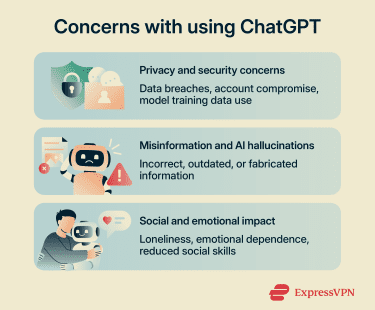
Privacy and security concerns
For personal ChatGPT accounts, OpenAI may use conversations and uploaded files to improve its models unless model training is turned off. When the setting is disabled, new conversations won't be used for training. In some cases, human reviewers may also read content to help improve OpenAI's services.
OpenAI doesn’t sell personal data or share ChatGPT conversations with advertisers. However, opting out of model training doesn't necessarily delete existing account or conversation data. As with any online service that stores user data, retained information may still carry residual security risks, including the possibility of unauthorized access or a data breach.
Misinformation and AI hallucinations
Like other generative AI systems, ChatGPT generates responses based on patterns learned during training, the user’s prompt, and any context or tools available in the chat. As such, it can produce incorrect, incomplete, or outdated information while presenting it confidently. These mistakes are often called AI hallucinations.
In high-stakes areas such as health, law, or finance, relying on an AI-generated answer without checking a trusted source or professional advice can lead to poor decisions. For example, incorrect medical information from an AI chatbot could contribute to unsafe health choices.
Social and emotional impact
OpenAI states that “ChatGPT isn't designed to replace or mimic human relationships” but acknowledges that some people use it that way. Early research by OpenAI and the MIT Media Lab found associations between certain patterns of ChatGPT use and measures such as loneliness, emotional dependence, and social interaction, though more research is needed to understand cause and effect.
Another concern with AI chatbots is sycophancy, in which a system becomes overly agreeable or affirming. This can reinforce a user’s existing view, even when a more balanced response would be safer or more helpful.
What you shouldn’t share with ChatGPT
The best practice is to treat ChatGPT like any online service that stores and processes user content. Avoid sharing anything highly sensitive, confidential, or unnecessary for the task.
Avoid sharing the following:
- Sensitive personal information: Full names, home addresses, phone numbers, email addresses, ID numbers, or other details that could identify, locate, or expose you.
- Credentials and access tokens: Passwords, MFA codes, API keys, security tokens, recovery codes, or other login details.
- Financial information: Bank account numbers, credit card details, tax information, or payment details.
- Health information: Medical records, diagnoses, test results, prescriptions, or other sensitive health-related details.
- Confidential work or client data: Proprietary information, internal documents, trade secrets, client files, or anything covered by a non-disclosure agreement (NDA) or workplace policy.
- Legal matters: Ongoing disputes, case details, legal strategy, or attorney-client privileged information.
- Other people’s private information: Personal details, photos, messages, or records involving friends, family members, clients, patients, or minors.
Is ChatGPT safe for kids and students?
OpenAI’s terms of use state that users must be at least 13 years old, or the minimum age required in their country to consent to use the service. Users under 18 must have permission from a parent or legal guardian. OpenAI has introduced age-prediction and age-verification measures, but these systems may not verify every user’s age at sign-up.
All general concerns about ChatGPT apply to kids and students, but younger users face additional risks. OpenAI also offers parental controls for linked parent and teen accounts, including options to manage some settings, set quiet hours, and receive safety alerts in certain situations.
Like other generative AI systems, ChatGPT may still produce content that isn't appropriate for all ages. OpenAI applies teen safeguards by default when a user is under 18 years old or when its systems estimate that an account likely belongs to someone under 18.
Using ChatGPT for schoolwork may violate academic integrity policies, depending on the school, course, or assignment rules. It can also hinder skill development if students use it as a shortcut rather than as an assistive tool.
Younger users may be more vulnerable to misinformation and the social or emotional effects of overreliance on AI chatbots, since they’re still developing critical thinking and interpersonal skills.
How to use ChatGPT safely
Users can mitigate potential risks by understanding ChatGPT’s limitations and using available privacy and security controls.
Use ChatGPT privacy tools
Before using ChatGPT, review its privacy settings. Built-in data controls can help reduce how your information is stored or used.
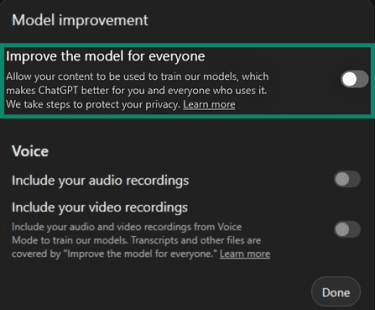
Opt out of OpenAI model training
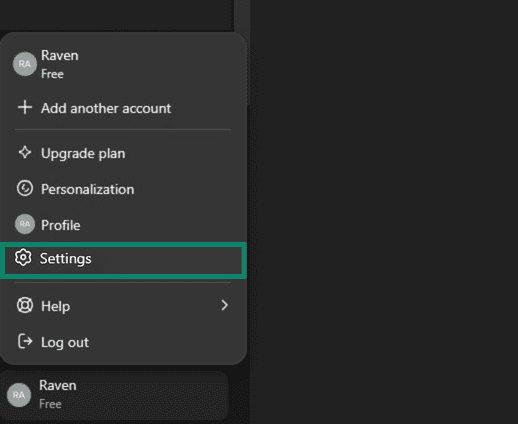
- Click your profile icon and select Settings.
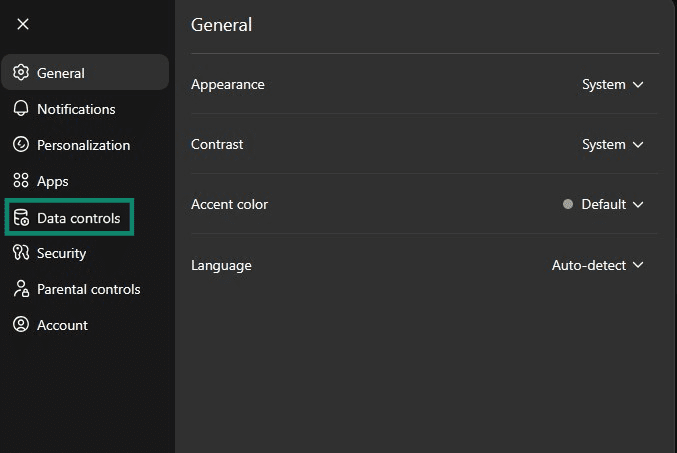
- Go to the Data controls.
- Toggle off Improve the model for everyone, then click Done.
Delete your chats
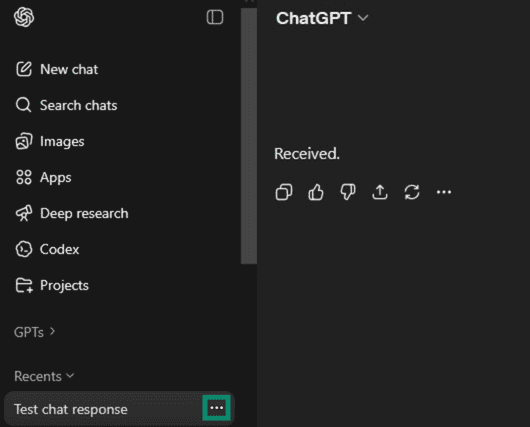
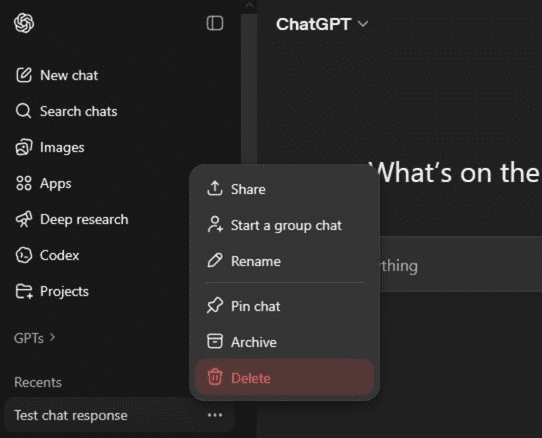
To delete an individual conversation:
- Open the chat history sidebar and hover over the chat you want to delete, then click the three dots (...) next to the chat title.
- Select Delete, then click Delete again to confirm.
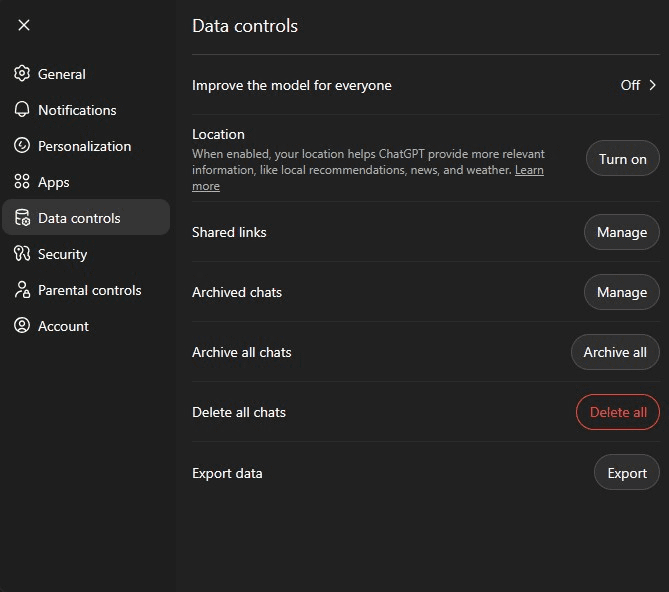
To delete all conversations at once:
- Open Settings.
- Go to Data controls.
- Click Delete all chat, then confirm deletion when prompted.
Use Temporary Chats
To start a Temporary Chat:
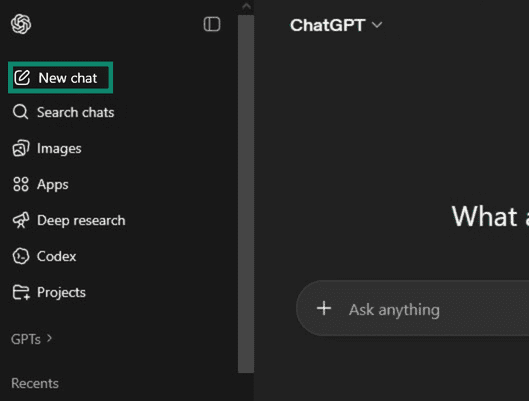
- Start a new conversation by clicking New chat.
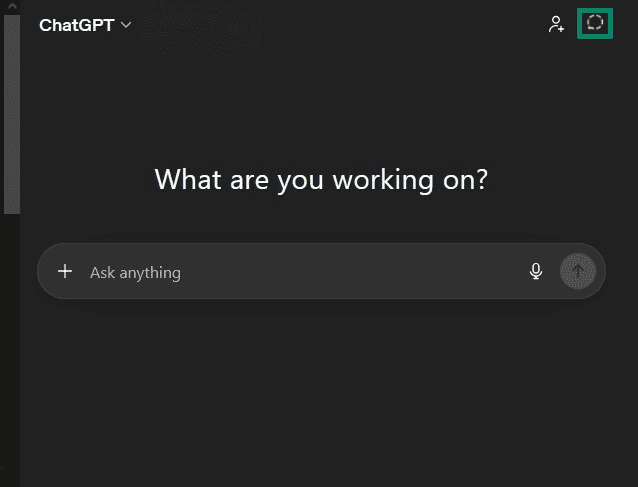
- Click the Temporary button in the top-right corner of the page, then Continue.
Use strong passwords and MFA
Strong passwords help protect accounts from password-guessing, credential stuffing, and other account takeover attacks.
A strong password is long, unique, and hard to guess. A password manager like ExpressKeys can help you create and remember complex passwords.
You can further enhance your account security by enabling MFA. To do so, open Settings, select Security, then choose a method under Multi-factor authentication (MFA) and follow the setup instructions.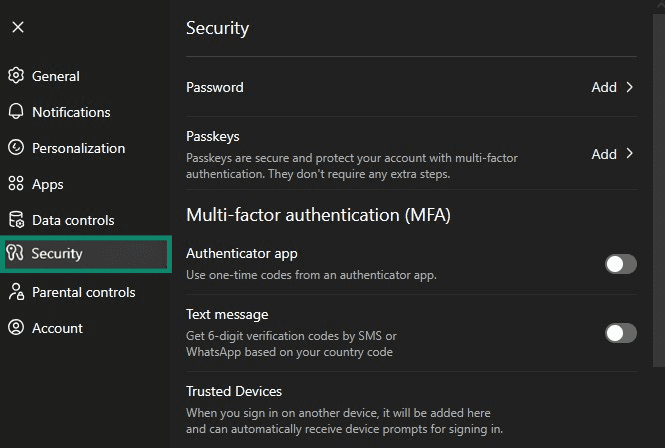
Verify important answers before acting
ChatGPT can be helpful, but its responses may also be inaccurate, incomplete, or outdated. For important decisions related to health, legal, or financial matters, verify the information using trusted sources or consult a qualified professional.
Be aware of scams
Scam apps and websites may impersonate ChatGPT or falsely claim an official connection to OpenAI. These fraudulent platforms may trick users into paying for an inferior service, steal login credentials or personal information through phishing, or install malware on devices.
OpenAI publishes the official ChatGPT app. Apps from other developers may use OpenAI’s technology, but they're not the official ChatGPT app unless they are published by OpenAI.
To avoid scams, verify the app’s developer and download only from trusted sources, such as OpenAI’s website, the Apple App Store, or Google Play.
Use adult supervision for children
For children aged 13 to 18, parents or guardians should set clear boundaries about what information they shouldn’t share with ChatGPT. Encourage younger users to question and verify ChatGPT’s responses rather than accept them at face value. Monitor interactions to help ensure responses are age-appropriate.
Be cautious with external content
ChatGPT may provide links to external websites. As with any link, check that the destination is legitimate before opening it or entering personal information.
To assess a link, hover over it on a desktop or long-press it on a mobile to preview the destination URL. Check whether the domain matches the expected source. For example, a Wikipedia link should lead to a wikipedia.org page, not a lookalike domain with extra words, misspellings, or unusual characters.
Avoid clicking on pop-ups or suspicious ads, and don’t download files or enter personal information on unfamiliar websites.
Use ExpressAI
ExpressAI is a privacy-focused AI platform that provides access to multiple AI models, including OpenAI’s gpt-oss-120b open-weight model.
ExpressAI is built on confidential computing. Prompts and files are encrypted and processed in a private enclave, so neither ExpressVPN nor the model providers can access or view chats. User inputs are not used to train models.
It's also undergone an independent security audit by Cure53. The published report covers testing of the client, backend, cryptography, key management, and infrastructure.
These features are designed to reduce the risk of unauthorized access, data exposure, and the use of personal prompts for model training. ExpressAI is included with the ExpressVPN Pro plans.
FAQ: Common questions about ChatGPT safety and privacy
Should I tell ChatGPT my real name?
Does ChatGPT save my conversations?
Can I delete my ChatGPT history?
Is ChatGPT confidential?
Can ChatGPT diagnose health issues?
Is ChatGPT safe from hackers?
Is it safe to use ChatGPT as a therapist?
Is it safe to upload bank statements to ChatGPT?
Is it safe to download files from ChatGPT?
Take the first step to protect yourself online. Try ExpressVPN risk-free.
Get ExpressVPN