Bank of America phishing emails: How to identify and report


Bank of America may contact customers by email about account activity, security alerts, or service updates. But scammers can also impersonate the bank in messages that are designed to look legitimate. As a result, it can be difficult to tell whether an email is genuine or part of a scam.
A fake Bank of America email can put login details, personal information, or finances at risk. This guide explains how to spot Bank of America phishing emails, how to report them, and what to do if a phishing link is clicked.
What are Bank of America phishing emails?
These messages aim to prompt an action, such as signing in via a link, sharing a verification code, or providing account details, potentially allowing scammers to take over an account or commit fraud. They often route recipients to lookalike pages or move the conversation to fake support channels to collect information.
Phishing is a form of social engineering, meaning it relies on psychological manipulation. Common tactics include creating urgency, fear, or trust so the request feels legitimate and time-sensitive.
How scammers impersonate Bank of America
Phishing emails that impersonate Bank of America are designed to look like official communications. The message may appear to come from a trusted sender, but key identity cues can be fabricated.
A common tactic is email spoofing, in which attackers forge sender details so the message appears to come from a real organization. In practice, this can mean the “From” name or address is made to look like it’s from Bank of America, even though the message was sent by scammers.
Scammers may also mimic Bank of America's branding and tone to make messages feel familiar. This can include copying logos, writing patterns, and terminology used in legitimate messages to appear convincing at a glance.
Some campaigns are sent broadly (bulk phishing), while others are targeted at a specific person or group (spear phishing). For example, leaked contact lists from a third-party data breach can be used to target people who may be Bank of America customers.
Why these emails are effective
Bank of America serves approximately 70 million customers. With such a large user base, even scam campaigns sent at random are likely to reach real Bank of America customers, who are used to receiving legitimate bank alerts.
Bank of America provides automatic account and security notifications, including alerts about unusual activity and low account balances, with options such as email, text, or mobile notifications.
Scammers often imitate these real alerts and add requests for sensitive information. That’s why Bank of America warns that real text, email, or phone call alerts will not ask for account details or request an account authorization code.
However, phishing emails (and texts or calls) often create urgency or pressure, which can make a message feel time-sensitive and reduce scrutiny, leading some victims to act before questioning the legitimacy of a message.
Common types of Bank of America phishing scams
Bank of America phishing scams often use familiar pretexts. The story varies, but the goal is usually to capture login details, one-time passcodes (OTPs), or personal/account information.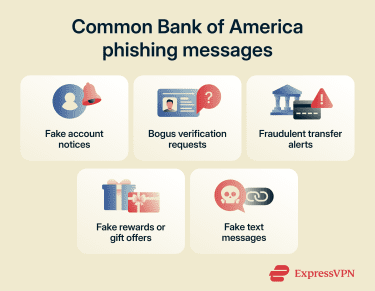
Account suspension or “account locked” notices
Scammers may send messages claiming an account is locked, suspended, or temporarily restricted, and instruct the recipient to sign in to restore access. Some versions threaten account closure if no action is taken within a short time frame, creating pressure to respond quickly.
Some messages also include a phone number that routes to a scammer, who may try to persuade the caller to make a payment or move money. Bank of America warns against transferring money or making payments in response to an unexpected call or text.
Information verification requests
These emails may claim that Bank of America needs to confirm your identity or verify account details. They might request information such as an Online ID, Social Security number, debit card or ATM PIN, account details, or an OTP.
The goal is generally to collect information that can be used to commit fraud, such as account takeover, unauthorized transactions, or identity fraud.
Fake payment or transfer alerts
Another strategy involves claiming a payment or transfer is in progress, awaiting confirmation, or flagged as suspicious. These messages often try to prompt immediate action, such as clicking a link, “if this wasn’t you.”
The link may lead to a lookalike sign-in page designed to capture credentials, an example of URL phishing, where a deceptive link routes to a fake site. Alternatively, the email may include a phone number that routes to a scammer who tries to collect personal information or persuade the caller to move money.
Gift card or reward scams
Some phishing messages may promise rewards such as gift cards, loyalty points, or "exclusive" offers, and may sometimes require a survey or form. In practice, the goal is often to collect personal or financial information.
While Bank of America offers credit card rewards, rewards balances and redemptions are typically accessed through official Bank of America channels, such as online banking or the mobile banking app (for example, “My Rewards”). Because of that, unexpected emails urging immediate action to “claim” a reward, especially via a link or by providing personal information, can be a red flag.
Text message phishing (smishing)
Smishing refers to phishing conducted through text messages. Scammers may impersonate Bank of America, prompting recipients to click a link or share sensitive information, or route the conversation to an unfamiliar number. Links may lead to malicious sites or other harmful content.
Why Bank of America phishing emails are dangerous
A phishing email can look harmless, but the damage can be real, and it can extend beyond a single account when stolen details are used elsewhere.
Credential theft and account takeover
One of the most common outcomes of phishing is stolen login details. With stolen login details (and sometimes OTPs), scammers may try to log in, reset the password, and take control of the account, then move money out quickly and lock the account owner out.
If the same password is used on other services, those accounts may be at risk too, because stolen username-and-password pairs are often tested across multiple sites (credential stuffing).
Even if the credentials aren’t used right away, stolen logins can be sold and used later by other criminals.
Fraudulent transfers and Zelle drains
Phishing doesn’t just expose personal data; it can lead directly to financial loss. Once scammers gain access to an account or persuade someone to authorize a transaction, they often try to move money quickly.
Services like Zelle are designed for speed, which is why many Zelle scams focus on pressuring quick authorizations: transfers between enrolled users typically occur in minutes, and Zelle says a payment can only be canceled if the recipient hasn’t yet enrolled.
If someone instructs the moving of funds to a “safe account,” it's best to pause. Bank of America says it will never ask customers to transfer money to anyone (including itself) because fraud has been detected.
Identity theft and Social Security exposure
Some scams don’t stop at banking login details. They may ask for a Social Security number, driver’s license details, or other identity information under the excuse of verification.
If such data is exposed, it can be used for identity theft, including attempts to open new accounts or take out loans in someone else’s name, which can create long-term credit and collections problems to untangle. Monitoring tools like ExpressVPN Identity Defender can help surface potential signs of identity theft, enabling early response to minimize the damage.
Secondary scams triggered by data theft
A stolen login can lead to follow-on scams. If scammers gain access to an email account, they may be able to reset passwords on other services. And if a SIM swap occurs, verification codes and password reset texts can be intercepted to help take over accounts protected by two-factor authentication (2FA).
Sometimes there's a so-called recovery service claiming it can get money back for a fee. The Federal Trade Commission (FTC) warns that these “refund and recovery” scams often target people who’ve already lost money.
How to recognize a fake Bank of America email
Most scam emails look more or less normal, which is exactly why they work. The clues are often subtle and easy to miss if you’re in a hurry.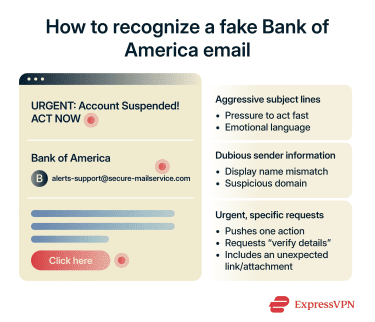
Red flags in subject lines
Scammers use subject lines to grab a target’s attention and create urgency, often hinting at consequences if there’s no quick response. Excessive capitalization and phrases like “urgent,” “action required,” or “final notice” can be warning signs.
If an email pushes immediate action or directs to a link to “verify” information, it’s safer to sign in through the Bank of America app or type the website address directly instead of using email links.
Also watch for awkward capitalization, unnatural language, random punctuation, and unexpected claims, such as a refund or an unclaimed reward.
Suspicious sender addresses
Just because an email appears to come from a real Bank of America address at first glance doesn’t mean that it’s safe. Check the full real sender address, not just the display name. Many email clients let you expand the sender details (for example, clicking or tapping the sender name) to reveal the actual address.
Common red flags include:
- A free webmail: Sender address paired with a “Bank of America” display name. For example, account.bankofamerica@freewebmail.com.
- Lookalike domains: Add words, hyphens, or numbers, or swap characters. For example, bankofamerica-alerts.example instead of an official domain (like bankofamerica.com).
Spoofing patterns and how to verify the sender domain in headers
Email spoofing can make messages look legitimate, so it can help to inspect the email headers and review the authentication results.
In Gmail, follow these steps:
- Next to Reply, click the three dots, then select Show original.

- Review the header details shown.
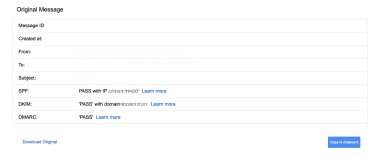
When viewing headers, the most useful area is usually the authentication results, which commonly list:
- Sender Policy Framework (SPF): Checks whether the sending mail server is authorized to send email for the domain used in the message’s envelope sender (MAIL FROM). A PASS means that SPF check succeeded for the domain it evaluated, but it doesn’t automatically confirm the visible From name/address is trustworthy.
- DomainKeys Identified Mail (DKIM): Uses a digital signature to confirm the message wasn’t altered in transit and that it was signed by a domain associated with the sender. A PASS means the signature validated for the domain it evaluated, but it still doesn’t guarantee the message is genuinely from the brand shown.
- Domain-based Message Authentication, Reporting, and Conformance (DMARC): Builds on SPF and DKIM by checking whether the authenticated domain(s) align with the visible From domain, and it tells receiving providers how to handle failures (and where to send reports). A PASS typically indicates that the visible From domain matches the authenticated domain(s) and the message passed the domain’s DMARC policy checks.
If one or more show FAIL, that can be a sign of spoofing (or misconfiguration), so it’s worth treating the message with extra caution.
Urgent requests and insistent posturing
Phishing emails targeting Bank of America customers often include urgent calls to action and push a single path, such as “click this link” or “call this number.”
When unsure, verify the message without using its links: open the Bank of America app or manually enter the website address and check for alerts there.
What to do if you clicked a phishing link
Clicking a suspicious link doesn’t necessarily mean your device is compromised, but it is a cause for concern. The risk increases if you take additional steps, such as entering your login details, downloading a file, or sharing a one-time code.
Immediate steps to secure your account
First, stop interacting with the email and close the tab. Don’t keep clicking links or downloading anything “just to check.”
If you downloaded or opened anything from the message, run a scan with a reputable antivirus or your device’s built-in security tools, and remove anything suspicious before signing in anywhere.
Next, go to Bank of America the safe way: use the official mobile app or type the bank’s address into your browser instead of using links in the email.
Once you’re signed in through official channels, check for security alerts. If the email was legitimate, you may see the same alert in online banking or the app.
If you entered your login details on a phishing page, change your password as soon as possible, and avoid reusing that password on other accounts.
If you shared card details or any login information, contact Bank of America right away. Bank of America lists 800-432-1000 as a customer service number for general account help (including lost or stolen debit cards).
Read more: Find out how to protect your bank account from hackers.
How to report the incident
Bank of America tells customers to forward suspicious emails that use its name to abuse@bankofamerica.com, then delete the message. Its Security Center also lists forwarding suspicious emails or texts using Bank of America’s name to the same address. Suspicious texts can also be forwarded to your mobile carrier by sending them to 7726 (SPAM).
You can also report scams to the U.S. FTC through its fraud reporting website. For identity theft recovery steps and documentation, the FTC directs victims to its identity theft website.
What to watch for after a compromise
After you’ve secured your account, monitor transaction history for unauthorized activity (including pending transfers). Watch for unexpected password reset emails and follow-up calls or messages that reference the incident.
Be cautious with “recovery” offers that claim money can be retrieved for a fee; these can be follow-up scams.
If a message includes a phone number, verify it by checking Bank of America’s listed contact details rather than calling the number in the email.
You may also want to consider dark web monitoring, which can alert you if exposed credentials or personal information show up in known breach data, especially if the same email address or password is used across multiple accounts.
Read more: Reduce unwanted emails and potential phishing exposure with private email aliases. If you shared information or think your account may be at risk, contact Bank of America using a verified channel, such as the bank’s official website or app contact options, rather than any number provided in the email.
The safer approach is to treat an email alert as a heads-up, then verify by opening the official app or typing the Bank of America website address directly, rather than using links in the email.
FAQ: Common questions about Bank of America phishing emails
How do I report phishing emails to Bank of America?
Does Bank of America send email alerts?
How can I verify the legitimacy of a bank email?
Are phishing scams more common during tax season or holidays?
Take the first step to protect yourself online. Try ExpressVPN risk-free.
Get ExpressVPN






 Support Center
  FAQ
FAQ  VPN Setup Tutorials


