What is steganography? A complete guide to hidden data techniques


Steganography is the practice of hiding secret information within a larger, ordinary-looking message. In a cybersecurity context, this often means embedding hidden data within common file types, such as images, audio, or documents.
While steganography can be used by researchers and privacy-conscious users to protect sensitive information or discreet communications, it may also be abused by attackers to conceal malicious code or data transfers.
This article explains how steganography works, why it appears in cyberattacks, and what you can do to reduce the risks posed by hidden threats.
What is steganography in cybersecurity?
Some cyber threats don’t rely on obvious red flags like suspicious file names or unusual network traffic. Instead, they hide in plain sight. Steganography is a technique used in cybersecurity to conceal information within existing files. Unlike encryption, which signals that protected data is present, steganography focuses on minimizing visible changes to reduce the likelihood of detection. However, specialized analysis techniques (known as steganalysis) can sometimes identify the presence of hidden content.
Long before digital files existed, people used physical forms of steganography, including invisible inks described in Roman sources and secret tattoo messages documented in ancient Greek accounts. Today, the same concealment principle applies to digital media.
From a cybersecurity perspective, steganography matters because it can be used to bypass traditional defenses. Attackers may use it to hide malware, command-and-control (C2) instructions, or stolen data inside seemingly harmless files. At the same time, security teams typically study steganography to better understand these techniques and develop ways to identify suspicious files and hidden communications.
How steganography differs from traditional cryptography
While both steganography and standard cryptography involve protecting information, they do so in different ways. Encryption, the standard cryptographic technique, involves mathematically transforming data so it becomes unreadable without the appropriate key. In contrast, steganography seeks to obscure the presence of a hidden message.
Here’s an overview of the key differences:
| Steganography | Cryptography | |
| What is concealed | The existence of a message | The content of a message |
| What is modified | The carrier file is altered; the hidden message remains unchanged | The message itself is transformed until decrypted |
| Use of a carrier medium | Requires a cover medium to conceal the secret message | Doesn’t require a cover medium; the encrypted output is openly visible |
| Primary security reliance | The subtlety of the hiding technique | The strength of the encryption algorithm and the secrecy of the key |
| Shared requirements | Sender and receiver must agree on the hiding method and parameters | Sender and receiver must share a secret key or public/private keys |
| When it’s typically used | Covert communication where avoiding detection is important | Secure communication where the confidentiality of data matters |
The two methods can be combined, for example, by encrypting a message and then hiding the resulting ciphertext in an image file.
How does steganography work?
Although steganography can be implemented in many ways, most techniques follow a similar high-level process. It begins with selecting a "cover medium," which is a file or physical object used to carry the hidden data. The message is then embedded in that medium using one of many possible techniques, ranging from complex signal manipulation to simpler methods such as modifying a file’s metadata to store plaintext.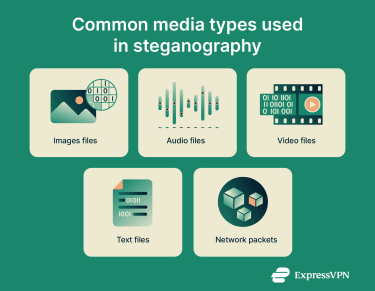
Once the message is embedded, the cover medium becomes a “stego-object.” If the goal is to share the message with a specific recipient, the stego-object may be transmitted through ordinary channels, such as file sharing or online uploads, without drawing obvious attention.
Finally, the hidden data must be extracted and accessed. In legitimate use cases, the recipient needs to know the method used to retrieve the information. In malicious campaigns, the hidden data may contain executable code or instructions that are extracted and run by malware, a vulnerable application, or a separate loader after the file is opened or processed.
Main steganography techniques
One of the most common and widely studied steganography techniques is called the least significant bit (LSB) method. As the name suggests, LSB often involves modifying the least significant bit in an 8-bit sequence (a byte) to encode a secret message. Because this bit contributes the least to the overall value, changing it is less likely to noticeably affect the data. For example, steganographers may change “01101011” to “01101010.”
LSB is typically best suited to audio or visual media, where flipping a single bit won’t significantly affect how the file appears. With more structured or fragile data, such as text documents or network protocols, indiscriminate bit alterations can corrupt the data.
This kind of steganography can be compromised if a file is modified or re-encoded with lossy compression, so it’s best suited to formats that remain lossless end-to-end, such as PNG images.
On the simpler side, a file can be turned into a stego-object by simply editing its metadata. For example, a video could be edited to include a plaintext password in a metadata field intended to contain the GPS location where it was filmed. Most people who interact with the file will never see this information, but it can be discovered easily by anyone who knows where to look.
Because metadata fields are often stored in plaintext and can be easily inspected, this approach provides little resistance to detection or analysis. It is sometimes used for basic concealment or tagging rather than for situations requiring strong secrecy.
How hackers use steganography in cyberattacks
Threat actors may use steganography as a concealment technique within broader cyberattack campaigns.
One of the most common attack patterns involves hiding data in downloadable files. While the file itself may function normally, the concealed information can later be extracted and acted upon by a separate malicious component, a vulnerable application, or a compromised system already under an attacker’s control. Steganography in these cases supports the attack rather than directly executing code.
In many campaigns, the hidden data does not contain a full malware program. Instead, it may include instructions that help malicious software communicate with remote servers, retrieve additional components, or coordinate later stages of an attack. This layered approach can make malicious activity harder to detect using traditional security tools.
Depending on the broader attack, this concealed information can support outcomes such as ransomware deployment, spyware installation, or unauthorized use of system resources. For defenders, understanding how steganography fits into these attack chains is important for identifying suspicious files and hidden communications that might otherwise go unnoticed.
Types of steganography
Just as there are many different types of encryption, steganography can take many different forms. These are primarily distinguished by the medium of the stego-object.
For the purpose of this article, we’ll mostly consider methods of steganography that hide messages at the data level. Surface-level techniques, such as reversing audio or low-opacity image overlays, won’t be addressed.
Image steganography
Image steganography exploits the large amount of data in digital images. A single image may contain millions of pixels, each typically represented by 24 or 32 bits, allowing small, controlled changes to carry hidden information.
One commonly used approach is the LSB method, which applies this technique to a pixel’s color channels, such as red, green, and blue, and sometimes to the transparency (alpha) channel. Because these bits have minimal impact on how a pixel appears, the overall image usually looks unchanged to human observers.
In theory, a large image can carry hundreds of kilobytes of hidden data using LSB techniques, though real-world capacity is usually lower to avoid detection and corruption.
To recover the hidden message, the recipient must know the encoding scheme used to alter the pixel values.
Audio steganography
Audio steganography involves concealing a message within an audio signal or sound file. For example, the composers for Doom (2016) used steganography to add easter eggs. When visualized in audio software, some tracks display symbols associated with the game.
Like image-based approaches, audio steganography can rely on LSB techniques, resulting in changes typically imperceptible to human listeners. Audio files can offer substantial capacity for hidden data, although they are often more sensitive to noise, recompression, and processing than images.
Another technique involves encoding data in momentary, low-amplitude echoes. This is often called echo hiding. The steganographer uses precise delay and fade timings to make the message challenging to detect but easy to decode if you know what to look for.
Video steganography
A video file typically consists of one or more visual and audio tracks. On top of this, it may have subtitle streams and other types of encoded data, increasing the steganographic opportunities.
Most videos consist of 24 or more frames per second, with each frame compressed to a size that varies, depending on the video quality and compression. Steganography can embed data across these frames. Though modern codecs don’t treat frames as fully independent images, there are still lots of opportunities to encode messages.
Researchers have also described techniques such as "echo hiding," which encode information through subtle alterations to the audio signal. These changes are designed to blend into the sound itself, making the hidden data difficult to notice without specialized analysis.
Text steganography
Most document file formats include much more than just raw text. A Microsoft Word file, for example, contains structural information and metadata related to revision history and authorship.
Steganographers may inject a wide variety of information into these types of files in different ways. The hidden content can range from secret text to data that, when processed by other software, supports malicious activity.
It’s also possible to conceal messages in the raw text of a file by making subtle changes to it. As long as the recipient knows how to extract the hidden message, doing so should be relatively straightforward.
For instance, this can be achieved by character substitution or making nearly indiscernible formatting changes, such as minute adjustments to spacing or font size. However, this type of steganography is easier to detect and can fail if the document is edited, reformatted, or otherwise altered.
Network steganography
This type of steganography embeds messages within data associated with network protocols, such as the Transmission Control Protocol (TCP), the User Datagram Protocol (UDP), and the Internet Control Message Protocol (ICMP).
Network protocols typically attach various headers and fields to each traffic packet. These describe the type of traffic and how it should be transported across the network.
Steganographers can hide information in this protocol-level data. Compared to the other methods described above, this is much more complex to execute and requires more specialized knowledge.
Examples of steganography in malware and real attacks
Steganography can be used as a concealment technique within broader cyberattack campaigns.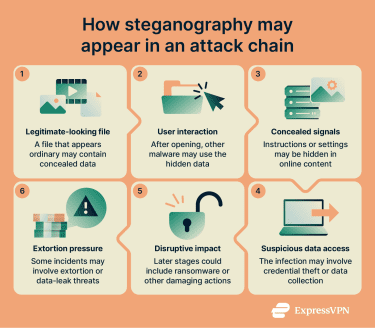
Command-and-control (C2) channels
This mechanism allows a threat actor to remotely interact with or manage an infected device. A skilled operative can hide a relatively small payload that establishes communication with a server once it activates. Cybercriminals have been observed using steganography to conceal configuration data or instructions that support C2 activity.
From there, the malicious code can receive instructions, download additional components, or leak information to the control server. The goal is to remain hidden long enough to achieve the attacker's objectives before the host realizes it has been taken over. Once an infection is established, remediation can become more difficult, particularly if additional components have been deployed.
Steganography in ransomware campaigns
In ransomware campaigns, steganography may be used to conceal components or instructions that support data theft or later encryption stages. Rather than performing the encryption itself, steganography can help obscure parts of the attack chain, allowing malicious activity to unfold gradually and reducing the likelihood of early detection.
In some campaigns, concealed data supports staged or prolonged activity, such as coordinating follow-on actions or retrieving additional components over time. This approach can make it harder for defenders to identify malicious behavior before the attack reaches its final phase.
Another tactic used in ransomware operations involves malware that encrypts data on a user’s device, often before the victim fully understands what is happening. Even though the encrypted files remain on the system, accessing the original data is typically not possible without the corresponding decryption key.
Known attacks using steganography
Organized groups have successfully employed steganographic principles in numerous high-profile campaigns:
- SteganoAmor: In 2024, security researchers linked campaigns attributed to TA558 with the use of image steganography to conceal data supporting multi-stage malware activity. The concealed information was extracted by other malicious components rather than executed directly from image files.
- Cerber ransomware: Security researchers documented a 2016 Cerber ransomware campaign in which malicious code fetched and processed a JPEG image that played a role in the attack chain, an early example of steganography in ransomware distribution.
Why it matters for regular users
Given documented cases in which steganography has been used as part of broader cybersecurity incidents, it’s understandable to be concerned about the potential risks. At its core, steganography matters because it demonstrates that dangers can exist in unexpected places.
Because of steganography, users need to be cautious even with seemingly innocuous file formats like .PDF, .JPG, and .DOC. Due to the risk of scripts, exploits, and embedded content, none of these can be assumed to be 100% safe. A sensible level of caution, like treating unexpected files as potentially risky, is recommended.
Additionally, privacy-conscious individuals and security-minded users may encounter steganography in academic, research, or defensive contexts. While it is not a substitute for encryption or other security controls, understanding how it works can help users better assess its risks and limitations.
How to detect steganography (steganalysis)
Steganalysis is the practice of examining content for signs that data has been deliberately hidden, and it’s most often applied to digital files and data streams. Because steganography is designed to blend in, detection often relies on indicators rather than certainty, and even strong indicators don’t always mean the hidden content can be extracted or read.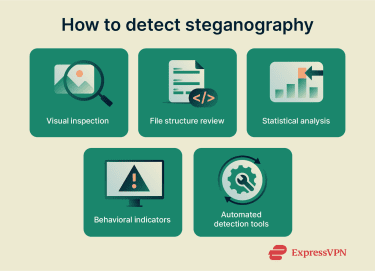
Steganalysis methods: Automated signals and deep-dive reviews
Even without a verified, unmodified copy of a file, analysts may use a mix of automated tools and case-specific review to look for signs of steganography.
Automated triage tools often look for
- Likelihood signals: Assessments that suggest hidden data may be present, rather than definitive proof.
- Statistical irregularities: Unusual patterns in pixel values, audio samples, or video frames that can be consistent with data hiding.
- Format and structure red flags: Unexpected metadata, headers, or internal structure that doesn’t match what’s typical for that file type.
These indicators can be helpful, but they’re not usually conclusive on their own and may not allow hidden content to be extracted or decoded. When automated checks suggest something may be unusual, analysts may follow up with a deeper, case-specific review.
Deep-dive analysis may include
- Clean-file comparison (when available): Comparing a verified original to a suspected stego-object to surface differences that may warrant further analysis.
- Contextual review: Considering the file’s source and expected behavior to help interpret whether findings are suspicious.
- Corroboration across signals: Validating findings, since benign edits (like resizing or recompression) can also explain differences.
Free steganalysis tools exist alongside commercial products. In addition, some organizations and government agencies use internal capabilities that are not publicly available.
Behavioral indicators of hidden payloads
Other clues can suggest a file compromised by malicious steganography. The presence of dangerous payloads may be indicated by:
- Unusual application behavior: It may be suspicious if opening a media file causes the viewing application to spawn unrelated scripts, loaders, or child processes.
- Unexpected network activity: It may be concerning if opening or previewing a media file is followed by unexpected outbound connections, Domain Name System (DNS) lookups, or web requests from the associated application or related processes.
- Delayed or staged activity: In some attacks, a file may appear inert at first, while related malicious activity occurs later as part of a broader chain.
- Abnormal resource usage: Unexpected spikes in CPU, memory, or disk usage from associated processes can be a warning sign.
- Security tool alerts: Warnings from antivirus or endpoint tools, or links to known malicious indicators, can add supporting evidence.
For these reasons, antivirus software often provides an indirect means of steganalysis. Focused on detecting suspicious behaviors rather than steganographic messages themselves, antiviruses can block steganographically hidden code from firing, protecting the user.
How network security helps reduce steganography risks
Steganography can be used to conceal data in files and, in some cases, within network traffic. For that reason, broader network security measures can help reduce the risk of tampering or covert activity going unnoticed.
Why encrypted connections help prevent in-transit payload injection
Attackers may attempt man-in-the-middle (MITM) attacks to intercept or alter traffic between two parties. In some cases, concealment methods (including steganography) may be used as part of a broader attack chain, but modifying content in transit generally requires access to data before it’s protected, or the ability to alter it without endpoints noticing.
Protocols like Transport Layer Security (TLS), used by HTTPS, provide encryption and integrity protection. When properly implemented, this makes it difficult for unauthorized intermediaries to read or modify traffic in transit without detection, because tampering typically causes integrity checks to fail and the data to be rejected by the endpoints.
Common technologies used to secure web traffic include HTTPS, which uses TLS, the modern successor to Secure Sockets Layer (SSL), which is now deprecated.
How VPNs protect against MITM risks on untrusted networks
Even if you can’t easily spot hidden data, reducing interception or tampering on untrusted networks can help lower some risks in the delivery chain.
TLS protects individual connections, such as a browser session to a website. A virtual private network (VPN), by comparison, typically creates an encrypted tunnel between your device and a VPN server, which can reduce exposure to certain MITM risks on untrusted networks by protecting traffic in transit to the VPN server. Coverage can vary by configuration (for example, split tunneling).
VPN protocols such as WireGuard, OpenVPN, and ExpressVPN’s Lightway rely on modern encryption, typically Advanced Encryption Standard in Galois/Counter Mode (AES-GCM) or ChaCha20-Poly1305, and Lightway further enhances this with post-quantum protection using Module Lattice–based Key Encapsulation Mechanism (ML-KEM), the post-quantum key-encapsulation mechanism standardized by the National Institute of Standards and Technology (NIST). HTTPS uses TLS, which can also use similarly strong encryption and integrity protections. The main difference is that TLS protects a specific connection, while a VPN protects traffic inside the tunnel to the VPN server.
FAQ: Common questions about steganography
What is steganography used for?
Steganography involves hiding information within a cover medium. When used correctly, it can make hidden data difficult to notice, and extraction typically requires knowing the method (and any keys or parameters). In modern cybersecurity contexts, cover media can take the form of a digital file, audio track, or document. The concealed data may be a message, configuration/instructions used by malware, or an embedded identifier used for tracking or watermarking.
Is steganography illegal?
It depends on the purpose and the jurisdiction. Steganography itself is generally legal and widely studied as a concept and tool, including cybersecurity, research, and digital forensics. However, using steganography as part of an unlawful activity can be prosecuted under applicable cybercrime laws, even if steganography isn’t singled out as a separate offense.
How do hackers hide malware in images?
One widely studied approach to image steganography is the least significant bit (LSB) method, which alters the part of pixel data that tends to have the smallest impact on an image’s appearance. These changes are often difficult to notice visually, but they can still be detectable with specialized analysis. Recovering hidden information typically requires knowing the specific embedding method (and any keys or parameters), rather than being inferred from the image alone.
Can steganography be detected?
Yes. Steganalysis is the field focused on identifying signs that content may contain hidden data. It can involve a range of approaches, from automated tools that estimate likelihood to case-specific manual review of files that appear unusual.
How can I protect myself from steganographic malware?
One of the most effective ways to reduce risk is to be cautious with unexpected links, attachments, and downloads, especially files from unfamiliar sources. Keep your security software enabled and up to date to help detect suspicious behavior and known threats. Using a VPN can also help reduce interception risks on public Wi-Fi by encrypting traffic between your device and the VPN server, though it doesn’t replace malware protection or safe download habits.
Take the first step to protect yourself online. Try ExpressVPN risk-free.
Get ExpressVPN















 Support Center
  FAQ
FAQ  VPN Setup Tutorials


