What is a cloud server? Everything you need to know


A cloud server is a virtual server hosted in a cloud computing environment that delivers computing resources like processing power, storage, and applications over the internet.
In this guide, we’ll explain what cloud servers are, how they’re structured, how they work behind the scenes, and how to choose the best cloud server for your situation.
What is a cloud server in cloud computing?
In cloud computing, a cloud server is a virtual server that runs on shared physical infrastructure in a cloud provider’s data center while functioning like an independent machine.
Like traditional servers, cloud servers provide computing resources such as processing power, memory, and storage and can run operating systems, host applications, process workloads, and store data. They’re typically hosted by cloud providers such as Amazon Web Services (AWS), Google Cloud, or Microsoft Azure.
Cloud server vs. physical server: How do they differ?
The main difference between a cloud server and a physical server is that a cloud server is virtual, while a physical server is a dedicated hardware machine. As a standalone machine, a physical server’s resources belong entirely to that system. In contrast, a cloud server uses computing resources allocated from a cloud provider's infrastructure.
What is virtualization in cloud servers?
Virtualization is the technology that makes cloud servers possible. Cloud providers use this technology to divide the resources of a physical server into multiple isolated software-based environments. Each of these environments functions as a cloud server with its own operating system, applications, storage, and network configuration.
To make this division possible, cloud providers run a hypervisor on the physical server. The hypervisor sits between the hardware and the virtual environments running on top of it and manages how resources are distributed. It allocates portions of the physical server’s CPU, memory, storage, and networking resources to individual cloud servers based on the configuration defined in the cloud platform.
This allows cloud providers to maximize hardware efficiency while giving users the experience of having their own dedicated server.
How does a cloud server work?
A cloud server works by receiving requests over a network, processing them using its operating system and applications, and returning responses to users or other services. Although the infrastructure behind it is virtualized and distributed across a cloud provider’s data centers, the server itself behaves much like a traditional server once it is running.
Accessing a cloud server
Once a cloud server is created, it can be accessed remotely over the internet. Administrators typically connect to it using secure remote protocols such as Secure Shell (SSH) for Linux servers or Remote Desktop (RDP) for Windows servers.
After connecting, users can install software, configure services, deploy applications, and manage files just as they would on a traditional server.
Operating system and applications
Each cloud server runs its own operating system, which manages system resources and provides the environment needed to run applications. The operating system handles tasks such as managing processes and memory, controlling file systems and storage, handling network communication, and enforcing security and user permissions.
Applications, such as websites, databases, or backend services, run on top of this operating system and process incoming requests.
Networking and request processing
Cloud servers are connected to virtual networks inside the cloud provider’s infrastructure. These networks allow servers to communicate with users on the internet and with other services inside the cloud environment.
When a user sends a request:
- The request travels over the internet to the server’s public IP address.
- The cloud provider’s network routes the request to the correct server.
- The operating system receives the request and forwards it to the appropriate application.
- The application processes the request and sends a response back to the user.
APIs and infrastructure management
Cloud servers can also be managed programmatically through APIs provided by the cloud platform. An API is a set of commands that allows software to interact with the cloud provider’s infrastructure and automate tasks such as resizing servers, attaching storage, or shutting them down based on conditions like traffic levels or scheduled times.
Most cloud providers also offer a command-line interface (CLI) where administrators send API commands directly from a terminal.
Different types of cloud servers
Cloud providers offer servers with different hardware configurations optimized for specific types of workloads. These configurations vary in how CPU power, memory, storage, and specialized hardware are allocated.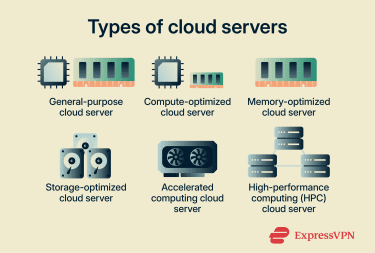
- General purpose: General-purpose servers provide a balanced mix of CPU and memory for workloads that don’t heavily favor one resource over another. They are commonly used for web servers, application hosting, small databases, and development environments where workloads do not heavily favor a single resource type.
- Compute optimized: Compute-optimized servers allocate a larger share of processing power relative to memory. They are designed for workloads that depend heavily on CPU performance, such as high-traffic web servers, batch processing systems, and analytics workloads.
- Memory optimized: Memory-optimized servers provide larger amounts of RAM for applications that require fast access to large datasets. These configurations are often used for in-memory databases, caching systems, and real-time analytics platforms.
- Storage optimized: Storage-optimized servers are designed for workloads that require high disk throughput or large amounts of storage capacity. They often use high-performance SSDs to support data-intensive applications such as data warehousing and log processing.
- Accelerated computing: Accelerated computing servers include specialized hardware such as Graphics Processing Units (GPUs) and Field-Programmable Gate Arrays (FPGAs). They’re commonly used for machine learning, artificial intelligence training, video rendering, and scientific simulations that benefit from parallel processing.
- High-performance computing (HPC): HPC configurations are designed for tightly coupled workloads that run across clusters and depend on high core counts, fast interconnects, and parallel execution. They are typically used in research, engineering simulations, financial modeling, and other compute-intensive applications.
Cloud deployment environments
Cloud servers can run in different types of cloud environments depending on how the infrastructure is managed and who has access to it.
- Public cloud: Public cloud servers run on infrastructure operated by a third-party provider and shared across multiple customers.
- Private cloud: Private cloud servers run on infrastructure dedicated to a single organization. The hardware may be hosted in a company’s own data center or managed by a third-party provider.
- Hybrid cloud: In this model, some servers run in a private environment while others run in a public cloud. Dedicated connectivity, such as cross connects, allows both environments to operate together.
- Multi-cloud: In a multi-cloud strategy, an organization runs cloud servers across multiple cloud providers.
- Community cloud: Community clouds are shared environments used by organizations with similar operational or regulatory requirements.
Benefits of using cloud servers
Cloud servers offer several advantages compared with traditional on-premises infrastructure.
Scalability and elasticity
One of the biggest advantages of cloud servers is the ability to scale resources up or down as demand changes. If an application needs more computing power, teams can increase the server size or add additional servers to handle traffic. When demand drops, those resources can be reduced again.
Many cloud platforms also support automatic scaling, where infrastructure adjusts itself based on real-time demand. This allows applications to handle traffic spikes without permanently running excess infrastructure.
Cost-effectiveness
Instead of purchasing physical hardware and maintaining data centers, organizations pay only for the resources they actually use. Key cost advantages include:
- Pay-as-you-go pricing: Compute, storage, and networking are typically billed based on usage.
- No hardware purchases: Organizations avoid large capital investments in servers and data centers.
- Lower operational overhead: Cloud providers manage physical infrastructure and platform maintenance
This makes it easier for teams to scale infrastructure without committing to long-term hardware costs.
Enhanced security and stability
Cloud platforms include several built-in security capabilities that help organizations protect their systems and data. Common security features include:
- Identity and access management (IAM) to control who can access systems.
- Network security tools such as firewalls and private network segmentation.
- Encryption for protecting data both in transit and at rest.
- Logging and monitoring to track administrative actions and system activity.
Cloud providers also secure the underlying infrastructure, while customers remain responsible for configuring and protecting the applications they run.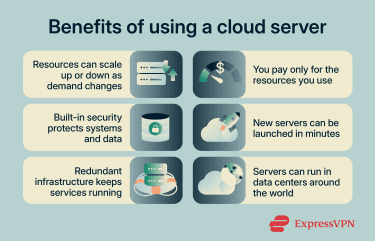
Faster deployment
In a traditional setup, making new infrastructure available can take significant time. In the cloud, much of that process is handled through software and automation. As a result, teams can provision infrastructure and expand services much faster than with traditional hardware procurement.
Faster deployment also supports more consistent provisioning practices. Teams can use infrastructure-as-code templates, automated provisioning pipelines, and configuration management systems.
Reliability and availability
Cloud platforms are designed with redundancy and fault tolerance built into their infrastructure. If one server fails, traffic can automatically be routed to another instance. Additional reliability features often include automated health checks, load balancing, data replication, and backup and recovery systems.
Global accessibility
Most cloud providers operate infrastructure in multiple geographic regions around the world, allowing organizations to deploy servers closer to their users. This can improve performance by reducing latency, make it easier to expand services into new markets without building local data centers, and give teams the flexibility to access and manage infrastructure remotely from different locations.
Potential drawbacks and limitations of cloud servers
While cloud servers provide flexibility and scalable infrastructure, they also introduce operational and architectural tradeoffs.
- Vendor lock-in: Cloud platforms often rely on proprietary APIs and services that integrate tightly with the provider’s ecosystem. Over time, workloads may depend on these components, making migration to another platform more complex.
- Downtime and latency risks: Even highly available cloud systems can experience outages or service disruptions. Network distance between users, regions, and services can also increase latency and affect application responsiveness.
- Performance variability: Cloud workloads run on shared infrastructure and configurable resource profiles. Performance may vary depending on machine type, storage configuration, and system demand.
- Compliance and data residency: The geographic location of stored or processed data can determine which legal and regulatory requirements apply (per data sovereignty). Organizations handling regulated information must ensure workloads remain within approved regions.
- Unexpected costs: Cloud infrastructure typically uses consumption-based pricing. If organizations don’t monitor resources carefully, usage spikes, inefficient configurations, or unnoticed workload growth can lead to increased spending.
What is a cloud server used for?
Cloud servers power many modern computing tasks because they provide programmable computing environments that run remotely.
- Hosting websites and applications: Run web servers, APIs, and application backends.
- AI and machine learning: Train models and run AI workloads on powerful compute resources.
- Business operations: Host internal tools such as CRM platforms, HR systems, and collaboration software.
- Data backup and disaster recovery: Store backups and restore systems during outages.
- Development and testing: Launch temporary environments for testing, staging, and CI pipelines.
- High-performance workloads: Run simulations, large-scale analytics, and other compute-intensive tasks.
Cloud server best practices
Operating a cloud server requires ongoing management beyond initial deployment. Here are some best practices to follow: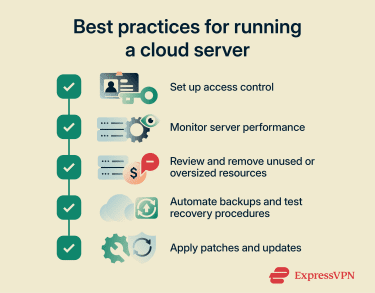
- Access control measures: Use least privilege access controls as part of a zero-trust cloud approach. Plus, strengthen account protection with multi-factor authentication and limit privileged roles to temporary or just-in-time access.
- Monitor performance: Define normal performance baselines for CPU, memory, storage input/output, and network traffic, then alert on sustained deviations, failures, and abnormal behavior.
- Optimize costs: Review resource usage regularly, shut down unnecessary capacity, and use budgets and anomaly alerts to catch waste before it grows.
- Establish backup and recovery strategy: Define backup policies that automatically protect server data and system configurations. Regular restore testing confirms that backups remain usable and allows teams to recover systems quickly if data loss occurs.
- Patch vulnerabilities and update systems: Apply security patches and system updates regularly to address known vulnerabilities and maintain software stability. Automated patch management tools can schedule updates and enforce patch policies across servers.
- Use a corporate virtual private network (VPN): Corporate and cloud VPNs create encrypted tunnels between remote devices and cloud networks. Administrators can then access servers securely from external locations without exposing management services directly to the public internet.
How to choose the best cloud server for your needs
Selecting a cloud server requires matching infrastructure choices to your application’s technical, operational, and regulatory requirements.
- Evaluate requirements and workloads: Identify the workload’s resource needs before choosing an instance. Review CPU, memory, storage throughput, network bandwidth, and latency sensitivity to match the configuration to actual runtime demands.
- Choose a cloud model and region: Select a deployment model and region based on architecture, dependency placement, legal requirements, and user distribution.
- Prioritize security, backup, and compliance: Verify that the provider supports the controls your workload requires, such as access policies, audit logging, retention settings, encryption options, recovery targets, and regional restrictions.
- Compare pricing and billing models: Examine how providers charge for compute resources and how usage affects cost. Compare pricing structures and use cost-monitoring tools to control spending.
- Review uptime and support: Check service level agreements to understand reliability guarantees. Also, review support plans and response channels to see how quickly incidents receive technical assistance.
FAQ: Common questions about cloud servers
Is a cloud server a virtual machine?
Can I set up my own cloud server?
How do I connect to a cloud server?
What security measures protect cloud servers?
How do cloud servers differ from traditional servers?
What are the disadvantages of using cloud servers?
How much does a cloud server cost per month?
Which type of cloud server is best for a small office?
Take the first step to protect yourself online. Try ExpressVPN risk-free.
Get ExpressVPN