What is a rootkit, and why is it so dangerous?


A rootkit is a type of malware that provides attackers with privileged access to your device. This allows them to install more malware to conduct additional attacks and to modify or remove software while avoiding detection.
What makes rootkits extra dangerous is their ability to remain hidden for extended periods of time. They can often hide or intercept system calls, so their presence isn’t visible, which means traditional scanning tools may fail to detect them.
In this guide, we’ll explain what a rootkit is, how to spot infection methods, and how to identify the different types of rootkits. We’ll also discuss removal and prevention best practices.
What is a rootkit?
Rootkits are collections of malicious tools that allow attackers to gain privileged access to a system while remaining undetected for as long as possible.
Privileged access means having the highest level of control over a device or OS. With this level of access, an attacker can view, modify, or disable almost anything on the system, including security settings, system files, and other users’ activity.
In legitimate use cases, privileged access is reserved for trusted users and system components that need deep control to manage a device. This typically includes system administrators, core parts of the OS, essential system services, hardware drivers, and certain security or management software.
This is very different from regular (user-level) access, which is limited by built-in restrictions. Normal users and most ordinary programs can only interact with their own files and settings, and are prevented from making deep system-wide changes. Privileged access bypasses these restrictions entirely. Rootkits are dangerous because they attempt to obtain this same level of trusted, system-wide access while hiding their presence from users and security tools.
Because they can operate at a high level of access and are designed to hide their own presence, rootkits tend to be very difficult to detect and remove. They can affect any OS, including Windows, Linux, macOS, and even mobile OSs like Android and iOS.
It’s easy to mistake rootkits for a virus (self-replicating malware), a worm (malware that spreads without user interaction), or a Trojan (malware pretending to be legitimate software). However, while rootkits can infect a system through trojanized software, they’re not the same thing.
Trojans primarily focus on delivery, deception, or enabling remote access, whereas rootkits specialize in concealment and maintaining persistent, privileged access, often hiding other malware in the process.
How rootkits infect systems
Like other types of malware, rootkits often spread through phishing emails, corrupt downloads, or software vulnerabilities.
Bundled malware and trojanized software
Rootkits often come as part of trojanized software, where a threat actor takes legitimate software like an installer and modifies it to include a rootkit installer. When the user runs the installer, often with administrator privileges, the rootkit installs itself in the background.
Another common infection method is via bundled malware. Attackers attach the rootkit installer to other infected files, like malicious PDFs that prompt users to run an embedded or accompanying executable, untrusted downloads or pirated content, or apps downloaded from suspicious platforms.
At this stage, the rootkit relies on social engineering to convince the user to open the malicious file or install the infected EXE application. For instance, it may try to disguise itself as a legitimate download, software update, or document that prompts the user to grant administrator permissions.
Exploited vulnerabilities and privilege escalation
An attacker can exploit a zero-day vulnerability (a previously unknown weakness for which no patch exists) or abuse known vulnerabilities in unpatched software to gain an initial foothold in the system.
Threat actors often achieve this by exploiting bugs in network services and web applications, as well as configuration oversights in firmware. This typically results in limited, user-level control. Once inside the system, the attacker can obtain higher privileges by exploiting additional vulnerabilities:
- Kernel (core component of an OS) vulnerabilities
- Stolen credentials (from breaches, password reuse, or memory dumping)
- Legitimate but flawed drivers
Once higher privileges are obtained, the attacker can install a rootkit that provides persistent control over the device. These techniques are more commonly used in targeted attacks or against systems that haven’t been regularly updated.
Modern OSs use mechanisms like Secure Boot to prevent unauthorized code from running during startup. Secure Boot requires kernel drivers and boot components to be cryptographically signed, ensuring that only trusted software can load. This mitigates many traditional rootkit attack vectors because unsigned or tampered code is blocked before it can execute.
That said, attackers targeting firmware or exploiting vulnerabilities in the signing process can sometimes bypass these protections, which is why firmware-level rootkits remain a rare but serious threat.
Supply chain and compromised updates
Software updates are another common attack vector for rootkits. Attackers can inject malicious drivers or modules into new updates and wait for users to install the software. These attacks are less common than phishing-based infections but can be harder to detect because they rely on trusted distribution channels.
The corrupt components may behave normally on the surface, but they’re running unauthorized processes in the background, including the potential installation of a rootkit.
Rootkits can also be delivered through infected drivers. In these cases, attackers exploit weaknesses in the code-signing process to embed a rootkit inside a driver, allowing it to appear legitimate and load during system startup. This undermines protections like Secure Boot, which are designed to ensure that only trusted, properly signed components run early in the boot process, enabling the rootkit to gain privileged access before many security controls are active.
Physical access and firmware flashing
Physical access to a system allows an attacker to manually install rootkit malware, usually from a USB stick. In these cases, attackers will often deploy a firmware-level rootkit (using specialized tools to reflash the device firmware), which runs “below the OS” where most security tools don’t check.
While very rare, firmware rootkits remain a threat that requires advanced detection techniques and sustained removal efforts to mitigate properly.
How rootkits work
Once installed, a rootkit can manipulate files, processes, registry entries, and local memory to avoid detection and remain hidden. These behaviors aim to give the attacker long-term control over the system to engage in activities like monitoring user behavior, exfiltrating sensitive data, or running additional malicious software without detection. Here’s how.
Gaining elevated privileges
Most rootkits (particularly kernel, bootkit, and firmware variants) require elevated privileges to be installed. To obtain this level of access, attackers may exploit OS vulnerabilities, kernel bugs, or driver-level flaws.
Once installed, kernel- and firmware-level rootkits already operate with elevated privileges, which means they can modify system processes and behavior to remain hidden. This enables persistent, stealthy access that attackers can later use to support further malicious activity.
Installing backdoors
To ensure uninterrupted long-term access to a system, rootkits can include a backdoor in the installer package. This allows the attacker to re-access the system in the future without alerting the user or the IT team. In other cases, rootkits enable or hide backdoors that already exist or that are installed after the rootkit goes live.
Evading security tools
Rootkits operate below the OS’s established security boundary, which is what makes them especially difficult to detect. Security tools like antivirus software rely on the OS to answer questions about what files, processes, and system activity exist. A rootkit inserts itself beneath that trust boundary and intercepts those requests before the OS can respond.
In practice, this means that any request, such as an antivirus scan, a registry query, or a check in Task Manager, passes through the rootkit first. The rootkit can therefore return a clean, falsified response even when malicious activity is present. As a result, suspicious processes may not appear at all, not because they are merely hidden, but because the mechanisms used to observe them have been compromised.
This is what distinguishes rootkits from most other malware. While many threats attempt to hide by blending in or using obscure locations, rootkits undermine the system’s trust model itself, allowing them to fully veil their presence from the rest of the OS.
Persisting across reboots
Aside from memory rootkits, most other rootkits (especially those at the firmware level) are persistent across reboots; they remain active even after you reboot your device. Even the system settings and permission changes can remain intact, which further decreases detection chances.
Types of rootkits
Rootkits differ based on how they’re installed, the level of control they have over the OS, and how effectively they hide.
User-mode rootkits
User-mode rootkits do not operate below the OS’s security boundary. Instead, they manipulate user-mode interfaces to that boundary, allowing them to deceive applications and security tools without fully compromising the kernel.
A user-mode rootkit runs in the “user space,” where standard apps like Microsoft Office run. This means the rootkit won’t have kernel-level privileges and will generally be less stealthy and less capable of hiding from the OS itself. However, it can still employ obfuscation techniques, such as:
- Replace dynamic link libraries (files used by multiple programs) to hook into system APIs (rules and protocols used by software) and corrupt them.
- Inject malicious code into legitimate services to modify behavior and conceal malware.
These rootkits are typically easier to deploy, as they don’t need root-level access for installation. Security scans may also detect them more easily, as they lack privilege escalation capabilities, which is why attackers tend to pair them with separate privilege escalation exploits.
Kernel-level rootkits
Kernel-level rootkits are extremely dangerous. They can achieve full system compromise, modify the way your OS works, and control the relationship between the hardware and software.
This allows kernel-level rootkits to gain unauthorized access to most resources on the system and add, delete, or modify files and registries. A threat actor controlling a functional kernel rootkit can perform a wide range of actions on a compromised system.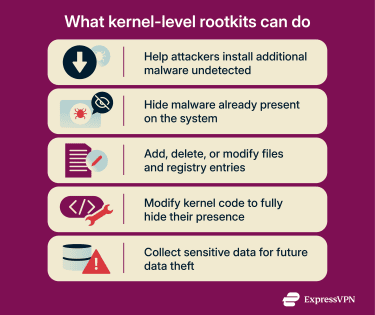
However, despite the high level of control provided, kernel rootkits are very technically complex and hard to assemble. Although some kernel rootkits are stable and stealthy, glitches and bugs are also common, which can impact the computer’s performance and alert users to the rootkit’s presence.
Bootkits and firmware rootkits
Bootkits (or bootloader rootkits) infect a computer’s bootloader (like the Windows Boot Manager) and become active at device startup. They run even before the OS kernel finishes loading, which means they have control over your entire system from boot to shutdown.
Because of this unique infection mechanism, bootkits are:
- Very hard to detect: Most security tools become operational only after the system fully boots, and they can’t detect bootkits that load earlier in the boot sequence.
- Extremely hard to remove: Rebooting doesn’t help because the malware activates automatically when the device restarts. Some bootkits may also resist OS reinstallation.
Firmware rootkits infect your device’s firmware (like your Basic Input/Output System (BIOS) or the more modern Unified Extensible Firmware Interface (UEFI)), which is the software installed on a chip on your motherboard. This type of malware lives “outside the OS” and is active before the OS starts, giving it a higher trust position than even kernel-level rootkits. This is because it controls the system before the OS can enforce privileges.
High system persistence is a significant issue, as firmware rootkits can often survive even a hard drive replacement. They can reinfect the system on a fresh startup, regardless of where the OS is installed. Detection is very difficult because security tools typically don’t scan firmware code.
Memory and application rootkits
Memory rootkits are loaded inside the RAM, just like fileless malware, and perform malicious activities in the background. They have a short lifespan (usually removed after a reboot) and may be easier to detect if they slow down your computer’s performance, especially if you have low RAM. That said, while performance impact is possible, it’s not guaranteed.
Application rootkits modify the files of an application like Notepad, with the attacker gaining access to your computer every time you run the infected application.
However, these rootkits are generally easier to detect. Antivirus programs can usually find them because they live on the application layer (where you install apps) instead of deeper levels like the kernel or the firmware.
How to detect a rootkit infection
Rootkits are among the hardest types of malware to detect because of their stealth techniques and privileged execution. Many traditional antivirus tools struggle to identify them because they actively interfere with detection mechanisms.
Attempts that rely on the potentially compromised OS can often be intercepted or manipulated by the rootkit. In other words, if the rootkit is active, it controls what the OS and security tools can see, so typical antivirus or endpoint detection and response (EDR) scans may appear normal even on an infected system.
Because of this, the most effective detection strategies operate outside the compromised environment, where the rootkit can’t interfere with the processes. These strategies include:
- Scanning the disk from another device: Disconnect the storage drive from the infected system and connect it to a separate, trusted device. Scanning the disk like this allows access to the raw contents without the rootkit being able to hide files or manipulate system calls. (Note, however, that firmware-level rootkits won’t appear on the disk because their malicious code is located in the motherboard’s flash memory.)
- Booting the disk in a virtualized environment: Use virtualization software to boot the potentially compromised disk on a different system. This setup lets you take memory dumps and analyze activity from outside the security boundary, bypassing the OS’s control. (Again, this method doesn’t reveal firmware-level rootkits.)
- Booting from external media: If a second device isn’t available, a bootable USB drive can allow for similar external analysis. However, this relies on the system firmware being uncompromised; if Secure Boot is disabled or the UEFI firmware itself is affected, the rootkit may still be active.
Overall, detection and analysis of firmware rootkits is extremely difficult. Attempting manual hardware-level recovery is very risky and not recommended for most users; in most cases, it’s best to seek professional help or get a new motherboard.
How rootkits are removed
After confirming a rootkit infection, it’s best to start with immediate containment. Isolate the affected systems from the rest of the network to prevent lateral spread, and start collecting system logs for forensic analysis.
Once contained, the next step is removal. Using specialized tools, including EDR solutions, may increase your chances of eliminating the rootkit. Booting up in safe mode can also help, as it can directly limit the malware’s access privileges. However, firmware rootkits and kernel rootkits may still load in safe mode. In such cases, complete removal may not be possible without rebuilding the affected system.
When system reinstallation may be required
If antivirus and EDR tools prove unsuccessful and the rootkit has infected the firmware or boot sector, complete system remediation may be necessary. This can include:
- Reinstalling the OS.
- Wiping or factory-resetting the BIOS.
- Rewriting firmware.
At this stage, organizations should consider engaging cybersecurity experts to ensure the rootkit is fully eradicated and the system is safe to return to production.
Reducing damage after a rootkit infection
After removing the rootkit, it’s a good idea to assess the damage and reinforce defenses to prevent further infections. Some of the steps you can take now include:
- Find the source of the infection: Determining how a rootkit entered the system is critical for preventing reinfection and containing the spread. Investigators should review recent software installations, connected removable media, downloaded files, and email attachments to trace the initial entry point. Accurately identifying and reporting the source helps security teams close the infection vector and accelerate mitigation efforts.
- Update your security architecture: Based on the vulnerabilities and infection vectors exploited by the attackers, you can now update EDR signatures, improve access controls, and enforce Secure Boot configurations to improve your security posture.
- Restore from backups: If data integrity has been affected by the rootkit infection, it’s best to restore from verified backups, if they exist. This can help individuals recover faster from a rootkit attack and organizations reduce business interruption.
- Document and analyze: Collect information about the rootkit infection and remediation process. Lessons learned can help improve incident response procedures and protect against similar attacks in the future.
How to prevent rootkit infections
Proper rootkit prevention requires following best cybersecurity practices. Here’s what that looks like.
Keeping systems and firmware up to date
Outdated software is a primary attack vector for rootkits; attackers can exploit vulnerabilities left unpatched, gain privileged access, and introduce the rootkit into the system. Once inside, the rootkit will immediately attempt to hide its activity, making it much harder to detect.
Keeping applications, servers, and software updated will remedy latent vulnerabilities, closing windows of opportunity for threat actors. Setting up automated updates can streamline the process.
Using security tools effectively
Security software like anti-malware tools can help detect early infections, but they’re often insufficient when it comes to rootkits. In organizational environments, EDR and security information and event management (SIEM) solutions provide additional visibility.
Reducing the attack surface on your kernel and boot process can also reduce exposure to rootkit infections. This may include disallowing unsigned kernel modules, enforcing proper Secure Boot policies, and hardening bootloaders (through digital signatures, passwords, and kernel command-line integrity).
Firewalls and network monitoring can also help detect network activity from malware, but they can't detect rootkits directly on a local system.
Avoiding high-risk downloads and phishing links
Phishing is a very common infection vector for rootkits and other types of malware. Phishing messages can deliver files that contain malicious code, such as:
- PDFs, ZIP files, or other document or archive types that include malware.
- Infected executables (EXE).
- Suspicious links that lead to Trojan or malware downloads.
To protect yourself, never click on links or open attachments in emails unless you are completely certain that they’re legitimate.
Downloads from untrusted or suspicious sources should also be avoided, including:
- Cracked or pirated software and license “activators.”
- Fake software updates or security tools.
- Bundled installers from unofficial download sites.
- Drivers or firmware from non-vendor sources.
These sources are often used to deliver rootkits and other malicious software, so sticking to official vendor downloads is the safest approach.
Preventing rootkits in organizational environments
Preventing rootkit infections in organizations requires a layered security approach. As well as using the right security tools, businesses need to consider:
- Employee training and awareness: Educate staff about phishing attacks, malicious downloads, and social engineering tactics, which are all common rootkit delivery methods.
- Strict authentication and authorization: Enforce least-privilege access, strong password policies, and multi-factor authentication (MFA) to reduce the ability of malware to gain elevated privileges.
- Network controls: Block unnecessary ports, disable unused services, and carefully manage external access to minimize entry points.
- Zero-trust policies and network segmentation: Limit lateral movement by ensuring endpoints only access resources they need.
FAQ: Common questions about rootkits
Can rootkits be completely removed?
Yes, but the method depends on the type of rootkit. Memory rootkits can usually be cleared with a reboot, and application-level rootkits are often removable with antivirus tools. Kernel- and firmware-level rootkits are much harder to eliminate, though: in some cases even reinstalling the OS isn’t enough, and a new motherboard may be required.
How serious is a rootkit infection?
Rootkit infections are very serious because they provide attackers with stealthy, high-level access to your system. Once installed, a rootkit can allow attackers to hide other malware, modify system behavior, track activity, and, in some cases, delete files, steal data, or spread to other networks. Their stealthy nature makes detection difficult, increasing the potential for long-term damage.
Are rootkits still common today?
Rootkit attacks remain a threat, especially to organizations with critical and valuable infrastructure. While modern security tools and detection methods are gradually improving, kernel- and firmware-level rootkits can still be difficult to detect and remove, so organizations should combine advanced monitoring with preventive controls to reduce risk.
Can rootkits infect firmware or hardware?
Rootkits primarily infect firmware, but some specialize in infecting the firmware of specific hardware components (like the Basic Input/Output System or BIOS, which is a chip on the motherboard). Firmware or hardware rootkits are some of the toughest to detect and remove because most security tools don’t perform integrity monitoring for the BIOS firmware.
How long can a rootkit remain hidden?
Rootkits can typically remain hidden for long periods because they specialize in hiding all traces of their activity, including files, processes, services, and registry entries. Firmware rootkits can sometimes even survive OS reinstallation and hardware replacements. Others, like memory rootkits, will disappear after a device reboot.
Take the first step to protect yourself online. Try ExpressVPN risk-free.
Get ExpressVPN



















 Support Center
  FAQ
FAQ  VPN Setup Tutorials


