Spam vs. phishing: Key differences and how to stay safe online


Most people’s inboxes are full of “spam” messages: sales emails, newsletters you never signed up for, or random promotions. While these messages can be annoying, they’re not inherently dangerous. Phishing emails, on the other hand, are crafted to trick you into giving up sensitive information or downloading malware.
Spam and phishing might look similar at a glance, but they’re not the same. Knowing the difference is key to staying safe online. This guide breaks down what sets spam and phishing apart, how to spot each, and the steps you can take to protect yourself.
Spam vs. phishing: What’s the difference?
Spam and phishing both involve receiving an unsolicited email or message. But spam isn’t typically as nefarious as phishing, and it’s less likely to lead to serious loss or harm.
In basic terms, spam is unsolicited communication sent in high volume to a large number of people. You can think of it as the digital equivalent of junk mail. Aggressive marketing emails, unsolicited offers, and bulk-sent promotional content are all considered spam.
Spam is a major issue: in 2024, the U.S. saw around 7.8 billion spam emails flood inboxes every day. It can take up valuable email storage and make it harder to spot important messages.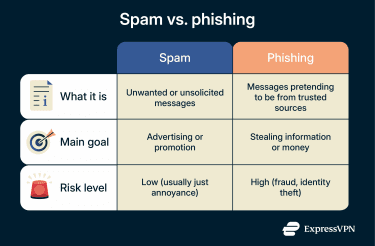
Phishing, on the other hand, is one of the most common types of cyberattacks. It uses deceptive messaging to mislead victims into various actions, such as sharing sensitive information, sending money, approving multi-factor authentication (MFA) prompts, visiting fake login pages, or downloading malicious content.
Cybercriminals impersonate reputable entities or known contacts to gain trust. At first glance, phishing emails can appear genuine, so it’s important to check that an email is really from who it claims to be.
How spam works
Spammers can get your email address from various sources, including data brokers or by using bots to scrape information from public sources. Once they have it, they’ll send you emails pushing goods, services, or misleading offers.
What makes spam so persistent is how cheap and easy it is to send. It costs next to nothing for a spammer to distribute thousands of emails. Some spam is from real companies that use aggressive marketing tactics, while some comes from low-quality or deceptive senders promoting dubious offers.
These messages can sit in a gray area between spam and phishing, using exaggerated claims, fake urgency, or misleading links to push a sale or collect personal information. While they may not always be outright scams, they can still pose some potential security risks.
How phishing works
Phishing starts with cybercriminals finding, buying, or scraping the internet for contact information. Once they have your email or phone number, they craft messages, often impersonating trusted companies or someone you know, like a colleague or friend.
In some cases, scammers set up fake websites to imitate real ones and make the attack more convincing. Emails often contain links that lead to these malicious sites or to fake login pages that steal credentials. They might also contain file attachments with malicious payloads to infect a device with spyware or ransomware.
Types of phishing
Phishing is an umbrella term for attacks that use deceptive messaging to get you to hand over sensitive data or install malware. From convincing deepfake voice messages to carefully crafted emails, phishing comes in many forms.
1. Email phishing
Email phishing is one of the most common forms of phishing and often acts as the entry point for other attacks. Phishing emails usually contain links or attachments that lead to fake websites or install malicious software when opened.
Since email is still a primary communication tool for both work and personal communication, email phishing can be highly effective. A single convincing message can be enough to trick someone into handing over login credentials or unknowingly giving attackers access to a wider network.
2. Vishing
Vishing is short for voice phishing. This tactic uses phone calls or voice messages to impersonate a trusted entity. Attackers might claim to be a bank customer service representative, a member of an IT team, or even someone you know.
Voice phishing is usually a person on the phone trying to trick you into revealing information or making a payment. However, with deepfake technology now able to accurately clone voices, some scams are getting more convincing. A scammer might use a synthetic voice to pressure you into sharing sensitive information, like your bank or credit card details.
3. Smishing
This is phishing by SMS. Common smishing scams involve messages claiming to be from delivery companies and banks. The messages contain links that might send you to a fake website to steal personal information such as login credentials, banking details, or credit card numbers.
People tend to respond more quickly to text messages than they do to emails, because texts are often perceived as more urgent or personal.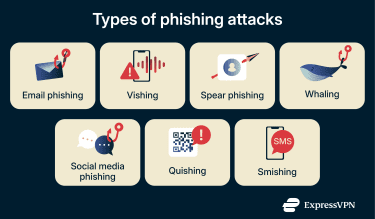
4. Spear phishing
Spear phishing is a targeted form of phishing where attackers tailor messages to a specific person or organization. Instead of sending bulk emails, they research specific targets by digging through social media, company websites, or even public records to collect personal details.
When attackers know more about you, they can reference real people, events, or responsibilities to seem more legitimate. This often catches people off guard, and the sense of familiarity increases the chance of success.
5. Whaling
Whaling is like spear phishing, but instead of targeting regular people, it goes after high-level corporate figures, chasing a higher pay-off. This is because these people generally have more access to sensitive data or company finances.
Cybercriminals disguise scam messages as urgent business emails from trusted contacts. They might reference legal issues, overdue invoices, or account problems. Because the sender appears important and the message feels high-stakes, it’s easier for the victim to fall for the scam without pausing to verify.
6. Social media phishing
Social media phishing happens when scammers use platforms like Facebook, LinkedIn, or X to reach people through direct messages instead of email. The messages might look casual and personal, attempting to lower your suspicion.
Attackers may impersonate other users, brands, or even someone in your professional network. They might message you with a story about needing help to recover an account or an opportunity that sounds too good to miss.
7. Quishing
Quishing is where scammers place QR codes in emails, posters, or packages. When you scan, it sends you to a fake website that can steal your info or infect your device. Since you can’t preview a QR code the way you would a link, these scams can be easy to fall for.
How to recognize phishing attempts
Knowing how to spot phishing red flags is the first step to staying safe. Here are some signs to look out for next time you receive an email you’re unsure about.
Slight mismatch in email address
Phishing emails often come from addresses that closely resemble those of real companies, with only minor differences. For example, alerts@examples.com instead of the official alerts@example.com. These small tweaks are easy to overlook, especially when you’re in a rush.
Requests for sensitive data
If an email asks you to enter login credentials, financial information, or other private data, it’s a strong indicator of phishing. Most legitimate companies, including banks and online services, don’t request sensitive information through email. Instead, they’ll ask you to log into your account directly through their official website, app, or over the phone using security questions to verify it’s you.
Sense of urgency
Phishing messages are often written to panic you into acting quickly. For instance, a fake email pretending to be from your bank might warn you that your account will be locked in 24 hours unless you verify your identity. The goal is to push you into clicking a link or sharing information without having time to process the information.
Suspicious links or attachments
Some phishing emails use links that look normal at first glance, but the embedded text often doesn’t match where the link actually leads. For example, a link might say “Contact us” but redirect to a completely different domain. You can hover your cursor over links on a desktop or press and hold on a mobile device to check the real destination.
Attackers also disguise malware as everyday files like invoices or receipts to trick you into downloading them. Be wary of any unexpected attachments, especially those with odd formats or double extensions like “.pdf.exe.”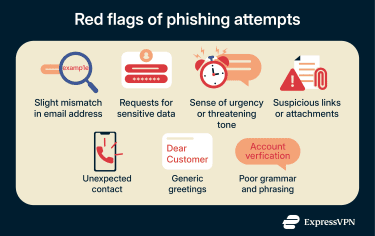
Unexpected contact method
If you usually get important updates from a company through their app, but suddenly receive a text about an urgent issue, that’s a red flag. For example, phishers might use SMS to send you a fake bank alert requesting information when your bank would never contact you that way.
Generic greetings
A legitimate organization will generally address you by name when contacting you about something important. If the message about your account safety opens with something impersonal like “Dear Customer,” be skeptical. Scammers use generic greetings so they can send the same message to thousands of people at once.
Poor grammar and phrasing
Phishing messages used to be easier to spot because of obvious spelling mistakes or awkward phrasing. While this is less common today thanks to AI-generated text, poor grammar can still be a warning sign. Messages that sound unnatural, overly generic, or slightly “off” may have been mass-produced or poorly adapted, especially when combined with urgent requests or suspicious links.
Learn more: How to use the SLAM method to protect against phishing
Security risks of spam and phishing
Spam and phishing can both cause problems, even if they don’t always seem dangerous at first. Below are the main risks linked to each.
Risks associated with spam
Some spam messages are just annoying promotions, but others can lead to scams.
Inbox overload
Spam volume can be overwhelming. A cluttered inbox makes it harder to spot legitimate messages, including alerts from your bank or verification emails. The more spam you receive, the more likely you are to miss something important.
Low-tier scams
Some spam messages include low-effort scams that still have the potential to carry real harm. Unlike phishing, which usually impersonates trusted entities to steal sensitive information, these scams are more direct. They often promise prizes or products (that are never received) to lure the victim into paying a fee or giving up their credit card number. For example, a spam email might claim they’ve won a contest and need to cover a “processing fee” to collect the prize. If the victim falls for it, they could lose money or expose personal data without receiving anything in return.
Dangers of phishing attacks
Unlike spam, phishing is always designed to pose a real threat to personal information, credentials, or system security.
Account takeovers
One of the most common outcomes of a successful phishing attack is an account takeover. When attackers get hold of login credentials, they can lock people out of their own accounts and take control of them. This can include email, social media, banking, or work accounts. Once inside, they may change passwords, send phishing messages from the compromised account, or use it to access other connected services.
Financial loss
Some phishing scams, such as ransom-style or advance-fee scams, directly demand money. Others steal from the victim directly by accessing their accounts. One successful phishing attempt can result in unauthorized transactions, drained accounts, or long disputes with banks and service providers to recover lost funds.
Malware installation
Phishing emails can be used as a means of delivering malware. Clicking a malicious link or opening an infected attachment can install spyware, ransomware, or other harmful software onto a device. This malware can then monitor the victim’s activity, steal additional data, or block access to files. In some cases, the infection spreads further across networks or shared systems, increasing the impact beyond a single device.
Identity theft
Phishing can lead to identity theft. If attackers collect enough personal details, such as a name, address, date of birth, or government ID number, they can impersonate someone. This information can then be used to open new accounts, apply for loans, or commit fraud in the name of the victim. The damage may go unnoticed until financial or legal problems start appearing.
Best practices to prevent spam and phishing attacks
There are some simple measures you can employ to keep your email secure and minimize spam and phishing attempts.
1. Keep your email address private
The fewer places your email is publicly available, the harder it is for scammers and spambots to find and target you. Avoid posting your primary email on forums, websites, or social media. Use privacy settings to keep your contact information hidden when possible, and only share it with trusted sources or services you actively use.
2. Use a burner or alias email for sign-ups
When signing up for newsletters, online giveaways, or one-time downloads, consider using a disposable or secondary email. This helps keep your primary inbox clutter-free and reduces the risk of spam or phishing in the event of data breaches.
Alternatively, try an email masking service like ExpressMailGuard, which lets you use an alias instead of your real email address when you sign up for sites. Using a different email alias for each website limits how far spam and phishing can spread. If one alias is exposed in a breach or targeted by phishing emails, you can deactivate it without affecting your main inbox or other logins. 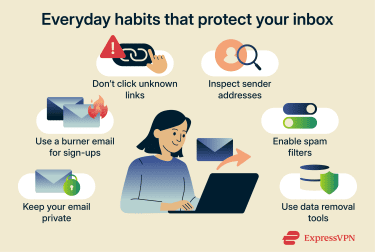
3. Avoid clicking unknown links
Clicking on unknown links, especially from unfamiliar senders, can lead to phishing sites or trigger malware downloads. If an email claims to be from a bank, retailer, or service, open a new browser window and type the URL directly instead of clicking.
4. Inspect sender addresses carefully
Always check the full sender address, not just the display name. Look for small differences such as extra letters, unusual domains, or slightly misspelled names that could indicate a spoofed sender. Differences can be tiny, so it’s important to check letter by letter against the sender’s official address.
5. Use spam filters
Most email services have built-in spam filters that sort suspicious or unwanted emails. These filters scan for known spam patterns and move the messages to your junk folder before you see them.
Here are a few common types of spam filters:
- Content filters: Scan the body of emails for keywords, phrases, or patterns commonly associated with spam.
- Blacklist filters: Block emails from specific IP addresses or domains that have been flagged as spam sources.
- Bayesian filters: Use probability and past behavior to determine whether a message is likely to be spam, based on its content and the types of emails you usually send to spam.
- Rule-based filters: Apply custom rules to incoming emails based on specific criteria, such as keywords in the message body or header, the sender’s name, or the sending domain; messages that match these rules are automatically sent to the spam folder.
6. Use data removal tools
Phishers collect email addresses from a wide range of sources. Some scrape them from public websites, forums, or social media. Others buy large lists from data brokers, who legally compile and sell personal information for advertising and analytics. While legitimate data brokers don’t knowingly sell to bad actors, these lists can still end up in the wrong hands.
Data removal tools, like ExpressVPN’s Data Removal feature for U.S. subscribers on the Pro plan, limit your exposure by removing your information from these databases. With less of your information online, you lower the chance of becoming a potential phishing target.
Learn more: How to improve your email security
What to do if you receive a suspicious email
There are a few things to consider when you receive a suspicious email, and the steps to take vary depending on whether you’ve interacted with the email or not. If you haven’t interacted with it and have determined that it’s suspicious, all you need to do is report it as spam or phishing using your email service, then delete it.
Here’s what to do if you have interacted with the email:
- If you clicked a phishing link: Don’t panic, but act quickly. Change any potentially affected passwords and update other accounts that used the same password. Make sure you update with strong passwords, and don’t use the same ones across multiple accounts going forward; a password manager can help you achieve this.
- If you downloaded malware: Disconnect your device from the internet and run a full antivirus scan before reconnecting online.
- What to do next: If the incident involved a work device or account, you should report it to your IT or security team as soon as possible so they can contain the damage. If personal accounts or financial information might have been compromised, alert your bank and notify any relevant contacts.
How network security reduces the impact of phishing
Even with the best phishing prevention tactics, some attempts can slip through. That’s where strong network security and good habits come into play.
Enable MFA
MFA adds an extra step when logging into accounts, such as entering a code sent to your phone or using an authenticator app. This means even if someone steals your password through a phishing attack, they can’t log in without the second factor. It’s an easy and effective way to block unauthorized access.
For even stronger protection, phishing-resistant MFA methods like security keys or passkeys reduce the chance of attackers tricking you into handing over login codes.
Keep software updated
Software updates do more than add new features; they fix known security flaws that phishing attacks often rely on. If you click a malicious link, up-to-date systems make it harder for malware to install itself or gain deeper access. Regular updates also improve built-in protections, such as browser warnings for unsafe websites.
Use a firewall and antivirus software
A firewall and antivirus software help limit the damage after a phishing attempt slips through. Firewalls can block suspicious connections before data leaves your device, while antivirus tools scan for and remove malicious files. Together, they act as a safety net when prevention fails and help stop one bad click from turning into a bigger problem.
Use a password manager
Password managers generate and store strong, unique passwords for every account. By reducing password reuse, password managers limit the damage phishing attacks can cause when credentials are compromised.
FAQ: Common questions about spam vs. phishing
Is spam or phishing more dangerous?
Phishing is more dangerous because it’s designed to deceive you into sharing sensitive information or downloading malware. Spam is annoying because it clutters your inbox, but unless it’s paired with an actual scam, it doesn’t lead to serious harm.
Are all spam emails phishing attempts?
No. While spam and phishing both involve unsolicited messages, spam is usually low‑risk marketing or bulk content. Phishing is a type of scam that tries to trick you into giving up data or infecting your device. Some spam can contain scams, but not all spam is phishing.
What is the strongest indicator of phishing?
There are several red flags. If you get an unexpected message urging you to act fast, like clicking a link or entering personal details, it could be phishing. Also, watch for inconsistencies in the sender’s email address and generic greetings.
Should I mark phishing emails as spam?
You can, but reporting it as spam mainly helps reduce unwanted bulk messages and improves spam filtering for promotional or nuisance emails. If your email provider offers a specific “Report phishing” option (as Gmail does), use that instead of marking the message as general spam. Reporting phishing helps email providers train their filters to detect similar scams and protect other users.
What should I do if I suspect a phishing attack?
If you think you received a phishing email, avoid clicking links or opening attachments. Double‑check the sender’s address carefully and go directly to the official website or app of the organization in question if you need to verify the message. If you’ve interacted with the email, act quickly: change any affected passwords, scan your device for malware, and notify the relevant people or organizations (such as your IT team, bank, or email provider).
How can I reduce spam emails?
You can reduce spam by keeping your primary email private and avoiding posting it publicly. Use a secondary or burner address for sign‑ups, and enable spam filters in your email service. Data removal tools can also help by removing your contact information from public databases where spambots and attackers might find it.
Take the first step to protect yourself online. Try ExpressVPN risk-free.
Get ExpressVPN






 Support Center
  Live Chat
  FAQ
FAQ 


