Smart speaker privacy explained: What they hear, what they store, and how to stay in control


Smart speakers are designed to respond to voice commands, providing quick access to information, entertainment, and home control. As their use becomes more common in everyday environments, questions arise about how these devices process spoken input and handle personal data.
The following guide explains how smart speakers work, why privacy concerns arise, and how to better manage the data they collect.
How smart speakers work
A smart speaker is a voice-enabled device built around a microphone array, a speaker, and a network connection, operated through a voice assistant such as Amazon Alexa or Google Assistant.
The device stays in standby mode and listens for a specific trigger: the wake word. Incoming audio is briefly processed to detect that phrase, and a machine learning model helps determine whether it was spoken. Once detected, the device records your spoken request and sends it to the provider's cloud servers, where automatic speech recognition (ASR) converts it to text and natural language processing (NLP) determines your intent.
The server returns a response, and the device acts on it by playing music, answering a question, or controlling a connected appliance. This architecture raises privacy concerns because the device is always waiting for an activation phrase, and false activations can sometimes cause audio to be processed unexpectedly.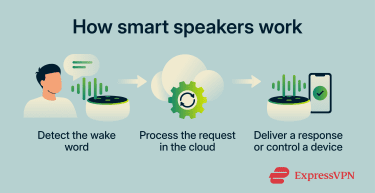
The biggest smart speaker privacy concerns
Smart speakers offer convenience, but their voice-processing features create privacy and security considerations.
What data do smart speakers collect?
Smart speakers can collect more than a single voice command. Depending on the provider, device settings, and connected services, they may store records of interactions, household preferences, and linked account data.
- Voice recordings and transcripts: Smart speakers may record audio of requests made after the wake word and generate text transcripts of what was said. How long these are stored (and whether they are stored at all) varies by provider and by the user's settings.
- Account-linked identifiers: Activity may be associated with a specific user, household, device, or account. In some cases, providers may use a random or device-generated identifier instead of a main account identifier, but that does not necessarily make the data anonymous.
- Location data: This can include a saved home address and, depending on settings and permissions, location-related data derived from the device, network, or linked account.
- Contact information: Devices may access contact details from connected accounts or apps when the relevant permissions or integrations are enabled.
- Search and activity history: Past queries and usage activity may be used to personalize future responses, depending on the provider and account settings.
- Connected device data and behavior patterns: Data from smart speakers and other linked devices can reveal routines, such as when someone is home, asleep, working, or away.
Where the platforms differ
While the categories of data collected are broadly similar across providers, the way each company processes, stores, and uses that data is not. Below is a comparison of the three major smart speaker platforms: Amazon Alexa, Google Nest (Google Assistant), and Apple HomePod (Siri).
On-device vs. cloud processing
Apple emphasizes on-device processing more heavily than the others, meaning many Siri requests can be handled without sending data to Apple’s servers, though some requests still require server-side processing.
Google Assistant sends requests to Google servers after activation, though standby-mode wake-word detection occurs locally on the device; certain devices, like the Nest Hub Max, also process specific data locally.
Amazon sends voice recordings to the cloud for processing.
Voice recording storage
The platforms take different approaches. When someone speaks to Alexa, a recording is sent to Amazon's cloud. Users can set recordings to auto-delete after 3 or 18 months, or choose not to save voice recordings at all, in which case Amazon deletes them after processing the request.
Google takes the opposite approach: audio recordings aren’t saved by default, and users have to opt in to have them stored.
Apple doesn’t retain audio at all unless users explicitly choose to share it to help improve Siri.
User identity and identifiers
Amazon and Google generally associate voice activity with the user's account and settings. Apple uses a random, device-generated identifier for Siri request history rather than tying those requests to the user's Apple Account or email address. Apple describes this approach as unique among digital assistants.
Voice data and advertising
Apple also states that Siri data is not used to build marketing profiles or made available for advertising. Google says audio recordings, video footage, and home environment sensor data from connected home devices are kept separate from advertising and are not used for ad personalization, though the text of Assistant voice interactions may still inform ad personalization.
Amazon’s general Privacy Notice states that personal information may be used to display interest-based ads, while its Alexa privacy materials focus primarily on voice data settings and controls, such as reviewing recordings and managing Alexa privacy preferences.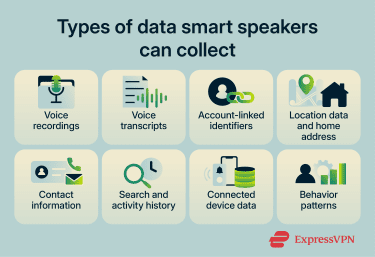
Accidental recordings and false activations
Smart speakers are designed to listen for a wake word, but they don't always detect it perfectly. Words, sounds, or background noise that resemble the trigger can cause the device to activate by mistake.
Research from Northeastern University and Imperial College London tested several smart speaker models by exposing them to 134 hours of TV dialogue. The researchers found that unintended activations occurred, with the highest observed rate reaching 0.95 misactivations per hour in some scenarios. They also found that some misactivations lasted long enough to capture meaningful audio, with 10% of misactivation durations lasting at least 10 seconds on certain devices.
The study also found that false activations were often inconsistent. In many cases, the words that triggered the device didn't even sound like the wake word, and the same words didn't always cause the same mistake in repeated tests.
When a false activation happens, the device may record a short audio clip and send it to the company's servers for processing. These unintended activations can capture parts of private conversations, including potentially sensitive information.
Voice recording, storage, and human review
Smart speakers may store parts of voice interactions to help improve speech recognition and system performance. In some cases, this has included audio clips being assessed by trained reviewers.
In 2019, a series of investigations by Bloomberg, VRT NWS, and The Guardian revealed that Amazon, Google, and Apple each employed contractors or staff to listen to samples of voice recordings.
The investigation by The Guardian found that Apple contractors heard private conversations (including sensitive personal moments) while grading Siri recordings for accuracy. Google was found to have a similar process, and over 1,000 Google Assistant recordings were leaked to a Belgian news outlet, VRT NWS. Bloomberg reported that Amazon reviewers could process up to 1,000 Alexa clips per shift.
Following the reports, all three companies announced policy changes. Apple suspended its grading program, apologized, and said it would no longer retain Siri audio by default; if users opt in, only Apple employees may review samples. Google says its voice and audio activity setting is off by default, and that samples saved when the setting is enabled may be analyzed by trained reviewers. Amazon added privacy controls that let users opt out of having saved voice recordings used to improve Amazon services and develop new features.
Read more: What you need to know about Alexa privacy.
Smart home and account security risks
Because smart speakers can be tied to sensitive personal accounts and smart home devices, a security problem with one assistant can ripple far beyond a single speaker. If an attacker gained access to a smart speaker account or a linked service, that access could potentially affect other connected devices or services in the home ecosystem.
The threat also comes from the wider voice assistant ecosystem. Research highlighted on a Federal Trade Commission (FTC)-hosted page identified gaps in the vetting of third-party voice apps (called "skills" on Amazon Alexa and "actions" on Google Assistant) that can allow privacy-invasive or malicious apps to pass review. In one study, researchers submitted 234 policy-violating Alexa skills designed to test Amazon’s certification process and reported that the review process had limitations and could be bypassed in some cases.
The researchers demonstrated attacks that impersonate legitimate skills, phishing for personal information, and continue listening after pretending to close (a technique called voice masquerading). They also described voice squatting, in which a malicious skill hijacks commands intended for a legitimate one by using a similar-sounding name.
Amazon has since documented a more structured certification process for Alexa skills, including validation tests, certification requirements, policy requirements, security requirements, and pre-certification functional tests before publication.
For Google, the older Actions framework referenced in past research has changed substantially. Google sunset Conversational Actions in 2023, and its current smart-home ecosystem uses the Google Home Developer Console, where integrations must meet policy requirements, submit test results, and go through a Google review before launch.
Also read: Is my phone listening to me? A step-by-step privacy check.
Privacy controls for popular smart speakers
Understanding how to change your speaker’s options can improve your privacy by limiting exposure. Here's how you can change your privacy controls on various popular smart speakers.
Alexa privacy settings
Delete voice history
You can delete saved recordings to reduce the amount of voice data tied to your account:
- Open the Alexa app.
- Tap More.
- Tap Alexa Privacy.
- Tap Review Voice History.
- Choose a date range, device, or profile.
- Tap Delete recordings.
Limit data use for improvement
Turn this off to stop Amazon from using your saved recordings to improve Amazon services and develop new features:
- Open Alexa Privacy.
- Tap Manage Your Alexa Data.
- Update the relevant improvement settings.
Stop saving future recordings
Change this setting to keep fewer recordings going forward, or stop saving them entirely if that option is available for your device and region:
- Open Alexa Privacy.
- Select Manage Your Alexa Data.
- Choose the setting for saving voice recordings.
- If available, select the option not to save voice recordings.
After changing this setting, future voice recordings may be deleted after processing rather than kept in the saved voice history, depending on the selected option.
Mute microphone
Mute the microphone to stop Alexa from listening until you turn it back on:
- Press the microphone-off button on the Echo device.
- Check for the red light.
Google Nest privacy settings
Delete voice history
Delete saved Google Assistant activity from your account:
- Go to your Google Account’s Assistant activity page.
- Sign in to your Google Account.
- In the Google Assistant banner, tap More.
- Tap Delete activity by.
- Choose a time period.
- Tap Delete.
Auto-delete saved activity
Turn this on to have Google delete older Assistant activity automatically:
- Open your device’s Settings app and tap Google.
- Tap Manage your Google Account.
- Tap Data & privacy.
- Under History settings, tap the activity setting you want to manage.
- Tap Auto-delete.
- Tap how long you want to keep your activity, then choose Next.
- Tap Confirm.
Stop saving voice and audio recordings
Turn this off to stop Google from saving voice and audio clips with your activity:
- Open your device’s Settings app and tap Google.
- Tap Manage your Google Account.
- Tap Data & privacy.
- Under History settings, choose Web & App Activity.
- Uncheck the box next to Include voice and audio activity.
Mute microphone
Mute the microphone to stop the speaker from listening until you turn it back on:
- Google Nest Audio: On the back, next to the power cable, turn the microphone switch on or off.
- Google Nest Mini/Google Home Mini: On the side, turn the microphone switch on or off.
- Google Home: On the back, press the microphone mute button.
- Google Nest displays: On the back, use the microphone switch.
When the microphone is off, the switch is often orange or red.
Apple HomePod privacy settings
Delete Siri history
Delete Siri interactions currently associated with your HomePod:
- Open the Home app on your iPhone or iPad.
- Tap your HomePod.
- Tap Settings.
- Tap Siri History.
- Tap Delete Siri History.
Turn off “Siri” or “Hey Siri”
To turn off voice activation so HomePod stops listening for the wake phrase, say, “Hey Siri, stop listening.”
Turn off Location Services
Turn this off to stop HomePod from using its location for local results like traffic, weather, and nearby businesses:
- Open the Home app on your iPhone or iPad.
- Tap More.
- Tap Home Settings and scroll down.
- Turn off Location Services.
Note that this applies to all HomePod devices in the Home.
Turn off listening history
Turn this off to stop music played on HomePod from affecting your Apple Music listening history:
- Open the Home app on your iPhone or iPad.
- Tap More.
- Tap Home Settings.
- Tap your user profile.
- Turn off Update Listening History.
How to protect your smart speaker privacy
The platform-specific settings above cover what to change within each app. This section focuses on broader habits and network-level steps that apply regardless of which speaker you use.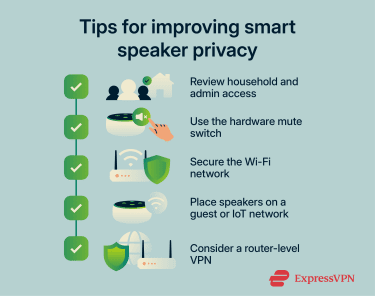
Smart speakers often allow multiple users or household members to control the device and, in some cases, view parts of its history or linked-home activity. Periodically check who has access to your speaker, home setup, and connected accounts, and remove anyone who no longer needs it.
Many smart speakers have a physical mute button or switch that cuts power to the microphone. Use it when you don't need voice control, during sensitive conversations, overnight, or when you're away from home. When the microphone is turned off, the speaker won't listen for wake words until it's turned back on.
Your smart speaker is only as private as the network it sits on. Keep your router firmware up to date, change the default login credentials, and use strong, unique passwords for every connected account. If your router supports it, use Wi-Fi Protected Access 3 (WPA3) and consider placing smart speakers on a separate Internet of Things (IoT) or guest network to isolate them from personal devices.
A virtual private network (VPN) configured at the router can encrypt traffic between the home network and the VPN service, which may limit what the internet service provider (ISP) can inspect. However, a VPN doesn’t stop the speaker's manufacturer from collecting data you've agreed to share, and it can’t compensate for weak passwords, outdated firmware, or overly permissive privacy settings.
Learn more: How to protect Wi-Fi from neighbors and keep it secure.
Real smart speaker breach examples
Publicly documented smart speaker breaches are usually reported as unauthorized access, device takeovers, or covert listening flaws rather than large customer data leaks. These cases show how attackers could gain control of a device or capture audio inside the home.
- Google Home backdoor account flaw: In research published in late 2022, security researcher Matt Kunze showed that a Google Home speaker could be tricked into adding a hidden account. He demonstrated that it gave an attacker a path to remotely control the device, abuse the microphone through a call routine, and make arbitrary HTTP requests on the local network. Google addressed the issue after Kunze disclosed it in 2021 and awarded him $107,500 through the bug bounty program.
- Sonos speaker eavesdropping flaw: In 2024, the National Cybersecurity Center (NCC) Group publicly presented research on a chain of vulnerabilities in Sonos devices that enabled covert recording of nearby audio on certain Sonos One devices. Sonos had already patched the issue earlier, in S2 release 15.9 on October 17, 2023, and S1 release 11.12 on November 15, 2023.
- Alexa vs. Alexa (AvA) self-issued command flaws: A 2022 study by researchers at Royal Holloway, University of London, and the University of Catania found that certain Echo devices could be tricked into issuing voice commands to themselves and then obeying them. The researchers said this could let an attacker control the speaker and connected smart-home devices. They reported the vulnerabilities to Amazon, and the researchers later said the remote self-wake issue via malicious skills was no longer possible in the demonstrated form because Amazon had fixed it.
Are smart speakers worth the privacy trade-off?
Smart speakers offer real practical value, from hands-free timers and music to controlling smart-home devices, and accessibility features that some users depend on. All three major platforms provide privacy controls and options to limit or prevent the storage of recordings.
At the same time, the privacy trade-offs are documented, and regulators have taken action. Each platform handles data differently, and the privacy controls covered in this article can significantly reduce exposure. What matters is making an informed choice and adjusting your settings accordingly.
FAQ: Common questions about smart speakers
Do smart speakers work without saving voice recordings?
Are smart speakers always listening?
Is muting a smart speaker the best way to protect privacy?
Can guests use my smart speaker to access personal information?
Are third-party skills and apps safe to enable in smart speakers?
What should I check before buying a privacy-friendly smart speaker?
Take the first step to protect yourself online. Try ExpressVPN risk-free.
Get ExpressVPN