Roku scams: How they work, common examples, and how to avoid them


With more than 90 million active accounts worldwide, Roku is one of the most widely used streaming platforms. Its devices make it easy to watch shows and movies across dozens of streaming services. Unfortunately, that popularity also makes Roku users a common target for scammers.
Roku scams usually involve fake activation pages, fraudulent tech support, phishing emails, or subscription fraud. These schemes are often convincing because scammers copy Roku branding, buy ads in search results, or impersonate customer support.
The good news is that once you understand how these scams work, they become much easier to recognize and avoid. This guide explains the most common Roku scams, the warning signs to watch for, and practical steps to protect your account and payment information.
What are Roku scams?
A Roku scam is any attempt to trick you into paying for something that should be free, handing over your login or payment details, or giving someone access to your device or computer. These scams can come via phone, text, email, or spoofed websites that look like an official Roku site.
The goal is usually one of two things:
- Getting payment for services that don’t exist or should be free, such as device activation, account setup, software updates, or customer support.
- Stealing login credentials or payment details that can be used for unauthorized purchases or account takeovers.
A useful rule of thumb is that if you’re being asked to pay for something that Roku normally provides for free, consider it a red flag.
Scammers target Roku users for a few reasons. The platform’s user base keeps growing, which gives them a steady stream of new customers who are still figuring out how things work and who search online for instructions or support.
Subscriptions and billing across multiple streaming services can get confusing, which creates easy openings. A message about an unexpected charge or billing issue may not seem suspicious when you’re already managing five different services.
Common types of Roku scams
Roku scams come in several forms, but most follow the same pattern: scammers either try to collect money directly or steal information they can use for fraud later.
Roku activation scams
Activation scams are one of the most common Roku fraud schemes.
When you set up a Roku device, the screen displays a device code and directs you to the official activation page. Scammers take advantage of this process by creating fake activation websites that appear in search results or ads.
These pages often ask users to:
- Enter the Roku device code.
- Provide personal information.
- Pay an activation or setup fee.
Roku never charges for device activation. If a website asks for payment during the activation process, treat it as a scam. Entering payment details on a fake activation site can lead to unauthorized charges or identity theft.
Always activate your Roku device yourself at roku.com/link using your own account.
Roku tech support scams
Tech support scams involve scammers pretending to be Roku customer service agents. They may contact Roku users directly or advertise phone numbers online. Once connected, the scammer may claim your device has a “security problem” or offer to help with setup or troubleshooting for a fee. Some try to sell “tech support plans” that Roku does not provide.
In some cases, someone claiming to be Roku support says they need access to your computer or device remotely to fix an issue, install an update, verify your account, or improve streaming performance.
They may ask you to download legitimate remote access tools such as AnyDesk, TeamViewer, or UltraViewer so they can connect to your device. Once they’re in, they can install malware, read saved passwords, make purchases using your stored payment details, and lock you out of your accounts.
No one from Roku will ever ask for remote access to your computer. If someone does, hang up.
Roku phishing emails
These phishing scams try to steal Roku account credentials. They start by sending the target an email that appears to be from Roku. The logo looks right, the formatting looks right, and the message tells the victim there’s a billing issue or account problem. The message usually creates urgency, warning that the account will be suspended unless verified or that a payment could not be processed.
The message usually includes a link to a fake Roku login page designed to capture the target’s username and password. Once scammers get these credentials, they can access the account, change settings, make purchases, or view stored payment information.
If you’re unsure whether a billing issue is real, log in directly at my.roku.com rather than following any link in an email.
Account takeovers
In 2024, Roku disclosed two separate credential stuffing attacks that together compromised around 591,000 accounts.
In credential stuffing, attackers use usernames and passwords stolen from breaches of other sites and try them on Roku, knowing many people reuse the same login across multiple accounts.
Once they’re in, attackers change the login details to lock the legitimate account owner out, then either sell access to the hijacked account or use the stored payment method to make purchases.
There’s also a variation where scammers activate someone else’s Roku device using their own Roku account. This lets them disable the device whenever they want and demand payment for activation.
Fake Roku deals and subscription offers
Some scams offer a lifetime streaming subscription to Netflix or Hulu, for example, a discounted premium channel bundle, or a special deal to unlock all Roku apps. The offer often asks for payment over the phone or through a link. After payment is made, the promised service never arrives.
You can order some streaming apps through the Roku Channel Store, but only via official channels and never through phone calls or external websites.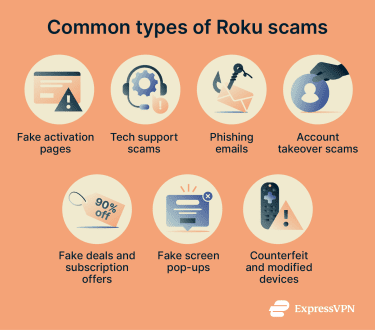
Fake screen pop-ups
Scammers send warnings on a TV or computer screen, saying the target’s Roku account has been “exhausted,” and their device needs a paid software update to continue working, or that they have to register their device for a fee. It directs the victim to call a number or visit a website.
Roku doesn’t push warning pop-ups to your TV asking you to call a support line. If something appears on your screen like this, don’t call the number and don’t visit the URL. Roku software updates are free and happen automatically through the device, and there’s no registration fee.
Counterfeit and modified devices
Some sellers, generally on unofficial marketplaces, advertise Roku devices that have been modified with extra features or pre-loaded content. These are often counterfeit devices that can expose your network to security risks, stop working without warning, or come with malware already installed.
Since Roku devices run a closed operating system, they can’t be jailbroken in the traditional sense, so treat any seller claiming a “jailbroken Roku” as a red flag. Buy Roku devices only from official retailers or directly from roku.com.
How to spot a Roku scam
Most Roku scams share a handful of telltale signs. The more of these you can spot, the easier it becomes to recognize something as fraudulent.
- Requests for payment during activation: Roku never charges for activation, support, updates, or account setup. If you’re asked to pay for any of these services, it’s most likely a scam.
- Suspicious website addresses: All official Roku websites end in roku.com, for example, support.roku.com, my.roku.com, and channelstore.roku.com. Watch out for subtle variations like r0ku.com (zero instead of the letter “o”) and roku-support.net. They’re designed to look right at first glance.
- Unsolicited tech support calls: Roku doesn’t cold-call customers. If someone calls you claiming to be Roku support and asks for payment or remote access, it’s almost certainly a scam. Hang up.
- Emails from unfamiliar domains: Legitimate Roku emails usually come from @roku.com domains. Be cautious if a message claiming to be from Roku comes from an unrelated domain or asks for sensitive information.
- Urgent language and threats: Phrases like “Act now or lose access” and “You owe an outstanding balance” are designed to make you act before you think. Pause and verify through official channels first.
- Requests to download remote access software: If anyone asks you to install any remote access tool to “fix” your Roku, you should cease communication immediately.
What to do if you fall victim to a Roku scam
Acting quickly matters. The longer you wait after a Roku scam, the harder it becomes to recover lost money or limit the damage.
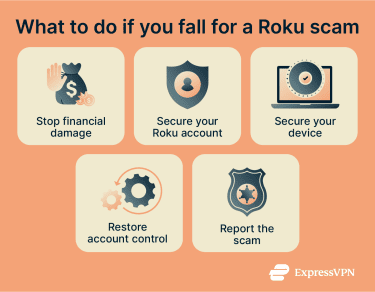
- Contact your bank or card provider: Tell them what happened, and ask them to cancel the card and flag any unauthorized charges. If you paid by bank transfer, report it as soon as possible.
- Change your Roku password: Use a new password you haven’t used anywhere else. Then change the password for your email account too, especially if it’s the same one linked to your Roku. Go to my.roku.com to do this. Consider using a password manager to help you keep track of them.
- Revoke remote access: If a caller asked you to install remote desktop software during a support call, disconnect the session and remove their access permissions.
- Run a malware scan on your device: If you granted the caller remote access to your computer, you should use trusted security software to check for anything that may have been installed without your knowledge.
- Review your Roku account activity: Log into my.roku.com, check for any subscriptions or charges you don’t recognize, and remove anything unfamiliar.
How to report a Roku scam
Reporting scams helps companies and authorities track fraudulent activity and can protect other users. You have a few options:
- Report the scam directly to Roku: Fill out a detailed report at support.roku.com/contactus/report-scam, or use the live chat to speak with someone directly.
- File a complaint with the Federal Trade Commission (FTC): The FTC uses these reports to identify patterns and take action against organized scam operations.
- Report internet fraud to the FBI: Report the incident to the FBI’s Internet Crime Complaint Center (IC3) if you lost money or your personal information was compromised.
How to protect yourself from Roku scams
A few simple security habits can significantly reduce the risk of falling for a Roku scam.
- Use strong, unique passwords: The 2024 Roku breaches worked because people used passwords from other sites. If you don’t use your Roku password anywhere else, you’re safe from credential stuffing attacks. Using a password manager makes it easy to use a different password for every account without having to remember them all.
- Set up a Roku PIN for purchases: You can create a four-digit PIN that allows you to control any purchases or additions to your account. It adds a simple but effective layer of protection against unauthorized purchases if someone does manage to access your account.
- Only search for Roku support through official channels: According to Roku, scammers buy paid ads to put fake support numbers at the top of search results. To avoid landing on a fake website, go directly to support.roku.com instead of searching for a contact number and clicking whatever comes up first.
- Buy devices from trusted retailers: Purchase Roku devices from official retailers or well-known stores to avoid counterfeit or modified products.
FAQ: Common questions about Roku scams
Why am I being charged for Roku?
How do I report a Roku scam?
Can someone watch me through my Roku TV?
The real risk is account-level: if someone has access to your Roku account, they can make purchases and access your payment information. If you use the Roku app or watch on a phone or computer, malware installed on those devices could potentially access a camera, but that’s not specific to Roku.
What are the most common Roku scams right now?
What should I do if my Roku account was taken over?
Take the first step to protect yourself online. Try ExpressVPN risk-free.
Get ExpressVPN









 Support Center
  FAQ
FAQ  VPN Setup Tutorials


