PYSA ransomware: What it is and how to protect your organization


Protect Your System Amigo (PYSA) ransomware might not dominate today’s headlines the way it once did, but public and private organizations can still become targets if they lack strong security measures. Understanding how it operates provides practical guidance for protecting against PYSA attacks and the many ransomware variants that use comparable techniques.
This article provides a clear overview of what PYSA ransomware is, how it operates, who can be affected by it, the potential impact of an attack, and the steps organizations can take to strengthen their defenses.
Note: Any attempt to deploy or replicate PYSA ransomware outside of authorized security testing is illegal and unethical. The information in this article is provided only to help readers understand the threat and improve their defenses.
What is PYSA ransomware?
PYSA is a variant of the Mespinoza ransomware and is a form of malicious software designed to lock victims out of their data by encrypting it. Attackers then demand payment in exchange for access, often in cryptocurrency. PYSA is generally deployed in human-operated attacks, where attackers manually gain access to a network, move laterally, and carry out actions such as privilege escalation, credential theft, and reconnaissance before encrypting systems.
This hands-on approach allows attackers to adapt their tactics to the victim’s environment rather than relying on automated, broad-scale distribution. It’s also what allows them to use double-extortion tactics: they can steal specific information during the intrusion and may threaten to release it if the victim doesn’t pay.
How does PYSA ransomware work?
PYSA ransomware is a data-encrypting payload that locks files on compromised systems and renders them unusable. When executed, the malware scans the system for data it can encrypt, avoiding directories that would damage the operating system but targeting documents, databases, archives, and other high-value files. The ransomware may also stop certain services or processes to ensure it can access files that are in use.
After encryption is complete, the ransomware writes a ransom note, embedded within its code, into affected directories, providing instructions for contacting the operators. If the victims honor the ransom agreement, the attackers manually provide the decryption keys.
How does PYSA infect systems?
PYSA doesn’t spread automatically: attackers must first gain access to a network before deploying it. They typically do this by using compromised or weak credentials, exploiting exposed remote access services like Remote Desktop Protocol (RDP), or sending phishing emails designed to capture login information or persuade users to open malicious attachments. In some cases, attackers exploit unpatched vulnerabilities or misconfigurations to bypass security controls.
What happens during a PYSA attack?
Once attackers have infiltrated a system, they work hands-on within the environment to prepare for the ransomware deployment. They map the network, gather credentials, escalate privileges, and move laterally to reach sensitive or high-value systems. During this stage, they often copy data out of the network, selecting information they believe could increase pressure during ransom negotiations. Only after completing this reconnaissance and data theft do they execute the PYSA ransomware payload to encrypt files across the environment.
Who does PYSA ransomware target?
PYSA attackers typically focus on organizations where operational disruptions or data exposure could have significant consequences. Reported incidents most often involve:
- Educational institutions: They often have tight budgets and older systems, which can leave security gaps.
- Healthcare providers: They rely on their systems to treat patients, so any downtime creates urgent pressure to recover quickly.
- Government and public sector organizations: They run essential services, and disruptions can affect large groups of people.
- Private companies handling sensitive or regulated data: They hold information that criminals see as valuable or easy to exploit.
What are the consequences of a PYSA ransomware attack?
A PYSA attack can have far-reaching effects that extend well beyond encrypted files. Because the ransomware is deployed only after attackers have already moved through the network and, in many cases, stolen sensitive data, organizations often face a combination of financial, operational, and reputational challenges.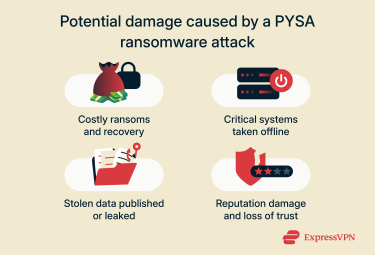
Financial costs
Organizations hit by ransomware often face pressure to pay substantial sums to restore access to their data, and these unexpected costs can disrupt normal operations. Even when victims refuse to pay, the financial impact can remain significant due to the need for recovery work, specialized cybersecurity support, and broader remediation efforts. In one reported PYSA incident involving a government institution, the total damages reached approximately $16 million.
Operational downtime and service disruption
Ransomware can severely disrupt an organization’s operations by blocking access to the data and systems needed to deliver services or products. In some cases, companies or institutions may have to suspend activities until they regain access. In one incident involving a financial services provider, the company reported that the resulting outage lasted nearly two weeks and affected roughly 13,000 customers.
Loss of data and customer trust
If victims don’t meet the ransom demand, attackers may publish the stolen data online. This exposure puts individuals’ personal information at risk and can seriously damage trust in the affected organization, as customers may no longer feel safe sharing their details. It can also lead to legal or regulatory consequences if the incident reveals gaps in security practices or non-compliance with privacy requirements.
How to prevent PYSA ransomware attacks
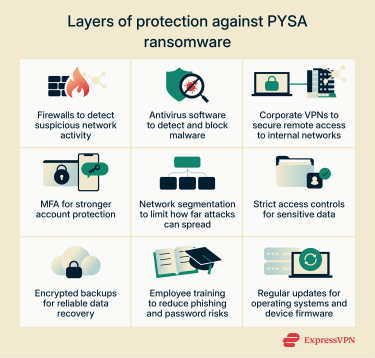
Protecting against PYSA ransomware requires a combination of strong technical controls, ongoing employee cybersecurity training, and keeping systems up to date.
Below is an overview of each approach:
Core technical defenses
Organizations may want to implement and utilize the following security measures to enhance protection against PYSA ransomware attacks:
- Firewalls: These systems continuously monitor network activity for unusual or suspicious behavior and automatically block traffic that appears harmful.
- Antivirus protection: Helps guard against malware, including ransomware, by identifying and isolating malicious files or code. Many solutions also warn users about unsafe links.
- Corporate virtual private networks (VPNs): These tools encrypt internet traffic, making it difficult for cybercriminals to spy on or interfere with remote connections to internal networks. Corporate VPNs shouldn’t be confused with commercial VPN services like ExpressVPN, which focus on encrypting internet traffic and improving privacy for individual users or small teams.
- Multi-factor authentication (MFA): Adds an extra identity verification step to the login process, such as a temporary code or authenticator prompt. This provides additional protection if credentials are compromised.
- Subnetting: Dividing a network into smaller, isolated segments limits how far an attack can spread. If one segment is affected, the rest of the network remains better protected.
- Strict access controls: Limit access to sensitive data so only the appropriate personnel or systems can reach it. Privileges must match job responsibilities and shouldn’t be shared across unrelated departments.
- Secure data backups: Maintaining encrypted, up-to-date copies ensures organizations can recover essential data after an incident and helps prevent unauthorized access to stored copies.
Employee training and phishing awareness
Attacks using PYSA ransomware often exploit human error or gaps in cybersecurity awareness to get into the system to infect it. To reduce this risk, organizations may want to invest in training programs that help employees understand essential security practices. This includes detecting phishing attempts, recognizing social engineering, using strong and well-managed passwords, and knowing the fundamentals of the organization’s ransomware incident response procedures.
Keeping software and systems up to date
Outdated operating systems and applications can contain unresolved security weaknesses that leave organizations more exposed to cyber threats. Keeping software up to date and automating updates where possible should be a priority. When patches are no longer available for certain tools or hardware, transitioning to a modern, supported alternative is the safest approach.
How to recognize a PYSA ransomware infection
Because attackers deploy PYSA manually, some signs appear before the ransomware runs, while others become visible only during or after encryption. The sequence below reflects the order in which most organizations would notice indicators of a PYSA infection:
- Unusual administrative activity: Early in the intrusion, IT teams may see unexpected remote logins, new user accounts, or privilege changes in system logs as attackers move through the network.
- Security tools being disabled: Shortly before deployment, antivirus services, backup agents, or monitoring tools may stop running, making systems easier for attackers to encrypt.
- Sudden system slowdown: As encryption begins, devices can become sluggish or unresponsive while large numbers of files are processed.
- Renamed files: Once encryption is underway, users will find that files no longer open and now have a different extension.
- Ransom notes appearing in folders: After encryption completes, text files with instructions for contacting the attackers appear across affected directories.
Note: None of these indicators are definitive on their own. Attackers sometimes take a more subtle approach. For example, instead of disabling antivirus software outright, they may delete its definition files so it appears to be running normally while losing the ability to detect malware.
Tools for detection and monitoring
Detecting a PYSA intrusion early requires visibility into both user activity and system behavior. Endpoint detection and response (EDR) tools can help identify unusual administrative actions, such as unexpected logins or privilege escalation, before the ransomware is deployed. Network monitoring can flag abnormal traffic patterns that may indicate data exfiltration or lateral movement.
Organizations may also use file integrity monitoring to detect sudden changes to large numbers of files, as well as centralized logging tools that highlight suspicious events across servers and workstations.
FAQ: Common questions about PYSA ransomware
Is PYSA ransomware still active?
Although PYSA ransomware is not as widespread as it was in previous years, it remains a cyber threat that organizations should take seriously. Implementing strong security measures, such as antivirus and firewall protection, strict access controls, network segmentation, and secure data backups, can help organizations identify early warning signs and reduce the likelihood of a successful infection.
What should I do if I’m infected?
If you suspect a PYSA ransomware infection, the priority is to limit its impact and prevent further spread. This typically involves identifying which systems are affected, restricting their connectivity, and engaging the appropriate IT or incident response teams to investigate unusual activity. Organizations may then work through their established containment and recovery processes, which can include restoring data from secure backups once systems are verified as safe.
Can encrypted files be recovered?
Attackers may claim they will restore access if a ransom is paid, but there’s no guarantee they will follow through. The most reliable approach is to have strong security practices in place, especially maintaining secure, up-to-date backups of important data, so that information can be restored independently if an incident occurs.
What tools can help prevent PYSA ransomware?
Key security tools that help reduce the risk of PYSA ransomware infections include firewalls and antivirus solutions, endpoint detection and response (EDR) tools, multi-factor authentication (MFA), network segmentation, secure data backups, and corporate VPNs used for protecting access to internal networks.
Take the first step to protect yourself online. Try ExpressVPN risk-free.
Get ExpressVPN















 Support Center
  FAQ
FAQ  VPN Setup Tutorials


